Stripped back to its essentials, cloud backup is a professional service that copies your critical business data to secure, off-site servers over the internet. Think of it as your ultimate digital safety net. If something happens to your local files—whether through hardware failure, human error, or a cyber-attack—you always have a clean, restorable version ready and waiting.
Understanding Cloud Backup for Modern Businesses
Let's use a practical example. Imagine all your vital business information—a law firm's client case files, an accountancy practice's financial records, an architect's project plans—is kept in a single filing cabinet in your office. A fire, a flood, or even a simple theft could destroy everything in an instant. Relying only on traditional on-site backups, like an external hard drive in the same building, is the digital equivalent. You're still exposed to the same localised risks.
Cloud backup completely rewrites this playbook. Instead of putting all your eggs in one basket, it sends encrypted copies of your data to multiple, highly secure, UK-based data centres. This isn't just about finding another place to store files; it's about building genuine business resilience.
A well-managed cloud backup strategy is the cornerstone of modern business continuity. It transforms data protection from a manual, often-forgotten chore into an automated, reliable process that shields your business from the unexpected.
For any professional services firm, this approach brings some immediate and powerful advantages:
- Automated Protection: Backups happen automatically on a schedule you define. No more relying on a staff member to remember to swap out a backup drive. For instance, a busy financial advisory firm can have its client portfolio data backed up every hour without any manual intervention.
- Enhanced Security: Your data is encrypted before it even leaves your network, while it's travelling, and while it's stored. This ensures that sensitive client information remains confidential at all times.
- Geographic Redundancy: Keeping copies in a different physical location means your data is safe from local hardware failures, power cuts, or office-wide emergencies. If your main office in Manchester is inaccessible due to a flood, your data remains secure and recoverable from a data centre in London.
The sheer speed at which this technology is being adopted speaks volumes. The UK cloud backup market was valued at around USD 201.63 million in 2024 and is expected to rocket to over USD 1.39 billion by 2031. This isn't just a trend; it's a fundamental shift in how businesses protect themselves.
To really get this right, you need a solid understanding of the infrastructure involved, like the systems offered by cloud-based Windows VM hosting services. If you want to go back to basics, our guide on what are backups? is a great place to start. Ultimately, moving to the cloud isn't just a technical upgrade—it's a strategic decision to ensure your business can weather any storm.
How Does Cloud Backup Actually Work?
So, how does your data get from your office server to a secure off-site location? It's not magic, but it is a clever, automated process that runs quietly in the background, keeping your business safe without you having to lift a finger. The whole system hinges on a small, lightweight piece of software called an agent.
Think of this agent as your data's personal security guard and chauffeur. We install it on any device you need to protect—be it a physical server, a virtual machine, or a company laptop. Its first task is a big one: to perform a full backup. This initial step involves taking a complete copy of every file, folder, and application you've marked for protection and sending it to the secure cloud data centre.
This first backup is always the most intensive, as it's moving a large amount of data. But once that baseline is set, things get a lot smarter and more efficient.
From Full Backups to Incremental Changes
After that initial full backup is complete, the agent's job changes. It no longer needs to copy and send everything every single time. Instead, it switches to performing incremental backups.
From this point on, the agent is only looking for what's new or what's changed since the last backup. It could be a single cell updated in a spreadsheet, a new paragraph added to a legal document, or a recently saved invoice. By only sending these tiny chunks of new data, the process is incredibly fast and uses very little of your internet bandwidth, so it never gets in the way of your team's work.
This diagram helps visualise the journey from your local machine to the cloud.
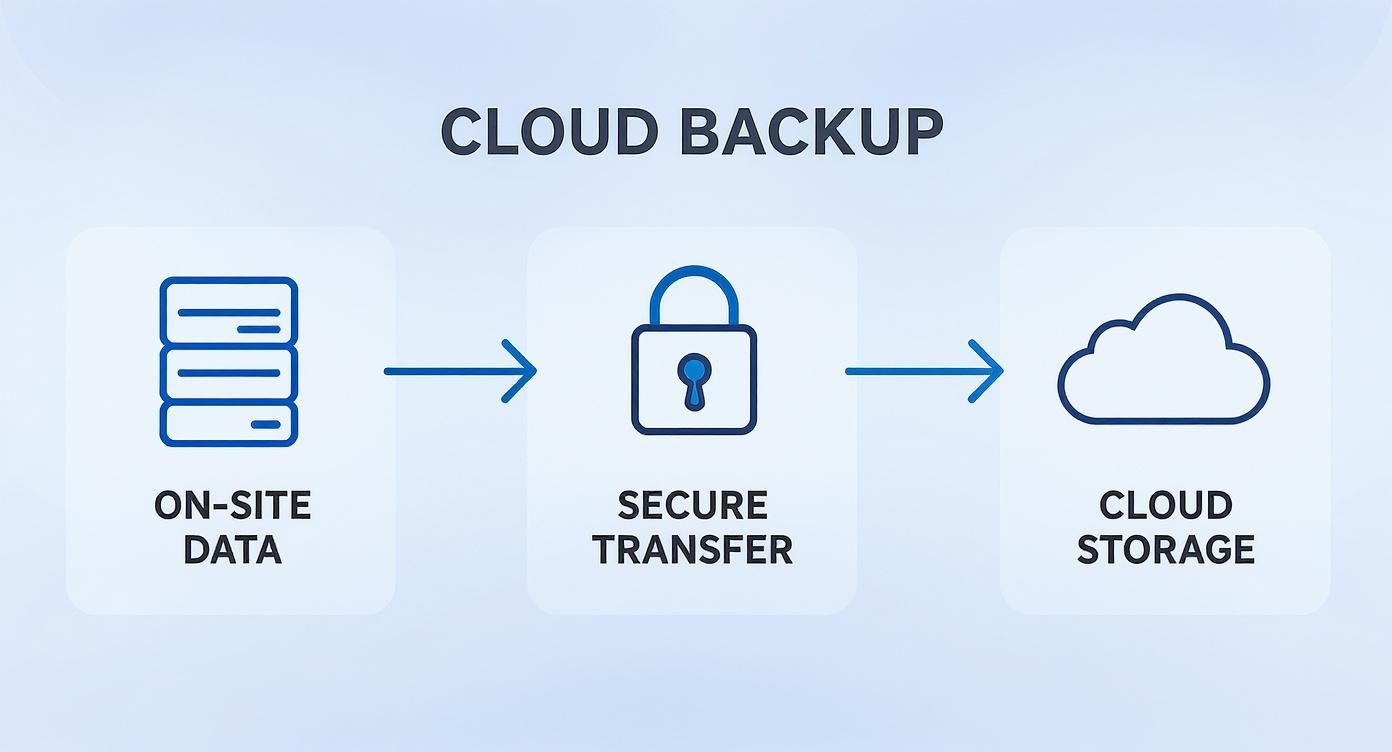
As you can see, the data is identified on-site, encrypted before it ever leaves your network, and then stored securely in the cloud.
A Real-World Scenario: Imagine an accountancy firm in Doncaster. After their initial full backup, their agent might only need to upload a few kilobytes of changes each hour as accountants update client records. The entire multi-gigabyte accounting database doesn't need to be sent again, making daily protection seamless.
Snapshots and Replication: The Keys to Real Resilience
Modern cloud backup goes far beyond just copying files. For true business continuity, we rely on more powerful techniques like snapshots and replication. These are the features that turn a simple backup into a genuine disaster recovery solution.
- Snapshots: A snapshot is an exact, point-in-time image of an entire server—the operating system, applications, settings, and all its data. For a marketing agency, if a critical software update to their design suite goes wrong or a server gets corrupted, we can use a recent snapshot to roll the entire machine back to a state where it was working perfectly. It's like a system-wide "undo" button that can save you days of rebuilding.
- Data Replication: This is where you get ultimate peace of mind. Your encrypted data isn't just sitting in one highly secure data centre. It's also replicated, or mirrored, to a second, geographically separate UK data centre.
This means that in the incredibly rare event that the primary facility has a major problem (like a regional power outage), an identical, up-to-date copy of your data is already safe and waiting elsewhere in the country. It’s this dual-location strategy that guarantees your data is always available for recovery, no matter what happens.
The Different Types of Cloud Backup
Right, let's unpack the different ways you can actually back up your data to the cloud. It’s not a one-size-fits-all situation. The best method for your business really hinges on what you’re trying to protect and, crucially, how fast you need to get it back up and running if things go wrong.
File-Level Backup for Specific Data Protection
The most straightforward approach is what we call file-level backup. Think of it as being highly selective. You pick and choose exactly which files and folders are important enough to be copied to the cloud. It’s a great, cost-effective way to protect specific, critical business documents without the overhead of backing up entire systems.
For instance, a solicitor's firm could use a file-level backup to protect just their client case files, legal documents, and billing records. This keeps the process lean, focuses on the crown jewels of their data, and ensures their most sensitive information is secure and easy to pull back when needed.
Image-Level Backup for Full System Recovery
But what happens when you need more than just a few files? What if an entire machine goes down? That’s where image-level backup steps in. Instead of just cherry-picking files, this method takes a complete "snapshot" of a server or workstation. We’re talking everything: the operating system, all your applications, user settings, and every last bit of data.
The real win here is the speed of recovery. Imagine your main accounting server completely dies. Restoring it piece by piece—reinstalling Windows, then Sage, then all the configurations and files—could take days of painful, expensive downtime. With a clean image-level backup, you can restore the entire machine to new hardware in a fraction of the time. It’s about getting back to business, fast.
The Hybrid Model: Combining On-Site Speed with Off-Site Safety
For many businesses we work with, the smartest solution isn't an "either/or" choice between local and cloud backup. It's a combination of the two, known as a hybrid cloud backup strategy. Honestly, this gives you the best of both worlds.
Here’s how it works in practice. We set up two identical backups to run at the same time:
- One copy stays right there in your office, stored on a dedicated backup device. This is your first line of defence, allowing for lightning-fast restores of files or even entire servers over your local network. For example, if an employee accidentally deletes a vital project folder, it can be restored from the local device in minutes.
- A second copy is securely replicated to the cloud. This is your off-site insurance policy. If your office suffers a disaster like a fire, flood, or even theft, your data is completely safe and sound, ready to be recovered from anywhere.
This dual-pronged strategy gives you rapid, on-site recovery for everyday hiccups and rock-solid off-site protection for a true disaster. It's no wonder this has become the go-to choice for UK businesses that simply can't afford to be offline.
Navigating Security and Compliance Requirements
For any professional services firm in the UK, data security and legal compliance aren't just tick-box exercises. They're the bedrock of your business. When you move your backups to the cloud, you're placing immense trust in your provider. You need absolute confidence that your data is wrapped in multiple layers of security, starting with powerful encryption.

Any provider worth their salt must offer end-to-end encryption. Think of it this way: your data is scrambled into unreadable code before it even leaves your network (that's encryption in-flight) and it stays scrambled while sitting on their servers (encryption at-rest). Critically, you and only you should hold the key to unscramble it. This ensures that no one, not even the provider's staff, can access your sensitive information. Understanding these fundamentals is key, and resources like a comprehensive guide to cybersecurity for SaaS can offer a deeper dive.
But security isn't just digital. The physical location of your data is a huge deal for compliance. Data sovereignty is a non-negotiable concept, especially under GDPR. In simple terms, your data is subject to the laws of the country where it's physically stored. That’s why UK firms must partner with a provider who can guarantee, without question, that all data is kept in UK-based data centres. It’s the only way to avoid a legal and regulatory minefield. Our own guide on is cloud backup secure unpacks these security considerations in more detail.
Defining Your Recovery Objectives
True security is also about how fast you can get back on your feet after a crisis. A solid business continuity plan hinges on two crucial metrics: your Recovery Time Objective (RTO) and Recovery Point Objective (RPO). Getting to grips with these is essential for defining just how much downtime and data loss your business can realistically handle.
These metrics are not just technical terms; they are business decisions. RTO dictates how long you can afford to be offline, while RPO determines how much data you can stand to lose. Getting these right is the key to true operational resilience.
Let's make this real with a practical example:
-
Recovery Time Objective (RTO): This is the stopwatch for a disaster. It's the maximum amount of time your business can be non-operational before it starts causing serious damage. A financial advisory firm might set an RTO of two hours. If their systems aren't fully restored within that window, the financial and reputational fallout could be immense.
-
Recovery Point Objective (RPO): This looks backwards. It's about the maximum age of the files you need to recover to get back to business as usual. If that same firm has an RPO of 15 minutes, they're saying they cannot afford to lose more than 15 minutes of transaction data. This directly dictates their backup schedule—it has to run at least every 15 minutes.
The sheer growth of the cloud sector underscores its importance. In the UK, the cloud computing market was valued at around USD 27.48 billion in 2024 and is on track to hit USD 97.21 billion by 2033. Data storage and backup are massive drivers of this growth, showing just how seriously UK businesses are taking data protection.
How to Choose the Right Cloud Backup Provider
Picking a partner to safeguard your company’s data is one of the most critical decisions you'll make. This isn't just about comparing storage prices; it's about finding a provider who acts as a genuine extension of your team, dedicated to keeping your business resilient no matter what.

This decision has never been more relevant. Cloud adoption in the UK is at an all-time high, with 96% of organisations using at least one cloud service and a staggering 92% running hybrid or multi-cloud setups. As businesses lean more heavily on the cloud, a robust, well-chosen backup partner becomes an essential pillar of a modern business strategy. You can learn more about these cloud adoption findings to see just how central this has become.
Verifying Technical Expertise and Compliance
When you start evaluating providers, your first port of call should be verifying their commitment to security and quality. Don't just settle for marketing claims—ask for the credentials to back them up.
A great starting point is the ISO 27001 certification. This isn't just a fancy badge; it's the international gold standard for information security management. It proves the provider has passed rigorous, independent audits of their security controls, processes, and risk management framework. It’s tangible proof they take protecting your data seriously.
Just as vital is a solid grasp of UK data compliance. Your provider must be an expert on GDPR and data sovereignty, guaranteeing your data stays within UK data centres. For many businesses, this is a non-negotiable requirement for staying compliant and avoiding serious legal headaches.
Scrutinising the Service Level Agreement
The Service Level Agreement (SLA) is more than just a contract; it’s the rulebook that defines the provider’s promises to you. It's a document that deserves your full attention, as it lays out the exact level of service you can expect.
A strong SLA is your assurance of quality. It moves beyond vague promises and provides concrete, measurable guarantees on service availability, response times, and the process for recovering your data in an emergency.
Look for specific, guaranteed response times for support tickets. If something goes wrong, how quickly will they be on the case? What are their guaranteed uptime percentages for the backup platform itself? A clear SLA defines these metrics, giving you peace of mind that help will be there when you need it most.
Beyond 'Set and Forget': Look for a Proactive Partnership
Ultimately, the best cloud backup providers deliver more than just a piece of software. They offer a genuine, proactive partnership. Be wary of any provider that suggests a 'set and forget' approach—that’s a major red flag. Your business is constantly changing, and your backup strategy must evolve with it.
A true partner provides constant, proactive monitoring to confirm your backups are completing successfully, day in and day out. They should also perform regular, scheduled recovery tests. After all, a backup is worthless if you can't restore from it. By testing the process, they prove the system works as intended, ensuring your data is ready and recoverable when you need it. To see what this looks like in practice, take a look at our breakdown of a fully managed backup service.
Frequently Asked Questions About Cloud Backup
Even when you've got your head around the basics, it's completely normal to have a few lingering questions before committing to a cloud backup service. We've put together some of the most common queries we hear from UK businesses to give you clear, straightforward answers.
Is Cloud Backup Different From Cloud Storage Like OneDrive?
Yes, absolutely. They might both live 'in the cloud', but they're built for completely different jobs.
Think of services like OneDrive, Dropbox, or Google Drive as digital filing cabinets. They're fantastic for syncing files across your devices and collaborating with your team. But they are not, and were never designed to be, a disaster recovery tool. If you accidentally delete a file, that deletion often syncs everywhere instantly.
A proper cloud backup service is your safety net. It takes point-in-time snapshots of your data and stores them completely separately. So, if a file gets corrupted or a ransomware attack encrypts your live server (and that encrypted file syncs to OneDrive), a true backup solution has multiple clean, historical versions ready to be restored. It’s the difference between a working document and a locked-down insurance policy.
What Happens to My Backup if Our Office Internet Fails?
This is a great question and a very practical concern. If your office broadband goes down, your scheduled backup simply pauses. The software agent running on your systems is smart enough to know the connection has been lost, so it just waits patiently.
The moment your internet is back online, the agent picks up right where it left off. It won't start the entire backup from scratch. This intelligent approach means that even with a spotty connection, your data protection keeps moving forward without you having to lift a finger.
How Often Should We Back Up Our Business Data?
This all comes down to one critical business metric: your Recovery Point Objective (RPO). In simple terms, how much data can you afford to lose without it causing serious pain?
For a busy solicitor's office creating client documents all day, or an accountancy firm processing non-stop transactions, the RPO might be just 15 minutes. That means they need their backups running every quarter of an hour to minimise potential rework. For another business where critical files only change once or twice a day, a daily backup could be perfectly fine.
The question isn't just "how often should we back up?" but "how much work are we prepared to lose?" Answering the second question honestly will give you the answer to the first. Your backup schedule should be a direct reflection of your business's tolerance for data loss.
How Can I Be Sure My Data Can Actually Be Restored?
This is the single most important question you can ask. After all, a backup you can't restore from is just a waste of money and a false sense of security.
Any decent managed backup provider won't just assume it's working. They prove it. This is done through regular, scheduled test restores where they take a recent backup and try to recover it in a safe, isolated environment. These drills confirm that the data is not just being copied, but that it's complete, uncorrupted, and ready for a real-world recovery.
When you're vetting a provider, always ask them to walk you through their recovery testing process. A confident, detailed answer is a sure sign you're dealing with professionals.
At SES Computers, we don't just sell you software. We provide a fully managed service where we constantly monitor your backups and carry out regular recovery tests to ensure everything works as it should. It's about giving you genuine peace of mind. To talk about a resilient, UK-hosted backup strategy for your business, get in touch with us at https://www.sescomputers.com.