When it comes to wifi solutions for businesses, the off-the-shelf router you use at home simply won’t cut it. We’re talking about enterprise-grade systems, built from the ground up for solid security, high-density traffic, and rock-solid performance. Picking the right one isn't just an IT chore; it’s a strategic decision that hinges on your specific needs, from the size of your office to the critical applications your team relies on every single day.
Finding the Best Business WiFi Solution For Your Needs
Let's be honest: choosing the right WiFi has become a core business decision, right up there with your other operational essentials. It directly impacts productivity, security, and even customer satisfaction. A slow, patchy network can bring a busy day to a screeching halt, leaving employees frustrated and customers walking away.
For example, imagine a law firm’s video conference with a key client repeatedly dropping, or a design agency unable to upload large project files to meet a deadline. These aren't just minor glitches; they're direct hits to your bottom line and your professional reputation.
This guide is here to help you move past the limitations of consumer-grade kit and into the world of professional, robust systems designed for the realities of a commercial environment. The perfect solution isn't a one-size-fits-all box; it's a system carefully chosen to match what you actually do.
Matching Your Needs to the Right Technology
To get started, you need a clear picture of your working environment. What really matters?
- Size and Layout: A small, open-plan office has completely different requirements to a multi-storey hotel or a sprawling warehouse where steel racking can kill a WiFi signal stone dead.
- User Density: You need to think about how many people and devices will be connected at once. For instance, a bustling coffee shop needs a network that can handle dozens of concurrent users, whereas a small legal practice might place a higher premium on security and stability for its confidential work.
- Critical Applications: What software keeps your business running? If you rely on VoIP phone systems, constantly shift large files to the cloud, or use live video streaming for client consultations, you need a network that’s built for consistent, high-speed performance.
This flowchart gives you a simple visual starting point for figuring out what kind of solution might be right for your scale of business.
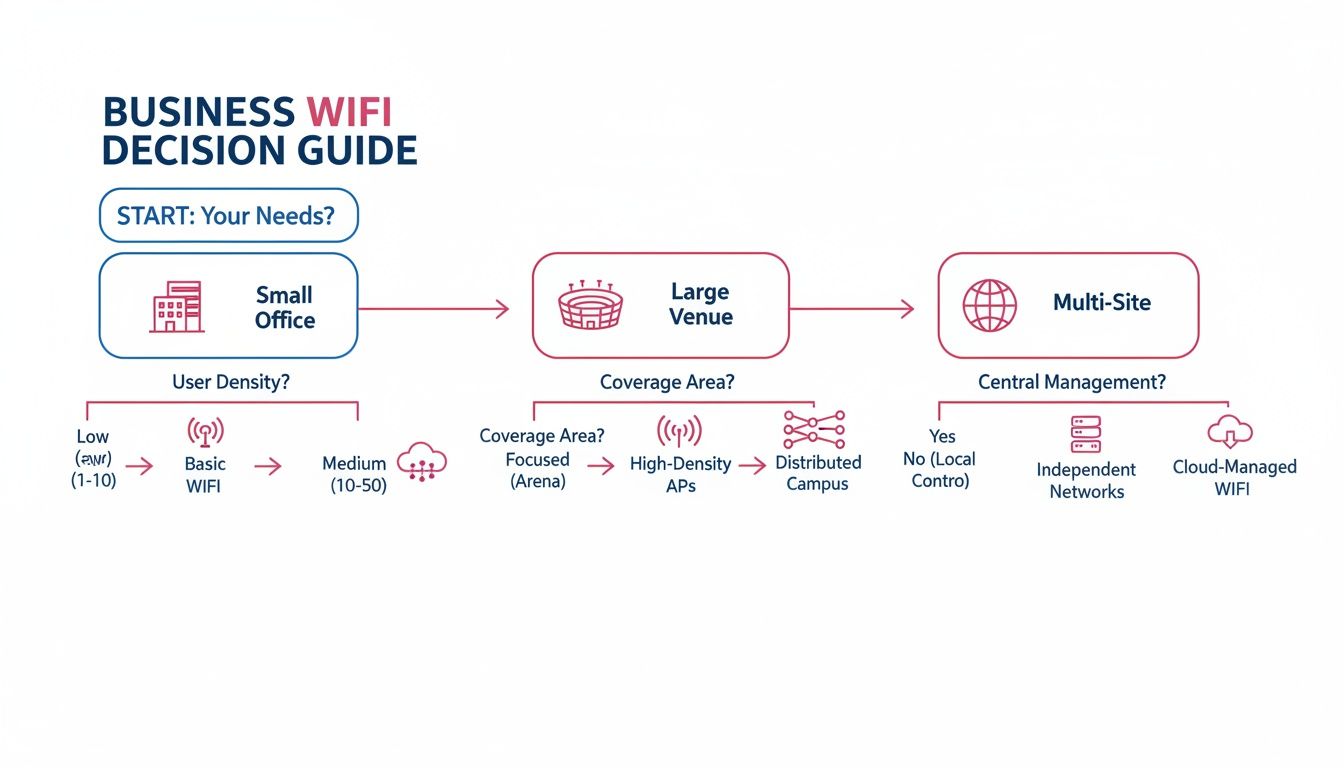
As you can see, the journey from a single small office to a large venue or a multi-site operation calls for increasingly sophisticated and centrally managed WiFi systems.
Below is a quick overview of the main professional WiFi solutions, helping you identify which might be the best fit for your business.
A Quick Comparison of Business WiFi Solutions
| Solution Type | Ideal For | Primary Benefit | Common Sectors |
|---|---|---|---|
| Enterprise APs | Single-site offices, venues, warehouses | High performance and centralised control | Offices, Retail, Education |
| Mesh WiFi | Complex layouts, historic buildings | Easy-to-expand coverage without cabling | Hospitality, Care Homes |
| Managed WiFi | Businesses without dedicated IT staff | Proactive monitoring and expert support | SMEs, Hospitality, Retail |
| SD-WAN | Multi-site organisations, remote workforces | Optimised performance and simplified management | Retail Chains, Corporate |
| Leased Line Backhaul | Rural areas or sites with poor broadband | Dedicated, high-speed, reliable connectivity | Rural Businesses, Large Estates |
This table shows there’s a specific tool for every job. The key is understanding your unique environment to select the one that delivers genuine value.
A purpose-built business WiFi network is more than just internet access. It's the foundation for every digital interaction, from how your team collaborates internally to how you serve your customers. Getting it right from the start bakes efficiency and security into your operations.
In the sections that follow, we’ll dig deeper into the specific technologies, planning steps, and security measures you need to create a wireless network that truly works for you.
The Core Technologies Behind Business WiFi
Before you can build a WiFi solution that truly works for your business, you need to understand what’s going on under the bonnet. Unlike the all-in-one router you have at home, a professional network is built from several specialised pieces of kit designed to work together as a single, powerful system. Getting to grips with these components is the first step towards creating a network that’s reliable, secure, and ready to support your business goals.
Moving beyond a simple router means stepping into the world of enterprise-grade hardware and services. Each piece of this puzzle has a specific job, from creating the signal itself to ensuring it has a rock-solid connection to the wider internet. Once you see how they fit together, you’ll understand why a professional setup is so vital for performance.
Enterprise Access Points: The Workhorses of Business WiFi
The real foundation of any serious business network is the enterprise-grade access point (AP). It’s best to think of these not as individual routers, but as a coordinated team. Much like the mobile phone masts that give us coverage across a city, multiple APs are strategically placed throughout your premises to provide a seamless blanket of signal.
These APs are hard-wired with network cables back to a central controller or switch. This is the secret sauce that allows them to work in harmony, intelligently managing how your devices connect. As you walk through the building with your laptop or phone, the system seamlessly hands your connection from one AP to the next without you ever noticing. No dropped calls, no buffering videos—just a stable, uninterrupted signal. A practical example is an architect moving from their desk to a meeting room while on a video call; the connection remains flawless.
The other huge advantage here is capacity. A standard home router might start to creak and groan with 20 devices connected. A single enterprise AP, on the other hand, can comfortably handle 50 to 100 simultaneous connections—sometimes even more. For a bustling office, a hotel lobby, or a school classroom, that ability to manage a crowd without slowing to a crawl is absolutely non-negotiable.
Mesh WiFi: A Smart Fix for Tricky Layouts
Enterprise APs are the gold standard, but what happens when running all those network cables just isn't an option? It’s a common problem in listed buildings, sprawling warehouses, or even just modern offices with solid concrete walls. This is where Mesh WiFi comes in as a very clever alternative.
Think of it like a relay race. A mesh network has one primary "node" that’s connected to your internet line. You then place other nodes around the area you need to cover. These nodes talk to each other wirelessly, passing the WiFi signal along from one to the next, just like runners passing a baton.
This creates a single, unified network that can snake its way into difficult spots without needing a single new cable drilled through a wall. For example, a historic hotel in Somerset could use a mesh system to get seamless guest WiFi into every room without touching its centuries-old structure. It’s a brilliant way to extend your network into those tricky corners and even outdoor spaces.
Managed WiFi Services: The "Done for You" Approach
Let’s be honest: designing, installing, and maintaining a high-performance network requires specialist expertise. For most business owners, this is where Managed WiFi Services become an absolute game-changer. This isn’t just about buying equipment; it’s about handing over the entire responsibility for your wireless network to a dedicated partner.
A managed service provider takes care of everything from start to finish:
- Initial Design and Survey: They’ll analyse your site to figure out exactly where to place APs for perfect coverage.
- Professional Installation: All the hardware is configured and installed by experts to ensure it works at its best from day one.
- Proactive Monitoring: They keep a constant eye on your network, spotting and fixing performance issues or security threats, often before you even know there’s a problem.
- Ongoing Support: You get a single point of contact for any issues, freeing up you and your team to focus on what you do best.
A busy accountancy firm in Dorset, for instance, cannot afford a single minute of network downtime during tax season. A managed service ensures their cloud software is always online and their client data is protected, all without them needing a dedicated IT department.
This approach turns your WiFi from a potential headache into a reliable utility that just works, plain and simple. It's one of the most popular WiFi solutions for businesses that value peace of mind.
Advanced Connections: Leased Lines and SD-WAN
Finally, remember that the world's best WiFi hardware is only as good as the internet connection feeding it. For businesses where reliability is paramount, a standard broadband line might be the weak link in the chain. A Leased Line solves this by giving you a private, dedicated fibre optic connection straight to your building. It guarantees your upload and download speeds and offers a level of stability that shared broadband simply cannot match. For a financial services firm that processes transactions in real-time, this guaranteed performance is essential.
For organisations with multiple locations—think a chain of retail shops or care homes spread across Hampshire and Wiltshire—Software-Defined Wide Area Networking (SD-WAN) is a powerful tool. It intelligently manages traffic across multiple connections (like leased lines and backup broadband lines), automatically prioritising your most critical applications and ensuring every site has a fast, resilient link back to your central resources.
How to Plan for Flawless WiFi Coverage and Capacity
Getting business WiFi right is all about smart planning, not just buying powerful hardware. If your strategy is to just plug in a few access points and hope for the best, you’re setting yourself up for dead zones, dropped connections, and a very frustrated team. Real success comes down to balancing two critical ideas: coverage and capacity.
Think of it like lighting a room. Coverage is about making sure the light reaches every single corner, leaving no dark spots. Capacity, on the other hand, is about how bright that light is—can it comfortably support everyone in the room without causing a strain? You absolutely need both.

This distinction is crucial in the real world. A sprawling warehouse needs complete coverage so that barcode scanners work reliably in every aisle. In contrast, a busy accountancy firm packed into a small office during tax season needs enormous capacity to handle dozens of people pulling down large files from the cloud all at once. One without the other is a recipe for failure.
The Crucial Role of a Professional Site Survey
You cannot solve a problem you cannot see. A professional wireless site survey is, without a doubt, the most important first step in designing a great business WiFi solution. It’s an in-depth analysis of your premises that creates a blueprint for perfect connectivity.
During a survey, we use specialised tools to measure signal strength and, more importantly, to hunt down potential "signal killers."
- Physical Obstructions: Things like concrete walls, metal shelving, and even large fish tanks can block or reflect WiFi signals, creating frustrating dead zones.
- Radio Frequency (RF) Interference: Your signal has to compete with other networks from neighbouring businesses, cordless phones, and even the microwave in the kitchen.
- User Density: We map out high-traffic areas—think meeting rooms, reception, or breakout spaces—to make sure enough capacity is directed exactly where it's needed most.
A site survey for a manufacturing facility in Somerset, for example, would immediately flag steel support beams and heavy machinery as major obstacles. Without this foresight, a standard installation would almost certainly fail, leading to costly rework.
Planning for Capacity and Future Growth
Once you have a map of your physical space, the focus shifts to capacity. This isn't just about counting heads; it’s about understanding what those people are doing. A single person on a 4K video call uses far more data than ten people sending emails. You have to plan for your busiest moment, not your average day.
To get a better grasp of how data moves through your network, it helps to read our guide explaining what network bandwidth is and why it matters. This knowledge helps you appreciate why planning for peak usage is so important.
A great network is also one that’s ready for what’s next. Your business isn’t standing still, so your WiFi shouldn't either. Future-proofing means asking some key questions:
- Are you planning to hire more staff in the next couple of years?
- Will you be adopting more cloud-based tools, like VoIP phone systems?
- Are you going to integrate more "Internet of Things" (IoT) devices, like smart sensors or security cameras?
Thinking ahead ensures your network can scale up without needing a complete and costly overhaul. It is a direct investment in your business's continuity. The demand for reliable connectivity isn’t slowing down. In the UK, there were 29.1 million residential and small business broadband connections in Q4 2024, a significant jump from the start of the year. Yet alarmingly, 20% of UK businesses report that poor internet speeds actively hinder their daily operations, showing just how high the stakes are.
Building a Secure Business WiFi Network
In any business today, network security isn't just a job for the IT team; it’s a core operational need. An insecure wireless network is the digital equivalent of leaving your front door wide open. It’s an open invitation for risks that can expose sensitive company data, client information, and ultimately, your reputation. Creating a secure business WiFi network is about building a digital fortress, layer by layer, to fend off persistent threats.
It all starts with using the latest security standards. Just as door locks have evolved from simple latches to complex deadbolts, WiFi security protocols have come a long way. Relying on outdated standards is a massive vulnerability, which is why WPA3 (Wi-Fi Protected Access 3) is now the absolute minimum for any professional setup. It delivers far stronger encryption and authentication, making it incredibly difficult for unauthorised users to snoop on your data or muscle their way onto your network.
Creating Digital Walls with Network Segmentation
One of the smartest security moves you can make is network segmentation. Think of your entire network as a large office building. Without segmentation, every single device—from the director's laptop to a visitor's smartphone—is crammed into one giant, open-plan room. If one device gets compromised, the threat can spread to everything else in a heartbeat.
Segmentation is simply the practice of building secure, locked 'rooms' inside your building for different groups of users and devices. Each room has its own strict access rules, and a key for one won't open any of the others. This kind of containment is fundamental to modern cybersecurity.
"Segmentation turns your network from a single point of failure into a series of compartmentalised, defensible spaces. A breach on a less secure guest network is contained and cannot spread to critical business systems, protecting your core operations from harm."
This principle is a game-changer across all sectors. For a closer look at the specific risks and how to defend against them, you can learn more about the crucial aspects of the security of Wi-Fi networks in our detailed guide.
Practical Examples of Segmentation in Action
So, what does this look like in the real world? Let’s take a legal practice in Wiltshire as an example. A properly segmented network would be carved up into multiple, isolated virtual networks (VLANs), each with a clear purpose:
- Partner & Staff Network: This is the high-security zone. It's reserved exclusively for staff laptops and devices accessing the case management system. Access is locked down with strong WPA3-Enterprise authentication, ensuring only authorised people and equipment can get in.
- Client & Guest Network: This network provides internet access for visiting clients in meeting rooms and the reception area. It’s the most restricted, using a login page (a captive portal) and having its speed limited. Crucially, devices on this network can see neither the staff network nor any internal servers.
- Building Management Network: A separate network for operational technology, such as CCTV and smart heating controls, isolating these devices from both staff and guest traffic to reduce the potential attack surface.
This separation means that even if a client’s laptop is carrying malware, the infection hits a digital brick wall and cannot jump across to the network that handles sensitive legal data.
The Importance of Guest Networks
A well-configured guest network is more than just a nice-to-have; it's an essential security tool. It lets you offer internet access to visitors, clients, and contractors without handing over the keys to your internal kingdom. A secure guest network must always be completely isolated from your main business network.
Here are a few best practices for keeping it secure:
- Captive Portal: This requires users to agree to your terms and conditions before they can connect.
- Time Limits: Automatically disconnect users after a set amount of time.
- Bandwidth Throttling: Limit the connection speed to stop guests from hogging all your internet capacity.
By putting these simple measures in place, you can provide a valuable service while keeping your core business operations safe and sound. It’s a straightforward but incredibly effective part of any robust WiFi solution for businesses.
WiFi Solutions Aren't One-Size-Fits-All
A generic approach to business WiFi just doesn't cut it. The day-to-day reality of a busy retail store is a world away from a quiet care home or a dynamic secondary school. To get a real edge, your network needs to be designed from the ground up for the unique challenges of your industry.
When you understand these specific needs, you can design a network that does more than just provide internet access—it actively supports and improves how you work. A well-thought-out system becomes a silent partner in your success, whether that means enabling faster transactions, improving patient care, or creating a better learning environment.
Driving Sales and Insights in Retail
For any modern retail business, a solid WiFi network is the central nervous system of the entire operation. It's not just about offering a guest network for shoppers anymore; it’s the foundation for every transaction and every bit of stock management.
Think about a busy garden centre here in Hampshire. Its network has to provide flawless connectivity for:
- Point-of-Sale (POS) Systems: Fast, reliable transactions are a must, both at fixed tills and on mobile devices staff use across the site, especially during the spring rush.
- Inventory Scanners: Staff need to be able to scan new deliveries and check stock levels from anywhere, from the back warehouse to the outdoor plant area, without the signal dropping.
- Guest WiFi with Analytics: Offering free WiFi to customers is more than just a nice gesture. Link it to a captive portal, and you can gather valuable marketing insights on things like footfall patterns and how long people stay, helping the business fine-tune store layouts and promotions.
Ensuring a Five-Star Experience in Hospitality
In the hospitality world, from boutique hotels in Dorset to sprawling holiday parks in Somerset, great guest WiFi is now as essential as hot water. A poor connection is one of the quickest ways to get a bad review. The biggest challenge is delivering seamless, high-performance coverage across the entire property—individual rooms, common areas, restaurants, and even outdoor spaces.
A managed solution with multiple, professionally installed access points makes sure that a guest moving from their room to the pool keeps a continuous, strong signal. This kind of reliability is what it takes to support everything from guests streaming films to business travellers holding video calls. It turns WiFi from a potential source of frustration into a key part of customer satisfaction.
Unwavering Reliability for the Care Sector
For the care sector, there's absolutely no room for compromise on network reliability. Here, WiFi is a critical utility that underpins the delivery of care and the safety of residents. An unstable connection isn't an inconvenience; it's a direct risk to people's well-being.
A care home in Wiltshire, for instance, depends on its network for digital care plans accessed on tablets during rounds, IoT health monitoring devices that track vitals, and VoIP phone systems for internal communication. The absolute priority is an ultra-reliable, always-on network with zero dead zones.
This is where a professionally designed solution, often backed up with a second internet connection like a leased line, is simply non-negotiable.
Managing High-Density Demands in Education
Schools and colleges present a unique high-density challenge. The network has to cope with hundreds, or even thousands, of student tablets and laptops all trying to connect at once at the start of a lesson, without buckling under the pressure.
Capacity planning is everything here. The solution demands enterprise-grade access points built specifically for these high-density environments, making sure every student gets the bandwidth they need for online learning platforms and digital resources. Network segmentation is also crucial to keep the staff network secure and completely separate from the student network.
The UK's impressive progress in connectivity makes these advanced solutions possible. The nation hit its 2025 gigabit broadband target early, with 86% of premises now having access, and 73% covered by full-fibre. This provides the powerful backhaul needed for such demanding environments. You can learn more about these UK broadband advancements and what they mean for businesses.
Why Choose a Managed WiFi Service Provider
Designing and deploying a professional-grade WiFi network is a surprisingly complex job. It goes far beyond just plugging in a few access points. You’ve got to think about site surveys, capacity planning, ongoing security monitoring, and performance tuning – it’s a specialised, full-time role. This is exactly why so many businesses decide to partner with a managed service provider, turning their WiFi from a constant headache into a real strategic asset.
When you bring in a managed service provider, they take complete ownership of your wireless network. Instead of your team reacting to problems like dropped connections or frustratingly slow speeds, your provider is proactively monitoring the system. They often spot and fix issues before you or your staff even notice anything is wrong. This frees you from the technical burden, letting you focus on what you do best: running your business.
The Advantage of Local Expertise
There's a world of difference between a generic national provider and a local expert. A team that truly understands the regional connectivity landscape can design far more realistic and robust solutions. For example, knowing the specific broadband and fibre challenges in rural Dorset or Somerset means we can build a resilient network right from the start, anticipating potential issues before they happen.
A local provider is also right there when you need them for rapid, on-site support. This builds a much stronger, more accountable relationship. By 2025, an estimated 63% of UK small and mid-sized businesses gained access to full-fibre broadband, a game-changer for SME connectivity. For a business in Somerset's manufacturing sector or a school in Wiltshire, a local expert like SES Computers can properly leverage these advancements with tailored fibre and leased line solutions, keeping downtime to an absolute minimum.
Turning Connectivity Into a Strategic Asset
A managed service isn’t just about keeping the WiFi signal strong. It’s about building a secure, high-performance foundation that supports your business's growth and efficiency. When you're looking at different providers, having a grasp of what comprehensive network management entails is crucial to making sure you get the performance and security you're paying for.
A managed WiFi solution shifts your perspective. You stop seeing wireless connectivity as just another operational cost and start viewing it as a powerful enabler for everything from staff productivity and customer engagement to adopting new technologies.
This expert oversight becomes absolutely vital for any organisation with more than one site. For businesses juggling connectivity across several locations, our article on managed internet services for multi-location businesses offers some valuable insights. By handing the reins to a specialist, you ensure your network isn't just working—it's actively helping your business thrive.
Got Questions About Business WiFi? We've Got Answers
Stepping into the world of professional-grade WiFi can feel a bit overwhelming. Let's break down some of the most common questions we hear from business owners, giving you the clear, straightforward answers you need to make the right call.
What's the Real Difference Between Business and Home WiFi?
It really boils down to three things: security, capacity, and management. Your home router is built for a handful of devices, but a business system uses commercial-grade access points designed to support hundreds of simultaneous connections without breaking a sweat. Think about a busy accountancy firm during tax season—they simply cannot afford network slowdowns when everyone is hitting the cloud at once.
Beyond raw power, professional setups come with critical security features like WPA3 Enterprise authentication and network segmentation. This means you can create completely separate, firewalled networks for your staff, your guests, and operational tech like payment terminals. It's a non-negotiable for protecting sensitive business data. And finally, business WiFi is built for rock-solid reliability, often managed remotely by an IT partner who can guarantee it stays online.
How Many Access Points Does My Business Actually Need?
This is the classic "how long is a piece of string?" question. The right number of access points (APs) is completely unique to your physical space, what your building is made of, and how many people will be using the network in any given area. A small, open-plan office in Hampshire might get perfect coverage with just one or two APs.
On the other hand, a larger warehouse in Somerset with metal racking or an older building with thick concrete walls will need more APs placed strategically to push a strong, consistent signal into every corner. The only way to know for sure is with a professional wireless site survey, which maps out your space to find the optimal number and placement for flawless performance.
Is a Mesh Network a Good Choice for My Business?
Mesh networks can be a fantastic tool, especially for businesses in tricky or listed buildings where running new cables is either impossible or forbidden. It's a great, flexible way to provide coverage across challenging layouts, like a multi-floor care home or a historic hotel with thick stone walls.
However, it's not a silver bullet. For really high-density environments—think a packed conference room, a school classroom, or an office where everyone is on video calls—a traditional system of wired enterprise access points will always deliver better speed and reliability. The best approach is to have an expert look at your specific situation to figure out whether a mesh or a wired AP solution makes the most strategic sense for you.
Ready to build a WiFi network that actually helps your business grow? The team at SES Computers has over 30 years of experience delivering robust, secure, and reliable connectivity for businesses across Dorset, Somerset, Wiltshire, and Hampshire.
Get in touch today for a no-obligation consultation and let's talk about what you need.