Remote working IT solutions are the collection of hardware, software, and services that allow your team to be just as productive and secure out of the office as they are in it. It's less about individual tools and more about creating a complete digital ecosystem that effectively replicates—and in many cases, improves upon—a traditional physical office.
Building Your Digital Headquarters
Today’s workplace isn't defined by four walls and a postcode. For small and medium-sized enterprises (SMEs) across the UK, thriving now means building a 'digital headquarters'—a virtual hub that’s every bit as secure, collaborative, and efficient as a physical office.
This requires a fundamental shift in mindset. It’s not about simply handing out laptops and software licences; it's about engineering a truly cohesive environment where everything just works, together. Think of it like building a new office: you need a solid blueprint before you start laying bricks.
The Blueprint for Remote Success
A well-designed digital office is built on several core components, each playing a crucial role. These are the foundations of your remote operation:
- Secure Connections: This is the bedrock. It’s all about giving every team member reliable and, most importantly, safe access to company data and systems.
- Seamless Communication: Think of this as the internal wiring and phone lines. It keeps collaboration flowing smoothly between colleagues, partners, and clients.
- Universal Access: This is your master key. It provides the team with consistent and secure entry to their files and applications from any device, anywhere in the world.
For a practical example, consider a Dorset-based accountancy firm during the busy tax season. Its accountants need to access highly sensitive client data from the office, from home, or even while on-site with a client. Their digital headquarters must provide instant, secure file access while ensuring client calls are routed professionally, no matter where the accountant is physically located.
From Temporary Fix to Permanent Advantage
The real goal here is to transform remote working from a reactive, short-term fix into a powerful, long-term competitive advantage. A properly constructed digital headquarters gives your business the agility to adapt quickly, attracts top talent from a much wider area, and keeps things running smoothly through any disruption.
By building a digital workspace with the right security, communication, and access tools, businesses create an environment where productivity is no longer tied to a postcode. It becomes a permanent asset that drives both growth and resilience.
A key part of any digital headquarters is its communication infrastructure, and a modern phone system is central to that. The best small business phone system will slot perfectly into this wider framework. Taking this holistic approach ensures every piece of your remote setup is strong, secure, and ready for whatever comes next.
The Five Pillars of a Modern Remote Work Strategy
A productive and secure remote work setup doesn’t just happen by accident. It's built on five interconnected pillars, each one crucial for creating a resilient digital headquarters for your business. Think of these as the core components of any solid remote working IT solution—a framework that genuinely supports your team and protects your business from day one.
Getting your head around these five elements is the first step. Once you understand them, you can build a strategy that empowers your staff to do their best work, whether they're in the office or at their kitchen table.
Let’s break down each pillar with practical examples relevant to UK professional services firms.
Pillar 1: Rock-Solid Connectivity
Let's start with the absolute foundation: connectivity. Without it, nothing else works. It's the digital equivalent of the roads and motorways that connect your office to the outside world. A patchy connection means dropped video calls, painfully slow file transfers, and a whole lot of frustration—all of which kill productivity and can damage your reputation with clients.
For a professional services firm, this is more than just an annoyance; it’s a critical point of failure. Picture a legal consultant in Dorset trying to join a crucial video deposition, only for their connection to repeatedly freeze. This not only wastes everyone's time but also reflects poorly on the firm. This is why robust solutions like superfast business broadband, fibre, and even dedicated leased lines for key team members are no longer a luxury, but a necessity.
Pillar 2: Hosted Desktops
Next, think about the actual tools your team uses every single day. A hosted desktop, sometimes called Desktop-as-a-Service (DaaS), gives every employee a complete, secure, and identical work environment they can access from any device.
It’s like giving each team member a key to their own office cubicle, which they can unlock from their home PC, a laptop on the go, or even a tablet. This clever solution centralises all your company's software, data, and security settings in a secure, UK-based data centre. The user’s device just acts as a window to their work desktop, which means sensitive company information never actually leaves the safety of the server.
Practical Example: A Community Care Provider
A care provider in Wiltshire has a mobile team of carers visiting clients at home. Using hosted desktops, carers can securely access and update sensitive patient records on their tablets right after a visit. This ensures the data is always up-to-date, compliant with GDPR, and completely secure, because no confidential information is ever stored on the local device if it gets lost or stolen.
Pillar 3: Unified Communications
Clear and effective communication is the lifeblood of any successful business. When your team is spread out, keeping up a professional and cohesive front is absolutely vital. This is where a Unified Communications solution, usually powered by Voice over IP (VoIP) technology, really shines.
A modern VoIP system like 3CX brings your business phone lines, video conferencing, and internal messaging together into one simple platform. It completely blurs the line between working from home and being in the office. For instance, a client’s call can be seamlessly transferred from a receptionist in your Hampshire office to a consultant working from home in Somerset, and the caller would be none the wiser.
Pillar 4: Proactive Cybersecurity
As your team starts working from different locations, the company’s "attack surface" gets a lot bigger. Every remote connection is another potential doorway for cyber threats. That's why proactive cybersecurity isn't just another pillar; it's the shield that protects your entire digital operation. And it goes way beyond just having basic antivirus software.
A strong remote security strategy needs multiple layers of defence:
- Advanced Threat Detection: Constantly scanning network traffic for anything suspicious and stopping threats before they can do any harm.
- Vulnerability Management: Regularly checking all connected devices for security weak spots and applying patches to close those gaps.
- Endpoint Security: Securing every single device—laptops, mobiles, and tablets—that connects to your network, no matter where it is.
A practical example for a professional services firm is deploying a managed Endpoint Detection and Response (EDR) solution. If a paralegal's laptop is targeted by a sophisticated phishing attack that bypasses traditional antivirus, the EDR system can detect the unusual behaviour, isolate the device from the network automatically, and alert the IT partner—all before a major data breach occurs. Adopting a biometric first approach for authentication adds another crucial layer, drastically cutting down on fraud risk.
Pillar 5: Automated Data Backup and Recovery
The final pillar is your ultimate safety net: automated data backup and disaster recovery. In a remote setup, critical data is being created and stored in lots of different places. A single hardware failure, an accidental file deletion, or a ransomware attack could be devastating without a solid backup plan.
Cloud-based backup solutions automatically and continuously save copies of your important data to a secure, off-site location. For a professional services firm handling large client project files, this means that if a ransomware attack encrypts their main server, they can restore all data from a clean backup taken just minutes before the attack, ensuring minimal disruption and no data loss. This provides peace of mind that client files, financial records, and project data are always recoverable.
Navigating the Opportunities and Risks of Hybrid Work
Adopting remote working IT solutions is a huge opportunity for any business looking to get ahead. But let's be realistic—it's not without its challenges. A smart strategy means looking at both sides of the coin, understanding the benefits and the potential pitfalls, so you can make decisions that actually strengthen your business.
The upsides are definitely tempting. Businesses that get their remote setup right often see a real boost in team efficiency and morale. When you're no longer limited by geography, you can suddenly hire the best person for the job, not just the one who lives closest. That kind of flexibility is also a massive win for keeping your best people around.
And, of course, there’s the bottom line. With fewer people in the office every day, many businesses find they can downsize their physical space, cutting down on rent, utilities, and all those other office-based costs.
Seizing the Advantages of a Flexible Workforce
The benefits go well beyond just saving money and hiring. A properly managed hybrid model can create a workforce that feels more trusted and in control. Key advantages really stand out:
- Increased Productivity: Many people simply concentrate better away from the constant buzz and interruptions of a busy office. Better focus often means better work.
- Improved Work-Life Balance: When your team has more say over their schedule, they're often happier, less stressed, and more committed to the company.
- Business Continuity: A spread-out workforce is a resilient one. If there's a local disruption—anything from a train strike to a power cut—your business can carry on without a hitch.
This is where a managed IT partner becomes invaluable. Their job is to make sure your team has secure, reliable tools that just work. The technology should fade into the background, letting your staff focus on what they do best.
This infographic breaks down what a solid remote work strategy looks like, from the ground up.
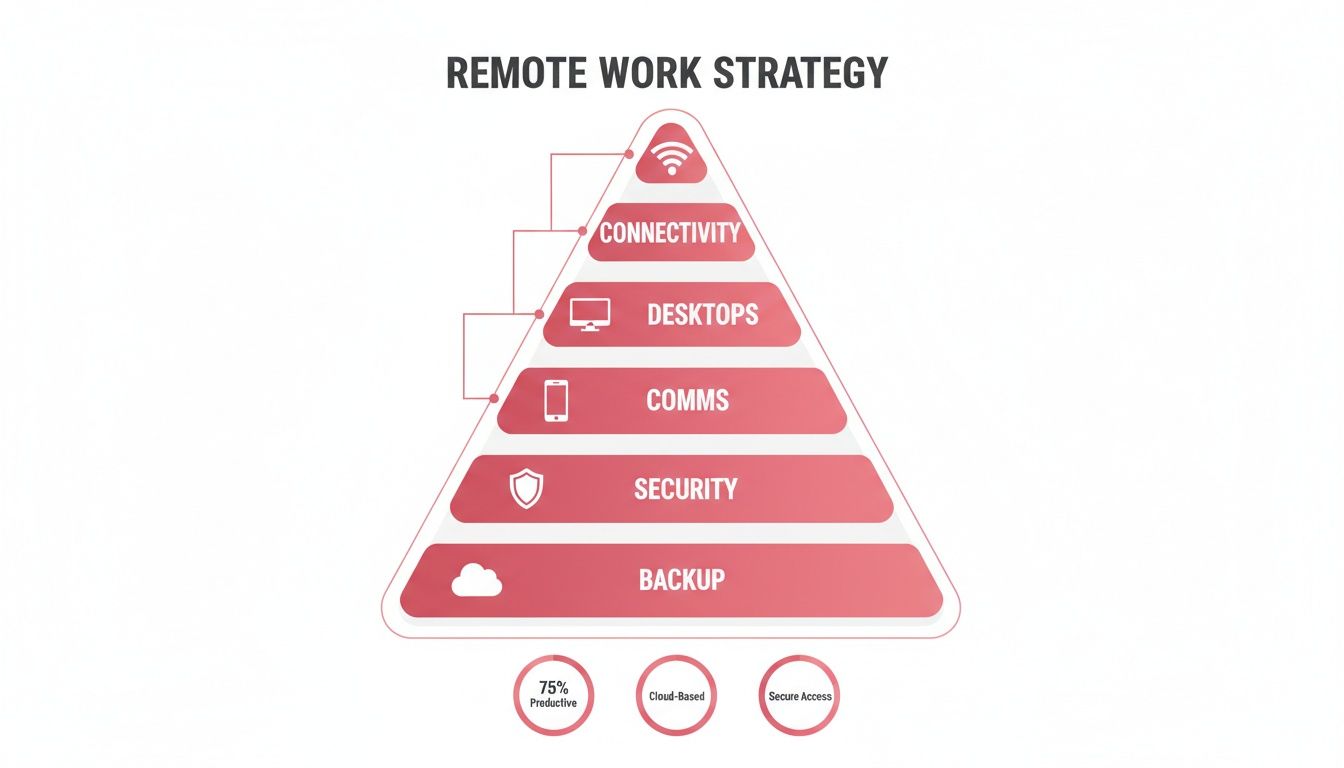
The pyramid shows how each layer supports the one above it. You can't just pick and choose tools; you need a complete approach where everything works together.
Understanding and Mitigating the Risks
Naturally, having a team spread out all over the place introduces new risks. If you ignore them, they can easily wipe out all the gains you've made.
Cybersecurity is usually the number one worry. Every employee's home network is a new potential backdoor into your company systems, and most home setups are nowhere near as secure as a controlled office environment. This bigger 'attack surface' gives cybercriminals more chances to get in. A good starting point is to understand the basics of securing your wireless network.
Another real challenge is keeping your company culture alive and well. When people don't see each other in person, it's harder to get that spontaneous chat and collaboration that sparks new ideas. There's also a genuine risk of burnout if the line between work and home life gets too blurry in an 'always-on' remote culture.
A Practical Example of Balancing Risk and Reward
Imagine a law firm in Wiltshire wanting to go hybrid. The chance to hire specialist solicitors from anywhere in the UK is a massive draw. The problem? They handle incredibly sensitive client data. A breach coming from an unsecured home Wi-Fi network would be catastrophic.
To make it work, the firm has to lock down every connection. That means bringing in a managed solution like Hosted Desktops, which keeps sensitive data off local machines entirely. They’d also need strong endpoint security and make multi-factor authentication mandatory for everyone. By taking these steps, they can get all the benefits of nationwide recruitment while methodically shutting down the security risks.
The move to flexible work isn’t just a phase; recent statistics show a significant portion of the UK workforce operates remotely in some form, forcing businesses to get their IT in order to stay competitive and secure.
How to Choose the Right Managed IT Partner
Getting the right remote working IT solutions in place is one thing. But the real game-changer for long-term success is picking the right managed IT partner to implement and look after that tech. You’re not just hiring a supplier; you're bringing a new, highly specialised department into your business.
This partner becomes the custodian of your digital office, responsible for keeping it secure, fast, and reliable. Their skill directly affects your team's productivity and your company's ability to operate without a hitch. A great partner is a genuine extension of your team, offering strategic advice and rock-solid, 24/7 protection.
Look for UK-Based Expertise and Infrastructure
For any UK business, a critical question to ask a potential partner is where they are and where your data will live. This isn't just about patriotism—it has serious consequences for your compliance and data security.
Choosing a provider that uses UK-based data centres is non-negotiable for staying on the right side of GDPR and ensuring data sovereignty. It means your sensitive business and client information stays on British soil, governed by UK laws. That’s a layer of legal protection and peace of mind you can’t afford to ignore.
A partner with a local presence in areas like Dorset, Wiltshire, or Hampshire offers more than just compliance. They understand the specific challenges and opportunities facing businesses in your region, providing a level of service and responsiveness that a distant, faceless corporation simply cannot match.
On top of that, local support means faster, more effective help when you need it most. Having an engineer who can actually visit your site to sort out a complex problem is an invaluable asset.
Scrutinise Their Technical Capabilities and Responsiveness
Let's be clear: not all managed service providers are created equal. You need a partner with real technical depth and a proactive mindset—someone who can stay ahead of threats and support your growth. This means you need to look past the glossy brochures and start asking some tough questions.
A good place to start is their approach to security. The old "break-fix" model, where you wait for something to go wrong before acting, just doesn't cut it anymore. You need a partner who is actively looking for trouble before it finds you.
Here are a few essential questions to throw at any potential IT partner:
- Proactive Security: "Can you walk me through your process for proactive threat hunting and managing vulnerabilities?"
- Incident Response: "What are your guaranteed response times for critical issues, and what does that process actually look like?"
- Scalability: "How do your solutions grow with a business? Can you give me an example of how you've helped a company like mine scale up?"
- Reporting: "What kind of performance and security reports can we expect to see, and how often will we get them?"
The quality and detail of their answers will tell you everything you need to know about their experience and their commitment to their clients. Vague responses should set off alarm bells.
A Partner for Attracting Top Talent
In today’s job market, offering a first-class remote work setup is a huge draw for recruitment and retention. Despite fluctuations in advertised remote roles in the UK, demand from workers remains high. This gap gives a massive advantage to businesses that get their remote experience right. You can discover more insights about the evolving remote job market here.
A top-tier IT partner helps make your technology a selling point, not a headache. By providing seamless and secure remote working IT solutions, they help you create an environment where the best people can do their best work, no matter where they are. That makes your choice of IT partner a strategic business decision that directly impacts your ability to build and keep a winning team.
A Practical Blueprint for Rolling Out Remote Work
Making the move to a secure and effective remote work model isn't about flipping a switch overnight. It’s a thoughtful process, a step-by-step journey from where you are now to where you need to be. This blueprint lays out that path, helping you implement or upgrade your remote working IT solutions without the chaos.
Think of it as building your digital headquarters. Each stage lays the foundation for the next, ensuring the final structure is solid, secure, and ready for business from day one.
Step 1: Start with an Honest Audit
Before you can build anything new, you need to know what you’re working with. A thorough audit of your current IT setup is the non-negotiable first step. This isn't just a quick glance; it's a deep dive into every piece of your existing infrastructure.
You’ll need to assess your network's capacity, check the age and performance of your hardware, and take stock of your software licences. Most importantly, you need to put your current security measures under the microscope. The aim here is to spot the weak links, bottlenecks, and security gaps before they become major headaches. For example, the audit might reveal that staff are using their own unsupported laptops to access company files, a major security risk that needs immediate attention.
Step 2: Define Your Hybrid Work Policy
Great technology is only half the battle. To make remote work truly successful, you need clear rules of the road for your team. This is where your hybrid work policy comes in—it’s the human element of your new setup.
Your policy needs to spell out:
- Who and How: Which roles are eligible for remote work and what the expectations are.
- Security Ground Rules: The mandatory security practices for home networks and personal devices.
- Measuring Success: How you'll track productivity and performance when people aren't in the office.
A clear, fair policy gets everyone on the same page and makes the transition far smoother for your entire team.
A strong policy is like the user manual for your new digital office. It ensures every team member understands their role in keeping things secure and productive, turning your IT investment into a real business advantage.
Step 3: Put the Core Technology in Place
With your audit done and your policy written, it's time to roll out the technology. This is where you choose the right tools for your specific needs, focusing on the five key pillars of a modern remote strategy.
This involves selecting the right Hosted Desktop (DaaS) provider to give your team a consistent, secure workspace. It also means choosing a professional VoIP phone system and layering in the right security solutions to protect your data. If you're new to hosted desktops, our article explaining why hosted desktops are the future of remote work is a great place to start.
Step 4: Secure Every Single Endpoint
When your team works remotely, the four walls of your office are no longer your security perimeter. Instead, every single device connecting to your network—laptops, smartphones, home PCs—becomes a potential entry point for threats. Securing these endpoints is absolutely critical.
At a minimum, you need robust measures like multi-factor authentication (MFA) across the board. For a much deeper level of protection, deploying endpoint detection and response (EDR) tools is the way to go. These systems actively hunt for and neutralise threats on each device, not just at the network gateway.
Step 5: Train Your People (Properly)
You can have the most sophisticated security tools in the world, but they're only as good as the people using them. This is why ongoing, practical training is so vital for building a security-first culture.
Your training needs to go beyond just showing people how to use the new software. It must include real-world cybersecurity skills: how to spot a convincing phishing email, why strong, unique passwords matter, and the importance of reporting anything suspicious immediately. A practical training session might involve sending a simulated phishing email to staff to see who clicks, followed by a non-judgmental debrief on the warning signs they missed.
Step 6: Hand Over the Monitoring
A remote working setup isn't a "set it and forget it" project. It needs constant care and attention to remain secure and run smoothly. For most businesses, the best way to achieve this is by partnering with a managed service provider for proactive monitoring and maintenance.
This gives you a team of experts keeping watch 24/7, handling system updates, and spotting potential issues before they disrupt your business. It leaves you free to focus on what you do best, confident that your digital headquarters is in safe hands.
Bringing IT Solutions to Life: Real-World Scenarios
It’s one thing to talk about the theory behind a 'digital headquarters', but seeing it solve genuine problems for UK businesses is where the real value becomes clear. Let’s look at a couple of scenarios that show the tangible impact of well-implemented remote working IT.
These examples highlight how a strategic IT partnership helps businesses become more resilient, secure, and productive. We’re not just talking about upgrades; these are fundamental improvements to the way businesses operate day-to-day.
Scenario 1: The Financial Advisory Firm
Picture a busy financial advisory firm in Dorset, deep in the chaos of the end-of-tax-year rush. Their team needs constant, secure access to incredibly sensitive client data, whether they're at the main office, at home, or meeting a client off-site. Any downtime or security breach could be catastrophic for their reputation and their regulatory standing.
The problem was simple: how could they provide flexible, secure access without cutting corners on compliance or letting client service slip?
Our Solution in Action
We rolled out a combination of Hosted Desktops and a modern 3CX VoIP phone system. This gave every advisor an identical, secure desktop environment they could access from any device, ensuring sensitive client data never actually left our UK-based data centre. The VoIP system then intelligently routed client calls to the right advisor, maintaining a professional front no matter where they were working.
The result? The smoothest tax season they’d ever had. The firm's team could work from anywhere with total confidence, knowing their communications were professional and their client data was completely protected and compliant. It freed them up to focus entirely on their clients during the most critical period of their year.
Scenario 2: The Regional Estate Agency
Now, think about a multi-branch estate agency in Wiltshire. Their agents are always on the move, dashing between viewings, branch offices, and their homes. They handle a huge amount of confidential information – from client contracts and financial records to property keys and alarm codes. Their biggest worries were data protection and simply keeping the business running.
A single data loss incident or system failure could bring operations to a standstill across every branch, leading to major financial losses and serious compliance issues.
To tackle this, we put a two-pronged strategy in place, focusing squarely on resilience:
- Automated Cloud Backups: We configured a fully automated cloud backup system. This continuously saved copies of their critical data to a secure, off-site location, creating a vital safety net.
- 24/7 Cybersecurity Monitoring: Our team provided round-the-clock monitoring of their entire network, actively hunting for and neutralising threats before they could cause any real damage.
This gave the agency the robust data protection and operational continuity it desperately needed. With their sensitive information securely backed up and under constant watch, the dispersed team could work efficiently, knowing they were protected against the risks of downtime and data breaches.
Your Questions About Remote IT, Answered
When it comes to setting up a solid remote working system, business owners tend to run into the same handful of questions. Here are some straight-talking answers to the queries we hear most often from SMEs.
What’s the Most Critical First Step?
Without a doubt, it all starts with a professional IT audit. Before you can build anything new, you need a crystal-clear picture of what you’re working with—your current systems, any hidden security gaps, and what your hardware can actually handle. This process isn't just about finding problems; it's about creating a practical roadmap for getting where you need to go.
How Can We Secure Devices We Don’t Own?
Securing personal devices—what the industry calls Bring Your Own Device (BYOD)—is a huge concern, and rightly so. The most effective way to handle this is with Hosted Desktops. This clever solution means all your company data, applications, and files live in a secure, UK-based data centre, not on the employee's laptop. If that device is lost or stolen, your data remains untouched and secure.
Think of it this way: a managed IT service turns any personal device into a secure window to your company's digital headquarters. Your sensitive information never actually leaves the building.
Are Cloud Solutions Really Cost-Effective for a Small Business?
Yes, they absolutely are. Cloud services like Hosted Desktops change the game for IT budgeting. Instead of a massive upfront cost for servers and hardware (a capital expense), you move to a simple, predictable monthly operational cost. You pay a straightforward per-user fee, which makes financial planning a breeze and allows your IT to scale up or down as your business evolves.
How Much Disruption Should We Expect When We Switch Over?
With an experienced IT partner managing the project, you should expect minimal to zero downtime. A smart, phased implementation, often scheduled outside of your core business hours, makes for a seamless transition. For instance, we often handle migrations over a weekend, so your team can log in on Monday morning and get straight to work without a hitch.
Ready to build a secure, productive, and resilient digital headquarters for your business? The expert team at SES Computers provides managed IT support and bespoke remote working IT solutions to empower SMEs across the UK. Get in touch today to schedule your IT audit.