So, what exactly is VDI? In simple terms, Virtual Desktop Infrastructure (VDI) is a technology that runs your entire desktop—your applications, files, and personal settings—from a central server instead of from your individual computer. This means your team can securely log into their complete, familiar work desktop from any device, wherever they are.
Understanding Virtual Desktop Infrastructure

Let's start with a typical office setup. Every employee has a physical computer or laptop. All their software, documents, and data reside directly on that one machine. If that device is lost, stolen, or simply breaks down, recovering their work becomes a real headache.
VDI takes a fundamentally different approach. It decouples the desktop environment from the physical machine. Instead of everything being stored locally, it’s all kept safe on a powerful, centralised server, usually tucked away in a secure data centre or a private cloud.
Your employees then use their devices—whether it’s a laptop, a low-cost thin client, or even a tablet—to connect and stream their desktop over the network. It's a bit like streaming a film on Netflix; the film isn't stored on your TV, but you can watch it perfectly.
To help break this down, here’s a quick look at the core components of VDI and how they work together.
VDI at a Glance: Key Concepts Explained
| Component | What It Does | Analogy (Central Office Library) |
|---|---|---|
| Hypervisor | The software that creates and runs virtual machines (VMs). It's the engine that makes VDI possible. | The librarian who organises the library and assigns desks (VMs) to people. |
| Virtual Machine (VM) | A self-contained, software-based computer that acts as a user's desktop, running its own operating system. | Your personal, assigned desk in the library, set up just the way you like it. |
| Connection Broker | Directs users to their assigned virtual desktop when they log in, managing the traffic. | The front desk receptionist who checks your ID and directs you to your specific desk. |
| Endpoint Device | The physical hardware (laptop, PC, thin client) the user uses to access their virtual desktop. | The library card you use to gain access to the library and all its resources. |
Each piece plays a crucial role, working together to deliver a seamless and secure desktop experience from a central hub.
How This Works in Practice
Picture an accountancy firm in Dorset with staff working from the main office, client sites, and their homes. With VDI, each accountant can log in from their chosen device and instantly see their familiar Windows desktop, complete with all their specialist accounting software and confidential client files.
The crucial point here is that none of this sensitive data ever actually leaves the firm's secure central server. All the processing happens there, and only the screen display is streamed to the user's device. This provides a consistent, secure experience no matter where the employee is working.
Why Is VDI Gaining Momentum?
The rise of hybrid and remote working has made VDI a vital tool for many UK businesses. It solves several major challenges modern companies face, from tightening data security to simplifying IT management. It’s a technology that’s really changing how businesses across Dorset, Somerset, Wiltshire, and Hampshire operate.
The numbers back this up. The United Kingdom's Virtual Desktop Infrastructure Market was valued at £1.2 billion in 2024 and is projected to soar to £4.0 billion by 2032. This explosive growth shows just how important VDI is becoming for SMEs. You can read more about the VDI market growth to understand its strategic impact.
VDI gives your business the agility to adapt to changing work patterns while maintaining strict control over your digital assets. It transforms IT from a reactive support function into a proactive enabler of secure, flexible work.
Ultimately, VDI is all about centralising control and providing secure, on-demand access to your company's computing resources. It's a foundational technology that empowers businesses to build a more resilient, manageable, and secure IT environment fit for a modern workforce.
How VDI Technology Actually Works
To really get to grips with VDI, it helps to pull back the curtain and see what’s happening behind the scenes. The whole process is a brilliantly coordinated dance, designed to give someone a familiar, secure desktop experience, whether they’re in the office or on the other side of the country.
Let's walk through it. Imagine an employee in Hampshire fires up their laptop or a simple thin client from their home office. They open an application and pop in their login details. That simple act triggers a sophisticated chain reaction back at your central server.
Their login request doesn't travel directly to a desktop. First, it’s picked up by a crucial piece of the puzzle called the connection broker. You can think of the connection broker as the ultimate air traffic controller for your network. It checks who the user is, confirms they have access, and then smartly guides them to their assigned virtual desktop from a pool of available machines.
The Engine Room of VDI
At the very heart of any VDI setup is the hypervisor. This is the powerful software that does all the heavy lifting, creating and running every single virtual machine (VM) that acts as a user’s desktop. It masterfully carves up a physical server’s resources—its processing power, memory, and storage—and dishes out a slice to each VM. This is how you can have dozens, or even hundreds, of individual desktops humming along on one server.
Once the connection broker gives the green light, it tells the hypervisor to wake up the user’s specific VM if it’s not already active. The user is then securely connected, and their desktop appears on their screen. To them, it looks, feels, and acts just like the PC they used to have under their desk. They can open files, run their usual software, and get on with their work. The only real difference is that all the actual computing is happening miles away in your server room.
For those interested in the finer details of how this connection is established and maintained, it’s worth understanding the role of the underlying protocols. You can find more information about these communication methods here: https://www.sescomputers.com/news/what-is-remote-desktop-protocol-2/.
It's also important to note that when VDI is hosted in the cloud, you'll come across different configurations. Getting familiar with tenancy models in cloud computing, like multi-tenant versus single-tenant, is key to making the right deployment choices.
Persistent vs Non-Persistent Desktops
One of the first big decisions you’ll make is what kind of virtual desktops your team needs, because they’re not all the same. This choice is fundamental to a successful VDI rollout and has a huge impact on both the user experience and your IT team’s workload.
The core decision between persistent and non-persistent desktops hinges on a simple question: should the user's desktop be a personal, customisable workspace or a standardised, temporary one?
Let’s break down what that means in the real world.
Persistent Desktops: With this model, every user gets their own dedicated virtual desktop that they return to every single time they log in. Any changes they make are saved for their next session. This includes installing specific software, arranging desktop shortcuts, or tweaking their settings.
- Practical Example: A law firm in Somerset would almost certainly use persistent desktops. Each solicitor needs to keep their case files, legal research tools, and custom document templates exactly where they left them, providing a consistent and highly personalised workspace.
Non-Persistent Desktops: This is the opposite approach. Users are given a generic, pristine desktop from a shared pool each time they log in. When they’re done and log out, that desktop is wiped clean and reset to its original state, ready for the next person.
- Practical Example: A customer service centre in Wiltshire is a perfect fit for non-persistent desktops. Every agent needs the same basic tools—the CRM, a phone app, and a knowledge base. Giving them a fresh, identical desktop at the start of each shift ensures consistency, boosts security, and makes it incredibly simple to manage.
The Real-World Business Benefits of VDI
It's one thing to understand the technology behind Virtual Desktop Infrastructure, but what really matters is what it can do for your business. For small and medium-sized businesses across the UK, VDI isn't just a fancy IT concept; it’s a practical solution to real-world problems like security gaps, spiralling IT workloads, and the need for a truly flexible workforce.
Let's move past the technical jargon and look at the tangible advantages VDI brings to the table.
Fortify Your Data Security
In today's world, your data is one of your most valuable assets. VDI changes the game by bringing it all back to a central, secure server. Instead of sensitive company information being scattered across countless laptops and PCs—each one a potential security risk—it all lives in one protected environment.
This seemingly simple shift has massive security implications.
- Lost or Stolen Devices: Think about it. If an employee's laptop is stolen from their car or left in a coffee shop, it’s a frustrating inconvenience, not a full-blown crisis. Since no data is actually stored on the device, the threat of a major breach is neutralised. You can revoke access in seconds and your network remains secure.
- Centralised Defences: It’s far easier to defend a single fortress than a hundred separate outposts. With VDI, your firewalls, anti-malware software, and monitoring tools are all concentrated on the central server, making it simpler to keep everything patched, updated, and secure.
- Controlled Access: You gain incredibly granular control. Need to stop someone from copying sensitive client files to a USB stick? Or prevent confidential documents from being printed at home? With VDI, you can set these policies with a few clicks, drastically reducing the risk of accidental or intentional data leaks.
Streamline IT Management and Support
For most SMEs, the IT "department" is often just one or two people trying to keep dozens of machines running. VDI completely transforms this reality. It replaces time-consuming, manual tasks with efficient, centralised control, freeing up your tech experts to focus on projects that move the business forward, not just putting out fires.
The biggest win here is managing everything from a single pane of glass.
With VDI, your IT team can stop running from desk to desk. Instead, they can set up new users, roll out software updates, and fix problems for everyone from one central console. It’s a massive boost for both efficiency and responsiveness.
For UK SMEs trying to balance cybersecurity with growth, VDI is a smart move. Centralising your desktops means you need less physical hardware and you're better prepared for any disruption. In regions like Dorset and Somerset, where over 5.7 million SMEs contribute a massive £2.4 trillion to the economy, VDI adoption has jumped by 35% since 2023. This surge is directly linked to the rise of Bring Your Own Device (BYOD) policies and hybrid working, with 85% of UK firms now supporting it. VDI helps cut the risk of a data breach by an estimated 60% through this central control—a critical defence as cyber threats continue to grow. You can discover more insights about the UK virtual desktop market to see the full picture.
Empower a Flexible and Productive Workforce
VDI is what makes modern, flexible working truly possible. It gives your team secure, reliable access to their complete work desktop from any device, anywhere they have an internet connection. The key here is consistency, which is vital for productivity.
An employee can start drafting a proposal on their office PC, tweak it on a tablet during their commute, and put the finishing touches on it from their laptop at home. The experience is completely seamless because they're logging into the exact same virtual desktop every single time.
A Practical Example: The Rapid Software Rollout
Imagine a financial services firm in Wiltshire needs to push a critical security patch for its accounting software to all 100 employees.
- Without VDI: The IT manager faces days of painstaking work, going from machine to machine to manually install the update, causing disruption for everyone.
- With VDI: The IT manager simply updates the master desktop image on the central server. The next time employees log in, the new, secure version is already there. The entire rollout takes minutes, not days, with zero downtime.
Comparing VDI with Other Desktop Solutions
Deciding how to deliver desktop environments to your team is a major business decision, one that ripples through your budget, security, and day-to-day operations. While VDI is a powerful contender, it’s not the only option out there. To make the right call, you need to see how it stacks up against the alternatives.
This flowchart can help frame your initial thinking, especially when data security is your top concern.
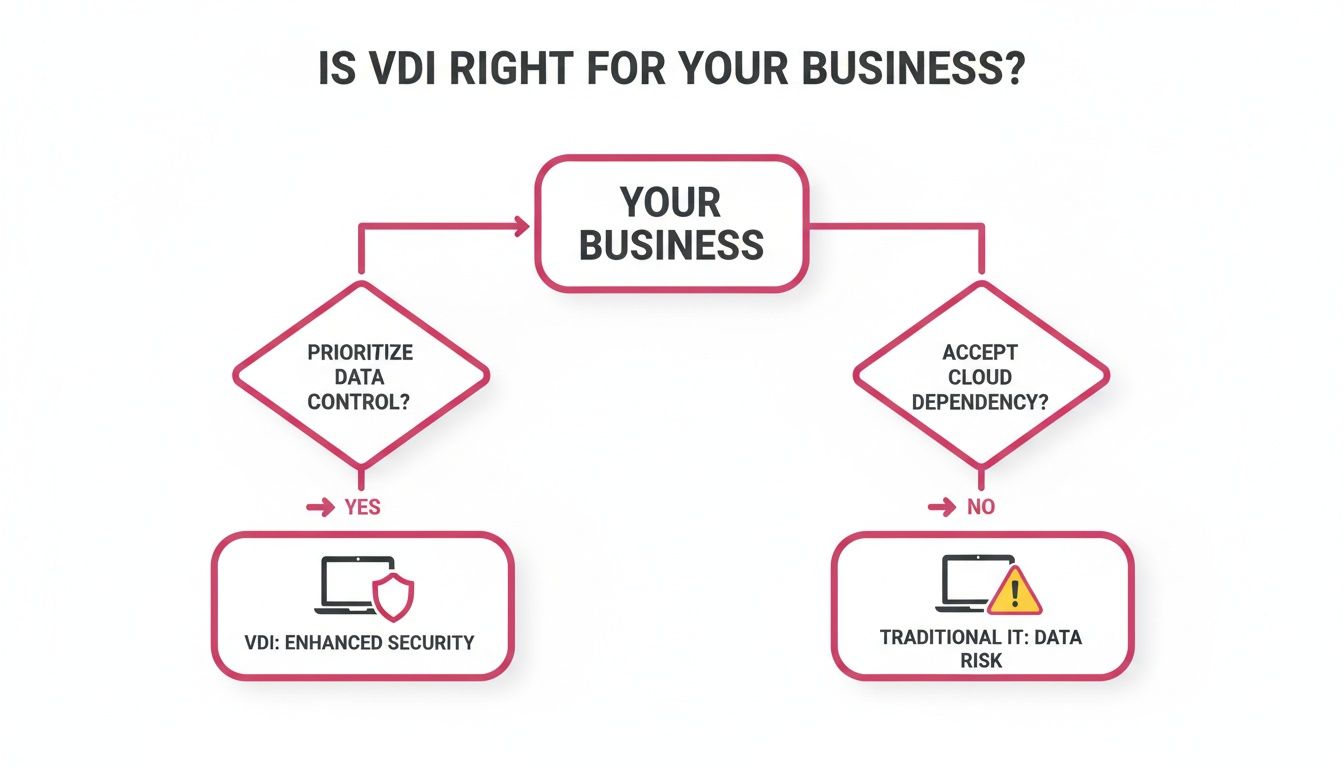
As you can see, if centralising control and keeping data off vulnerable laptops and home computers is a priority, then VDI is definitely a path worth exploring. Let's break down the comparisons in more detail.
VDI vs Traditional Physical PCs
The classic setup is simple: every employee gets their own desktop PC or laptop. All their software, applications, and files are stored right there on the local hard drive.
It's a model we all know, but it’s a real headache for management and a nightmare for security. Need to roll out a software update or a critical security patch? Your IT team has to touch every single machine. Worse, if a laptop is lost or stolen, any sensitive company or client data on it is gone, creating a serious security breach.
VDI completely flips this around. By keeping everything in one central, secure place, management becomes a breeze. And your data? It stays safely tucked away in your network, not scattered across dozens of devices in the wild.
VDI vs Remote Desktop Services (RDS)
People often mix up VDI with Remote Desktop Services (RDS), but they operate on a completely different principle. With RDS, multiple users share a single server and its operating system. Imagine everyone logging into the same computer to use a shared pool of applications.
This can be a cost-effective way to give your team access to a few standard programmes, like your accounting software. The problem is, it offers very little personalisation and no real isolation between users. Because everyone is sharing the same resources, one person running a demanding report can slow things down for the entire team.
VDI gives each user their own dedicated virtual machine, complete with its own operating system. This isolation means you get a genuine, personalised desktop experience that's far more stable, secure, and customisable than the shared environment of RDS.
VDI vs Desktop as a Service (DaaS)
Think of Desktop as a Service (DaaS) as VDI, but delivered as a cloud service. With a traditional, on-premise VDI setup, you are responsible for everything—buying the servers, managing the storage, and maintaining the infrastructure. This means a hefty upfront investment and the need for specialist IT skills.
DaaS providers, like SES Computers, take all that heavy lifting off your plate. We host and manage the entire infrastructure for you in our secure, UK-based data centres. You simply pay a predictable monthly fee per user.
This model is a game-changer for most UK SMEs. It gives you all the security and flexibility of VDI without the huge capital expense and management overhead. It effectively turns a major capital expenditure (CapEx) into a manageable operational expenditure (OpEx).
VDI vs RDS vs DaaS vs Traditional Desktops
To help you visualise the trade-offs, this table breaks down the key differences between each approach. It's a quick reference to help you match the right solution to your specific business needs.
| Feature | VDI | DaaS | RDS | Traditional Desktops |
|---|---|---|---|---|
| Upfront Cost | High (servers, storage) | Low (subscription-based) | Moderate | Moderate (per device) |
| Scalability | Good (but requires planning) | Excellent (on-demand) | Limited by server capacity | Poor (requires new hardware) |
| Management | High (in-house IT team) | Low (managed by provider) | Moderate | High (per device) |
| User Personalisation | Excellent (full desktop) | Excellent (full desktop) | Limited (shared OS) | Excellent (local machine) |
| Security Control | Excellent (centralised) | Excellent (centralised) | Good | Poor (decentralised) |
So, what's the verdict? If you have a large, specialist IT department and the capital to invest, on-premise VDI gives you ultimate control. For the vast majority of UK SMEs, however, a DaaS solution hits the sweet spot—delivering all the benefits of VDI with none of the headaches. It’s the perfect balance of security, flexibility, and cost-effectiveness.
Planning and Budgeting for Your VDI Project
Getting VDI right comes down to one thing: careful planning. It's tempting to dive straight in, but that's a classic misstep that almost always leads to a system that underperforms and costs far more than you budgeted for. For any UK business, the planning stage is where you map out everything from the initial hardware investment to how your team will actually use their new virtual desktops day-to-day.
First up, you need to decide how you're going to pay for it. With a traditional, on-premise VDI setup, you’re looking at a significant upfront investment, known as Capital Expenditure (CapEx). This means buying the physical servers, storage, and networking gear yourself. The alternative, a cloud-hosted solution like DaaS, flips this on its head, turning it into a predictable monthly or yearly cost – an Operational Expenditure (OpEx), just like your electricity bill.
Getting Your Infrastructure Right
Before you spend a penny, you need a crystal-clear picture of what your business actually needs. This goes way beyond a simple headcount. You have to understand what your people do. Are they just tapping away in Word and Excel, or are they power users running heavy-duty design software?
Here’s what you need to size up:
- Server Power: How much processing muscle (CPU) and memory (RAM) will each virtual desktop really need? If you over-spec it, you're just burning cash. Under-spec it, and your team will be staring at loading screens all day.
- Storage Speed: VDI puts a huge strain on storage. You absolutely need fast storage, like SSDs, to prevent frustrating bottlenecks. This is especially true first thing in the morning when everyone is trying to log on at once – a phenomenon known as a "boot storm".
- Network Capacity: Think of your network as the motorway connecting your users to their desktops. A slow or patchy connection guarantees a laggy, frustrating experience for everyone.
And remember, planning for your VDI hardware isn't just about the initial purchase. You also need a plan for the end of its life. Having a solid server decommissioning checklist is vital for managing asset retirement responsibly when the time comes.
The Maze of Software Licensing
Software licensing in a virtual world can be a real headache. Microsoft, for instance, has a notoriously complex set of rules for running Windows and Office on VDI. A simple mistake here can lead to a very expensive compliance breach down the line.
Getting licensing wrong is a costly mistake. It’s essential to work with a partner who genuinely understands the ins and outs of virtualisation licensing. They can ensure you have the right agreements in place, like Microsoft’s Virtual Desktop Access (VDA) licences or the correct Software Assurance coverage, to stay compliant and avoid nasty surprises.
A Real-World Planning Example
Let’s imagine a 40-person architectural firm in Hampshire. Their team relies on resource-hungry CAD and 3D modelling applications, which means each virtual desktop needs a lot of grunt.
- User Assessment: The first step would be to analyse their typical daily workload. This tells us exactly how much CPU, RAM, and specialised graphics power (vGPU) to allocate to each person’s virtual machine.
- Infrastructure Plan: With that data, they can figure out how many high-performance servers they’ll need. They'd also need a high-speed, low-latency storage system and probably an upgrade to their office network and internet connection. This analysis forms the foundation of their entire project budget.
The growth of VDI is proving to be a game-changer for UK SMEs. In fact, UK businesses that switch to VDI often report 40% reductions in IT support tickets and see up to 70% less downtime – huge wins for any company in Wiltshire or Hampshire. At SES Computers, we use UK-based data centres to build solutions that not only deliver these benefits but also ensure you stay compliant with GDPR.
A solid grasp of your unique requirements is the foundation of any successful VDI project. To dig deeper into this, you can learn more about crafting the right IT infrastructure solution.
Finding the Right Partner to Implement VDI
Navigating the world of Virtual Desktop Infrastructure isn't just a technical challenge; it’s about finding a partner who genuinely gets your business. The right team acts as your guide, demystifying the whole process—from the first planning session to long-term support—to make sure the solution actually works for you.
For small and medium-sized businesses across Dorset, Hampshire, and the surrounding areas, choosing a local expert really matters. A partner on your doorstep understands the regional business landscape and can be there with hands-on support when you need it most.
Why SES Computers Is Your Expert Guide
At SES Computers, we’ve spent over 30 years helping SMEs design and manage VDI and DaaS solutions that deliver practical, cost-effective results. We don't just sell you a piece of technology and walk away; we build lasting partnerships.
It all starts with a simple conversation. We take the time to learn about your unique workflows, security needs, and where you want to take your business. This allows us to map out a solution that’s built for you, not for a generic template.
We handle everything, so you don't have to worry about the details:
- UK-Hosted DaaS: We offer a fully managed, secure Desktop as a Service solution hosted in UK data centres, removing the need for a big upfront investment in hardware.
- Specialist VMware Expertise: Our team knows VMware inside and out. We make sure your migration is seamless and your new virtual environment is fine-tuned for peak performance.
- Proactive Managed IT Support: We don’t stop at the setup. Our job is to keep your systems running perfectly with continuous monitoring and support. You can read more about the advantages of working with managed IT service companies.
A successful VDI project isn't about chasing the latest tech trend. It's about putting a strategic tool in place that tightens security, improves productivity, and gives you a solid foundation for growth.
Ready to see how a well-planned VDI strategy could help your business? Let's have a chat.
Contact SES Computers today for a no-obligation consultation and discover how we can design a secure, efficient, and scalable virtual desktop solution that works for you.
VDI Questions We Hear All the Time
When businesses across Dorset, Somerset, Wiltshire, and Hampshire consider moving to a Virtual Desktop Infrastructure, they naturally have a lot of questions. We've gathered some of the most common ones we hear to give you a clearer picture of what a VDI project actually involves.
Is VDI a Secure Way to Handle Our Sensitive Client Data?
Absolutely. In fact, this is one of the biggest reasons businesses make the switch. Think about your current setup: sensitive information is likely scattered across every employee's laptop and PC. If just one of those devices is lost or stolen, you've got a potential data breach on your hands.
VDI flips that model on its head by bringing all your data back to a central, secure location. Everything lives in a protected UK-based data centre, not on individual machines. When you combine this centralisation with strong encryption and proper access controls, you seriously strengthen your data security and take a massive step towards GDPR compliance.
You can think of the employee's device as just a secure window to their desktop. The actual data never leaves the safety of your server environment, which takes the sting out of a lost or compromised laptop.
What Sort of Internet Connection Do We Need for VDI?
You don't need the fastest connection money can buy, but you absolutely need a reliable and stable one. For VDI, consistency is far more important than raw speed. A connection that keeps dropping or suffers from high latency (the technical term for delay) will create a laggy and frustrating experience for your team.
That's why we always recommend a dedicated, business-grade broadband connection. Before any project kicks off, one of the first things we do is assess your current connectivity. We need to be sure it can deliver the smooth, responsive desktop experience your staff need to get their work done without a hitch.
Will Our Specialist Software Work in a VDI Environment?
This is a make-or-break question, and the good news is the answer is almost always yes. Most modern business applications, from standard office software to highly specialised industry tools, run perfectly well within a VDI setup.
Of course, we never leave it to chance. A critical part of any VDI migration is the discovery and testing phase. We work closely with you to identify every piece of critical software—whether it's a bespoke accounting package, a CAD program, or your CRM system—and put it through its paces. We need to be 100% certain it performs flawlessly in the new virtual environment before you go live.
Ready to see how a VDI or DaaS solution could strengthen your security and give your team more flexibility? The experts at SES Computers are here to help. Contact us today for a no-obligation consultation and we can talk through your specific business needs.