Securing your office Wi-Fi is not merely a box-ticking exercise for the IT department; it is a cornerstone of your business's continuity and client confidentiality. Think of it as a layered defence, starting with strong encryption like WPA3, reinforced by meticulous network segmentation, and backed up by constant, proactive monitoring. For any professional services firm, truly robust Wi-Fi security means getting well beyond the default settings.
Why Business Wi-Fi Is a Prime Target for Attackers
Your office Wi-Fi is the invisible engine powering your daily operations. It's how your team accesses critical client data, how you interact with stakeholders, and what keeps everything from your billing systems to your video conferencing facilities connected. But all this convenience comes with a hefty, and often overlooked, risk. To a cybercriminal, a poorly configured business network is a wide-open door.
It is surprising how many professional firms, especially small to medium-sized enterprises (SMEs), still use the default router passwords and outdated security protocols that came straight out of the box. These credentials are an open invitation for an attack. A quick search online is all it takes for a hacker to find those default passwords and gain administrative access in seconds.
The Real-World Risks for UK Businesses
This is not theoretical fear-mongering; it is happening to businesses across the UK every day. The latest UK Cyber Security Breaches Survey for 2025 painted a stark picture, revealing that a staggering 43% of all UK businesses suffered a breach or attack in the last year alone. While phishing often grabs the headlines, weak Wi-Fi security is frequently the initial crack in the armour that lets these campaigns succeed. You can dig into the full details in the official government report on cyber security breaches.
Let's bring this closer to home with a few practical scenarios we see all the time with professional services firms in Dorset, Wiltshire, and Hampshire:
- The Compromised Guest Network: A law firm in Dorset offers free Wi-Fi as a client courtesy. But if that guest network isn't properly walled off from their main business network, a hacker posing as a client could easily jump from the public access point straight into the case management system, siphoning off confidential client information.
- The Weak Password Breach: An accountancy firm in Wiltshire protects its primary Wi-Fi with a simple, easy-to-guess password. An attacker sitting in a car nearby runs a brute-force tool, cracks it in minutes, and suddenly has full access to the network and all the sensitive client financial data it holds.
- The Outdated Protocol Exploit: A small engineering consultancy in Somerset is running its operations on an old router that only supports the WPA2 protocol, which has known vulnerabilities. An attacker exploits this weakness to launch a ransomware attack, bringing all project work to a complete standstill until a massive ransom is paid.
These are not far-fetched Hollywood plots. They are real-world examples of how small oversights can spiral into devastating outcomes, from financial ruin and reputational damage to serious regulatory penalties under GDPR.
Your Wi-Fi network should be treated with the same level of security as your physical office. Leaving it unprotected is like leaving the front door unlocked with a sign that says, "valuables inside."
In the end, ignoring Wi-Fi security is a gamble that professional firms can no longer afford to take. It has shifted from a simple technical setting to a vital part of your overall risk management and business resilience strategy. Building a strong defence is not just about preventing a data breach; it is about making sure your business can keep running, day in and day out, without costly interruptions.
Getting the Wi-Fi Security Fundamentals Right
Alright, now that we're clear on the risks, it is time to roll up our sleeves and build a strong security foundation. These are not just suggestions; they are the absolute essentials for protecting your business network. Getting these first steps wrong is like installing a state-of-the-art alarm system but leaving the front door wide open.
First thing's first: change the default administrator credentials on every single router and wireless access point. It is a simple task that is so often overlooked. Every new piece of kit arrives with a generic username and password like 'admin' and 'password'. Hackers know this, and they have huge, publicly available lists of these defaults. They even run automated scripts that constantly scan for networks that have not been changed.
You would be shocked at how common this is. Recent research showed that a staggering 69% of UK internet users have never changed their default Wi-Fi password. That is a massive vulnerability just waiting to be exploited. It gives an attacker the keys to the kingdom.
Choose the Right Lock: Your Security Protocol
With the admin access secured, your next move is to make sure your Wi-Fi traffic is properly encrypted. Using an old, outdated security protocol is a rookie mistake. Attackers can slice through them with readily available software. This is all about choosing the right security keys for WiFi and the protocol that manages them.
To help you decide, let's look at the options.
Wi-Fi Security Protocol Comparison
| Protocol | Security Level | Best For | Recommendation |
|---|---|---|---|
| WEP | Very Low | No one. It's obsolete. | Disable Immediately. It can be cracked in minutes. |
| WPA | Low | Legacy devices only. | Avoid. Known vulnerabilities make it unsafe for business. |
| WPA2 | Good | General use, older hardware. | The absolute minimum. Use with AES encryption, not TKIP. |
| WPA3 | Excellent | All modern business networks. | The current standard. Offers far superior protection. |
Essentially, if your hardware supports it, you should be using WPA3. It offers much stronger encryption and protects against the kind of brute-force attacks that can crack WPA2 passwords over time. For any new hardware purchases, WPA3 support is a must-have.
Think of your Wi-Fi protocol as the lock on your office door. WEP is a flimsy latch. WPA2 is a decent deadbolt. But WPA3 is a modern, high-security lock system. You wouldn't secure your business assets with just a latch, would you?
Tightening Up Your Access Points
Encryption is crucial, but there are a few other quick wins that dramatically shrink your network's attack surface.
A big one is WPS (Wi-Fi Protected Setup). It was designed to make connecting new devices easy—just press a button or enter a short PIN. Unfortunately, that convenience comes at a huge security cost. The PIN system has a major design flaw that hackers can exploit to get your main password. For any business, WPS should be turned off in your router settings. No exceptions.
Another smart move is to turn down your Wi-Fi signal strength. Most business-grade routers can broadcast a signal far beyond your office walls, spilling out into the car park, street, or neighbouring buildings. This just gives an attacker more opportunity to sit outside and try to break in. Tweak the transmission power so it provides solid coverage inside your premises and not much further. If you find this creates dead spots, our guide on how to improve Wi-Fi coverage can help you get it right without over-broadcasting.
Layering Your Defences with Network Segmentation
Once you've nailed the basics, it is time to build some real, layered security. The single most effective strategy you can deploy is network segmentation. Forget having one flat network where every device can see every other device. Instead, think about creating multiple, isolated digital zones inside your office.
It helps to picture your office layout. Your main work area is for staff only, the reception is for visitors, and the server room is a high-security zone. Network segmentation does exactly this for your Wi-Fi, making sure a problem in one area does not bring the whole house down.
Building Digital Walls with VLANs
The standard way to pull this off is with Virtual Local Area Networks, or VLANs. A VLAN essentially tricks a single physical network switch into acting like several separate ones. This lets you broadcast distinct Wi-Fi networks that are logically walled off from each other, even though they are running on the same physical kit.
Let's look at a real-world example. We recently worked with a professional services firm in Hampshire. They are constantly handling sensitive client files, have a bunch of smart devices around the office, and get a steady stream of visitors. A single network for all of that would be a disaster waiting to happen.
We helped them set up a properly segmented network with three main VLANs:
- Trusted Staff Network: For company-owned laptops and employee devices only. This network has full access to internal servers, databases, and shared drives. Access is locked down tight.
- Operational Devices Network (IoT): A dedicated zone for all the ‘smart’ things that need an internet connection but have no business touching company data. Think printers, smart thermostats, security cameras, and VoIP phones. These gadgets are often riddled with security holes, so quarantining them is a must.
- Guest Wi-Fi Network: A completely separate, internet-only network for visitors and contractors. Crucially, it is set up with client isolation, which stops devices on the guest network from even seeing each other, let alone your internal systems.
The real win here is containment. If a visitor connects with a malware-infected laptop, it is stuck on the guest network. It cannot jump across to the firm's file servers or an employee's machine. This simple act of separation turns a potential catastrophe into a non-event.
Moving Beyond Shared Passwords with WPA3-Enterprise
Segmentation builds the walls, but you still need a proper gatekeeper. For your internal staff network, a single shared password—no matter how complex—is a massive weak spot. Every time someone leaves the company, you face the headache of changing the password on every single device.
This is exactly the problem that WPA3-Enterprise and RADIUS authentication solve.
Instead of a single Pre-Shared Key (PSK) for everyone, WPA3-Enterprise gives each member of staff their own unique login. They connect to the Wi-Fi using the same username and password they use for their computer, which is often managed through Active Directory.
This approach is leagues ahead in terms of security and manageability:
- Individual Accountability: Every connection is logged against a specific user. If something suspicious happens, you know exactly which account was involved, which makes investigation and auditing straightforward.
- Simple Onboarding and Offboarding: New starter? Just create their account. Someone leaves? Disable their credentials in one central place, and their Wi-Fi access is gone instantly. No more frantic password changes.
- Seriously Tough Encryption: This protocol uses 192-bit encryption, providing the robust protection needed for handling sensitive financial or client data and meeting compliance rules like GDPR.
- Granular Policy Control: You can assign different access rights to different groups. For example, the finance team can get to the accounting server, while the marketing team cannot—all managed from one central point.
By combining the structural security of VLANs with the individual access control of WPA3-Enterprise, you create a defence that is not just strong, but also flexible and genuinely manageable for a growing business.
Taking a Proactive Stance on Monitoring and Maintenance
Securing your office Wi-Fi is not a one-and-done job; it is an ongoing commitment. Getting the initial setup right is a great start, but true network security comes from the daily routines you put in place to monitor, maintain, and respond to new threats. Without this constant vigilance, even the strongest defences can weaken over time.
This is where many businesses stumble, usually because they are stretched for time and resources. It is one thing to get your network configured properly, but it is another entirely to keep it secure day in, day out. Frankly, this is why managed IT services are so valuable—they provide the consistent oversight that many in-house teams just cannot manage.
The Non-Negotiable Role of Firmware Updates
Let's start with the basics: keeping the firmware on your routers and access points updated. Firmware is essentially the operating system for your network hardware. When manufacturers find a security hole, they patch it with a firmware update. Ignoring these updates is like leaving a known backdoor wide open for anyone to walk through.
We cannot stress this enough. We once worked with a local architectural practice who got hit by a ransomware attack that completely paralysed their project servers. The attackers got in through a well-known vulnerability in their business-grade router—a flaw that had a patch available for months. It was never installed.
A single missed update, an action that would have taken just a few minutes, led to days of lost business and a hefty financial hit. It is a stark reminder that cybercriminals actively look for outdated devices because they are low-hanging fruit.
Regularly checking for and applying these updates is not just a good idea; it is a fundamental part of keeping your Wi-Fi secure.
This diagram shows how you can use network segmentation to contain a potential breach. By isolating different types of traffic, you limit the attacker's ability to move laterally across your network.
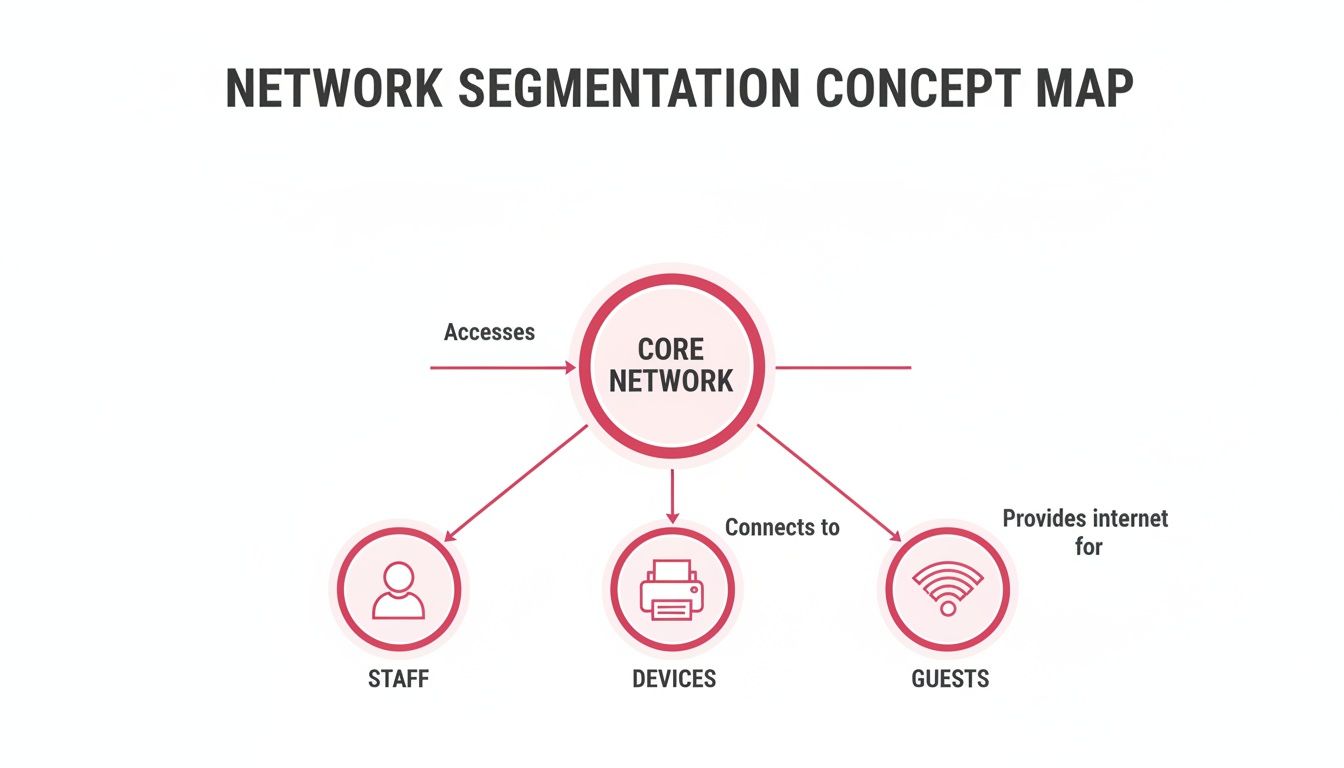
Keeping guest, staff, and operational device traffic separate from your core network is a cornerstone of modern security strategy.
Your Digital Sentry: IDS and Monitoring Tools
While updates patch known vulnerabilities, you still need to watch for active threats. This is where network monitoring tools and an Intrusion Detection System (IDS) are invaluable. Think of an IDS as a digital alarm for your network; it is constantly on the lookout for suspicious activity and alerts you the moment something seems amiss.
These systems are brilliant at flagging behaviour that could signal an attack is underway. For any business, this early warning is absolutely critical.
A properly configured IDS can spot a range of threats:
- Rogue Devices: It will immediately alert you if an unknown device tries to join your staff network.
- Odd Traffic Patterns: An IDS can detect unusual data flows, like a computer suddenly trying to send huge amounts of data to an unknown server—a classic sign of a data breach.
- Malware Signatures: It can spot the digital fingerprints of known viruses or ransomware as they try to spread.
- Port Scanning: This is a common tactic attackers use to probe for weaknesses, and an IDS will raise the alarm instantly.
Imagine an employee accidentally clicks a phishing link and malware gets installed. An IDS can detect that malicious software trying to "phone home" to its command-and-control server. That alert gives you a vital window to isolate the infected machine before the infection spreads. To dive deeper into this, you can learn more about how to monitor network traffic in our detailed guide. This shifts your security from being a passive wall to an active, intelligent defence.
Crafting a Wi-Fi Security Incident Response Plan
When a security breach happens, the first few minutes are critical. Even the strongest defences are not foolproof, so you absolutely must be prepared for a worst-case scenario. A clear, well-rehearsed incident response plan is not just another document gathering dust; it is your business's emergency protocol for containing damage, getting back online, and protecting your hard-earned reputation.
The aim is to shift from a state of panic to a structured, effective response. The actions you take right after discovering a breach can dramatically reduce operational downtime and financial loss. Without a plan, teams working under pressure often make crucial mistakes that can turn a bad situation into a catastrophe.
Immediate Steps for a Suspected Breach
Let's imagine a financial advisory firm in Somerset gets an alert from its Intrusion Detection System. An unauthorised device has popped up on the primary staff network. The clock is now ticking. The initial phase is all about containment—stopping the threat dead in its tracks.
Here is a practical checklist for what to do immediately:
- Isolate Affected Devices: The first move is to get the compromised or suspicious device off the network. You can do this physically by unplugging its cable or remotely by disabling its network port or blocking its MAC address right from the access point.
- Force a Network-Wide Password Change: If you have any reason to believe your main Wi-Fi password is out in the wild, change it. Now. This kicks every single device off the network, including the attacker's, forcing a re-authentication with the new credentials.
- Segment and Quarantine: If your network setup allows, shunt the affected network segment into a quarantined VLAN. This effectively puts the threat in a digital isolation ward, letting you investigate without endangering the rest of your business systems.
- Preserve Logs and Evidence: Resist the urge to start rebooting routers and switches unless absolutely necessary. These devices hold vital logs—like connection times, MAC addresses, and IP addresses—that are crucial for figuring out the source and scope of the breach.
Your initial response needs to be swift, decisive, and focused entirely on containment. The goal is not to fully understand the attack in the first hour, but to limit its impact. A well-defined plan makes these critical steps second nature.
From Eradication to Recovery
Once the immediate threat is boxed in, the focus shifts to eradication and recovery. This is a methodical process to ensure the attacker is completely booted from your network and that all systems are clean before you even think about returning to business as usual.
For our Somerset advisory firm, this would involve a few key steps. They would start by digging into network traffic logs to pinpoint how that unauthorised device got access in the first place. Was it a weak password? An unpatched vulnerability on a network device? A convincing phishing email that an employee clicked on? Once you find the entry point, you have to seal it for good.
This process naturally leads to a crucial post-incident review. This is where you sit down and analyse what happened, why it happened, and what needs to change to prevent it from happening again. It should be a blame-free discussion focused purely on improving your security for wi fi and overall resilience. Our detailed guide on cyber security incident response steps provides a much deeper framework for this entire process.
The Value of a Managed Partner in a Crisis
Trying to manage a security incident while also running your business is an incredibly tall order. Recent UK cyber stats reveal a significant Wi-Fi weak spot, with over 400,000 fraud cases often traced back to insecure networks. For businesses in Hampshire and Dorset, where phishing is the root cause of 93% of breaches, every unsecured network is a ticking time bomb—a vulnerability a managed IT partner is built to handle.
Having an expert partner like SES Computers leading the response brings specialist knowledge to the table and frees you up to focus on your operations. We handle the technical heavy lifting—from forensic analysis to system restoration—while providing clear, consistent communication so you know exactly what is happening. This partnership turns a crisis into a controlled, manageable event, drastically reducing downtime and protecting your bottom line.
Your Wi-Fi Security Questions, Answered
When it comes to securing your network, it is easy to get bogged down in technical jargon. Business owners across Dorset, Wiltshire, and Hampshire often ask us the same practical questions. Here are some straightforward answers to help you cut through the noise and make the right security decisions.
Is Hiding My Wi-Fi Network Name a Good Security Measure?
In short, no. Hiding your network name (the SSID) is a bit like hiding your front door key under the mat—it only stops the most casual snooper. Anyone with basic, free network scanning tools can find a "hidden" network in minutes.
The real danger here is that it creates a false sense of security, which can lead businesses to skip the measures that actually work. Instead of relying on obscurity, your energy is far better spent on proper security protocols like WPA3, a genuinely strong password, and segmenting your network.
How Often Should We Change Our Main Wi-Fi Password?
For your primary business network, a good rule of thumb is to change the password every 90 days. This is assuming you are already using a long, complex passphrase—think more than 16 characters with a mix of cases, numbers, and symbols. This regular refresh minimises the risk if the password ever gets compromised.
Of course, some situations call for an immediate change, no matter where you are in that 90-day cycle.
- When someone leaves: If an employee who knew the password leaves the company, change it that same day.
- After a potential breach: The moment you suspect any unauthorised access, a password reset should be your first action.
- If a device is lost or stolen: A missing company laptop or phone is a security risk. Changing the Wi-Fi password helps lock down that access point.
If you are using a more sophisticated setup like WPA3-Enterprise, where each user has their own login, your password policy should mirror your company's standard user account rules.
Can a Guest Wi-Fi Network Put Our Business Systems at Risk?
Absolutely. This is one of the most common and dangerous oversights we see. If your guest network is not properly walled off from your internal systems, it is a huge security hole. All it takes is one visitor with a malware-infected laptop to connect, and suddenly an attacker has a direct line to your servers, sensitive files, and private data.
The solution is network isolation. At a minimum, your guest network must have 'client isolation' enabled. Even better, it should be on its own separate VLAN (Virtual Local Area Network), creating a digital barrier that guest traffic simply cannot cross. The only thing your guest network should do is provide a path to the internet—nothing else.
What Is the Single Most Important Step to Improve Our Wi-Fi Security?
If I had to pick just one thing, it would be this: use the strongest encryption available to you. That means implementing WPA3 if your hardware supports it (or WPA2 with AES at the very least) and pairing it with a long, unique, and complex password. This single action protects you from the most common attacks that criminals rely on, like password guessing and listening in on your traffic.
Running a very close second is changing your router's default administrator login. Attackers have lists of these factory-set usernames and passwords and constantly scan the internet for vulnerable devices. By changing the default credentials and locking down your encryption, you shut the two widest-open doors, dramatically improving your security for wi fi.
Protecting your business network is not a "set it and forget it" task—it requires ongoing attention. If you are feeling unsure about your current security or need a hand putting these measures in place, SES Computers is here to help. We deliver managed IT solutions that keep businesses across Dorset, Somerset, Wiltshire, and Hampshire secure and running smoothly.