When we talk about professional wifi business solutions, we’re not just talking about faster internet. We're referring to specialised networks built from the ground up for performance, security, and rock-solid reliability—far beyond what any off-the-shelf home router can offer. It’s a strategic asset, engineered to handle the intense connectivity demands of a modern business.
Moving Beyond Basic WiFi to a Strategic Business Asset
So many small and medium-sized businesses (SMEs) start out using the same kind of Wi-Fi setup they have at home. It makes sense at first, but it quickly becomes a major bottleneck that stifles growth. Professional connectivity is a completely different beast; it’s not just about getting online, but about building a secure and high-performing foundation for your entire operation.
Here’s a good way to think about it: a home router is like a quiet residential street, perfect for a few cars. A business network, on the other hand, is a multi-lane motorway, designed to handle a huge volume of traffic safely and efficiently, day in and day out.
Why Standard Routers Fail in a Business Environment
A consumer-grade router is built for a simple life with a handful of devices. Drop it into a professional setting, and its weaknesses show almost immediately. You’ll start noticing common frustrations like:
- Frequent Dropouts: The hardware just can't cope with managing dozens of simultaneous connections from staff laptops, company mobiles, and guest devices.
- Security Vulnerabilities: These basic routers are often missing crucial security features like network segmentation, which can leave your sensitive company data dangerously exposed.
- Poor Coverage: A single router simply doesn’t have the power to provide a consistently strong signal across an entire office, warehouse, or shop floor, leading to those infuriating "dead zones."
For professional firms in Dorset, Hampshire, and the surrounding areas—whether you’re an accountancy practice, a care provider, or a manufacturing business—this kind of spotty connection just won’t cut it. Your critical operations depend on a digital foundation you can trust.
A purpose-built business WiFi network ensures your cloud software, VoIP calls, and secure client data transfers just work. It turns your connectivity from a simple utility into a real competitive advantage, paving the way for smoother operations and better client service.
The Strategic Value of Professional WiFi
Investing in proper wifi business solutions brings real, tangible benefits that directly boost your operational efficiency and capacity for growth. To keep up, businesses must embrace better infrastructure. For instance, many of the latest hospitality technology trends depend heavily on having advanced Wi-Fi in place.
For a local business, this translates to reliably supporting everything from the point-of-sale systems in a shop to the data-heavy design software at an engineering firm. Without a network truly built for business, you’re putting an artificial ceiling on your team's productivity and your company's potential. This is where a strategic approach to your connectivity really starts to pay off.
The Core Components of a High-Performance Business Network
Building a professional Wi-Fi network isn’t about just plugging in a powerful router and hoping for the best. It’s more like putting together a high-performance team; each part has a specific job, and they all need to work in sync to give you the speed, coverage, and security your business depends on.
Let's pull back the curtain on the essential building blocks of a reliable business network. Getting to grips with these will show you exactly why a professional setup is in a different league from what you’d use at home.
The Key Hardware Players
Think of your network hardware as the physical foundation of your entire digital operation. Each piece of kit plays a crucial role in getting data where it needs to go, ensuring every device—from a director's laptop to a warehouse scanner—has a solid, stable connection.
- Access Points (APs): These are the devices that actually broadcast the Wi-Fi signal. In a proper business setup, you will not have just one. Instead, you'll have several APs placed strategically around your building to kill off dead zones and blanket the entire space with strong, consistent coverage.
- Network Switches: A switch is like the central sorting office for all your wired devices. It intelligently directs traffic between your PCs, servers, printers, and phones, making sure data gets where it's going without causing jams and slowdowns on the internal network.
- Routers: The router is your gateway to the outside world. It manages all the traffic flowing between your local network and the internet, assigning internal addresses to your devices and acting as the first line of defence against threats from outside.
For a deeper dive into how these components fit together, you can explore our detailed guide on what network infrastructure involves.
The Brains of the Operation: Software and Security
If hardware is the foundation, then software is the intelligence that runs the whole show. This is where a business-grade solution really flexes its muscles, giving you a level of control and protection that consumer gear simply cannot touch.
A central Network Controller, often a cloud-based dashboard, acts as your command centre. From this single screen, you can see how everything is performing, manage all your Access Points at once, and fine-tune security settings. This centralised approach is a lifesaver for keeping the network running smoothly without having to physically fiddle with individual devices.
Think of a network controller like an air traffic control system for your data. It seamlessly hands off your device's connection from one Access Point to the next as you walk through the building—a process called "roaming"—so your video call never drops.
And of course, modern security is non-negotiable. Today’s standards, like WPA3 encryption, offer serious protection against hacking attempts, keeping your sensitive company and client data safe. This is often paired with network segmentation, a clever feature that lets you create separate, firewalled networks for staff, guests, and critical systems like payment terminals. It’s a simple way to stop a problem on one network from spreading to another.
Fuelling Performance with High-Speed Connectivity
All the best internal hardware in the world won't do much good without a fast, reliable internet connection feeding it. The rollout of full-fibre broadband has been a complete game-changer, delivering the raw speed needed to power cloud software, video conferencing, and other data-hungry tasks.
The UK's connectivity is moving forward at a fantastic pace. You can discover more about the surge in UK business broadband connectivity and market trends to see how this growth supports businesses. This widespread access to high-speed internet truly unlocks the potential of professional wifi business solutions, enabling professional services firms in Wiltshire and Somerset to operate seamlessly in the cloud.
Choosing the Right WiFi Architecture for Your Business
Getting the foundation of your business network right is one of the most important IT decisions you'll make. It’s not a one-size-fits-all situation; the architecture you choose dictates performance, how easily you can grow, and how much time you’ll spend keeping it all running smoothly.
Think of it as choosing the right type of vehicle for your business. A solo tradesperson does not need an articulated lorry, and a logistics company cannot run on a single van. It's about matching the technology to what you actually do day-to-day, whether you’re a quiet accountancy firm in Wiltshire or a busy seaside hotel in Dorset.
This decision tree gives you a quick visual guide to see how your needs point toward different solutions.
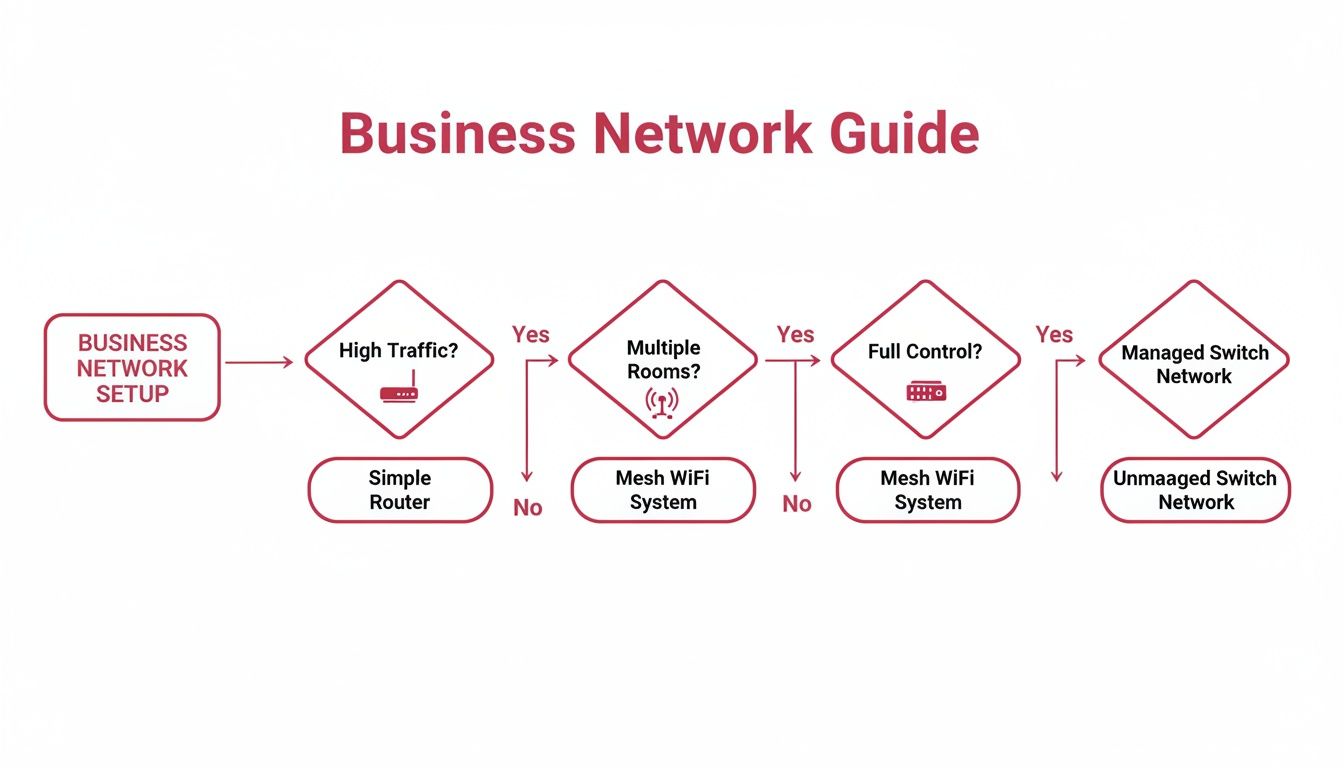
As you can see, the moment you have a high number of users or multiple rooms to cover, a simple, single-router setup just will not cut it. You need something more robust.
To help you decide, let's look at the main approaches you can take.
On-Premises vs Cloud-Managed WiFi
One of the first big questions is where the ‘brain’ of your network—the controller—will live. It really boils down to this: do you want to own and maintain the engine yourself, or would you rather have a fully serviced lease?
An on-premises solution is like owning the engine. All the control hardware sits physically in your office. This gives you ultimate, granular control over every aspect of your network, and all your management data stays in-house. The trade-off? You're on the hook for all the maintenance, security updates, and eventual hardware replacements.
A cloud-managed solution is the serviced lease. The controller is hosted securely in the cloud by a provider. This is a game-changer for many SMEs. You can manage your entire WiFi network from a web browser anywhere in the world. Updates happen automatically, and adding a new access point is incredibly simple. It’s a far more hands-off approach that’s quickly becoming the standard.
For instance, a Hampshire-based law firm handling sensitive client data might opt for a secure, cloud-managed solution. It gives their IT partner real-time visibility and the power to push critical security patches to every access point instantly, without ever needing to step foot in the office.
This shift towards more flexible systems is happening everywhere. As businesses across Dorset and Somerset embrace hybrid working and connect more devices (from laptops to smart thermostats), the demand for high-performing, easily managed networks has soared. The future is fast, flexible, and often cloud-based.
Mesh WiFi for Complex Layouts
What do you do when the building itself is the problem? Listed buildings with thick stone walls, offices spread across multiple floors, or sprawling rural venues can be a nightmare for conventional WiFi. This is where a Mesh WiFi network shines.
Instead of every access point needing a physical cable run back to a central point, mesh nodes talk to each other wirelessly. They create an intelligent 'web' of connectivity, automatically figuring out the fastest and most reliable path for data to travel. This design makes installation dramatically simpler and is brilliant for wiping out those frustrating dead zones in awkward spaces. If you're struggling with a weak signal, our guide offers some great tips on how to improve WiFi coverage.
- Practical Example: A boutique hotel in a historic Somerset building could use a mesh network to offer seamless, high-speed WiFi to every guest. Access points can be placed discreetly in hallways and common areas, creating a robust signal that penetrates thick walls without the cost and disruption of running new cables everywhere.
Comparing Business WiFi Architectures
This table breaks down the key differences between the three main setups, helping you see at a glance which might be the best fit for your business needs and budget.
| Feature | On-Premises WiFi | Cloud-Managed WiFi | Mesh WiFi |
|---|---|---|---|
| Control | Total control, all hardware and software is on-site. | Centralised control via a web dashboard, accessible anywhere. | Simple control via an app or web interface, focused on coverage. |
| Scalability | Can be complex and costly to expand. | Very easy to scale; add new APs and they configure from the cloud. | Easy to expand coverage by adding more wireless nodes. |
| Maintenance | Requires in-house expertise for updates and troubleshooting. | Updates are automatic; provider handles platform maintenance. | Low maintenance, firmware updates are often automated. |
| Upfront Cost | High, due to purchasing controller hardware. | Low, often just the cost of the access points. | Moderate, depends on the number of nodes required. |
| Ongoing Cost | Low, no subscription fees. | Subscription-based, licensed per access point or device. | None, aside from hardware purchase. |
| Best For | Large enterprises with dedicated IT teams. | Most SMEs, multi-site businesses, and those wanting simplicity. | Complex layouts, historic buildings, or areas where cabling is difficult. |
Ultimately, the choice depends on your priorities. If you value simplicity, scalability, and remote management, a cloud-managed system is almost always the way to go for an SME.
Captive Portals for Guest Engagement
If your business offers WiFi to customers or visitors, a Captive Portal is an absolute must. This is the branded login page that pops up when someone first connects to your guest network. Before they can start browsing, they have to take an action—like agreeing to your terms or entering an email address.
This single step achieves three critical things:
- Legal Protection: It gets users to agree to your acceptable use policy, which can protect you from liability if the connection is misused.
- Marketing Power: It’s a golden opportunity to collect customer emails for a newsletter, display a special offer, or direct people to your social media pages.
- Professional Branding: It presents a polished, professional image from the very first interaction, reinforcing your brand identity.
- Practical Example: A professional services firm, such as a solicitor's office in Wiltshire, could use a captive portal for its client waiting area. It presents a professional welcome message and requires clients to accept terms of use, reinforcing a secure and well-managed image while providing a useful amenity.
How a Professional WiFi Network Translates to Real-World Gains
It’s easy to get bogged down in the technical jargon, but what does a professional WiFi business solution actually do for your business? The truth is, a purpose-built network is not just another line item for the IT budget. It’s a direct investment in your company’s productivity, security, and potential for growth.
You’ll feel the difference every single day. When your team has rock-solid, high-speed connectivity, work just flows. No more dropped video calls, no more agonisingly slow cloud apps. That reliability boosts not only efficiency but also staff morale by getting rid of a major source of workplace frustration.

Boosting Productivity and Enhancing Customer Experience
An uninterrupted workflow is the absolute cornerstone of a productive team. A professional WiFi network makes sure your staff can get to critical data, collaborate on projects, and talk to clients without a hitch, whether they're at their desks or moving around the building.
That operational smoothness has a ripple effect that reaches your customers. For any business that interacts with the public—be it a shop, a café, or a professional firm—offering seamless guest WiFi is no longer a nice-to-have; it's an expectation. A stable connection improves their experience, whether they’re just browsing while they wait or joining a crucial video call in one of your meeting rooms.
Of course, a powerful network needs a powerful connection to the outside world. Thankfully, the full-fibre broadband rollout across the UK is providing just that. Businesses are now perfectly positioned to build robust WiFi solutions and sidestep costly downtime. You can discover more about the surge in UK business broadband connectivity and what it means for companies like yours.
Securing Your Most Valuable Asset: Your Data
Perhaps the most important advantage of a professional network is the massive leap forward in security. Your standard home router lumps all network traffic together, which is a huge risk. If a guest connects with a compromised device, it could potentially expose your entire business network.
Professional solutions solve this problem with network segmentation. This brilliant feature lets you create multiple, isolated networks that all run on the same physical hardware. Think of it like having separate, secure motorways for different kinds of traffic.
By segmenting your network, you can create a dedicated channel for staff, another for guests, and even a third for sensitive systems like payment terminals. A breach on the guest network is completely firewalled off from your confidential company data, keeping it safe.
The real-world applications of this are incredibly valuable for any business handling sensitive information.
- Practical Example: A care provider in Wiltshire could use segmentation to offer residents and their visitors reliable internet access. At the same time, all confidential patient records, staff communications, and administrative systems remain on a completely separate and highly secure network. This helps the organisation meet its GDPR obligations without any extra hassle.
This level of granular control and security is simply not possible with off-the-shelf, consumer-grade equipment. It turns your network from a potential weak point into a fortified asset, protecting your business, your people, and your clients from the constant threat of cyber attacks.
Comparing In-House IT vs. Managed WiFi Services
So, who’s in charge of your network? That's one of the biggest questions a growing business has to answer. Do you keep your Wi-Fi management in-house and ask your existing team to look after it, or do you bring in a specialist managed service provider (MSP)? It’s a decision that directly impacts your costs, your security, and how much time your team can dedicate to what they do best.
On the surface, handling it all yourself gives you complete, hands-on control. But this path demands a serious level of specialist knowledge that many smaller businesses just do not have on the payroll. It also means the heavy burden of 24/7 security monitoring, troubleshooting, and hardware maintenance lands squarely on your team's shoulders.
The True Cost of the In-House Approach
The DIY route often looks cheaper at first glance because you're not paying a monthly management fee. That's a classic false economy. This view completely misses the significant hidden costs that can creep up and quickly spiral. The real price of in-house management is not just paid in pounds and pence, but in lost time, diverted focus, and unnecessary risk.
Think about the time your most tech-savvy employee spends trying to fix a dodgy connection instead of focusing on their actual job. Every minute they're distracted is a direct hit to productivity. Then there’s the constant responsibility for updating firmware, patching security holes, and responding to outages—often outside of normal working hours.
The biggest risk of the in-house model is downtime. Without someone actively watching the network, a problem might not even be noticed until it grinds your entire operation to a halt. For a busy firm in Hampshire, even a few hours of lost connectivity can be a major financial blow.
The Strategic Value of a Managed Service Partner
Choosing managed wifi business solutions completely changes the game. Instead of just reacting to problems as they happen, you get a dedicated partner whose entire job is to prevent them from happening in the first place. An MSP provides proactive, 24/7 monitoring to spot and fix potential issues long before they can affect your business.
This approach brings some huge advantages for SMEs:
- Access to Expertise: You immediately get a team of certified engineers who live and breathe network management, security, and performance.
- Predictable Costs: Forget about sudden, budget-busting bills for new hardware. You pay a fixed monthly fee that covers everything from monitoring to support.
- Enhanced Security: MSPs are always on top of the latest cyber threats, making sure your network is protected with the latest security protocols and configurations.
- Effortless Scalability: As your business grows, your provider can seamlessly expand your network to handle more staff and devices without any disruption.
As you look into this, you’ll find that a managed Ethernet switch is a key piece of the puzzle, offering the enhanced control and performance that managed Wi-Fi services provide.
Making the Right Choice for Your Business
The decision between in-house and managed services is not just about technology; it’s a strategic business choice. To help you weigh things up, here’s a look at how each model handles the critical parts of network management.
| Function | In-House IT | Managed WiFi Service |
|---|---|---|
| Monitoring | Reactive; problems are usually dealt with after they happen. | Proactive; 24/7 monitoring to prevent issues before they impact you. |
| Expertise | Limited to the knowledge of your internal team. | Access to a team of certified network specialists. |
| Costs | Unpredictable; includes hardware, staff time, and downtime. | Predictable monthly fee, making budgeting simple and clear. |
| Security | Depends on your team's ability to keep up with new threats. | Managed by experts focused on continuous threat protection. |
| Focus | Pulls your people away from core business goals. | Allows your team to focus entirely on your business. |
For many SMEs, the ability to reclaim their team's time and sidestep the risk of costly downtime makes a managed solution the most logical and cost-effective way forward. To dig deeper, you can learn more about what managed IT services include and how they support your goals. It’s all about turning your network from a necessary headache into a reliable, professionally managed asset that helps you grow.
Your Practical Wi-Fi Deployment Checklist
Putting in a new network or overhauling an old one can feel daunting. I get it. But if you break the project down into clear, manageable stages, the whole process becomes much smoother. Think of this checklist as a roadmap for getting your business Wi-Fi right, turning a complex job into a series of logical steps.
This guide will help you get your thoughts in order so you can have a really productive chat with your IT partner. The goal is to make sure what you end up with is exactly what your business needs.
Phase 1: The Assessment
Before you can build the right network, you have to know exactly what you’re working with and where you want to go. This initial discovery phase is, without a doubt, the most important part of the entire project. It’s the foundation for everything that follows. Do not rush it—getting this bit right saves a lot of headaches and money down the line.
Start by getting a feel for your physical space. Literally walk through your offices, warehouse, or shop floor and pinpoint those notorious Wi-Fi "dead zones" or areas where the connection just crawls. Then, think about your people. How many staff and devices need to connect? What are the mission-critical things they do online? We're talking about VoIP phone calls, cloud-based software, or shifting large design files around.
And do not forget your visitors. Will you need a separate, secure network for clients, customers, or suppliers? Answering these questions paints a clear picture of your starting point.
Phase 2: Strategic Planning
Right, with your assessment in hand, it's time to plan. This is where you and your IT partner turn those needs into a technical blueprint. It's all about choosing the right gear, deciding on the best network structure, and making sure it can grow with you.
Using your floor plan and device count, you’ll work out how many access points you need and where they should go for the best coverage. This is also when you'll decide on the type of system. For most small and medium-sized businesses in Dorset or Wiltshire, a cloud-managed solution really hits the sweet spot between performance, scalability, and straightforward management.
A crucial part of planning is thinking about the future. Your business will not stand still, and your network shouldn’t either. A good plan always allows for more staff, new technology, and the ever-increasing demand for data over the next three to five years.
Phase 3: Professional Implementation
This is where the plan comes to life. While it can be tempting to have a go yourself, a professional installation is vital for getting the best performance and security. An expert knows how to run cabling neatly, safely, and in just the right spots to maximise signal strength.
During this stage, your IT partner will configure everything according to the blueprint you agreed on. The key steps usually involve:
- Secure Configuration: Setting up robust WPA3 encryption and creating strong admin passwords.
- Network Segmentation: Building separate, firewalled networks. One for internal staff, another for guests, and perhaps another for sensitive systems like point-of-sale terminals.
- Captive Portal Setup: If you have a guest network, this involves creating a branded login page. It’s great for capturing marketing details and making sure you’re legally covered.
Phase 4: Post-Deployment and Support
So, your new network is up and running. Great! But the job is not quite done. The final, ongoing phase is all about monitoring, maintenance, and support. This is what ensures your investment keeps performing at its best. Your IT partner should hand over all the documentation you need, like network diagrams and login details.
It’s also a good idea to arrange some basic user training to show your team how to connect and use the new system. Most importantly, you need a solid support plan. A good managed service provider will keep a watchful eye on your network's health, apply security updates as they come out, and be ready to jump on any problems that pop up. This ensures your Wi-Fi remains a reliable tool that just works, letting you get on with running your business.
Your Business Wi-Fi Questions, Answered
Choosing the right Wi-Fi for your business can feel like navigating a minefield. To help clear things up, here are some straightforward answers to the questions we hear most often from businesses across Dorset, Somerset, Wiltshire, and Hampshire.
What’s the Real Cost of a Professional Business Wi-Fi Solution?
This is a classic "how long is a piece of string?" question, as the investment depends entirely on your needs. A small office might spend a few hundred pounds on hardware, while a large warehouse or a multi-storey building could easily be looking at several thousand.
But the hardware is only one part of the picture. The total cost includes licensing for advanced features, essential security updates, and the support you need to keep it running smoothly. That's why a managed service, which bundles everything into a predictable monthly fee, often works out to be more economical in the long run. It saves you from unexpected costs and frees up your team from troubleshooting network issues.
Can’t I Just Use a Few Home Wi-Fi Routers for My Business?
You could, but it’s a decision you’ll likely regret. Stringing together a few consumer routers creates a chaotic and insecure environment, not a unified network. Each router operates independently, meaning your connection will drop as you move from one end of the building to the other—a nightmare for video calls or file transfers.
Worse still are the security gaps. Home routers lack the business-grade features needed to protect your data, like properly segmenting your network. A professional setup with centrally managed access points ensures everyone is on a single, seamless, and secure network, which is fundamental for protecting your business.
Imagine a local accountancy firm using separate home routers. They would have no reliable way to keep their guest network completely separate from the network handling sensitive client financial data. This is not just a security risk; it's a serious compliance breach waiting to happen. A managed solution isolates these connections by design.
Is Business Wi-Fi Secure Enough to Handle Our Client Data?
Absolutely. When set up correctly by experts, a business-grade Wi-Fi network is designed from the ground up to protect confidential information. It’s built around advanced security protocols like WPA3 encryption, the current gold standard for wireless security.
The real game-changer is network segmentation. This lets us create entirely separate, firewalled virtual networks on the same physical hardware. You can have one for staff, a completely isolated one for guests, and even another for specific systems like payment terminals or IoT devices. When managed by a team that keeps everything updated and enforces security policies, it’s the most robust way to meet your compliance obligations, including GDPR.
Ready to build a reliable, secure network that lets your business grow without limits? The team at SES Computers has been delivering expert managed IT and connectivity solutions for over 30 years. Find out how we can help.