When you're mapping out your data storage strategy, it boils down to one fundamental question: do you want direct, physical control over your data, or do you need the flexibility and anywhere-access that comes with the cloud?
There's no single right answer, but the one you choose will have a real impact on everything from your budget and security posture to your team's day-to-day workflow.
Choosing Your Business Data Storage Strategy
For any UK business, getting to grips with the difference between cloud and local storage is the first step. These two approaches aren't just technical choices; they represent completely different philosophies for managing your company's most critical asset—its data.
Local storage, what we often call on-premise, means you own the hardware. It's the server humming away in a comms room, a Network Attached Storage (NAS) device in the corner of the office, or even the hard drives in your team's computers. The key takeaway here is ownership: it's your kit, on your premises, under your complete control.
Cloud storage, on the other hand, is a service. Instead of buying and managing your own equipment, you essentially rent space from a specialised provider like Microsoft Azure or Amazon Web Services (AWS). Your data lives securely in their massive, purpose-built data centres (many of which are right here in the UK) and you access it over the internet. You're trading hands-on control for convenience, scalability, and expert management.
Cloud vs Local Storage At a Glance
To make this tangible, think about a small accountancy firm in Manchester. If their main goal is to let accountants securely work on client files from home or while visiting clients, a cloud solution makes perfect sense. But if their absolute top priority is keeping sensitive financial data completely isolated with no third-party access whatsoever, an on-premise server is the more logical path. It’s all about context.
This table gives a quick rundown of the core differences.
| Attribute | Cloud Storage | Local Storage |
|---|---|---|
| Cost Model | Operational Expenditure (OpEx) – A predictable monthly or annual subscription. | Capital Expenditure (CapEx) – A significant upfront investment in hardware. |
| Accessibility | Access from anywhere with an internet connection, on any device. | Generally limited to your office network unless you set up a complex VPN. |
| Scalability | Simple and instant. Need more space? Just increase your plan. | A manual process. Scaling up means buying and installing new drives or servers. |
| Management | The provider handles all the hardware maintenance, security, and updates. | Your responsibility. Requires in-house or outsourced IT expertise to manage. |
It's a classic trade-off: the predictable, service-based model of the cloud versus the control and ownership that comes with having your own hardware on-site.
What We're Seeing in the UK Market
The move to hybrid and remote working has been a massive catalyst for change. Cloud storage adoption has soared, with the UK market valued at £4.2 billion in 2024 and forecast to hit a staggering £21.2 billion by 2033.
This boom is driven by businesses needing to support flexible work arrangements and by major providers building more data centres within the UK to satisfy data residency requirements. In sharp contrast, sales of traditional on-premise storage have remained flat, signalling a clear and decisive shift. If you're interested in the numbers, you can find more cloud computing statistics that back this trend up.
Comparing Critical Factors for Decision-Makers
Choosing the right data storage solution isn't a simple case of ticking boxes on a pros and cons list. To get to the heart of the cloud vs local storage debate, you need to weigh up several critical factors against the reality of how your business operates. Let's dig into the key areas that will shape your decision.
This flowchart gives a great high-level view of the decision-making process, starting with whether you prioritise flexibility or direct control.
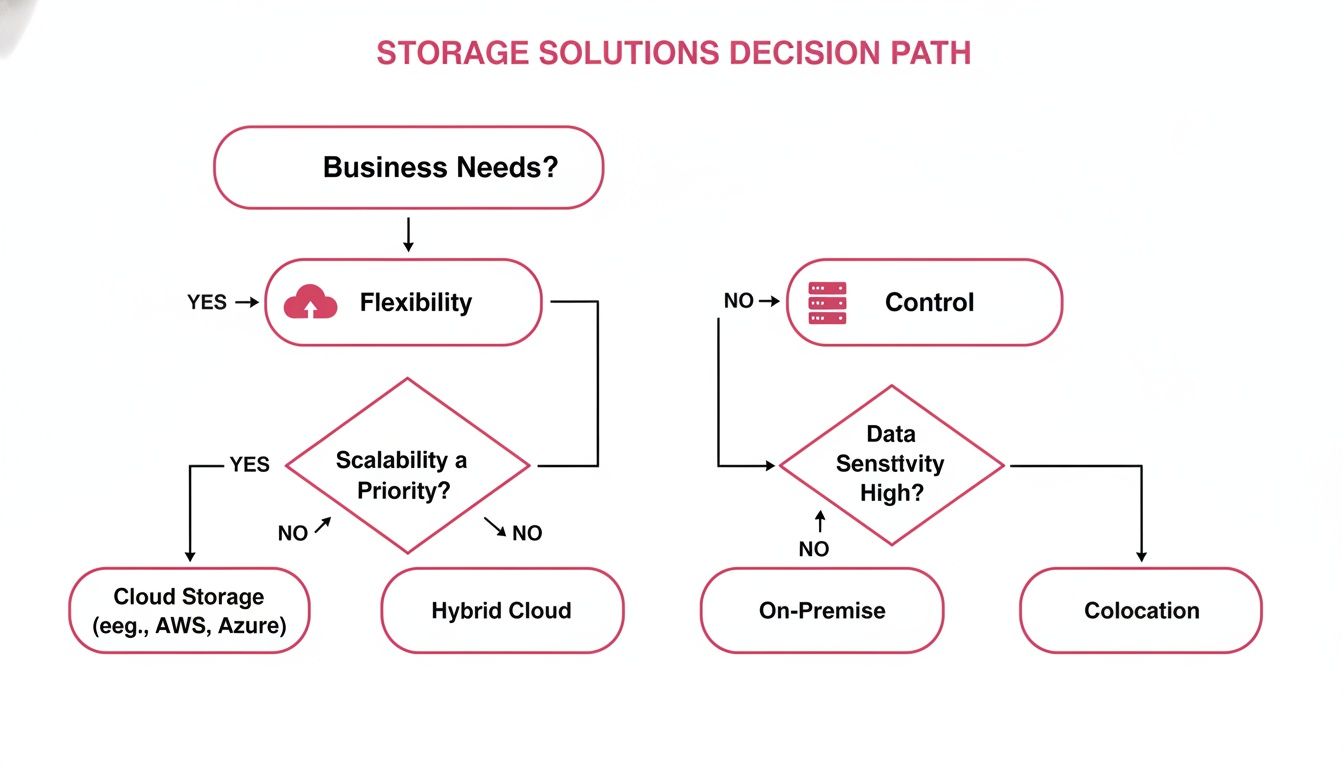
As you can see, your core business needs really do dictate the path, pushing you towards the adaptability of the cloud or the hands-on oversight of an on-premise setup.
Cost Models: Capital vs Operational Spend
One of the first, and most significant, differences you'll encounter is how you pay. Local, on-premise storage is a classic Capital Expenditure (CapEx). You buy the servers, the drives, and all the networking gear upfront, which can be a substantial initial investment. And don't forget the ongoing "hidden" costs—electricity for power and cooling, the physical space it occupies, and the eventual bill for replacing ageing hardware.
Cloud storage flips this on its head, working as an Operational Expenditure (OpEx). You pay a predictable subscription fee, usually monthly or annually, which makes budgeting much more straightforward. There are no sudden, unexpected costs for failed hardware; the provider handles all of that.
Key Insight: The CapEx vs OpEx debate is central. A startup with tight initial funding will almost certainly lean towards the low barrier to entry of a cloud subscription. In contrast, a more established professional services firm might prefer the long-term predictability of owning its assets, even with the higher upfront cost.
Performance and Accessibility
Performance isn't just a measure of raw speed; it's about how your team accesses data and where they do it from.
- Local Storage Performance: When you're dealing with huge files—think video editing, CAD, or complex architectural designs—the blistering speed of your internal Local Area Network (LAN) is tough to beat. Access is virtually instant because the data has zero distance to travel over the public internet, meaning latency is a non-issue.
- Cloud Storage Accessibility: The trump card for the cloud is its "anytime, anywhere" access. As long as you have an internet connection, your team can get to their files from any location or device. The big caveat, of course, is that this is entirely dependent on your internet bandwidth. Latency can become a real factor for performance-heavy applications.
Practical Example: A retail business with multiple shops across Hampshire needs its staff to see live inventory data. A cloud-based system is perfect, ensuring every branch is working from the same real-time information. On the other hand, a scientific research lab in Dorset processing massive datasets from on-site equipment would find the low-latency performance of a local server indispensable.
Security and Control
The security conversation is often misunderstood. It’s not a simple case of which is "more secure," but rather where the responsibility for that security actually sits.
With local storage, you have complete control. You are personally responsible for every single aspect: the physical security of the server room, the network firewalls, user access permissions, data encryption, and having a solid disaster recovery plan. This gives you maximum oversight, but it also means you carry the full weight of liability and need significant in-house expertise to manage it properly.
Cloud storage works on a shared responsibility model. The provider takes care of securing the core infrastructure—the physical data centres, servers, and networks. Your business is then responsible for managing who can access your data, configuring your security settings correctly, and ensuring your own team's devices are secure. For anyone looking at public cloud providers, a detailed AWS vs Azure vs GCP comparison can highlight the specific security features of the major players.
Scalability and Business Agility
How your storage grows with your business is a massively important consideration.
Scaling up local storage is a manual, and often slow, process. When you're running out of space, you have to go through procurement, order new drives, wait for them to be delivered, and then get an IT technician to install and configure everything. This can easily take days, if not weeks.
The cloud, by contrast, offers almost instant scalability. Need more capacity to handle a seasonal rush for your e-commerce site? You can increase your storage with a few clicks. Once things quieten down, you can scale back down just as easily, ensuring you only ever pay for what you actually use. This flexibility is a huge advantage for any business with fluctuating demands. This idea is central to modern data protection, which you can read more about here: https://www.sescomputers.com/news/what-is-cloud-backup/.
Navigating UK Security and Compliance
For any UK business, data security is far more than a technical problem to be solved—it’s a fundamental legal and ethical duty. When you're weighing up cloud versus local storage, your decision has serious knock-on effects for how you meet regulations like GDPR and manage data sovereignty.
Getting to grips with your responsibilities is the essential first step. If your business processes any personal data, compliance with the General Data Protection Regulation (GDPR) is not optional. It sets out strict rules for collecting, processing, and securing personal information, and the penalties for getting it wrong can be severe.

As the image highlights, GDPR is built on core principles like lawfulness, fairness, and transparency. These principles directly influence which storage solution is right for you.
Data Residency and the Cloud
A major point of concern for UK firms is data residency—in other words, knowing precisely where your data is physically located. Recognising this, major cloud providers like Microsoft Azure and AWS have invested heavily in establishing huge data centre regions right here in the UK.
By choosing a UK-based data centre region, you can guarantee your data stays within the country’s legal jurisdiction. This is often the most straightforward way to meet regulatory requirements without the headache and expense of building your own infrastructure.
But this convenience is governed by a critical concept: the Shared Responsibility Model.
The cloud provider is responsible for the security of the cloud—the physical servers, the network, the buildings. You, the customer, are responsible for security in the cloud—who has access, how data is encrypted, and how you configure your security settings.
This means that while the provider gives you a secure foundation, the ultimate responsibility for governing and protecting your data still rests with your business.
The On-Premise Control Advantage
With local storage, the compliance picture changes completely. You have total, undisputed control because the data never leaves your four walls. For businesses in sectors handling exceptionally sensitive information, where even the slightest risk of third-party access is unacceptable, this can be a decisive advantage.
The flip side is that the entire burden falls on you. You are solely responsible for:
- Physical Security: Protecting the server room from theft, fire, or unauthorised entry.
- Network Defence: Implementing, managing, and continuously updating firewalls and intrusion prevention systems.
- Backup Protocols: Designing and, crucially, testing robust backup and disaster recovery plans to safeguard against data loss.
This absolute control means you also shoulder 100% of the liability. There’s no shared model to fall back on; the success or failure of your compliance strategy depends entirely on your own internal expertise or the support you get from a trusted IT partner.
A Practical Scenario: The UK Care Home
Let's put this into context with a UK care home in Wiltshire. They handle highly sensitive resident information, including medical histories and personal care plans, which falls under strict NHS and Information Commissioner's Office (ICO) guidelines.
- Cloud Approach: The home could use a UK-based cloud provider, ensuring all resident data is stored in a London data centre. They would configure the platform's tools to enforce granular access controls, allowing only specific care staff to see patient files, and enforce multi-factor authentication for everyone. This makes secure remote access for visiting nurses much easier but demands diligent management of user permissions.
- Local Storage Approach: Alternatively, the home could run its own server from a locked, climate-controlled office on-site. All data access would be limited to the internal network, creating a strong physical security boundary. In this scenario, the manager is responsible for performing daily backups to a separate drive and hiring an IT specialist for regular security audits and updates.
Both options are perfectly valid, but they carry different risk profiles. The cloud model hinges on trusting the provider and configuring its security tools correctly. The local model depends entirely on the care home's own processes and physical security. The right choice comes down to a clear-eyed risk assessment of where the business is best placed to manage its obligations.
Which Storage Solution Fits Your Industry?
The whole 'cloud vs local storage' debate becomes a lot more straightforward when you look at it through the lens of your own industry. What works for a design agency in Bristol might be totally wrong for a legal firm in Somerset. The right choice really comes down to the nuts and bolts of your daily operations, your client expectations, and the regulatory hoops you have to jump through.
There's no single right answer, but by looking at how different sectors work, we can see where one approach clearly has the upper hand. This isn't just about picking technology; it's about making sure your data strategy actually supports your business goals.
Accountancy Firms: Embracing the Digital Shift
For any modern accountancy practice, the cloud isn't just an option anymore—it's practically a requirement. The profession runs on tight deadlines, constant client communication, and strict rules like HMRC's 'Making Tax Digital' initiative. Cloud platforms are built for this world.
- Secure Client Portals: The cloud makes it simple to create secure portals where you and your clients can safely upload, review, and approve documents. It's a world away from the security headache of emailing sensitive financial information back and forth.
- Seamless Software Integration: Most of the accounting software you rely on, like Xero or QuickBooks, is already cloud-based. Keeping your working files in the same ecosystem just makes sense, streamlining workflows and guaranteeing everyone is looking at the same numbers.
- Work From Anywhere: Whether you're at a client’s office or working from home, the cloud gives you secure access to all the files and software you need. It’s a huge boost for productivity and flexibility.
Trying to run a modern accountancy firm on a local server just creates friction. It makes secure collaboration a chore and slows down the adoption of the very digital tools designed to make your life easier.
Legal Practices: Making the Case for Hybrid Storage
The legal sector deals with some of the most confidential client data there is, so absolute control and security are non-negotiable. At the same time, law firms have the same administrative and collaborative needs as any other business. This is where a hybrid storage model often hits the sweet spot.
A hybrid setup allows a firm to separate its data according to its sensitivity.
You can keep highly sensitive case files, privileged client communications, and court documents on a tightly controlled on-premise server. This gives you maximum security and minimises any risk from third-party access. At the same time, you can use the cloud for less critical administrative work like marketing materials, team schedules, and email archiving.
This strategy gives you the iron-clad security of local storage where it counts most, combined with the efficiency and collaborative ease of the cloud for everything else. Understanding the available cloud solutions for small business is the first step to building a hybrid model that works for you.
Creative Agencies: The Need for Speed and Scale
Creative agencies, whether in marketing or architectural design, live and breathe collaboration. They also wrestle with absolutely massive files. A single video project or a portfolio of high-resolution images can easily run into terabytes of data. For these businesses, the physical limits of a local server can quickly become a serious bottleneck.
Cloud storage, on the other hand, feels like it was designed specifically for the creative workflow:
- Effortless Scalability: An agency can expand or shrink its storage on the fly to match the demands of a new project, paying only for the space it actually needs. This avoids shelling out for a huge on-premise server that might sit half-empty most of the time.
- Easy Freelancer Access: The cloud makes it incredibly simple to give secure, temporary access to huge project files to freelancers and contractors, wherever they are, without messing around with complicated VPNs.
- Rock-Solid Version Control: Good cloud platforms have excellent versioning features. This means designers, clients, and project managers can be certain they’re always looking at the latest draft and can easily roll back to an earlier version if needed, preventing costly mistakes.
For creative businesses, it's all about being agile. The ability to scale resources instantly and collaborate with a team spread across different locations gives cloud-powered agencies a massive competitive advantage.
Putting a Practical Hybrid Storage Solution into Action
The whole "cloud vs. local" debate often overlooks the most sensible answer for many UK businesses: why not both? A hybrid model isn't a compromise; it's a strategic choice. It brings together the solid, reassuring security of your own on-premise servers with the get-it-anywhere flexibility of the cloud. The result is a balanced solution that truly fits how you work.
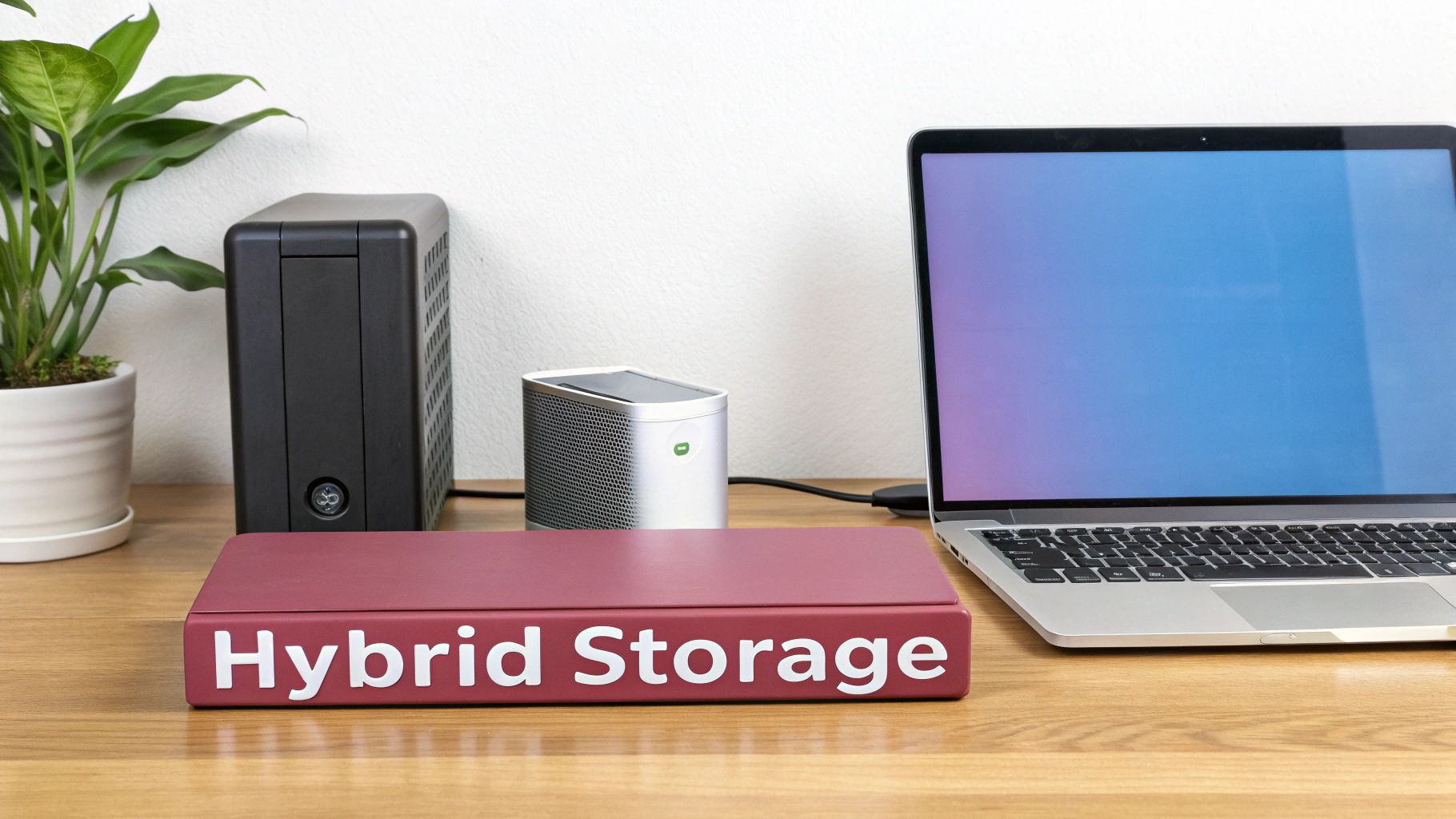
This pragmatic approach lets you build a data infrastructure around your actual business needs, making sure every bit of data is stored in the right place for the right reasons. For agile UK companies, this is quickly becoming the new standard.
Figure Out What Goes Where: Auditing Your Data
Before you can build a hybrid solution, you need a clear map of your data. This means a thorough audit where you categorise your information based on sensitivity, how often it's needed, and any regulatory strings attached. This isn't about just lifting and shifting everything; it’s about smart, strategic placement.
Start by asking a few simple but critical questions:
- What kind of data is it? Are we talking about sensitive client financial records, your company's crown jewels (intellectual property), marketing materials, or just the day-to-day operational files?
- Who needs access? Is it just for people inside the office, or do your remote staff, field teams, and external partners need to get to it?
- How sensitive is the information? Does it fall under GDPR or other strict compliance rules that demand you keep it under lock and key?
Think of a UK manufacturing firm. It makes perfect sense for them to keep confidential product schematics and R&D data on a secure, air-gapped local server. But their sales forecasts, CRM data, and email archives? Those are ideal for the cloud, giving the sales team the freedom to work effectively from any location.
Designing a Framework That Works Together
Once you know what data will live where, the next step is to design the framework. This means setting out clear access policies and security protocols for both environments so they function as a single, seamless system. The goal is to create a unified infrastructure, not two separate data silos that don't talk to each other.
Key Takeaway: A successful hybrid model is far more than just a mix of technologies—it's a cohesive strategy. The real aim is to create a single, resilient infrastructure where data is tiered. You keep your most critical assets on-premise while using the cloud for collaboration, flexibility, and scale.
This is the direction UK businesses are overwhelmingly heading. Research shows that by 2025, an estimated 92% of UK firms will be running hybrid or multi-cloud setups—a huge jump from 70% in 2022. As the appeal of purely local storage wanes, it's clear the hybrid model is seen as the most resilient way forward. If you're looking to blend storage types, digging into hybrid storage solutions for performance offers some great technical insights.
Planning a Migration Without the Disruption
A well-executed migration is key to avoiding headaches and downtime. Instead of a risky "big bang" approach, a phased migration is almost always the better option. It lets you move data in manageable chunks, testing workflows and ironing out kinks as you go.
A smart move is to start with low-risk data—think archived emails or marketing assets. This lets you refine the process before you touch more critical business systems. And don't forget, a hybrid model is a cornerstone of modern business continuity. Using the cloud for your off-site data backups creates a powerful safety net and provides the foundation for truly robust IT disaster recovery solutions.
Finding the Right Partner for Your IT Strategy
Let's be realistic: navigating the maze of data storage options is a huge task, especially if you don't have a dedicated IT team on standby. Deciding between cloud and on-premise storage isn't just a technical puzzle; it's a strategic decision that will shape how your business operates. This is precisely where a Managed Service Provider (MSP) becomes your most valuable asset.
A good MSP takes the guesswork out of the equation. They won't just sell you a one-size-fits-all solution. Instead, they’ll start by getting to know your business inside and out—analysing your workflows, understanding your compliance responsibilities, and mapping out your future growth. This ensures the final recommendation is built for you, not the other way around.
From Technical Choices to Business Strengths
A genuine IT partner does more than just install hardware or set up a cloud account. Their job is to design, implement, and manage the storage infrastructure that perfectly fits your business, whether that’s a pure cloud setup, a robust on-premise server, or a hybrid model that gives you the best of both.
Their involvement doesn't stop once the system is live, either. They will manage the entire migration from your old setup, making sure the switch is smooth and causes as little disruption as possible to your day-to-day work.
The Bottom Line: Working with an MSP turns a daunting technical problem into a real business advantage. You offload the complexity and stress of IT management, freeing you up to focus on what you actually do best—running your business.
It's this ongoing support that makes all the difference. Your MSP will provide constant security monitoring to guard against new threats, carry out proactive maintenance to stop problems before they start, and offer strategic advice to make sure your IT keeps up as your company grows.
Imagine a growing retail business in Hampshire. They might begin with a straightforward cloud solution. As they open more shops, their MSP could help integrate a local server for faster on-site operations while keeping the cloud for secure backups and disaster recovery. The result is a resilient, scalable system that grows with them.
Ultimately, you need a data infrastructure that is secure, cost-effective, and completely dependable. With the right partner, you get more than just a service provider—you gain a long-term ally invested in your success.
Frequently Asked Questions
When you're weighing up cloud and local storage, a few key questions always come up. Here are the straightforward answers we give to businesses we work with every day.
Is My Data Truly Secure in the Cloud?
It’s a fair question, and the short answer is yes—if you choose the right partner. Think of cloud security as a partnership. The provider, like Microsoft or Amazon, handles the heavy lifting of physical security. Their data centres have fortifications, fire suppression, and security staff that are simply beyond the reach of a typical business.
Your side of the bargain is managing who gets access to your data. This is where good IT practice comes in:
- Encryption: All credible cloud services encrypt your data as it travels to them and while it's sitting on their servers. It’s standard practice.
- Access Controls: This is your domain. You set the rules with strong passwords, multi-factor authentication, and clear user permissions.
- Certifications: Big providers are audited against standards like ISO 27001, which is a strong signal that they meet rigorous international security benchmarks.
What Are the Hidden Costs of Local Storage?
The price tag on the server is just the tip of the iceberg. The real cost of running your own hardware in-house—the total cost of ownership—creeps up on you over time.
Key Consideration: Buying a server isn’t a one-off expense. It’s an ongoing operational cost that includes much more than the initial hardware purchase.
Don’t forget to factor these into your budget:
- Power and Cooling: Servers need a lot of electricity and often require dedicated cooling, both of which show up on your utility bills.
- Maintenance and Support: From security patches to replacing a failed hard drive at an inconvenient time, ongoing maintenance is a must.
- The Replacement Cycle: That shiny new server will need replacing in three to five years. You have to plan for that big capital expense all over again.
- IT Expertise: Someone has to manage it all. That means paying for a skilled staff member or bringing in an IT consultant.
How Disruptive Is Migrating from Local to Cloud?
The amount of disruption really comes down to the quality of the plan. With a carefully managed, phased approach, you can move to the cloud with very little impact on your day-to-day work.
Trying to move everything in one big bang is a recipe for headaches. We always recommend breaking the migration down into logical chunks. You might start with older email archives, then move team files, and leave your core business applications until last. This lets you iron out any kinks and get your team comfortable without grinding the business to a halt.
What Happens if I Switch Cloud Providers?
This is a really important point, often called vendor lock-in. The key is to think about your exit strategy before you even sign up. When you're assessing a provider, ask them upfront: "How do I get my data back out?" Reputable services will have clear processes and tools to let you export your data in a standard format.
Having a plan for this gives you freedom. If your needs change, or a better service comes along, you know you have the flexibility to move without being held hostage by your current provider.
Making the right choice between cloud storage vs local storage is a critical step in building a resilient and efficient IT foundation. SES Computers has over 30 years of experience helping businesses across Dorset, Wiltshire, and Hampshire design and implement the perfect storage strategy. To get expert guidance tailored to your specific needs, get in touch with our team today.