When we talk about IT support, it’s easy to picture someone who just fixes a computer when it stops working. But for a modern business, it’s so much more than that. Think of it as having a dedicated technical partner whose entire job is to manage, secure, and fine-tune your technology so that everything just works.
Good IT support is what keeps your systems running smoothly, your data safe, and your team productive, day in and day out.
Why IT Support Is Your Business Engine Room
Imagine your business’s technology is the engine in a high-performance car. You wouldn't just wait for it to break down on the side of the motorway to call for help. You'd want routine servicing, expert tuning, and proactive checks to catch problems before they leave you stranded.
That’s exactly what modern IT support & services deliver. It's a complete shift away from the old 'break-fix' approach where you only call for help when something goes wrong. Instead, it’s about forming a strategic partnership focused on keeping your business running without interruption. Your IT support company becomes your pit crew, constantly monitoring systems, applying security updates, and making sure every part of your engine is optimised for peak performance.
Proactive vs Reactive IT Support
The difference between these two approaches couldn't be clearer, and it has a direct impact on your bottom line.
- Reactive 'Break-Fix' Model: This is the equivalent of calling a recovery truck after a breakdown. It's an unexpected cost that always brings downtime, lost productivity, and potential data risks while you wait for an engineer to arrive. For example, a marketing agency's main server fails, halting all work until an engineer can diagnose and replace the faulty hardware, costing a full day's revenue.
- Proactive Managed Services: This is like having your car regularly serviced by a specialist. A team of experts maintains your systems, spots potential issues, and sorts them out before they cause a major failure. For instance, a proactive provider would receive an alert that a server's hard drive is showing signs of imminent failure and replace it out of hours, preventing any downtime.
A proactive IT strategy isn’t a cost centre; it’s an investment in operational resilience and a powerful enabler for business growth. By preventing costly disruptions, it lets your team focus on what they do best, without technology getting in the way.
Ultimately, it’s about seeing your IT as a strategic asset, not just a utility. For a deeper dive into what that partnership looks like, you can explore our guide on what IT support companies do exactly. This change in mindset is vital for any business serious about success.
The Core Components of Modern IT Services
When we talk about modern IT support, it's easy to picture a single helpdesk service. In reality, it’s a whole suite of specialised services working in concert. Each one is designed to tackle a specific business need, from keeping daily operations ticking over smoothly to building a long-term defence against digital threats. When you bring them all together, they create a powerful framework that keeps your business productive, secure, and ready for whatever comes next.
This diagram shows how different approaches to IT—being proactive versus just reacting to problems—directly impact your business goals.
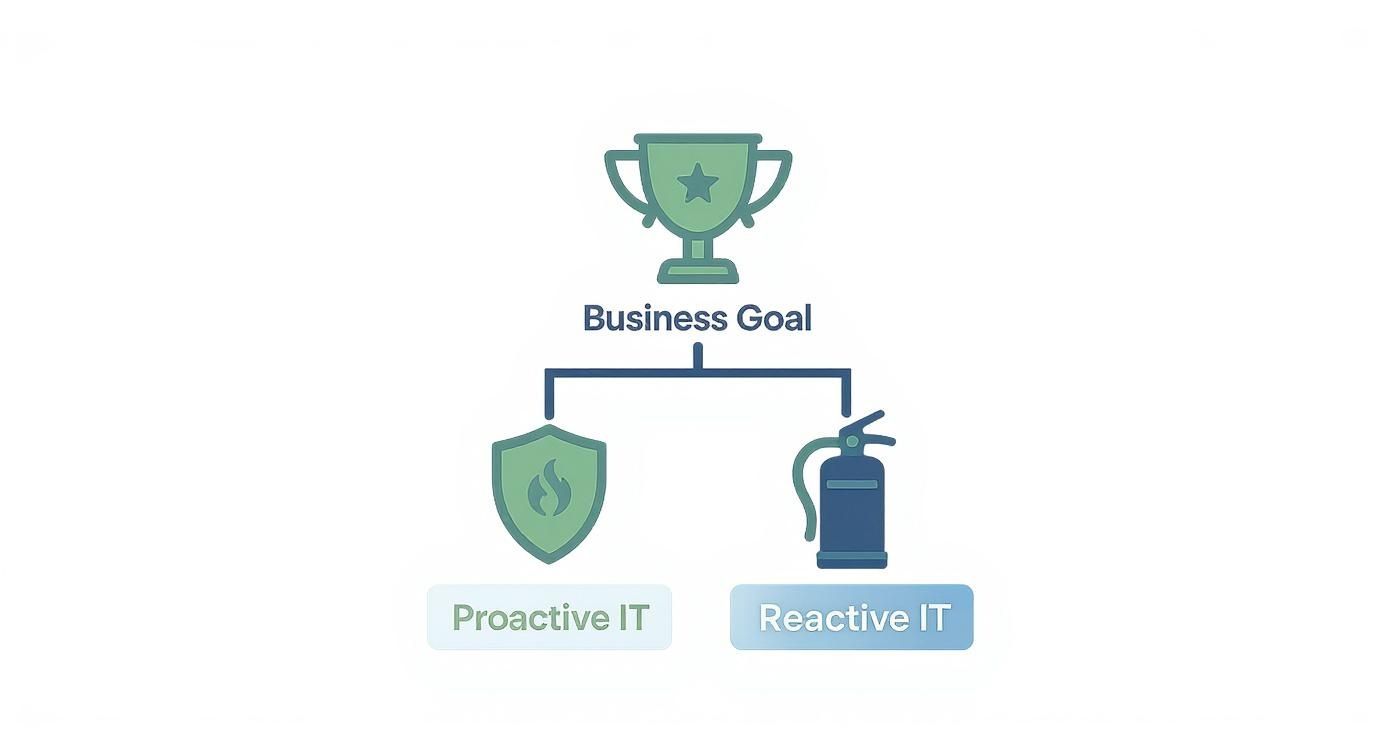
The message is clear: a proactive strategy, represented by the shield, gives you a solid foundation for growth. Constantly reacting to issues is just firefighting. So, let’s unpack the essential services that build that proactive shield.
Managed IT Services
Think of Managed IT Services as the central nervous system for all your technology. It’s a completely proactive approach where a dedicated provider takes full ownership of your entire IT environment. Instead of you calling them when something breaks, they’re constantly in the background, monitoring, maintaining, and fine-tuning your systems to stop problems from ever happening.
This covers everything from software updates and security patches to user support and network performance. For a Dorset-based retailer, this means having a team dedicated to ensuring their tills are always online and secure, preventing disastrous payment failures on a busy Saturday. A key part of this efficiency comes from implementing modern deployment tools like Microsoft Intune to manage devices and applications effectively.
Cloud Services and VoIP Systems
The cloud offers incredible flexibility, giving businesses access to software, storage, and serious computing power over the internet. You no longer need to buy and maintain expensive servers in your office, and your team can get secure access to their data from absolutely anywhere. Imagine a law firm in Somerset using a cloud platform to let their solicitors securely work on sensitive case files, whether they're at their desk, in court, or working from home.
In the same vein, Voice over IP (VoIP) systems bring business communications into the 21st century. By routing your phone calls over your internet connection, you get access to advanced features like video conferencing and smart call routing, often for less than the cost of an old-fashioned landline. It’s a simple switch that instantly improves collaboration and makes your business look more professional.
Data Backup and Cybersecurity
In this day and age, protecting your company’s data is simply non-negotiable. Two components are absolutely vital here:
- Data Backup & Disaster Recovery: This isn’t just about making copies of your files. It's about having a tested, reliable plan to restore everything—quickly—after a disaster strikes, whether that’s a server failure, a ransomware attack, or even a fire.
- Cybersecurity Services: This is your multi-layered defence system. It includes everything from firewalls and antivirus software to advanced email filtering and, crucially, staff training to shield your business from threats like malware and phishing scams.
These services are the bedrock of business continuity. Managed Service Providers (MSPs) have become a cornerstone of the UK’s IT support ecosystem, offering businesses a proactive and cost-effective approach to managing their technology. As of March 2025, there were 12,867 active MSPs in the UK, a testament to their growing importance. For more details, you can read the full government research on managed service providers. These providers ensure that every part of your technology, including your network infrastructure, is secure and reliable.
To help put all this into perspective, here is a quick summary of how these core services function in the real world.
At-a-Glance Guide to Core IT Services
| IT Service | Primary Business Function | Practical Example |
|---|---|---|
| Managed IT Services | Proactive monitoring, maintenance, and support for all IT systems | A Wiltshire-based engineering firm has its servers and workstations managed remotely, preventing downtime and ensuring security patches are always applied. |
| Cloud Hosting | Secure, flexible access to data and applications from anywhere | An estate agent in Hampshire uses cloud-based CRM software to allow its agents to access client and property details while on the go. |
| Data Backup & Recovery | Protecting data and ensuring business continuity after a disaster | A local charity in Dorset automatically backs up its donor database to a secure off-site location, ensuring it can recover from a system failure. |
| VoIP Phone Systems | Modern, flexible, and cost-effective business communications | A financial adviser's office in Somerset uses a VoIP system to route client calls to the right person, even if they are working from home. |
| Cybersecurity | Defending against digital threats like malware and phishing | An accountancy practice implements advanced email filtering and staff training to prevent fraudulent invoices from being paid. |
As you can see, each service plays a distinct but interconnected role in building a technology foundation that doesn't just support your business—it helps it thrive.
Why Proactive IT Support Is a Business Advantage
Many businesses are still stuck in a 'break-fix' cycle, only calling for IT help when something has already gone horribly wrong. This isn’t just old-fashioned; it’s a genuine risk to your income and your reputation. Proactive IT support completely flips this script, focusing on prevention instead of cure. And that gives you a serious competitive edge.
Instead of facing surprise bills for emergency call-outs, a proactive approach means you make a consistent, predictable investment in keeping your technology running smoothly. This simple change drastically reduces expensive downtime, bolsters your defences against cyber threats, and gives you access to specialist skills you couldn't possibly afford to hire in-house. It’s the difference between constantly fighting fires and calmly planning for the future.
A Tale of Two Manufacturers
Let's picture two manufacturing firms right here in Hampshire. One morning, they both receive the exact same threat: a cleverly disguised phishing email designed to launch a ransomware attack.
-
Company A (The Reactive One): They have no one watching their systems. An employee clicks the link, and chaos ensues. Ransomware rips through their network, locking down critical production data and grinding operations to a halt. They're now facing days of downtime, lost orders, and a frantic, eye-wateringly expensive effort to get back on their feet. Their reputation, of course, is in tatters.
-
Company B (The Proactive One): This company has a managed IT partner. Their advanced email security spots the danger and blocks the email before anyone even sees it. But even if it had slipped through, their 24/7 monitoring would have detected the rogue activity instantly, isolating the threat while their well-rehearsed backup plan kicked in for a swift recovery. Minimal fuss, minimal disruption.
For Company B, it was a minor blip. For Company A, it was a disaster.
The Power of Predictability
This proactive model is the cornerstone of modern it support & services. You only have to look at the numbers to see the shift. As of 2025, the UK IT services market is valued at a staggering £110 billion and is forecast to hit £180 billion by 2032. That's a huge vote of confidence from businesses who now see technology as essential. You can discover more UK IT support best practices and insights that dig deeper into this trend.
By turning IT from a chaotic, reactive cost into a predictable, fixed monthly expense, you can budget properly and focus your energy on growing the business, not just on fixing things.
Understanding Service Level Agreements
A key part of any professional IT partnership is the Service Level Agreement, or SLA. This isn't just a piece of paper; it’s a formal contract that clearly defines the level of service you're paying for. It turns vague promises into solid, measurable commitments, giving you a guarantee of performance.
When you're looking at an SLA, here’s what really matters:
- Response Time: How fast will they actually acknowledge your problem? For instance, a 15-minute response time for a critical server failure.
- Resolution Time: What's the target for getting it fixed? This might be a 4-hour resolution target for high-priority issues.
- Uptime Guarantee: A specific promise of system availability, usually as a percentage like 99.9% uptime.
- Support Hours: When is help available? Is it just 9-5, or do you have 24/7 cover for critical systems?
A well-written SLA brings clarity and accountability. It ensures your IT partner is fully aligned with what your business needs to stay up and running.
How Cloud Services Transform UK Businesses
The term 'cloud' gets thrown around a lot, but what does it actually mean for a business in Dorset or Hampshire? It’s more than just storing your holiday photos online. Think of it as a fundamental shift in how your business runs its technology. Instead of buying and maintaining expensive, power-hungry servers in a back office, cloud services let you access everything you need—from specialist software to serious computing power—securely over the internet.
This move gives small and medium-sized businesses a level of flexibility and resilience that, not too long ago, was only within reach for massive corporations. It's no surprise that cloud adoption has become a cornerstone of modern it support & services. A recent study found that a staggering 96% of UK organisations now use some form of cloud service. Even more telling is that 92% have embraced a hybrid or multi-cloud approach, mixing different services to strengthen their operations and disaster recovery plans.
Practical Applications of Cloud Computing
The real value of the cloud isn’t in the theory; it’s in the practical, day-to-day difference it makes. It’s not an abstract concept but a toolkit that solves genuine business headaches, making your team more efficient and your data more secure. For those looking for a foundational understanding of cloud services, there are some excellent primers available.
So, how are local businesses actually using it?
- Seamless Collaboration: A regional chain of solicitors uses Microsoft 365. This allows their legal teams across multiple offices to collaborate on case files in real-time, share documents securely with clients, and conduct virtual meetings, improving efficiency and client service.
- Virtual Servers: A growing e-commerce business hosts its website and inventory management system on virtual servers in a secure, UK-based data centre. This provides the reliability and scalability needed to handle traffic spikes during sales periods without the cost of owning and maintaining physical hardware.
- Enhanced Flexibility: A hybrid cloud strategy lets you combine your own on-site systems with public cloud services. A financial services firm might keep its most sensitive client data on a private, in-house server for maximum control while using a public cloud service for email and office applications to benefit from its scale and resilience.
Moving key operations to the cloud isn't just a tech upgrade. It's about building a more nimble, resilient business that can react to whatever the market throws at it, without being weighed down by heavy upfront investment.
Case Study: A Wiltshire Design Agency
We worked with a design agency in Wiltshire that was constantly battling enormous project files. Their old in-house server was painfully slow for anyone working remotely, and the costs of maintenance and inevitable upgrades were a constant drain. Worse, the nagging worry about backups and potential hardware failure was a major distraction from their creative work.
The solution was to migrate their entire file system to a secure, UK-based cloud environment. The results were immediate. Suddenly, their team could access and collaborate on huge design files from a client’s office or their own home just as fast as they could at their desks. Project turnaround times improved, and so did client satisfaction. Best of all, they significantly cut their annual IT costs by completely removing the need for server maintenance and hardware replacements.
To see how this could apply to your own organisation, you can explore our detailed guide on the many other cloud computing benefits for businesses.
Choosing the Right IT Support Partner
Picking an IT provider is a huge decision, and it’s about a lot more than just comparing monthly costs. Think of it this way: the right partner is like an extension of your own team, someone in your corner who actively helps your business grow. Get it wrong, and you could be facing constant tech headaches, surprise bills, and serious security risks.
That’s why you have to look beyond the price tag. A service that looks cheaper on paper might have painfully slow response times or be missing crucial cybersecurity skills, which could cost you a fortune in downtime or, worse, a data breach. The real goal is to find a partner who delivers genuine value and gets what your business is all about—especially if you're based in places like Dorset, Somerset, Wiltshire, or Hampshire, where a bit of local insight goes a long way.
Getting to Grips with Pricing Models and SLAs
IT support companies usually structure their prices in a few common ways. Figuring out which one works for you is the first step.
- Per-Device Pricing: This is straightforward. You pay a set fee for every computer, server, or smartphone you want them to look after. For example, £40 per laptop and £150 per server each month. It’s transparent and makes it easy to budget as your company grows or shrinks.
- Per-User Pricing: Here, you pay a flat fee for each employee, which covers all the tech they use—their laptop, desktop, and company mobile. This model is perfect for businesses where people frequently switch between devices, such as a field sales team.
- Tiered Packages: Many providers offer plans like Bronze, Silver, and Gold, each with more features and a higher level of support. A Bronze plan might offer basic helpdesk support, while a Gold plan could include advanced cybersecurity monitoring and strategic planning meetings.
No matter the model, it needs to be backed by a solid Service Level Agreement (SLA). This document is your safety net; it’s their written promise to you. Look very closely at the guaranteed response times (how fast they’ll get back to you) and resolution times (how fast they commit to fixing the problem). If the promises seem woolly, that’s a major red flag. A proper partner will give you clear, measurable targets they stand by.
Why a Local Team Still Matters
Remote support is brilliant for sorting out most day-to-day glitches, but there are times when nothing beats having an expert right there in the room. If your office in Dorset has a major network outage, knowing your support team can be on-site in a hurry provides a peace of mind a remote-only provider can't offer. A local provider also has a much better feel for the regional business community and the challenges we all face.
Choosing an IT partner is about building a relationship based on trust, expertise, and a shared understanding of your business goals. They should be as invested in your success as you are.
The Must-Ask Questions for Any Potential Provider
To get past the slick sales talk and find out what a provider can really do, you need to ask some direct questions. Having a list ready helps you compare different companies on a level playing field and pinpoint the one that’s the right fit.
Here’s a checklist of what you should be asking any potential IT partner:
- What industry certifications do your engineers have? You want to see credentials from trusted names like Microsoft, CompTIA, or specific cybersecurity organisations.
- Can you show me case studies or testimonials from businesses like mine?
- How will you help us stay compliant with regulations like GDPR?
- What does your onboarding process for a new client look like?
- Do you have engineers who are actually based near us (in Wiltshire or Hampshire, for instance)?
- How do you proactively monitor our systems to stop problems before they start?
- Can we go through the specific terms of your Service Level Agreement?
With the answers to these questions in hand, you’ll be in a much better position to choose a partner who will not only fix your problems but help secure and grow your business for the future.
Your Questions About IT Support Answered
Choosing the right IT support is a big step for any business, and it's natural to have questions. We get it. To help clear things up, here are answers to some of the most common queries we hear from business owners just like you.
How Much Should a Small Business Budget for IT Support?
While there's no magic number, a solid rule of thumb for a comprehensive managed service plan is to budget between £50 and £150 per user per month. The final figure really depends on the size of your team and how complex your IT setup is. For instance, a small accountancy firm with five staff might fall at the lower end, while a twenty-person engineering firm with complex software needs would be at the higher end.
Think of it this way: this investment rolls proactive monitoring, helpdesk support, and crucial cybersecurity into one predictable monthly cost. It’s about swapping the high, unexpected bills from emergency call-outs for a stable, manageable operational expense.
What Is the Real Difference Between Managed Services and Break-Fix?
This is a classic one. The "break-fix" model is purely reactive – you call for help only when a computer crashes or a server goes down. It might feel cheaper on the surface, but the hidden costs of downtime and more expensive emergency repairs can quickly add up.
Managed services, on the other hand, are all about being proactive. Your IT partner is constantly keeping an eye on your systems, spotting potential issues and fixing them before they can disrupt your business. It's the difference between routine car maintenance and calling a tow truck from the side of the motorway.
How Does IT Support Help with GDPR Compliance?
A good IT partner is absolutely essential for navigating GDPR. They're the ones who put the technical safeguards in place to protect the personal data you handle, which is a cornerstone of your legal obligations.
This isn't just a tick-box exercise. They'll actively help you by implementing:
- Data Encryption: Scrambling your data so it’s useless to anyone who shouldn't have it. For example, encrypting the hard drives on all company laptops.
- Secure Backup: Making sure your data is not only safe but can be restored quickly if the worst happens, such as restoring a client database from a secure backup after a ransomware attack.
- Access Controls: Setting up systems so that only the right people can see and use sensitive information. For instance, ensuring that only HR personnel can access employee records.
- Vulnerability Scanning: Regularly checking your network for security weak spots and patching them up, like identifying and updating an outdated firewall firmware that could be exploited by hackers.
Ready to build a technology foundation you can truly rely on? SES Computers offers expert IT support designed for businesses across Dorset, Hampshire, Wiltshire, and Somerset. Contact us today for a no-obligation consultation.