Microsoft 365 Business Premium is far more than just another software subscription; it's a complete operational toolkit designed specifically for UK small and medium-sized businesses (SMBs). It bundles the familiar Office apps your team relies on with a robust suite of security and device management tools, all in one package. It’s built for companies with up to 300 employees who need to protect their data while helping their people stay productive.
What Is Microsoft 365 Business Premium, Really?
The best way to think about Microsoft 365 Business Premium is as a fortified digital headquarters for your business. It takes the everyday essentials—Word, Excel, Outlook, and Teams—and wraps them in a powerful, integrated security shield that works quietly in the background to keep you safe.
This plan was built from the ground up for ambitious UK businesses. It’s a perfect fit for professional services firms—like an accountancy practice in Dorset or a legal firm in Hampshire—that need to juggle operational efficiency with stringent data protection and compliance regulations. It shifts IT from a simple running cost into a strategic investment in your company’s resilience.
A Toolkit for Productivity and Protection
To give you a clearer picture, let's break down what's inside.
Microsoft 365 Business Premium At a Glance
This table offers a quick summary of the core components included in the Business Premium plan, making it easy to see the value at a glance.
| Category | Key Features Included |
|---|---|
| Productivity Apps | Full desktop versions of Office apps (Word, Excel, PowerPoint, Outlook), plus web and mobile versions. |
| Email & Calendaring | Exchange Online with a 50 GB mailbox and custom email domain address. |
| Communication | Microsoft Teams for chat, online meetings, calling, and team collaboration. |
| Cloud Storage | 1 TB of OneDrive cloud storage per user for file storage and sharing. |
| Advanced Security | Microsoft Defender for Business (endpoint protection), Microsoft Defender for Office 365 (email & link protection). |
| Device Management | Microsoft Intune for managing PCs, Macs, and mobile devices (iOS/Android). |
| Identity & Access | Azure AD Premium P1 for features like Conditional Access and multifactor authentication. |
| Data Protection | Azure Information Protection for classifying and protecting sensitive documents and emails. |
Essentially, it gives you everything you need to run your business securely from anywhere.
The heart of modern collaboration in this package is, without a doubt, Microsoft Teams. Its growth in the UK has been huge; Teams now holds an 11.11% share of its total customer base here, which translates to over 6,200 dedicated customers. This shows just how central it has become for SMBs across Dorset, Somerset, Wiltshire, and Hampshire.
This solution is about more than just applications. It’s about providing a secure, unified environment where your team can work from anywhere, on any device, without compromising the security of your company’s sensitive information.
Who Benefits Most from This Plan?
While any small business can use it, Business Premium really comes into its own for organisations that handle sensitive data, have staff working remotely, or need to manage company devices. Think of businesses like:
- Professional Services: Accountants, solicitors, and financial advisers who are custodians of confidential client information.
- Healthcare and Care Providers: Organisations that must comply with strict data privacy laws like GDPR.
- Businesses with Remote or Hybrid Teams: Companies needing to secure and manage the laptops, tablets, and phones used outside the office walls.
It directly answers that critical question many business owners ask: "How can we give our team the best tools for the job while making sure our data is completely locked down?" If you want to dive even deeper, this ultimate guide to Microsoft 365 Business Premium is an excellent resource.
Unlocking Your Core Security and Management Tools
While the familiar Office apps are what we use every day, the real muscle behind Microsoft 365 Business Premium is in its advanced security and management tools. These aren't just tacked on; they're woven into the fabric of the platform, creating a protective shield around your entire business—from individual emails to every company device. For a professional services firm in Wiltshire or Hampshire, getting to grips with these tools is crucial for protecting client data and, ultimately, your reputation.

Many business owners I talk to worry that "enterprise-grade security" means "enterprise-level complexity." But the beauty of Business Premium is that it translates these powerful concepts into practical, often automated, defences that work quietly in the background to keep you safe. Let's pull back the curtain on the core components.
Microsoft Defender: Your Digital Security Guard
Imagine having a dedicated security guard for every single laptop, phone, and tablet your company uses. That's a good way to think about Microsoft Defender for Business. It’s a top-tier endpoint security solution that provides 24/7 protection against malware, ransomware, and the kinds of sophisticated cyber threats you read about in the news.
Crucially, Defender doesn’t just sit and wait for an attack. It actively hunts for vulnerabilities and suspicious behaviour. For example, if an employee accidentally clicks a malicious link that tries to download something nasty, Defender is designed to spot it, isolate it, and stop it from spreading across your network. It's the first line of defence for your critical data.
Microsoft Intune: The Central Command Centre
With teams working from anywhere and everywhere, keeping track of the devices they use is a huge challenge. Microsoft Intune steps in as your central command centre for all company-owned and even personal devices (BYOD) that need to access business data. It lets you set and enforce essential security rules from one place, ensuring everyone is protected to the same standard.
For a practical example, a legal firm can use Intune to:
- Enforce Device Compliance: Require that any device accessing company email must have a PIN, be encrypted, and have up-to-date antivirus software. No exceptions.
- Deploy Applications: Automatically push essential business apps, like Microsoft Teams or specific case management software, to all company devices, saving time and hassle.
- Wipe Company Data Remotely: If a solicitor's phone is lost or stolen, the firm can selectively remove all company data without touching the employee's personal photos or files.
This gives businesses in regions like Dorset and Somerset the confidence to embrace flexible working without losing control over their digital assets. It’s all about enabling productivity, securely.
"Business Premium’s security isn’t about locking things down; it's about creating a safe and flexible framework for your team to do their best work, whether they're in the office or working from a client site."
Conditional Access: Your Smart Entry System
Now for one of the most powerful features in the entire package: Conditional Access. Think of it as a smart, automated bouncer for your company’s digital front door. Before it lets anyone in to access your apps and data, it checks multiple signals to make sure they are who they say they are, and that they're connecting safely.
Conditional Access policies work on a simple "if-then" logic. For example, a professional services firm could create a rule that says: IF a user tries to open sensitive client files in SharePoint, THEN they must be using a company-managed device, be in the UK, and prove their identity with multi-factor authentication. This simple but powerful system dramatically cuts the risk of unauthorised access. If you're new to the concept, you can learn more about what multi-factor authentication is and why it's so vital today.
A Practical Example From a Dorset Accountancy Firm
Let’s see how this all comes together in the real world. A Dorset-based accountancy firm handles highly sensitive financial data for its clients. They rely on Microsoft 365 Business Premium to protect this information and stay compliant.
-
The Challenge: An accountant needs to work on a client's tax return from home. This opens up risks—what if they use an unsecured personal laptop, or accidentally email a spreadsheet full of financial data to the wrong person?
-
The Solution in Action:
- Conditional Access kicks in the moment the accountant tries to log in. Seeing the connection is from a home network (an untrusted location), it immediately triggers a multi-factor authentication prompt on their phone.
- The policy also checks that they're using their company-issued laptop, which is managed by Microsoft Intune and confirmed as compliant (meaning it's encrypted, up-to-date, and secure).
- Once they're in, Microsoft Defender for Business is running silently on the laptop, scanning for any potential threats in the background.
- Finally, a Data Loss Prevention (DLP) policy—another feature in Business Premium—is set up to recognise financial data formats. If the accountant accidentally tries to email that spreadsheet to their personal Hotmail address, the system blocks it and alerts them, preventing a serious data breach before it can happen.
This integrated system delivers genuine peace of mind, allowing the firm to work flexibly while upholding its duty to protect client confidentiality.
Choosing the Right Microsoft 365 Plan for Your Business
Navigating Microsoft’s licensing can feel like trying to find your way through a maze. With so many plans, features, and price points, it's easy to get overwhelmed. But the secret isn't to memorise a feature list; it's to look squarely at your own business—your needs, your risks, and where you're headed. This isn’t just a software purchase; it's a strategic decision that affects your budget, your security, and your ability to bounce back from a crisis.
For most UK small businesses, the choice usually boils down to three main options: Microsoft 365 Business Standard, Microsoft 365 Business Premium, and the step-up plan, Microsoft 365 E3. Each is built for a different purpose, and knowing the difference is key to making a smart investment.
Think Scenarios, Not Spreadsheets
Instead of drowning in technical details, let’s look at this through a practical lens.
Picture a small, dynamic creative agency in Hampshire. Their lifeblood is collaboration—they're constantly sharing huge design files, video-calling clients, and working together on project proposals. For them, Microsoft 365 Business Standard is likely the perfect tool for the job. It gives them all the core productivity apps like Teams, SharePoint, and OneDrive, letting them create and collaborate brilliantly without needing heavy-duty security layers.
Now, let's switch gears. Imagine a financial advisory firm in Somerset. They're handling incredibly sensitive client data every single day, from personal financial statements to investment portfolios. They aren't just a potential target for cyberattacks; they are a prime target, and they have to comply with strict GDPR and financial regulations. For this firm, Business Standard just won't cut it. They absolutely need the advanced threat protection and device management that are the heart and soul of Microsoft 365 Business Premium.
The right plan isn’t about getting the most features; it’s about getting the right features. The crucial question is: what level of risk is your business exposed to, and what tools do you need to effectively manage it?
Understanding Where the Value Lies
The jump in cost from Business Standard to Business Premium is really an investment in integrated, enterprise-level security. It’s the difference between putting a standard lock on your office door and installing a comprehensive security system with 24/7 monitoring and controlled access.
To make this clearer, here’s a quick comparison of what these plans are really designed for.
Business Standard vs. Business Premium vs. Enterprise E3
| Plan | Best For | Key Differentiator |
|---|---|---|
| Business Standard | Businesses needing powerful cloud productivity and collaboration tools with standard security. | Focuses on the Office app suite, Teams, and cloud storage, providing a solid foundation for teamwork. |
| Business Premium | Businesses handling sensitive data that require robust, integrated security and device management. | Adds advanced threat protection, mobile device management (Intune), and access controls like Conditional Access. |
| Enterprise E3 | Larger organisations or those with complex compliance needs requiring more advanced legal and data governance tools. | Expands on security and adds advanced eDiscovery and data loss prevention capabilities for complex regulatory needs. |
The main takeaway here is that Microsoft 365 Business Premium hits a unique sweet spot. It brings security tools that were once reserved for huge, expensive enterprise plans and makes them accessible for businesses with up to 300 staff.
An Integrated System vs. a Patchwork of Tools
We see this all the time: a business opts for a basic plan like Business Standard and then tries to bolt on security with third-party tools—a separate antivirus, another system for device management, a different email filter. While it might look cheaper on paper, this approach often leads to a disjointed, weaker security setup.
You end up juggling multiple vendors, wrestling with integration problems, and trying to train your team on several different platforms. This complexity doesn't just create headaches; it creates gaps for threats to slip through. The real power of Microsoft 365 Business Premium is that everything is designed to work together from the ground up. Defender, Intune, and Conditional Access communicate seamlessly, sharing threat data and giving you a single, clear view of your security. This integrated system isn't just more secure—it's far more efficient to manage, giving you back precious time to focus on what you do best: running your business.
Deploying Your System and Avoiding Common Pitfalls
Making the switch to Microsoft 365 Business Premium is a brilliant move for any small or medium-sized business, but how you get there is just as important as the destination itself. A well-planned deployment means you start seeing the benefits right away. A rushed job? That often leads to disruption, frustrated staff, and dangerous security gaps.
Think of it less as a technical switch-over and more as a fundamental shift in how your team works and how your business stays secure. The process doesn't start the day you move data; it begins weeks, sometimes months, earlier with clear communication, realistic expectations, and a solid timeline. So many projects fall flat because they simply underestimate the time it takes to move off old servers or forget about the learning curve for staff getting to grips with new tools.
This flowchart shows how the decision-making process usually works, moving from basic productivity tools up to the advanced security that defines the Premium plan.
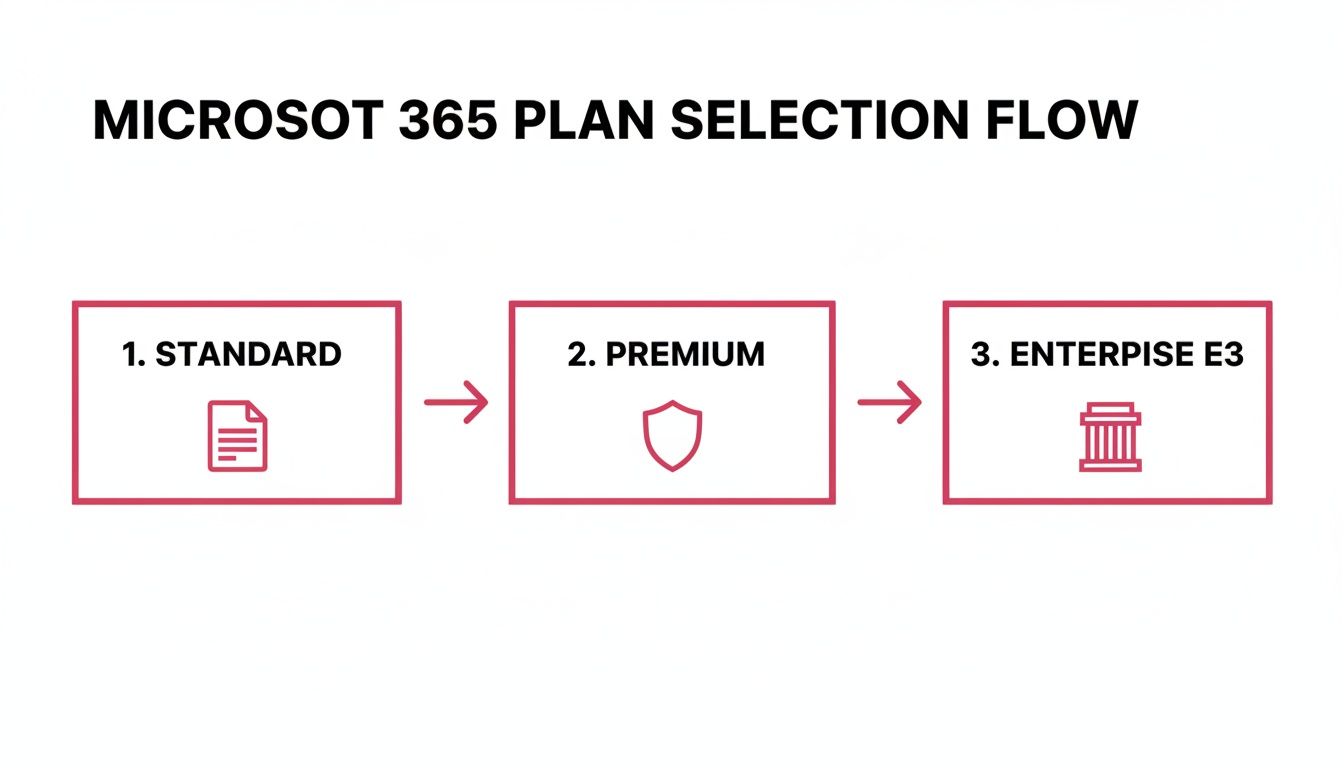
As you can see, Business Standard is great for documents and collaboration. But Business Premium brings in that crucial security and management layer, making it the only real choice for businesses that take compliance and data protection seriously.
Mapping Your Migration Journey
A structured, phased migration is the only way to do this properly. Each stage needs careful attention, and trying to skip or speed through one is usually where things start to go wrong.
A typical migration roadmap looks something like this:
- Discovery and Planning: This is the most important part, hands down. We take a deep dive into your current IT setup, figure out exactly what needs moving (emails, files, archives), and build a detailed project plan.
- User Communication and Training: We let your team know what's happening and when. We manage expectations and get them started with some initial training on the key apps like Teams and OneDrive.
- Data Migration: Here’s the technical core of the project. We carefully transfer your emails to Exchange Online and shift files from local servers or other cloud services into their new home in SharePoint and OneDrive.
- Security Configuration: With the data safely moved, we lock it down. This is where we implement the core security features of Microsoft 365 Business Premium, setting up Microsoft Defender, Intune device policies, and Conditional Access rules built around your specific business.
- Device Setup and Final Cutover: Finally, we get every user's computer and mobile phone connected to the new system and perform the final switch, which we almost always do over a weekend to cause minimal disruption.
A common mistake is thinking migration is just an IT job. In our experience, a successful deployment is 80% planning and communication and only 20% technical execution. Forgetting the human side of things—like proper training and managing the change—is the fastest way to derail the entire project.
Common Pitfalls and How to Sidestep Them
Even the best-laid plans can hit a snag. The trick is knowing what those common challenges are so you can prepare for them ahead of time.
- Poor User Training: Just handing over new tools and hoping for the best is a recipe for disaster. Without good training, your staff will either fall back on old, inefficient habits or use the new tools incorrectly, creating security risks. Solution: We always schedule dedicated, role-specific training sessions and make sure ongoing support is available.
- Overlooking Security Configurations: One of the biggest pitfalls is moving all your data but forgetting to properly set up the security features you're now paying for. It’s like moving into a high-security building but leaving the front door wide open. Solution: Security configuration has to be a non-negotiable part of the deployment plan from day one.
- Underestimating Migration Time: Moving years of data takes time, and you can almost guarantee you’ll run into a few surprises. Rushing it is a surefire way to risk data loss or corruption. Solution: Always build some contingency time into the project plan and tackle the migration in manageable stages.
Understanding these complexities is the first step. For a deeper look at the strategy behind a smooth transition, our guide on planning a successful cloud migration for your company is a great resource.
Real-World Example: A Hampshire Professional Services Firm
We recently worked with a consulting firm in Hampshire that was stuck with an ageing on-premise server. Their main goal was to let their consultants work securely from anywhere without causing any delays to active client projects.
We took a phased approach. First, we moved all company emails over to Exchange Online. With that done, we systematically migrated their client project files into dedicated SharePoint sites, taking great care to structure permissions so only the right people could access sensitive client data.
The final piece of the puzzle was enrolling all company laptops and mobile phones into Microsoft Intune. This gave us the power to enforce crucial security policies, like mandatory device encryption and multi-factor authentication, for every consultant, no matter where they were working. The result was a seamless switch that boosted their security and flexibility, with absolutely zero downtime affecting their clients. It's a perfect example of how working with an expert helps you avoid the common pitfalls and get immediate value from your investment in Microsoft 365 Business Premium.
Meeting UK Compliance and Data Protection Rules
For any UK business, compliance isn't just a box-ticking exercise. It's woven into the very fabric of how you operate, especially if you're in a regulated sector like finance, law, or healthcare. Navigating the rules of the road, particularly the General Data Protection Regulation (GDPR), is non-negotiable. A slip-up can lead to serious financial and reputational damage.
This is where Microsoft 365 Business Premium really shows its value, stepping beyond just productivity to become a core part of your risk management strategy. It gives you an integrated toolkit for compliance and data protection, so you're not trying to patch together different systems to meet your legal duties. It's about having confidence that your client data is being handled properly.
Protecting Data From Accidental Leaks
Let’s be honest, one of the biggest data breach risks isn't a shadowy hacker. It’s often a simple mistake. Someone in your team accidentally emails a spreadsheet full of client financial details to the wrong person. It happens. Microsoft 365 Business Premium comes with powerful tools to stop this exact scenario in its tracks.
Its Data Loss Prevention (DLP) features act like an intelligent gatekeeper. You can set up rules that automatically spot sensitive information inside documents and emails, such as:
- Credit card or National Insurance numbers.
- Specific patient or client ID codes.
- Financial data that looks like bank account details.
If an employee tries to send an email with this kind of info outside the company, the DLP policy can step in, block the email, and pop up a custom warning. It’s a proactive safety net that can prevent a data leak before it even has a chance to happen.
Responding to Legal and Data Requests
Under GDPR, people can ask for a copy of all the data you hold on them. You might also face legal or regulatory demands that mean you need to find specific information, and fast. Sifting through years of emails and files by hand is a nightmare.
Microsoft 365 Business Premium equips your business with eDiscovery tools, allowing you to perform organisation-wide searches across mailboxes, SharePoint sites, and OneDrive accounts from a single, central console. This simplifies the process of finding, preserving, and exporting data for legal holds or Subject Access Requests, ensuring you can respond efficiently and compliantly.
This is a complete game-changer for any business that needs to be ready for an audit. Making sure your systems are up to scratch is vital, and solutions that offer GDPR compliant HR software and Microsoft Purview integration demonstrate just how deeply these tools can be integrated into your day-to-day operations.
Data Sovereignty and UK Data Centres
For a lot of UK businesses, especially those in the public sector or handling very sensitive personal information, knowing exactly where your data lives is a crucial point of compliance. This idea, called data sovereignty, is something Microsoft takes very seriously.
Microsoft operates several huge data centre regions right here in the UK. When you first set up your Microsoft 365 tenancy, you can choose to have your core data—for things like Exchange Online emails and SharePoint files—stored "at rest" inside these UK facilities. This is a massive help for meeting specific regulatory demands or client contracts that insist data stays within the country's borders.
A practical example is a care provider in Somerset. They can use Business Premium to keep all their patient records on SharePoint, knowing that data is physically stored in Microsoft's UK data centres. They can then layer on sensitivity labels and DLP rules to stop this information from being emailed externally. When they get a records request, they use eDiscovery to manage it. This all-in-one approach gives them complete peace of mind that they are handling patient data in a fully GDPR-compliant way.
How Managed IT Services Maximise Your Investment
Buying a Microsoft 365 Business Premium licence is a great first step, but it’s just the start. To really get your money's worth, you need experience and a bit of focused effort. For any business in Dorset and Hampshire, even the most powerful platform is only an asset if it's set up, managed, and supported correctly. This is exactly where managed IT services come in, turning a great product into a real engine for your business.

Think of it like buying a high-performance car. You wouldn't just drive it off the forecourt and forget about it. To keep it running at its best, you need a skilled mechanic for the initial setup, routine servicing, and performance tuning. An expert partner like SES Computers acts as your own in-house technical team, handling everything from the initial consultation and licensing to the hands-on migration and, crucially, the proactive day-to-day management.
Proactive Management and Expert Support
Our job doesn't end once you're up and running. The security tools inside Microsoft 365 Business Premium are incredibly powerful, but they constantly generate alerts and need fine-tuning to stay ahead of new threats. Without an expert keeping watch, a critical warning could easily be overlooked.
We provide that essential oversight, with services designed to keep your business running securely and smoothly:
- Proactive Security Monitoring: We keep a close eye on the alerts from Microsoft Defender, investigating potential issues before they have a chance to cause any real damage.
- Policy Optimisation: Your business doesn't stand still, and neither should your security. We regularly review and tweak your device and access policies to make sure they're always a perfect fit for how you work.
- Expert Helpdesk Support: When your team runs into a problem or just has a question, they get direct access to our local experts who know your specific setup inside and out.
A managed service isn't just about fixing things when they break; it's about stopping them from breaking in the first place. We help you move from a reactive IT scramble to a proactive strategy, making sure your technology is always secure, efficient, and pushing your business forward.
Your Local Partner for Growth
When you partner with SES Computers, you’re getting more than just technical support. Businesses across Dorset and Hampshire gain a local technology partner who is genuinely invested in making Microsoft 365 Business Premium work for them. We take the complexity of cybersecurity and IT management off your plate, so you can get back to focusing on what you do best.
This strategic approach ensures your technology becomes a genuine driver of growth, not a source of frustration. To see more on how this model helps businesses just like yours, take a look at our overview on the value of IT support and managed services.
Frequently Asked Questions
Switching to a new system always brings up a few questions. To help you get a clearer picture, we've put together answers to some of the most common things we're asked by professional services firms and other UK businesses looking at Microsoft 365 Business Premium.
Is Business Premium Really Worth the Extra Cost Over Business Standard?
For any UK business that handles client data or sensitive information, our answer is almost always a firm "yes." The price difference isn't just about adding a few extra bells and whistles; it's a direct investment in crucial security and management tools that would cost a small fortune to buy and piece together separately.
Think of it this way: you're getting built-in cyber-resilience and IT management for a predictable monthly fee. The plan gives you advanced threat protection, device management, and access controls that act as your first line of defence against expensive cyber-attacks and data breaches. In today's climate, that's fundamental for keeping your clients' trust.
Can We Move Our Existing Emails and Files Over to Business Premium?
Absolutely. Moving from older on-premise Exchange servers, or even from other cloud platforms like Google Workspace, is a well-established process. In fact, it's a core part of making the switch to Microsoft 365 Business Premium.
That said, the migration itself needs careful planning to avoid any data loss or disruption to your daily operations. A good IT partner will manage the whole project for you – from the initial strategy and data transfer right through to the final cutover and helping your team get settled. It makes the entire transition smooth and stress-free.
A common pitfall is seeing a migration as just a simple 'lift and shift' of data. A successful project is much more than that. It involves remapping permissions, setting up security policies for the new environment, and training your staff—all vital steps to get the full value from the platform right from the start.
What Sort of Devices Can We Manage with Business Premium?
The platform uses a tool called Microsoft Intune to look after a whole range of devices, which is perfect for how teams work these days. It covers your Windows PCs and Macs, as well as iOS and Android smartphones and tablets.
This flexibility is key. It means you can apply consistent security rules across every single device that connects to your business. For instance, you can insist on a PIN to open company apps, remotely wipe corporate data from a lost phone without touching personal photos, and check that every device meets your security baseline before it can access your network.
Do We Need an In-House IT Expert to Use the Security Features?
While the platform is designed with businesses of up to 300 users in mind, getting the advanced security features configured properly to give you maximum protection really does require specialist knowledge. This is exactly where working with a managed service provider like us comes in.
We take care of the complex setup of things like threat protection, access policies, and device management. Then, we keep an eye on it all for you. This frees you up to focus on what you do best—running your business—with the peace of mind that comes from knowing your security is being handled by experts.
Ready to see how Microsoft 365 Business Premium could improve your business's security and productivity? Contact SES Computers today to find out how our managed IT services can deliver a seamless switch and make sure you get the most from your investment.