When it comes to preventing data loss, there is no silver bullet. It is all about building layers of defence that combine solid backups, smart access controls, and a company culture where everyone understands their security role. For any UK business, this means getting practical and putting a real strategy in place to handle everything from hardware meltdowns and human error to the ever-present threat of cyber-attacks.
The goal here is simple: make data resilience an everyday part of how you operate. It is not just a task for the IT team; it is a core business function.
Why Data Loss Prevention Is Non-Negotiable
If you are running a professional service firm in the UK, your data is not just a collection of files—it is the foundation of your entire business. Whether you are an accountancy practice in Dorset or a law firm in Somerset, losing that information can bring your operations to a screeching halt. The fallout is not just a technical headache; it is a direct threat to your bottom line, your reputation, and your ability to stay in business.
Just picture it: a local accountancy firm's server fails without warning, right in the thick of tax season. Suddenly, chaos erupts. Deadlines are missed, clients are furious, and hefty penalties from HMRC are looming. This is not some far-fetched disaster movie plot; it is a genuine risk that highlights why you have to be prepared.
The True Cost of Inaction
Thinking about data loss prevention as just another IT expense is a mistake. It is a vital business strategy, and the cost of ignoring it can be staggering.
- Financial Impact: You are not just looking at the bill for data recovery. There are potential fines for not complying with regulations like GDPR, lost revenue from being unable to operate, and even the risk of legal action from clients whose data was compromised.
- Reputational Damage: Trust is the cornerstone of any professional service. A data breach or a major loss of information can shatter that trust overnight, making it incredibly difficult to keep your current clients, let alone win new ones.
- Operational Disruption: Imagine trying to work without access to client records, project files, or financial data. Everything grinds to a halt. This kind of disruption can drag on for days or even weeks, crippling your team's productivity and your ability to serve your customers.
For a professional services business, data is not just an asset; it is the currency of trust. Protecting that data is paramount to protecting your entire business.
A Multi-Layered Approach to Defence
A proper data loss prevention strategy has to account for a wide range of threats, from an employee accidentally deleting a critical folder to a sophisticated ransomware attack locking up your entire network. This guide will walk you through the practical, actionable steps you can take.
We will cover everything from designing a robust backup system and implementing strong cyber security controls to training your staff and having a clear plan for when things go wrong. By putting these measures in place, you can build a resilient defence that truly protects your company’s most valuable asset.
Your Blueprint for Data Backup and Recovery
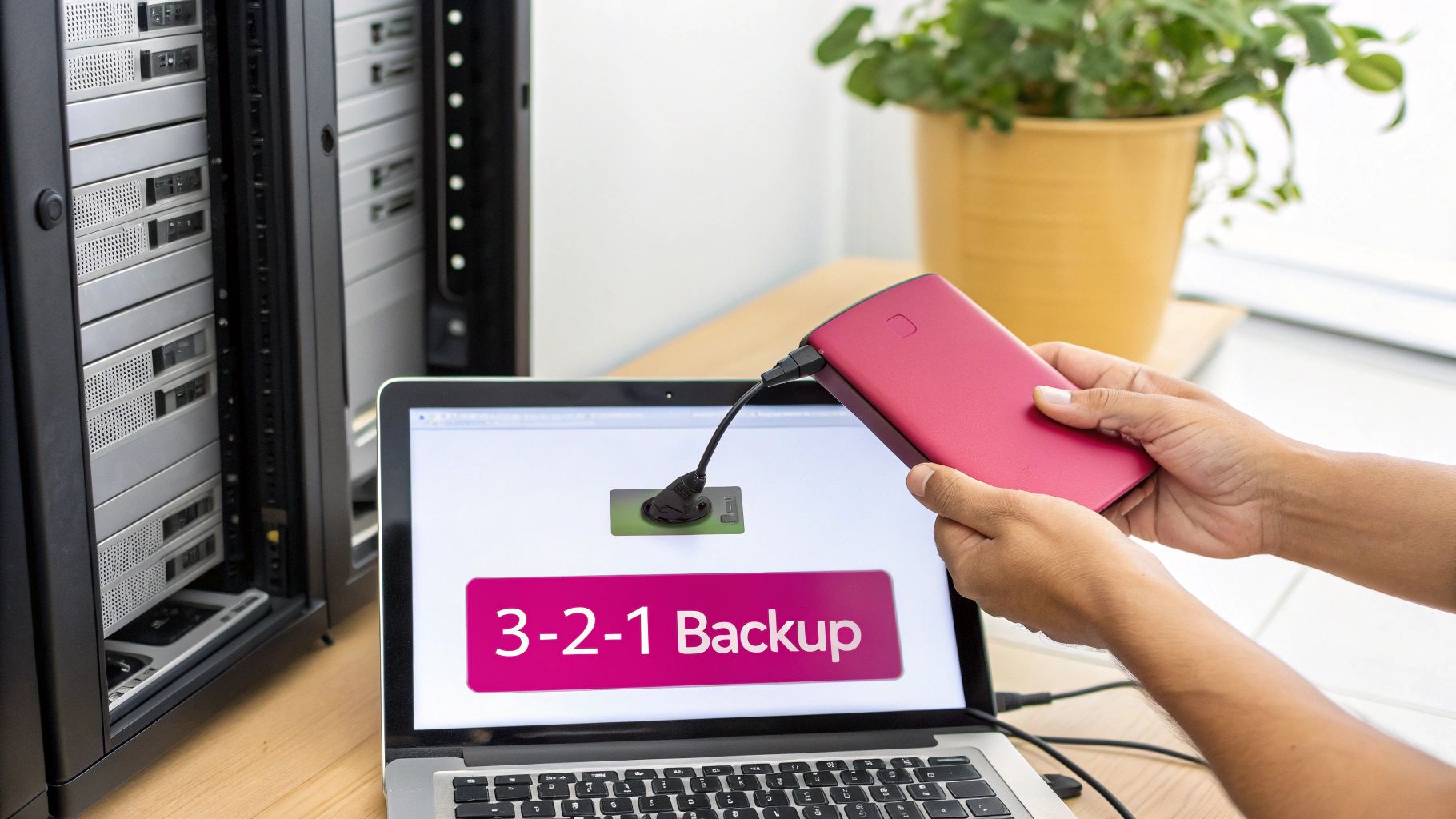
Any serious data protection plan has to start with a solid, well-thought-out backup strategy. For UK businesses, this is about more than just dragging files onto an external drive; it is about adopting a professional framework that actually guarantees you can get back on your feet when things go wrong.
The gold standard here is the 3-2-1 rule. It is a deceptively simple concept that provides a powerful blueprint for keeping your data safe.
At its heart, the rule is this: keep three copies of your data, store them on two different types of media, and make sure one copy is kept securely off-site. This layered approach is all about building redundancy. It ensures that a single point of failure—whether that is a dead server or a fire in the office—does not take your business-critical information with it.
Putting the 3-2-1 Rule into Practice
Knowing the theory is one thing, but translating the 3-2-1 rule into a practical, working strategy is where the real work begins. It demands a smart mix of on-site and off-site solutions that fit how your business actually operates.
For example, a busy solicitor's office in Somerset needs immediate access to case files and client correspondence. Their first line of defence could be an on-site Network Attached Storage (NAS) drive, set to perform backups every hour. If someone accidentally deletes a crucial document, they can restore it in minutes with minimal fuss.
But what about bigger threats? For their second and third copies, they need a solution that protects them from a disaster at their site. This is where an automated, UK-hosted cloud backup service is vital. This off-site copy is physically separate from the office, protecting the data from local events like theft or flooding and ticking the final box for the 3-2-1 structure.
The core principle of the 3-2-1 rule is diversification. By spreading your data across different devices and locations, you dramatically reduce the risk that any single event can lead to permanent data loss.
On-Site vs UK-Hosted Cloud Backup: A Comparison for SMEs
Choosing the right combination of backup media is a critical decision. Each option comes with its own set of pros and cons, especially when you weigh up your needs for recovery speed, security, and cost.
This table breaks down the key differences to help you decide on the right mix.
| Feature | On-Site Backup (e.g., NAS Drive) | UK-Hosted Cloud Backup (e.g., Managed Service) |
|---|---|---|
| Recovery Speed | Very Fast: Data is restored directly over your local network. | Slower: Dependent on internet bandwidth; full recovery can take time. |
| Security | Your Responsibility: You manage physical security and access controls. | Managed Security: Provider handles data centre security, encryption, and compliance. |
| Disaster Protection | Vulnerable: At risk from fire, flood, theft, or power surges at your premises. | Highly Resilient: Data is stored in a secure, geographically separate location. |
| Scalability | Limited: You must purchase new hardware to increase capacity. | Highly Scalable: Storage can be increased or decreased on demand. |
| Initial Cost | High: Requires an upfront investment in hardware. | Low: Typically a predictable monthly or annual subscription fee. |
Ultimately, a hybrid approach often works best. The speed of local backups for minor issues, combined with the security of an off-site copy for major disasters, gives you the best of both worlds.
The Critical Role of Data Versioning
Modern cyber threats, especially ransomware, have changed the game. It is no longer enough just to have a recent copy of your data; you need the ability to restore it from a specific point in time before it was compromised. We call this data versioning, or point-in-time recovery.
Imagine your systems are hit by ransomware on a Monday morning. If your backup simply overwrote Sunday night’s good data with the newly encrypted files, your "safe" copy is now completely useless.
Versioning prevents this by keeping multiple historical snapshots of your files. With a solid versioning policy in place, you can simply "roll back" your entire system to how it was on Friday afternoon, effectively erasing the ransomware's impact. Our detailed guide offers more on the importance of your backup of data.
To make these arrangements official, particularly with a service provider, a Service Level Agreement (SLA) is essential. It clearly defines the expectations and responsibilities for keeping your data available. This helpful guide to Service Level Agreements offers a much deeper look into how they work.
Automating for Peace of Mind
Let's be realistic—managing all of this manually is a recipe for disaster. The real key to a successful, reliable backup strategy is automation.
A managed IT service can set up a system that handles everything—backups, versioning, retention policies—automatically in the background. This completely removes the risk of human error, like someone forgetting to swap a backup tape. It also provides constant monitoring to flag any issues before they become serious problems.
The government's Cyber Security Breaches Survey shows that while 71% of businesses use cloud services for backups, many still lack a complete, robust strategy. The NCSC strongly endorses the 3-2-1 policy, which helps mitigate the kinds of incidents that affected 43% of UK businesses last year.
By combining the 3-2-1 rule with smart versioning and automation, you build a formidable defence against data loss, ensuring your business can bounce back quickly from almost anything.
Putting Your Essential Cyber Security Controls in Place
A solid backup strategy is your ultimate safety net, but proactive security controls are what stop you from falling in the first place. These are the practical, technical measures every business needs to build a strong defensive wall around its data. Think of them as your first line of defence, working together to shrink your attack surface and shield your critical information before disaster strikes.
These controls are not just about fancy software; they are about creating clear rules and barriers. They make it significantly harder for an attacker—or even a well-meaning employee making a mistake—to cause a data breach. Getting these fundamentals right is also central to meeting compliance standards like UK GDPR and achieving certifications such as Cyber Essentials.
Master Access Control with Least Privilege
The simplest way to stop data from ending up in the wrong hands is to control who can touch it. This is where the principle of least privilege comes in. It is a beautifully simple but powerful idea: give people access only to the information and systems they absolutely need to do their job. Nothing more.
If you run a professional services firm, this means segmenting access with care. A junior accountant does not need to see the entire company's payroll, and a marketing assistant has no business modifying client financial records. By locking down access like this, you dramatically shrink the potential blast radius if an account is ever compromised.
For a practical example, consider a chartered surveyor's office. An administrator needs access to client appointment schedules and contact details. However, they do not require access to sensitive building valuation reports or the firm's financial accounts. By implementing least privilege, if that administrator’s account is compromised, the attacker’s reach is severely restricted from the outset.
Make Multi-Factor Authentication Non-Negotiable
Passwords alone just do not cut it anymore. Stolen or weak login details are one of the most common ways attackers get their foot in the door. That is why Multi-Factor Authentication (MFA) is not a 'nice-to-have'; it is a non-negotiable security layer.
MFA forces anyone logging in to provide at least two different pieces of evidence to prove they are who they say they are. This usually involves a combination of:
- Something you know: Your password or a PIN.
- Something you have: A code from a smartphone app (like Google Authenticator) or a physical security key.
- Something you are: Your fingerprint or face scan.
By demanding that second factor, you instantly block the vast majority of automated attacks that rely on stolen passwords. Even if a criminal gets hold of an employee's password, they are stopped dead without the physical device needed to complete the login. It is one of the single most effective things you can do to prevent unauthorised access.
Think of MFA as the modern equivalent of a bank needing both a key and a signature to open a safe deposit box. One without the other is useless, creating a simple yet formidable barrier against intruders.
Demystify Data Encryption
Encryption is simply the process of scrambling your data into an unreadable code, making it useless to anyone without the right key. It is a vital tool for protecting information in its two key states: at rest and in transit.
Data at Rest: This is any data sitting on a device, like a laptop, server, or even a USB stick. Encrypting these devices with tools like BitLocker for Windows or FileVault for macOS is straightforward. It means that if a laptop is ever lost or stolen, the information on it remains a locked, unreadable jumble of code.
Data in Transit: This is data on the move across a network—think of emails being sent or files being uploaded to a cloud service. Using security protocols like TLS (Transport Layer Security), the technology behind that little padlock icon in your browser, ensures this data is scrambled and hidden from prying eyes as it travels.
For any business handling sensitive client information, encryption is not just a good idea; it is often a legal requirement under GDPR for protecting personal data.
Protect Your Endpoints and Patch with Discipline
Your endpoints—all the laptops, desktops, and mobile phones connected to your business—are the main gateways to your network. Protecting them now requires more than old-school antivirus software. Modern Endpoint Detection and Response (EDR) solutions are the new standard. They go a step further, actively monitoring device activity for suspicious behaviour, which allows for real-time threat hunting and is crucial for stopping sophisticated attacks like ransomware in their tracks.
Finally, we come to one of the most critical security habits: patch management. Software developers are constantly finding and fixing security holes in their products. Failing to apply these patches, or "updates," leaves gaping holes in your defences that attackers are all too eager to exploit.
You need a disciplined process for this. It means regularly scanning for missing updates across all your operating systems and applications and applying them promptly. Automating this where you can is a huge win, ensuring you consistently close the door on the easy opportunities that cybercriminals love to find.
Building a Security-Aware Company Culture

All the technical defences in the world will not stop a data breach if your team is not on board. The truth is, your people can either be your strongest security asset or your most significant vulnerability. The goal is to build a culture where they become your vigilant first line of defence.
This is not about creating an atmosphere of fear or pointing fingers when someone makes a mistake. It is about fostering an environment where everyone understands why data protection matters and feels confident in how to handle it responsibly. That kind of cultural shift starts with clear, sensible policies and is cemented through ongoing, practical training.
Establishing Clear IT Policies
Your first move should be to create straightforward policies that leave no room for guesswork. These documents are not just for compliance; they set clear expectations for how staff should handle company data and use IT resources. They form the very foundation of your security culture.
Imagine a Hampshire-based financial advisory firm. Their policies need to be crystal clear on managing client data, especially with remote work in the mix. This means defining what is acceptable use for company laptops, mandating secure Wi-Fi connections, and explicitly forbidding the transfer of sensitive files to personal cloud accounts or USB sticks.
Your core policies should cover:
- Acceptable Use Policy (AUP): The ground rules for using company networks, computers, and software.
- Data Handling Policy: How to classify, store, and share sensitive information safely.
- Remote Work Policy: The specific security requirements for anyone working outside the office.
These should not read like dense legal contracts. Write them in plain English, make them easy to find, and ensure they serve as a practical guide for day-to-day work.
Moving Beyond Tick-Box Training
Let's be honest: that once-a-year, generic security training rarely sticks. To genuinely build awareness, training has to be practical, continuous, and engaging. You are aiming to develop reflexive security habits, not just tick a box for an audit.
A much more effective approach is running simulated phishing campaigns. These are controlled exercises where you send harmless but realistic-looking phishing emails to your team. When an employee clicks a link, they are not punished. Instead, they are immediately directed to a bite-sized training module explaining the red flags they missed.
Phishing simulations transform a theoretical risk into a tangible learning experience. They teach employees to be critical of incoming communications in a safe, controlled environment, which is far more memorable than any slide deck.
This hands-on method helps people instinctively recognise the tactics criminals use—urgent requests, suspicious attachments, or slight variations in a sender's email address. To learn more about structuring these exercises effectively, check out our guide to IT security awareness training. Regular, varied simulations build a healthy, necessary sense of scepticism across the entire organisation.
Developing a Robust Incident Response Plan
Even with the best defences in place, you have to be prepared for a breach. An Incident Response (IR) Plan is your playbook for what to do when the worst happens. Having this ready means you can react quickly and decisively, which is crucial for minimising damage and downtime.
Think of it as a practical checklist, not a hefty manual. Key personnel need to know it well enough to act without panic. For a business in Wiltshire, this plan could be the difference between a ransomware attack on a Friday afternoon turning into a weekend recovery effort versus a week-long operational shutdown.
Your incident response checklist should cover these critical stages:
- Identification: How do you spot and confirm an incident? Who is the first person to call?
- Containment: What are the immediate steps to isolate affected systems and stop the breach from spreading?
- Eradication: How do you get the threat (like malware) off your network for good?
- Recovery: What is the process for restoring data from backups and bringing systems back online safely?
- Post-Incident Review: What did we learn? How can we strengthen our policies and defences to prevent it from happening again?
Just having a plan is not enough; you need to test it. Running tabletop exercises where you walk through a potential scenario is vital. It helps you find the gaps and ensures everyone knows their role, turning a potential crisis into a manageable event.
Taking a Proactive Stance with Advanced Monitoring
If you are handling sensitive client data, the standard security playbook is only your first line of defence. To truly get ahead of data loss, you need to shift your mindset from reacting to problems to actively hunting for them before they can do any real damage.
This is where you move into the realm of advanced monitoring and specialist tools like Data Loss Prevention (DLP). Think of them as your always-on digital security guards, constantly watching the flow of information across your network, flagging suspicious activity, and enforcing your data handling rules on the fly.
The Value of a 24/7 Watch
Imagine having a managed security service keeping a constant, vigilant eye on your network. This is not about micromanaging your team; it is about understanding what ‘normal’ looks like for your business so that you can instantly spot when something is dangerously out of place.
Let’s take a practical example. An accountancy firm’s network hums along with a predictable rhythm of data during office hours. But then, at 2 a.m., an alert fires. A monitoring service has detected a massive chunk of data being siphoned from a senior accountant's machine to an unknown external address.
Because of that immediate, automated alert, an IT partner can jump in, find out the accountant's login details were compromised, and kill the connection. A catastrophic data breach is stopped in its tracks. That is the power of proactive, round-the-clock monitoring.
How Data Loss Prevention (DLP) Software Works
While general monitoring looks for odd behaviour, Data Loss Prevention (DLP) software is the gatekeeper for your most sensitive information. It is specifically built to understand the content and context of your data, stopping it from leaving the building without permission.
DLP tools are not magic; they work by using rules you define to identify sensitive data through pattern matching. You can configure them to recognise specific formats, such as:
- Financial Records: It can spot patterns that look like client account numbers or sort codes.
- Personal Information: It can be tuned to recognise National Insurance numbers or other personally identifiable information (PII).
- Proprietary Data: You can set it to block files containing keywords related to your unique intellectual property.
Once it is set up, the software can automatically block actions that break the rules. For instance, if an employee tries to email a spreadsheet packed with client financial data to their personal Gmail account, the DLP system intercepts the email, blocks it, and notifies an administrator. It can do the same for attempts to copy sensitive files onto a USB stick or upload them to a public cloud service.
DLP is all about enforcing your security policies right at the point where data could leave your control. It transforms data protection from a manual, hope-for-the-best approach into an automated, rules-based system that actively prevents leaks.
Finding Your Weak Spots Before Attackers Do
A huge part of a proactive defence is finding and fixing your own security weaknesses before a criminal can. This is where regular security audits and vulnerability scanning become non-negotiable.
- Vulnerability Scanning: Think of this as an automated health check. Specialist tools scan your systems, network, and applications for known security flaws, like unpatched software or misconfigured servers. You get a clear, prioritised to-do list of what needs fixing first.
- Security Audits: This is a much deeper dive, often involving a third-party expert who reviews your policies, procedures, and technical controls against established standards like Cyber Essentials or ISO 27001.
These exercises give you an honest, unfiltered look at your security posture. They show you where you are strong and, critically, where you are exposed. They are a vital investment in staying one step ahead of sophisticated threats.
Here in the UK, the market for Data Loss Prevention (DLP) services is growing, and for good reason. Cyber threats are on the rise, and regulations are getting tougher. While 77% of businesses have malware protection, a worrying 30% implement user monitoring, leaving huge gaps an attacker could walk right through. With ransomware now a factor in 44% of breaches and third-party risks increasing, proactive solutions like 24/7 monitoring and managed DLP are becoming essential for protecting sensitive data. You can explore more about these market trends and what they mean for your business's security.
Your Data Loss Prevention Action Plan
All this advice is great, but turning it into action is what really matters. Let’s bring everything we have discussed together into a practical plan. This is not just theory; it is about building real-world resilience for your business, starting today.
A strong defence is not a one-off task. It is a continuous cycle: you monitor for threats, you block them, and you audit your own controls to find weaknesses before someone else does.
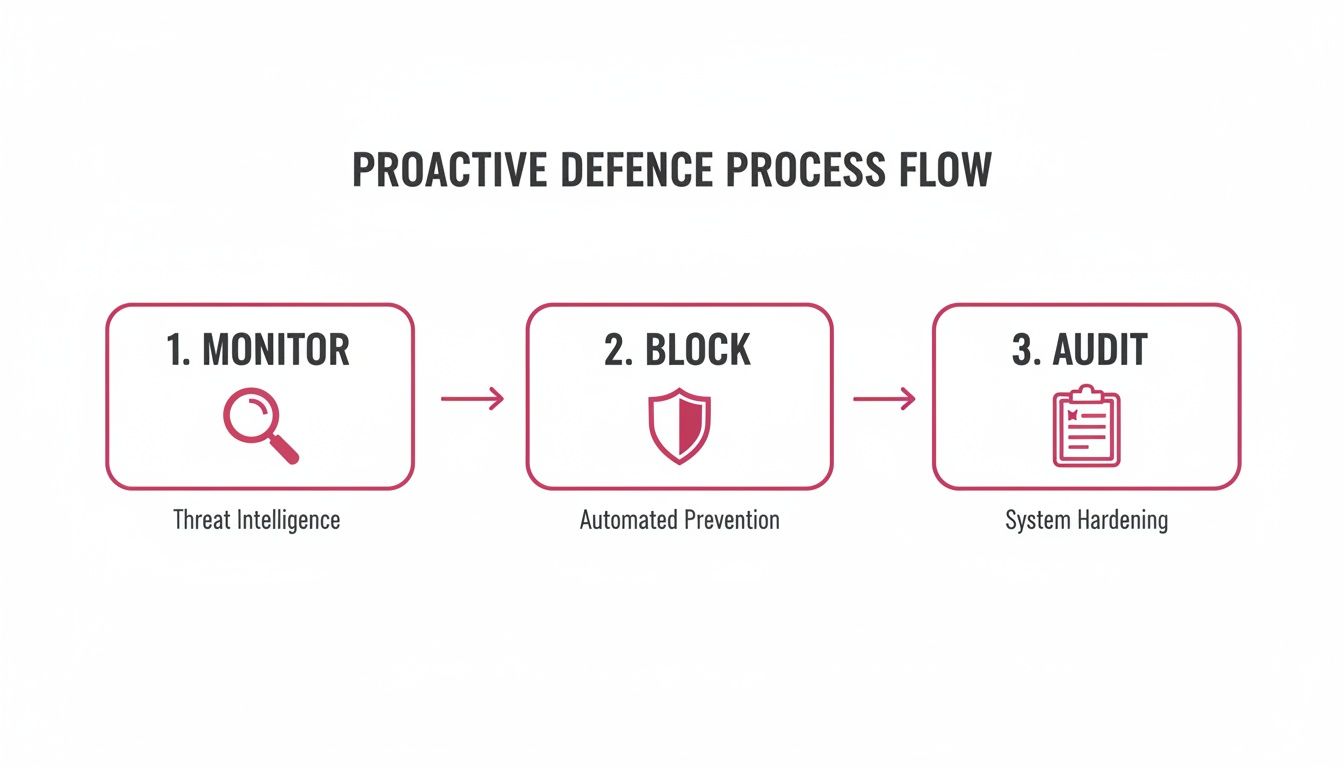
This constant loop of monitoring, blocking, and auditing is the foundation of an active, robust security posture. It is what keeps you ahead of the game.
Your Self-Assessment Checklist
Let's start with a quick, honest look at where you stand right now. Use this checklist to gauge your current data protection measures. Do not worry if you find gaps—that is the whole point.
- Backup and Recovery: Do we actually follow the 3-2-1 rule? Are our backups automated and stored off-site? Crucially, when did we last test a full data restore?
- Access Controls: Is the principle of least privilege properly enforced? Or does everyone have access to everything? Is Multi-Factor Authentication (MFA) mandatory on all key systems and cloud services?
- Endpoint Security: Are all company devices—laptops, mobiles, the lot—encrypted and running up-to-date endpoint protection? Is our software patching process consistent or a bit hit-and-miss?
- Staff Policies and Training: Do we have clear, simple policies for data handling that everyone understands? Are we running regular, practical security training, like phishing simulations, to keep staff sharp?
- Monitoring and Response: Do we have an incident response plan? Has it been looked at or tested this year? Are we actively monitoring our network for strange behaviour, or are we flying blind?
Think of this checklist as a starting point, not a finish line. Every "no" or "I'm not sure" is a signpost pointing directly to your most urgent priorities.
Defining Your Next Steps
Okay, you have completed the assessment. Now what? The next step is taking decisive action to plug those gaps. This is often where partnering with a trusted IT provider can make a huge difference. They can handle the technical heavy lifting, leaving you to focus on running your business.
Your first two priorities should be straightforward. First, schedule a professional security assessment to get an expert, unbiased view of your risks. Second, take a hard look at your current backup strategy. A detailed review is the only way to know for sure if you can recover quickly and completely when disaster strikes.
For more on this, you can explore our expert insights on building effective IT disaster recovery solutions to guide your thinking.
Ultimately, preventing data loss is an achievable goal. With a solid plan and the right support, you can build a defence that genuinely protects your company, your clients, and your hard-earned reputation.
Common Questions About Data Loss
When it comes to protecting business data, it is easy to get bogged down in the technical details. Most business owners I speak with have similar, very practical questions about where they should be putting their time and money. Here are some of the most common ones.
How Often Should We Actually Test Our Backups?
It is a simple truth: a backup you have not tested is just a hope, not a plan. You absolutely have to test them.
We advise clients to run a quick recovery test of a few key files or folders at least every quarter. This just confirms the data is intact and recoverable. Beyond that, you need to simulate a full-blown disaster recovery scenario at least once a year. This is the only way to be certain your entire process works under pressure, from spinning up new hardware to getting critical software running again.
Is the Cloud Really Secure Enough for Our Sensitive Data?
This question comes up a lot. The short answer is yes, provided you choose a reputable UK-hosted provider. High-quality cloud backup services deliver security that is often far more advanced than what a typical small business can achieve on its own.
They use heavy-duty security measures like end-to-end encryption, which scrambles your data before it even leaves your network and ensures it stays unreadable to anyone else. Their data centres are physically secure fortresses, built to comply with stringent UK GDPR regulations.
Many people feel that keeping data on-site is safer, but that is often a false sense of security. A dedicated UK data centre with 24/7 security staff and multiple certifications is almost always a more resilient home for your critical information.
We Are Just a Small Business. Do We Really Need All This?
Cybercriminals love small businesses precisely because they often assume they are flying under the radar. The reality is that data loss prevention is not about the size of your company; it is about the value of your data. A catastrophic data loss can hit a five-person team just as hard as a fifty-person one.
The good news is you do not have to do everything overnight. It is about starting smart.
If you do nothing else, focus on these three things:
- Automated Backups: Get a reliable, automated 3-2-1 backup system in place.
- Multi-Factor Authentication (MFA): Switch it on for every important account, especially email.
- Staff Training: Your people are your first line of defence. Teach them how to spot a phishing email.
You can build on that solid foundation as your business grows.
At SES Computers, we build practical, robust data protection plans for businesses across Dorset, Hampshire, and Wiltshire. To make sure your defences are ready for whatever comes next, get in touch with our expert team today.