The security of your Wi-Fi is not merely an IT concern—it is a cornerstone of your business's operational integrity and safety. A secure wireless network is your first line of defence, protecting sensitive company data, maintaining client trust, and ensuring business continuity. Neglecting it leaves your organisation vulnerable to cyber-attacks that can inflict catastrophic financial and reputational damage.
Why Wi-Fi Security Is Non-Negotiable for Professionals

For most UK businesses, the Wi-Fi network is the invisible engine powering daily operations. It connects employee laptops, payment terminals, printers, and an increasing number of smart devices. However, this convenience can foster complacency. An unsecured network is a clear invitation for malicious actors to infiltrate your internal systems.
Consider a professional services firm, such as a law practice or a financial consultancy. You handle incredibly sensitive client data daily. A weak password or an outdated, unpatched router could be all it takes for an attacker—perhaps sitting in a vehicle across the street—to gain access to your network. Once inside, they could intercept confidential emails, exfiltrate financial records, or deploy ransomware that brings your entire operation to a grinding halt.
The Real-World Costs of a Wi-Fi Breach
The fallout from a breach extends far beyond initial technical disruption. It triggers a domino effect that can impact every facet of your business. Understanding these risks is the first step toward building a robust defence.
Here is what your organisation is up against:
- Data Theft and Financial Penalties: Unauthorised access places your company's intellectual property, client details, and banking information at risk. This can lead to direct financial theft and significant fines under GDPR.
- Reputational Damage: A public data breach can irrevocably damage the trust you have cultivated with your clients. Rebuilding that trust is often far more challenging than rectifying the technical failure.
- Operational Paralysis: A network crippled by malware or ransomware can shut down your entire operation, resulting in lost productivity and zero revenue until services can be restored.
For professional firms, robust Wi-Fi security is a critical component of a comprehensive strategy. It works in tandem with other essential cybersecurity tips for small businesses required to safeguard your data and your livelihood.
View a proactive security strategy not as a cost, but as an essential investment in your business's resilience. The expense of preventing a breach is invariably a fraction of the cost of remediation.
Give Your Network a Quick Health Check
You do not need to be a technology expert to identify glaring security vulnerabilities. Taking five minutes to conduct a quick audit can highlight areas for improvement and underscore the value of seeking expert advice.
Begin by asking these straightforward questions about your current configuration:
- Is our main Wi-Fi password genuinely strong? If it incorporates the company name, a common phrase like "password123," or your office address, it is not. A truly strong password is your most basic, yet most critical, defence.
- Are we still using the ISP-provided router from several years ago? Older equipment often lacks support for modern security standards and, crucially, ceases to receive security updates, leaving it exposed to known exploits.
- Do we operate a separate network for guests? Permitting clients, visitors, or even staff's personal devices onto your primary internal network is a significant risk, as it co-mingles untrusted devices with your critical business systems.
Uncertainty in answering any of these questions is a clear indicator of a security gap. Mastering these fundamentals is the only way to build a secure wireless environment that enables your business to thrive rather than exposing it to unnecessary risk.
Selecting and Configuring Secure Network Hardware
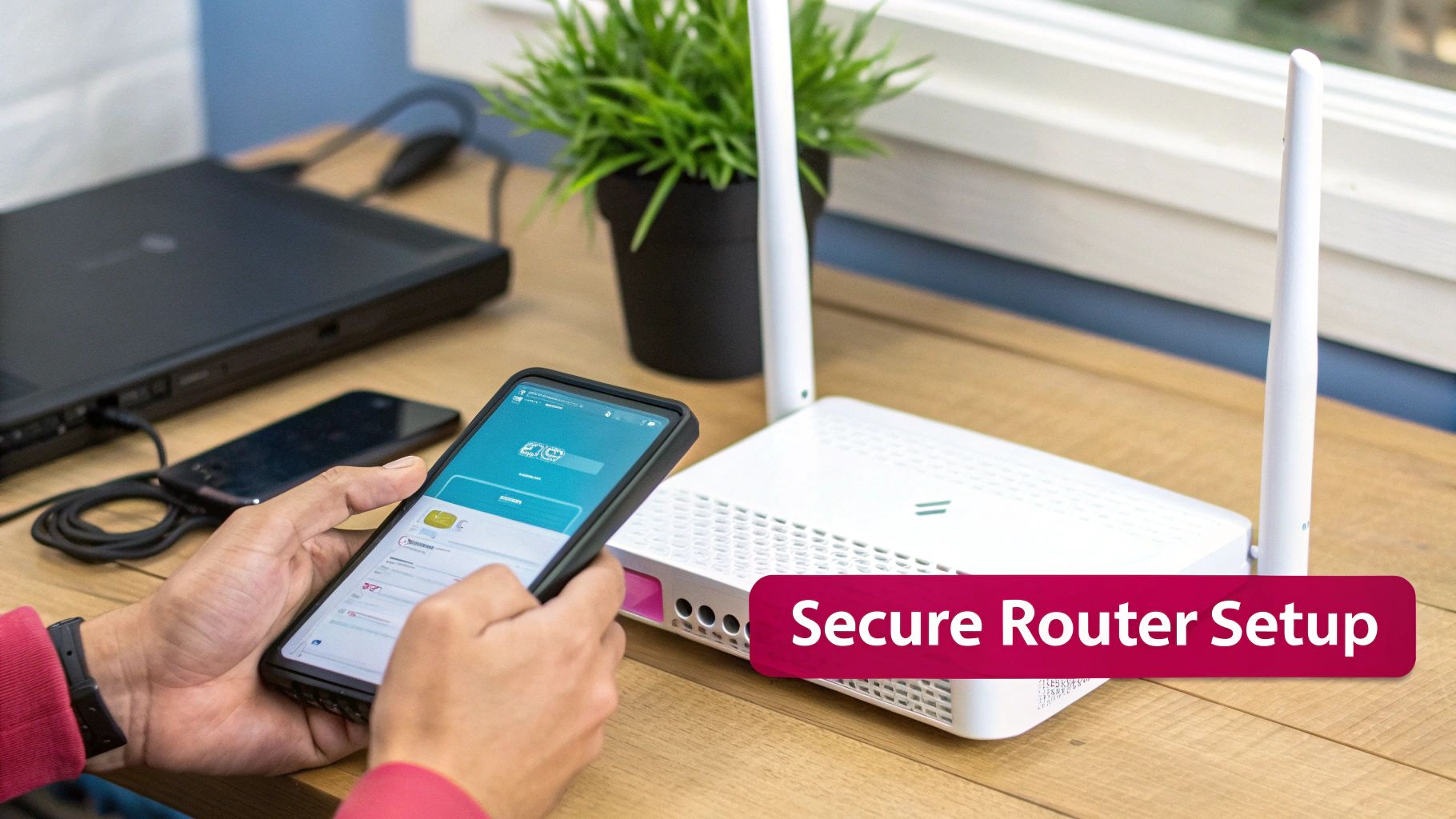
Your network hardware, particularly the router, serves as the central hub for your entire business's internet connection. It is tempting to treat it as a simple plug-and-play device, but this is a major strategic error. Consider it the gatekeeper to your digital enterprise; its configuration is your first and most critical line of defence. Procuring the right equipment and implementing a secure setup from the outset is absolutely non-negotiable.
When evaluating new hardware, prioritise devices that support the latest security standards. Specifically, you should look for WPA3-certified hardware. This is the modern encryption protocol that provides far superior protection against password-cracking attempts. It also ensures that if one device on your network is compromised, an attacker cannot easily monitor traffic from other devices.
For a growing business, it is prudent to explore dedicated Wi-Fi solutions designed for business. These systems typically offer more advanced security and management capabilities than a standard consumer-grade router.
Your First Security Steps with New Hardware
The moment you unbox a new router, it is at its most vulnerable. Manufacturers ship devices with default settings optimised for ease of setup, not for robust security. Therefore, before connecting a single business-critical system, your primary task is to harden this device.
This process begins with changing the default administrator login credentials. Every router has a username and password to access its settings panel, and the factory defaults (such as "admin" and "password") are widely known. Leaving them unchanged is akin to providing an attacker with the keys to your entire network.
A router with its default password is like leaving the office key under the doormat—it is the first place an intruder will look. Changing these credentials immediately is the single most effective initial step you can take.
You might be surprised how frequently this is overlooked. A recent UK survey revealed that a staggering 81% of respondents have not changed their router administrator password. This simple omission creates a massive, and entirely avoidable, security gap. You can read more about these common oversights in the 2025 Router Security Survey from Broadband.co.uk.
Disabling Risky Features and Managing Updates
Once you have changed the password, several other default settings require immediate attention. Many routers are equipped with features that, while convenient, can introduce unnecessary risks.
A major culprit is Wi-Fi Protected Setup (WPS). It is designed to simplify connecting new devices, either with a button push or an eight-digit PIN. The problem is that WPS is notoriously insecure. The PIN system is highly susceptible to brute-force attacks, which could allow an attacker to crack your network password in a matter of hours. Your best course of action is to locate WPS in your router's settings and disable it immediately.
Then there is the firmware—the router's internal software that controls its functions. Like any software, it can contain vulnerabilities that hackers can exploit. Manufacturers regularly release firmware updates to patch these security holes and improve performance. The issue is that many routers do not update automatically, meaning it is your responsibility to check for and install them. If you neglect this, you leave your hardware exposed to newly discovered threats.
A Practical Configuration Checklist
Configuring your router correctly from the start is crucial for protecting your business and client data. The following checklist covers the essential first steps for any new business router.
Essential Router Security Configuration Checklist
| Configuration Step | Default State (High Risk) | Secure State (Best Practice) | Reasoning |
|---|---|---|---|
| Admin Login | "admin" / "password" or similar | Strong, unique password | Prevents unauthorised access to router settings, the network's control centre. |
| Wi-Fi Protected Setup (WPS) | Enabled by default | Disabled | Closes a well-known vulnerability that allows attackers to crack the Wi-Fi password. |
| Firmware | Out-of-the-box version | Latest version installed | Patches security holes and protects against the latest known exploits. |
| Network Name (SSID) | Default (e.g., "BT-Hub-XYZ") | Unique, non-identifying name | Prevents attackers from identifying the router model and its potential weaknesses. |
| Encryption Protocol | WPA2 (or older) | WPA3-Personal or WPA3-Enterprise | Provides the strongest, most current encryption for all wireless traffic. |
By working through this checklist, you are not just ticking boxes; you are building a solid security foundation for your entire network. This initial setup should be viewed not as a one-off task, but as the beginning of a continuous process of security management.
Locking Down Your Network with Proper Encryption and Authentication
With your hardware and firmware secured, it is time to focus on the invisible shield that protects your data in transit: the encryption and authentication protocols. These technologies scramble your information and act as the gatekeepers to your network. Merely having a strong password is no longer a sufficient defence; today’s threats demand a more sophisticated, multi-layered approach.
For many years, WPA2 (Wi-Fi Protected Access 2) was the established standard for wireless security. However, its age is now a liability. Sophisticated attackers have developed methods to exploit its weaknesses, particularly through "dictionary attacks." In this scenario, they capture a small amount of your network traffic and then use powerful software to test millions of password combinations against it offline, without your knowledge. This is precisely why migrating to WPA3 is not just advisable—it is essential for professional services.
Why WPA3 Should Be Your New Minimum Standard
WPA3 represents a significant advancement, addressing the core vulnerabilities of its predecessor. It strengthens the encryption and makes it exceptionally difficult for anyone to brute-force your password, even if it is not optimally complex. For any business, adopting WPA3 is a fundamental step in securing wireless communications.
Here is why WPA3 makes such a difference:
- Built-in Password Protection: It employs a more secure connection method, rendering offline dictionary attacks completely ineffective. An attacker can no longer passively listen and guess their way onto your network.
- Individualised Data Encryption: On a busy network, WPA3 wraps each device's connection in its own unique layer of encryption. This is a game-changer for guest networks, as it prevents one user from eavesdropping on another's traffic.
- Safer Open Networks: With a feature called Opportunistic Wireless Encryption (OWE), even open, password-free guest networks receive a layer of automatic encryption. This protects your customers and visitors from casual snooping without requiring any action on their part.
Switching to WPA3 requires compatible hardware, but the security return on investment is substantial when protecting sensitive business data.
Moving Beyond a Shared Password with 802.1X and RADIUS
For businesses requiring stringent access control, the single shared password model is obsolete. The gold standard is an enterprise-level authentication system utilising the 802.1X protocol paired with a RADIUS (Remote Authentication Dial-In User Service) server. Instead of one password for everyone, this architecture provides each employee with their own unique credentials to access the Wi-Fi.
This completely transforms the security dynamic. When an employee leaves, you simply disable their individual account. There is no frantic rush to change the Wi-Fi password on every laptop, printer, and phone in the office. This granular control defines a truly professional and secure network. The need for this is highlighted by government statistics: 43% of businesses suffered a cyber security breach or attack in the last year. A weakly secured Wi-Fi network is a common entry point for such attacks. You can read more in the 2025 Cyber Security Breaches Survey.
Practical Example: An Accountancy Firm’s Security Overhaul
An accountancy firm with 50 staff relied on a single, long WPA2 password for their main Wi-Fi. When a senior accountant left on difficult terms, the IT manager faced the daunting task of manually updating the Wi-Fi details on every single device. The process was disruptive and consumed hours of billable time.They transitioned to an 802.1X framework with a RADIUS server, allowing employees to log in with their existing company usernames and passwords. Now, when someone leaves, their Wi-Fi access is revoked centrally in seconds. As a further benefit, the firm gained the ability to log and monitor network activity by user, adding a crucial layer of accountability.
This type of architecture is no longer exclusive to large corporations. Modern networking hardware and cloud-based RADIUS services have made it affordable and practical for small and medium-sized businesses. It represents a shift from a flimsy shared secret to robust, individual accountability—a cornerstone of professional Wi-Fi security.
How Network Segmentation Can Contain Threats
Operating your entire business on a single, flat Wi-Fi network is analogous to leaving all internal doors in your office unlocked. If one device is compromised—be it a staff laptop, a guest's smartphone, or a smart thermostat—an attacker has an unobstructed path to your most critical systems. This is why network segmentation is no longer an optional extra; it is a fundamental component of a secure wireless strategy.
By partitioning your network into smaller, isolated zones, you are effectively creating digital bulkheads. A breach in one area is contained, preventing it from propagating and compromising your entire operation. This is a core principle of modern cyber security, closely aligned with the concept of Zero Trust, which operates on the simple but powerful premise: never trust, always verify.
How to Build a Segmented Network
Implementing segmentation is more straightforward than it may sound. The key technology is the Virtual Local Area Network (VLAN). Most business-grade routers and switches support VLANs, enabling you to create multiple, distinct networks that run on the same physical hardware but are logically isolated from one another.
For most small to medium-sized businesses, a practical and highly effective configuration involves three primary segments:
- Internal Staff Network: This is your high-security zone, exclusively for company-owned devices used for core business functions. Access is tightly controlled, as this is where your sensitive data, servers, and applications reside.
- Guest Wi-Fi Network: A completely separate network for clients, visitors, and contractors. It should provide internet access and nothing more. It must be completely firewalled from your internal network, ensuring guests cannot see or access any of your business systems.
- IoT Device Network: This third segment is for all your "smart" devices—security cameras, smart speakers, printers, or climate control systems. These devices are notoriously insecure and are a common target for attackers, making their isolation critical.
This simple diagram illustrates how a single router can be configured to create these separate, secure zones.
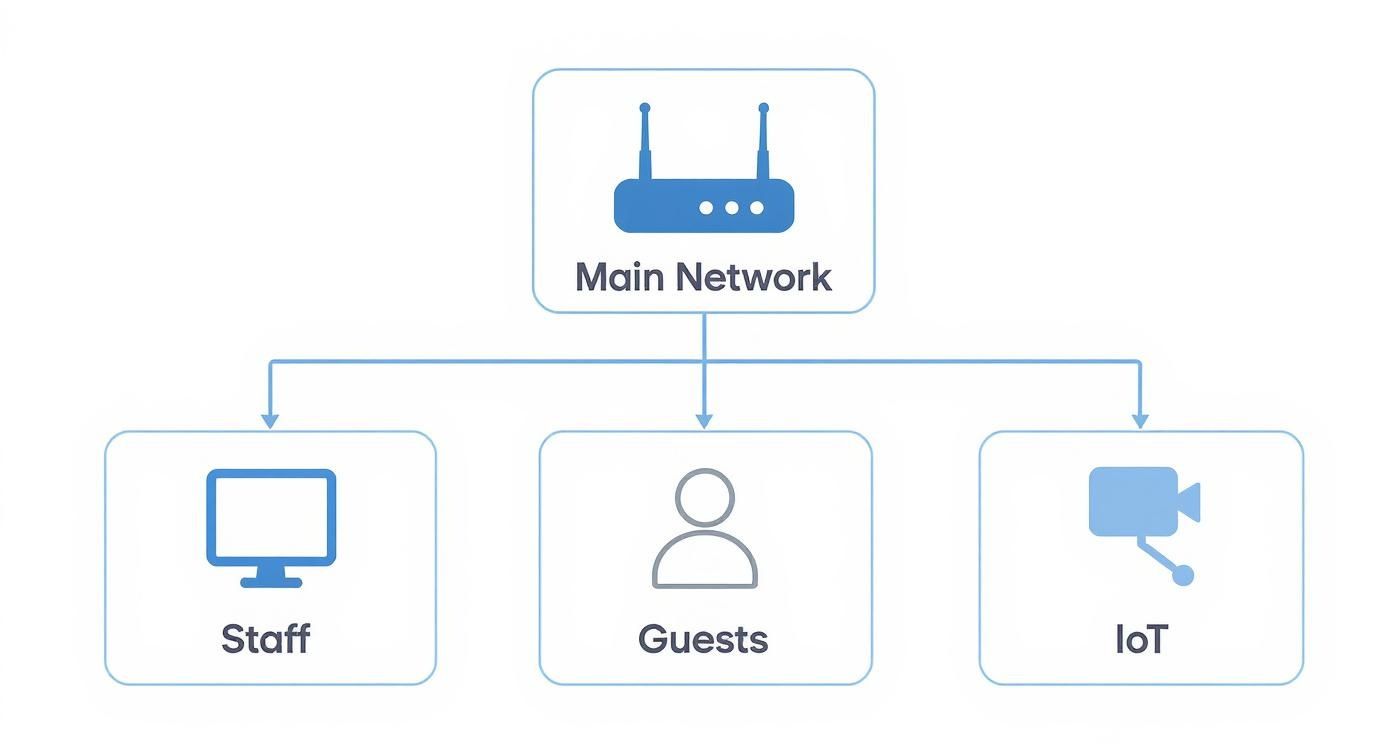
As shown, segmentation creates isolated pathways. A threat originating on the guest or IoT network has no direct route to your secure internal staff network.
Creating a Professional and Secure Guest Network
Your guest Wi-Fi often forms a client’s first digital impression of your business, so it must reflect your professionalism while maintaining robust security. A simple password is not sufficient; several key controls should be implemented.
One of the most effective methods for managing guest access is a captive portal. This is the branded landing page users see upon connecting, often requiring them to accept terms and conditions or provide an email address before gaining online access.
Practical Example: A marketing agency implemented a captive portal for their guest Wi-Fi. It displayed their company logo and required visitors to agree to an acceptable use policy. This not only reinforced their brand but also created a log of all guest connections, providing a vital layer of accountability.
Beyond the login, you should also establish bandwidth limits on your guest network. This practice, often called throttling, prevents a single guest from consuming all your internet bandwidth by streaming high-definition video or downloading large files, which could impede your business operations. A limit of 5 Mbps per user is typically adequate for browsing and email.
Another intelligent measure is to enable client isolation. This feature prevents devices connected to the guest network from communicating with each other, adding an extra layer of security for your visitors by protecting them from potential threats posed by other guests' devices.
Developing Proactive Network Monitoring Habits
Achieving robust Wi-Fi security is an ongoing process, not a one-time project. Once you have deployed solid hardware and segmented your network, the real work of maintaining that security begins. This requires vigilance and the cultivation of proactive network monitoring as a regular business practice.
This extends beyond simply checking for internet outages. It involves actively searching for indicators of compromise—such as an unfamiliar device appearing on the network, anomalous spikes in data usage, or repeated failed login attempts. For most small businesses, this does not require a dedicated security team. The right tools and a consistent routine can make a significant difference.
Tools and Techniques for Effective Monitoring
You can accomplish a great deal with the tools you already possess. Most business-grade routers include built-in monitoring features that provide an excellent starting point. It is not necessary to invest in enterprise-level software to maintain effective oversight.
Here is what we recommend focusing on:
- Spotting Unauthorised Devices: Regularly review the list of connected devices in your router’s administration panel. If you see an unrecognised device name, such as "Galaxy-A51" or "unknown-PC," it requires immediate investigation.
- Scanning Router Logs: Your router logs all significant events: successful and failed logins, configuration changes, and potential system errors. Dedicating five minutes each week to reviewing these logs can reveal red flags, such as repeated failed login attempts from a single IP address—a classic sign of a brute-force attack.
- Watching Traffic Patterns: Monitor for unusual data usage patterns. A sudden and sustained spike in outbound traffic at 3 AM when the office is empty is a major warning sign. It could indicate that a compromised machine is exfiltrating company data. Learning how to monitor network traffic is one of the most practical security skills you can develop.
Creating a Simple Incident Response Plan
Detecting a threat is only half the battle; knowing precisely what to do next is what truly matters. An incident response plan is your procedural guide for security events, ensuring you can act swiftly and decisively without panic.
A common error we observe is businesses assuming they will "figure it out" when an incident occurs. During a security event, clear thinking is often compromised. A simple, documented plan helps you follow a logical process to contain the threat and minimise damage.
Your plan does not need to be a 50-page document. For most small and medium-sized businesses, a straightforward checklist is sufficient. Alongside proactive monitoring, having a robust security incident response plan is what differentiates a minor issue from a business-ending disaster.
A Walkthrough of a Security Incident
Imagine you are conducting your weekly network check and you identify an unrecognised smartphone connected to your primary staff Wi-Fi. Here is how a basic incident response plan would be activated.
- Detection and Identification: You have already completed the first step by spotting the anomalous device. The next step is identification. Is it a new employee's device they forgot to register, or is it a genuine intruder?
- Containment: The immediate priority is to neutralise the threat. The very first action is to forcibly disconnect the unknown device from the network via your router’s administration panel. Then, as a precaution, you immediately change the internal Wi-Fi password. This ensures the intruder cannot reconnect.
- Investigation: With the immediate threat mitigated, you can investigate further. Check the router logs to determine when the device first connected. This helps establish the potential duration of the breach and what data might have been exposed.
- Recovery and Follow-Up: After changing the password, you will need to reconnect all legitimate company devices using the new credentials. This is also a crucial moment to conduct a post-mortem analysis: how did this happen? Was a password written on a sticky note? This final step transforms a reactive incident into a proactive learning opportunity, strengthening your overall security posture.
Answering Your Wi-Fi Security Questions
When securing your business's Wi-Fi, questions are inevitable. The technology and the threat landscape are constantly evolving. Let's address some of the most common queries we receive from UK businesses, providing clear, actionable advice.
Mastering these details is more than an IT exercise; it is about safeguarding your business. This is particularly important when considering user behaviour on public networks. Research shows that while 66.5% of UK users worry about the risks of public Wi-Fi, nearly a quarter do not use a VPN for protection. The full data is available in this public Wi-Fi safety report from Panda Security. This is a clear signal that businesses cannot afford complacency with their own internal security.
Is WPA3 Really That Much Better Than WPA2?
In short, yes. The transition from WPA2 to WPA3 represents a genuine leap forward for wireless security and should be a priority for any business. The most significant advantage of WPA3 is its ability to thwart offline dictionary attacks. This is a classic technique where an attacker captures a small amount of your network data and then uses software to guess the password repeatedly until a match is found.
WPA3 renders this method almost entirely ineffective. It also mandates the use of Protected Management Frames (PMF), which helps protect your network from eavesdropping and disruption. For your guest network, WPA3 provides individualised encryption, meaning each connected user's traffic is encrypted separately. This prevents them from spying on each other—a non-negotiable feature in any professional environment.
How Often Should We Change Our Wi-Fi Password?
If you are still using a single password for all users (a Pre-Shared Key or PSK), it should be changed at least every three months as a baseline. More critically, it must be changed immediately when an employee who knows it leaves the company.
However, the definitive expert advice is to move away from shared passwords entirely. The superior solution is to implement WPA3-Enterprise with a RADIUS server. This provides every employee with their own unique login credentials for the Wi-Fi. It grants you exceptional control—you can revoke an individual's access instantly without affecting anyone else and maintain a clear audit trail of network activity.
Relying on a single shared password is like issuing everyone the same key to the main office. When someone leaves, you must re-key the entire building. Individual credentials allow you to manage access with surgical precision, enhancing both security and operational efficiency.
This individualised approach eliminates the risk of a disgruntled former employee retaining access and spares you the significant administrative burden of updating every phone, laptop, and tablet with a new password.
Can I Use a Consumer Router for My Small Business?
While it is tempting to reduce initial costs, using a consumer-grade router for your business is a risk we strongly advise against. Any perceived saving is quickly negated by the absence of crucial security features required to adequately defend a business network.
Business-grade routers are designed for more complex and high-stakes environments. They include features that consumer models simply do not offer:
- VLAN Support: This is essential for segmenting your network into separate, isolated zones for staff, guests, and IoT devices. If one zone is compromised, the threat is contained.
- Advanced Firewall Controls: You gain far more granular control over the traffic permitted in and out of your network, making it much easier to block suspicious activity.
- WPA3-Enterprise Support: This is necessary to implement the individual user authentication with a RADIUS server discussed earlier.
- Timely Security Updates: Manufacturers of business hardware are more reliable in patching security vulnerabilities, releasing firmware updates more frequently and for a longer product lifespan.
Investing in appropriate business-grade hardware from the outset builds a stronger, more resilient foundation for your network. It provides the robust features and scalability necessary to protect your business as it grows and as cyber threats continue to evolve.
At SES Computers, we understand that securing your network is fundamental to your success. If you require expert guidance on implementing these security measures—from selecting the right hardware to configuring a fully segmented network—our team is here to assist. Discover our managed IT and security services at https://www.sescomputers.com.