Virtual Desktop Infrastructure (or VDI, as you'll often hear it called) is a sophisticated method for running your team's work computers from a central server. Imagine this: instead of your desktop environment residing on the physical machine in front of you, it's hosted within a highly secure data centre. You can then access that full desktop experience from almost any device, anywhere.
What Is VDI and Why It Matters for UK Businesses
Let’s start with a picture of a typical professional services firm. Every employee has their own desktop PC or laptop. Each of those machines is its own island—it needs to be configured individually, have software installed, be patched for security, and maintained. When one breaks down or a laptop is stolen, the data on it is vulnerable, and your employee is out of action. It's an inefficient, expensive, and frankly, risky way to operate.
Now, imagine a different setup. Instead of all those separate islands, you have a single, central hub for your entire digital office. From that one hub, you can deliver a perfect, secure, and fully-equipped desktop to any employee, on any device they happen to be using. It could be a basic terminal in the office, their personal laptop at home, or even a tablet while they're travelling. That, in a nutshell, is the power of VDI virtual desktop infrastructure.
Shifting from Islands to a Central Hub
VDI completely changes the game for managing business IT. It directly addresses some of the biggest headaches UK businesses are dealing with, especially as flexible working becomes the norm. The key advantages really boil down to a few critical areas:
- Simplified IT Management: Your IT team goes from wrestling with hundreds of individual PCs to managing a single, master desktop "image." Need to update an application or apply a security patch? They do it once on that central image, and every single user gets the update instantly. For a law firm, this means a critical software update can be rolled out to every solicitor's desktop simultaneously, ensuring compliance without any downtime.
- Strengthened Data Security: Because the desktop is running in the data centre, your company data never actually leaves it. All the user sees on their screen is a stream of pixels. If an employee's laptop is lost or stolen, there's no sensitive data on it to be compromised.
- Enabled Flexible Work Models: VDI is one of the cornerstones of a modern work culture. It gives your team a consistent, secure way to work no matter where they are, which is crucial for keeping the business running and attracting top talent.
A major reason so many UK companies are turning to VDI is its ability to create a secure and flexible remote working setup. If you're looking to understand this area better, it's worth exploring the different remote work solutions available.
VDI transforms IT from a reactive, device-centric model to a proactive, user-centric service. The focus shifts from managing physical hardware to delivering a secure and reliable digital workspace experience.
Take a UK accounting firm, for example. Using VDI, they can give their accountants secure access to confidential client files and specialised financial software from home. Business carries on without a hitch, and they don't have to fork out for expensive, high-spec laptops for everyone. An accountant can simply use their own home computer, safe in the knowledge that all company data remains completely isolated and protected within the corporate network. This is what makes VDI virtual desktop infrastructure such a strategic advantage for any modern business.
A Look Under the Bonnet: VDI Architecture and Its Components
To really get to grips with what a VDI virtual desktop infrastructure can do, it helps to lift the bonnet and see how all the pieces fit together. It might sound complicated, but the architecture is actually quite logical. The easiest way to picture it is like a modern, fully-serviced apartment block, where every part has a specific and vital job to do.
This diagram shows the centralised VDI model side-by-side with a traditional IT setup, where every computer is its own island.
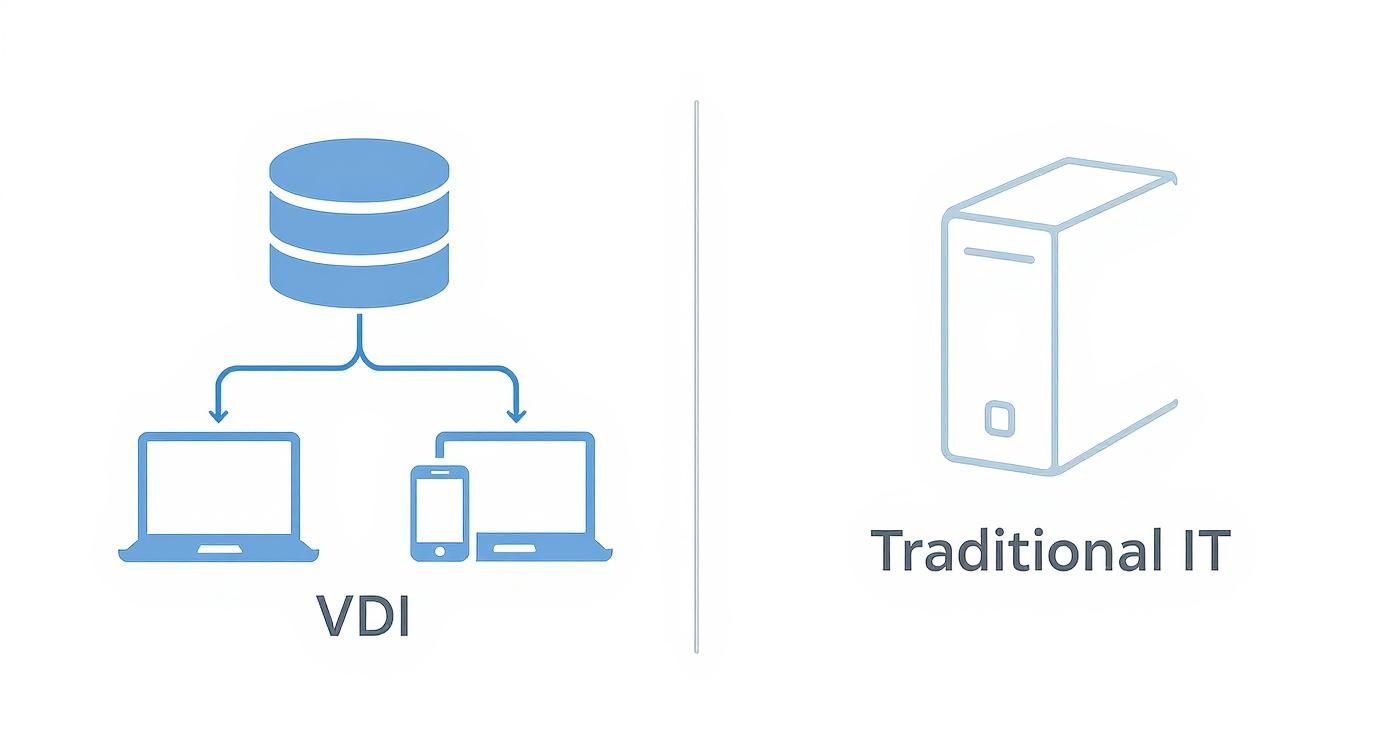
As you can see, VDI pulls all your computing resources onto a central server. This massively simplifies management and security, which is a world away from the scattered nature of traditional IT. This architectural shift is the key to delivering a consistent, reliable experience to your team, no matter what device they're using.
The Foundation: The Hypervisor
Right at the base of our apartment block, we have the hypervisor. This is the fundamental software that runs on the physical server. Its whole purpose is to create and run the virtual machines (VMs) that will become your employees' desktops.
In our analogy, the hypervisor is the ground floor and the entire structural framework of the building, making it possible to build all the individual flats above. It cleverly carves up the server’s resources—like processing power, memory, and storage—and allocates them to each virtual desktop as needed.
The Concierge: The Connection Broker
Next up is the connection broker. Think of this as the building's concierge or front desk manager. When an employee wants to access their desktop, they first check in with the broker. This component confirms their identity, checks their access permissions, and then directs them to their assigned virtual flat.
It’s an essential gatekeeper, making sure only the right people get access to the right resources, and it plays a huge part in managing all the active user sessions. The technology that underpins this process is often detailed in guides explaining what is Remote Desktop Protocol.
Organised Floors: Desktop Pools
Inside our VDI apartment block, desktops aren’t just scattered randomly; they're organised into desktop pools. These are simply groups of similar virtual desktops, a bit like floors full of flats with identical layouts.
For example, your accounts team might have a pool of desktops with specific financial software already installed. At the same time, the marketing team could have a completely different pool loaded with their creative applications. This approach makes it incredibly efficient to manage and update desktops for different departments or roles.
A well-designed VDI architecture shifts the focus of IT management. Instead of constantly fire-fighting issues on individual devices, the team can strategically deliver entire digital workspaces. The priority becomes the user and their applications, not the piece of hardware on their desk.
Persistent vs. Non-Persistent Desktops
Finally, it’s important to know about the two main types of "flats" you can offer your team. This choice has a big impact on both the user's experience and your own management workload:
- Persistent Desktops: This is like giving each user their own flat. They get a dedicated virtual desktop that saves all their changes, personalisations, and data between sessions. It’s the perfect setup for knowledge workers, developers, or anyone who needs a consistent and customised environment to work in. For an architect, this means their project files and specific software customisations are exactly as they left them every morning.
- Non-Persistent Desktops: This is more like using a hotel room. Every time a user logs in, the desktop is a generic, clean slate. As soon as they log out, it resets back to its original state. This is ideal for call centres, training labs, or any shared workstation where users don’t need to save personal files on the machine itself. For a financial services contact centre, this ensures that no sensitive customer data is ever left on a desktop after a call.
The remarkable growth of the VDI market in the UK shows just how important this technology has become. Valued at around $15 billion in 2025, it's set to grow significantly, driven by the need for more secure and flexible IT solutions. Sectors like government and financial services have seen huge benefits; for instance, over 72% of UK IT leaders report that VDI has made their business continuity plans much more robust.
On-Premises VDI vs Cloud-Based DaaS for UK SMBs
When you decide to bring a VDI virtual desktop infrastructure into your business, one of the first big questions you'll have to answer is: where will it all live? You essentially have two paths to choose from. You can build it all yourself, right on your own premises, or you can opt for a cloud-based service, often called Desktop as a Service (DaaS), managed by an external provider.
The choice you make here isn't just about technology; it fundamentally shapes your costs, your level of control, and how you allocate your IT resources. It's a bit like deciding whether to buy a car or just use a ride-sharing service. Owning the car gives you ultimate control, but you're responsible for everything—the hefty initial price, fuel, insurance, and every single repair. The subscription service, on the other hand, offers a simple, predictable monthly fee while someone else handles all the complicated work behind the scenes.
This isn't just a technical decision. It's a strategic one that directly impacts your company’s financial planning and its ability to adapt and grow.
The Traditional Route: On-Premises VDI
With an on-premises VDI setup, your business buys, owns, and manages every piece of the puzzle. We’re talking servers, storage, networking gear—the lot—all housed in your own office or a private data centre. This model puts your IT team in the driver's seat, giving them total control over every aspect of the environment.
This hands-on approach is often the preference for organisations with highly specific security or compliance needs, such as legal or financial services firms, where knowing exactly where your data is at all times is non-negotiable. However, this path requires a significant upfront investment and, crucially, the in-house expertise to design, build, and maintain a complex system.
The Flexible Alternative: Cloud-Based DaaS
Desktop as a Service, or DaaS, lifts the entire VDI virtual desktop infrastructure out of your server room and places it in the cloud. A third-party provider, like a local managed IT partner, owns and looks after all the back-end infrastructure. Your business simply pays a predictable subscription fee, typically per user, each month.
This completely changes the financial model, turning a large capital expense into a manageable operational one, which is a massive advantage for most small and medium-sized businesses (SMBs). It also means you don't need a team of VDI specialists on your payroll, because the provider handles all the maintenance, security patches, and performance checks. To get a better feel for this model, take a look at our guide on the benefits of VDI as a Service.
For many UK SMBs, DaaS is the most accessible way to start using VDI. It removes the steep initial cost and the headache of managing complex infrastructure, letting them focus on running their business while still accessing enterprise-level technology.
The move towards cloud solutions is undeniable here in the UK. Recent market analysis projects the UK cloud VDI market will hit £5.0 billion by 2032, growing at an impressive 16.5% annually. This growth is being fuelled by businesses seeking more agile, secure, and scalable ways of working. In fact, estimates suggest that over 60% of mid-sized UK companies are now actively exploring VDI or DaaS solutions.
Making the Right Choice for Your Business
So, which is right for you? On-premises VDI or DaaS? The answer really boils down to your specific business needs, your budget, and the technical skills you have in-house. A side-by-side comparison can make the best path forward much clearer.
On-Premises VDI vs Cloud-Based DaaS at a Glance
This table breaks down the key differences between the two models to help you weigh your options.
| Factor | On-Premises VDI | Cloud-Based DaaS |
|---|---|---|
| Initial Cost | High capital expenditure (CapEx) for servers and licences. | Low to no upfront cost; becomes an operational expense (OpEx). |
| Ongoing Costs | Power, cooling, maintenance, and specialist IT staff salaries. | A predictable monthly subscription fee, usually per user. |
| Control | Complete control over hardware, software, security, and data. | Less direct control; you rely on the provider's infrastructure. |
| Scalability | Slower and more expensive to scale; requires buying new hardware. | Scale up or down quickly; add or remove users on demand. |
| IT Expertise | Requires a dedicated, specialised in-house team to manage. | Managed entirely by the provider; minimal in-house skill needed. |
Ultimately, for a UK SMB that does not have a large, dedicated IT department or deep pockets for upfront capital, DaaS often presents a much more practical and cost-effective solution for deploying a VDI virtual desktop infrastructure.
The Good, the Bad, and the Essential: VDI's Pros and Cons
Like any major technology overhaul, adopting VDI has its upsides and its potential challenges. It’s crucial to go in with your eyes open, understanding both what you stand to gain and what you need to plan for. A clear-eyed view is the first step towards a successful implementation.
For most businesses, the conversation starts with security and simplicity. When a VDI rollout is done correctly, it can genuinely make your operations more secure, agile, and, in the long run, more cost-effective.
So, What’s the Big Win with VDI?
For many UK businesses, the most powerful draw is the immediate security boost. Consider this: all your company data and applications live safely within your data centre, not scattered across dozens of laptops out in the wild. If an employee’s device gets lost or stolen, it’s an inconvenience, not a catastrophe. Your critical information remains completely untouched.
But the benefits go well beyond just security. The day-to-day operational wins are huge:
- Sanity for your IT Team: Imagine no longer having to update, patch, and fix hundreds of individual computers. With VDI, your IT team manages a single master "golden image." Need to roll out a software update? It can be done for everyone in minutes, not days.
- Work from Anywhere, Properly: Your team gets the exact same desktop experience whether they’re in the office, at home, or in a coffee shop. It’s true flexible working, but without ever compromising on performance or security.
- Smarter Spending: Yes, there's an upfront cost, but VDI can seriously reduce your total cost of ownership over time. Because the heavy lifting happens in the data centre, you don't need powerful PCs for your staff. You can breathe new life into older hardware or switch to cheaper, simpler thin clients.
This isn't just theory; it’s happening right now. The shift is clear, with over 64% of UK SMBs now viewing cloud platforms like VDI as vital for remote work. We're seeing this across the board, from healthcare trusts needing secure access to patient records, to the 73% of educational institutions using cloud tools for hybrid learning. You can get a deeper look at the UK's cloud adoption statistics over on ITDeskUK.com.
The Reality Check: Potential Hurdles to Plan For
Now for the other side of the coin. A successful VDI project means being honest about the challenges from day one. The biggest hurdle, especially if you’re building it yourself on-premises, is the initial complexity and cost.
You'll need some serious planning around your servers, storage, and network infrastructure. It’s a demanding project, and trying to tackle it without the right expertise is a recipe for failure.
VDI isn't a simple plug-and-play solution; it's a fundamental change to your infrastructure. Success hinges on meticulous planning that connects the technology directly to what your users and your business actually need—especially when it comes to the network.
Here are a few other critical points to keep on your radar:
- The User Experience is Everything: A user's experience is only as good as their network connection. Any lag or unreliability between their device and the data centre will make their virtual desktop feel sluggish and frustrating. You absolutely cannot skimp on network capacity planning.
- Your Network is Now Mission-Critical: Since everything depends on the network, an internet outage can grind work to a halt for your entire remote team. You need to think about robust, and probably redundant, connectivity from the outset.
- Not All Applications Play Nicely: Most modern software is built for this kind of environment, but some older or very niche applications can be stubborn. They might need extra testing and tweaking to make sure they run properly.
For example, a London-based marketing agency could use VDI to give freelance designers secure access to high-end graphics software, saving a fortune on expensive workstations. But first, they would have to be 100% certain their network could handle the massive bandwidth those creative tasks demand. Get it wrong, and they’d just have a team of frustrated designers.
By facing these challenges head-on, you can build a VDI virtual desktop infrastructure that truly delivers on its promises.
Your Practical VDI Migration Checklist
Moving to a VDI virtual desktop infrastructure is a significant undertaking, but with thoughtful planning, it can be a smooth and strategic upgrade for your business. A successful switch all comes down to understanding your organisation's real needs before you even think about configuring a server.
This checklist walks you through the essential planning stages to make sure your transition is effective and helps you sidestep the common, costly mistakes we often see.

Assess Your User Needs and Workloads
First things first: you need to analyse your people. Not everyone in your company uses technology the same way, and a one-size-fits-all approach to virtual desktops is a recipe for disaster. You'll end up with some staff frustrated by poor performance, while others have far more power than they actually need.
The best way to start is by grouping your employees into different user profiles or 'personas'. This lets you provide each role with the right virtual desktop experience for the job they do.
- Task Workers: Think of roles like data entry clerks or call centre agents. They typically use a very small, specific set of applications. Their performance needs are quite low, which makes them perfect candidates for simple, non-persistent desktops.
- Knowledge Workers: This is your staff in departments like accounts or marketing. They juggle multiple applications, from office suites to web browsers, and need a bit more power. They work best with persistent desktops that remember their settings and files.
- Power Users: Here you have developers, engineers, and graphic designers who rely on seriously resource-hungry software. They need top-tier virtual desktops, often with dedicated graphics processing (vGPUs), to handle their demanding workloads without any issues.
Evaluate Application and Hardware Compatibility
Once you know what your users need, it's time to look at the tools they use. You have to be certain that every piece of critical business software will run smoothly in a virtual environment. The best approach is to make a full inventory of all your applications and rank them by how important they are to your daily operations.
From there, set up a test environment to trial your most crucial software. Taking this step early on helps you spot any compatibility issues or performance bottlenecks long before they can impact your whole team. You'll also need a solid plan for your old hardware; understanding IT Asset Disposition is key to handling legacy equipment securely and responsibly.
Plan Network Capacity and Security
Think of your network as the central nervous system for your VDI setup. If it is not up to the task, you'll get lag, latency, and a terrible user experience that completely undermines the whole point of the project. You need to take a hard look at your current network traffic and calculate the extra demand that VDI will place on it.
At the same time, you must build your security strategy from the ground up. This is about much more than just putting up a firewall. It means having clear policies for:
- Access Control: Using role-based access to make sure people can only get to the data and applications they actually need for their jobs.
- Data Encryption: Protecting your data both when it's travelling across the network (in transit) and when it's stored on your servers (at rest).
- Endpoint Security: Making sure the devices people connect from are secure, whether they're company-issued thin clients or their own personal laptops.
A VDI migration isn't just an IT project; it's a business transformation. Success comes from a phased, user-focused approach that puts testing, feedback, and continuous improvement first.
Create a Pilot Programme and Rollout Plan
Finally, whatever you do, do not try to launch everything at once. A phased rollout, starting with a pilot programme, is by far the safest and most effective way to proceed. Select a small, representative group of users from your different personas and let them test the system in their day-to-day work.
This pilot phase is absolutely invaluable. It gives you a chance to get direct feedback, uncover any unexpected issues, and fine-tune performance before you roll VDI out across the entire company. For more detail on structuring this, our hosted desktop implementation guide has some great pointers.
By following these steps, you will build a solid foundation for a VDI virtual desktop infrastructure that genuinely works for your business.
Finding the Right VDI Partner in the UK
Moving to a VDI virtual desktop infrastructure is a major business decision, not just an IT project. The success or failure of your entire VDI rollout often comes down to the partner you choose to guide you through it. For businesses here in the UK, working with a local managed IT provider gives you a significant advantage. They are already immersed in the specific security and compliance landscape that affects your day-to-day operations.
A local partner understands the nuances of UK data protection laws, like GDPR, and can build a VDI environment that meets all regulatory requirements. Plus, when you really need help, they are close by, not halfway across the world.
Key Questions for a Potential Provider
When you're vetting potential partners, you need to dig deeper than just a sales presentation. It’s about finding a team that fits your business – your size, your industry, your objectives. A good provider will not just talk about technology; they will talk about your business.
Make sure you ask some direct questions before signing anything:
- Experience: Can you provide case studies of VDI projects you have completed for businesses similar to ours in size and sector?
- Support Model: What happens when things go wrong? Do you offer 24/7 monitoring, and what are your guaranteed response times for critical system failures?
- Security & Compliance: Are you certified with schemes like Cyber Essentials? How will you ensure our VDI setup keeps our data secure and compliant with UK law?
- Performance Optimisation: How do you maintain performance? We have power users who cannot afford lag – what is your strategy for them?
Choosing a VDI partner isn’t just about buying technology. It’s about finding an expert you can trust with a critical part of your business. Their grasp of your unique challenges is every bit as important as their technical skills.
Your Next Steps to a Modern IT Setup
Bringing VDI into your business is a huge step forward. It’s the foundation for secure remote work, better efficiency, and tighter control over your IT. You centralise everything, seriously strengthen your security, and give your team the freedom to do their best work from anywhere. The right VDI virtual desktop infrastructure can make your business far more resilient and agile.
If you’re ready to see what VDI could do for your organisation, the next step is to have a discussion with someone who has the right experience. Get in touch with us at SES Computers for a no-obligation consultation. We'll help you map out your needs and determine if VDI is the right move for you.
VDI: Your Questions Answered
Even with a solid grasp of the big picture, many businesses still have nagging questions about what VDI looks like in practice. Let's tackle a few of the most common queries we hear from UK organisations when they're considering a move to a VDI virtual desktop infrastructure.
How Do We Handle Software Licensing?
This is a significant issue, and rightly so—getting it wrong can lead to serious compliance problems and unexpected costs. The simple truth is that you cannot just transfer your existing desktop software licences into a virtual environment.
Most major vendors, like Microsoft, have specific rules for virtualisation. You will likely need to look at things like Windows Virtual Desktop Access (VDA) licences for every user or device connecting to a Windows virtual desktop. It’s absolutely crucial to review your current agreements and work with an IT partner who knows the landscape. An expert can often find more cost-effective licensing routes designed specifically for virtual setups.
Can It Really Work for Our Power Users?
Absolutely. It’s a common myth that VDI is only for standard office workers. Modern VDI can easily support your most demanding roles, whether it's designers, architects, or engineers running complex CAD software.
The magic happens by assigning dedicated graphical processing units (GPUs) to their virtual machines, a setup known as vGPU. This gives their virtual desktop the serious graphical horsepower needed to handle those resource-hungry applications without a stutter, just like a top-spec physical workstation. Be aware, though, that this is not inexpensive. It requires careful planning of your server and network capacity to avoid performance bottlenecks, so you will want to be strategic about who gets this level of resource.
A common mistake is to over-provision resources for every user. A successful VDI strategy matches the virtual desktop's power directly to the user's role, ensuring cost-efficiency without compromising the experience for those who need it most.
What’s Our Plan B if the Internet Goes Down?
A very important question. Since VDI relies on a stable network connection to the central server, a total internet outage means remote users are cut off from their virtual desktops. You must plan for this eventuality.
The best way to guard against this is by investing in redundant, high-availability internet connections from different providers. This builds genuine resilience. It's also worth remembering that if you have an on-premises VDI deployment, your team in the office can carry on working just fine on the local network, even if the main internet line is down. A solid network continuity plan is a non-negotiable part of any VDI virtual desktop infrastructure strategy.
Ready to see how a VDI virtual desktop infrastructure could reshape the way your business operates? The expert team at SES Computers can offer a no-obligation consultation to talk through your specific needs. Learn more about our managed IT services at sescomputers.com and find out if a more secure, flexible, and efficient way of working is right for you.