Picture this: your entire office desktop—every file, piece of software, and personal setting—isn't stuck on a single physical computer. Instead, it’s all safely housed in a central, secure hub. That’s the big idea behind Virtual Desktop Infrastructures (VDI). It's a technology that gives your team consistent, secure access to their full work environment, no matter what device they're using or where they are.
What Are Virtual Desktop Infrastructures?

To really get your head around VDI, think of it as a secure, digital toolkit for your professional services firm. Rather than handing every employee a physical toolbox that could be lost, damaged, or stolen, you give them a key to a master workshop. Inside that workshop, they have access to every tool they could possibly need, all perfectly maintained and organised.
It doesn't matter where your people are—at home, on a client's site, or grabbing a coffee—they can always access the exact tools they need to do their job. As the business owner, you're in charge of the workshop's security and maintenance, making sure everything is up-to-date and protected.
Solving Common Business Problems
Virtual desktop infrastructures are brilliant at tackling several persistent headaches that UK small and medium-sized businesses face every day. The technology offers real-world fixes for issues that can stunt growth, eat up resources, and introduce serious security risks.
Here are a few key problems that VDI helps solve:
- Inconsistent PC Setups: Trying to manage a whole fleet of computers with different operating systems, software versions, and custom configurations is an IT nightmare. For a legal practice, VDI solves this by standardising the desktop environment, ensuring every solicitor has the same compliant software versions.
- Bring Your Own Device (BYOD) Security: When staff use their own laptops or tablets for work, company data can easily end up in the wrong place. With VDI, no data is ever stored on the local device, creating a clean separation between their personal and professional worlds.
- High Hardware Costs: The endless cycle of buying, maintaining, and replacing expensive PCs is a major capital drain. VDI lets you use less powerful, cheaper devices (often called thin clients) or even breathe new life into older hardware.
As a core part of a modern IT strategy, virtual desktop infrastructures are becoming increasingly popular as effective remote working solutions. This approach centralises control and makes IT management far simpler, which is a massive draw for businesses wanting to be more efficient and secure.
The real game-changer with VDI is centralising your data and applications. By shifting the heavy lifting from the user's device to a secure data centre, you massively shrink your company's attack surface and make compliance much easier to manage.
For example, imagine a Dorset-based accountancy firm. They can give their team secure access to sensitive financial software from anywhere. If an employee's laptop is lost or stolen, no client data is compromised because it never actually left the secure central server. This simple concept shows the immediate value of VDI, even before we get into the technical nitty-gritty of how it all works.
How VDI Works: A Practical Breakdown
To really get your head around how VDI delivers such a seamless experience, it helps to peek under the bonnet and see how the moving parts work together. Think of it like a highly organised digital office, where every component has a specific job to do so your team can work effectively from anywhere.
At the very core of any VDI setup is the hypervisor. This is the powerful engine that creates and runs all the virtual machines (VMs). In simple terms, the hypervisor carves up a single, beefy physical server, dividing its processing power, memory, and storage into multiple, completely separate virtual desktops.
This clever division means one server can host dozens of individual desktop environments. Each one acts as a complete, independent computer for a user, which is the foundational technology that makes centralising your entire office’s computing power possible.
The Key Players in a VDI System
Once the hypervisor has created the virtual desktops, two other critical components step in to manage who gets access and to keep everything consistent. They are the gatekeepers and organisers of your virtual office.
The Connection Broker: You can think of this as the system's digital receptionist. When an employee logs in from their laptop at home, the connection broker checks their credentials, confirms their access rights, and then points them to their assigned virtual desktop. It expertly manages all the user traffic, making sure everyone gets to the right place securely and without delay.
Desktop Pools: Instead of building every single desktop from scratch, IT administrators use a much smarter approach: desktop pools. These are groups of identical virtual desktops all created from one master template. For example, your accounts team might have a pool with their specific finance software, while the sales team gets a different pool configured with their CRM.
This approach is incredibly efficient. When a new person joins the company, IT doesn't have to spend hours setting up a physical computer. They just add the new user to the right desktop pool, and a fully configured, secure desktop is ready to go in minutes.
A Real-World Example in Dorset
Let’s picture an architect from a local Dorset firm. She’s out on a building site with a client and needs to make some urgent tweaks to a massive, complex CAD drawing.
She pulls out her standard, lightweight laptop—which has nowhere near the power to run CAD software on its own—and logs into her company's VDI portal. The connection broker instantly verifies who she is and connects her to her powerful virtual desktop, which is running on a server back at the main office.
Her familiar desktop appears on her screen, looking exactly like the one she uses at her desk. It's already loaded with the high-performance CAD software she needs and has full access to all the project files stored on the central server. The connection itself is managed by a highly efficient process, and you can learn more by understanding the Remote Desktop Protocol and its role.
Even though she's using a basic laptop, she experiences no lag or performance bottlenecks. All the heavy lifting and demanding processing is happening on the powerful central server, not on her local machine. This is the real magic of virtual desktop infrastructures: centralising all that computing muscle to deliver a high-performance desktop to any device, anywhere.
Choosing Your VDI Deployment Model
Deciding how to roll out a virtual desktop infrastructure isn't just a technical choice—it's a strategic move that will shape your budget, IT workload, and overall business agility for years to come. There’s no single "best" answer here. The right path depends entirely on your company's resources, security needs, and what you want to achieve in the long run.
Your decision really boils down to three main deployment models. Each offers a different mix of control, cost, and convenience, so it's vital to get your head around the trade-offs before you commit.
On-Premises VDI: The Do-It-Yourself Approach
With an on-premises model, you are in the driver's seat. Your business buys, owns, and manages every piece of the puzzle in-house—the servers, the storage, the networking gear, and all the VDI software licences.
This approach gives you absolute authority over security protocols and system configurations. It’s often the go-to for organisations handling highly sensitive data or those bound by strict regulations that demand all information stays on their own physical site. The flip side? It requires a hefty upfront investment and a skilled IT team to handle the constant maintenance, updates, and troubleshooting.
Hosted VDI: The Managed Partnership
A hosted VDI model offers a smart middle ground between control and convenience. In this scenario, a specialist partner like SES Computers owns and manages the core infrastructure in their secure data centre, but carves out a dedicated environment just for your business.
You keep control over your desktop images, applications, and user permissions, but you hand off the enormous responsibility of managing the underlying hardware. This sidesteps the need for a huge capital spend on servers and storage, turning it into a predictable operational expense. It’s a fantastic option for businesses that need top-tier security and performance without the headache of managing the kit themselves.
Think of a law firm in Wiltshire with strict client confidentiality rules. This model would be perfect. They get the security and compliance of a private environment, backed by expert management, letting them focus on their clients, not on server racks.
Desktop as a Service (DaaS): The Flexible Subscription
Desktop as a Service (DaaS) is a fully cloud-based solution you pay for on a subscription basis. With DaaS, a third-party provider handles absolutely everything—from the hardware and software to maintenance and updates. Your team just needs an internet connection to access their desktops.
This model is the ultimate in flexibility and scalability. You can add or remove users whenever you need to, paying only for what you use. This is ideal for businesses with a fluctuating workforce or seasonal peaks and troughs. The UK Virtual Desktop market is expected to grow at a CAGR of 18.7% from 2025 to 2032, driven by the need to support distributed teams securely and efficiently.
A fast-growing marketing agency in Hampshire, for instance, could use DaaS to get new team members up and running instantly for a big project. They skip the hardware costs and can scale back down just as easily when the project ends, tying their IT spend directly to their workflow.
No matter which model you choose, the underlying VDI process remains the same, as shown in the diagram below.
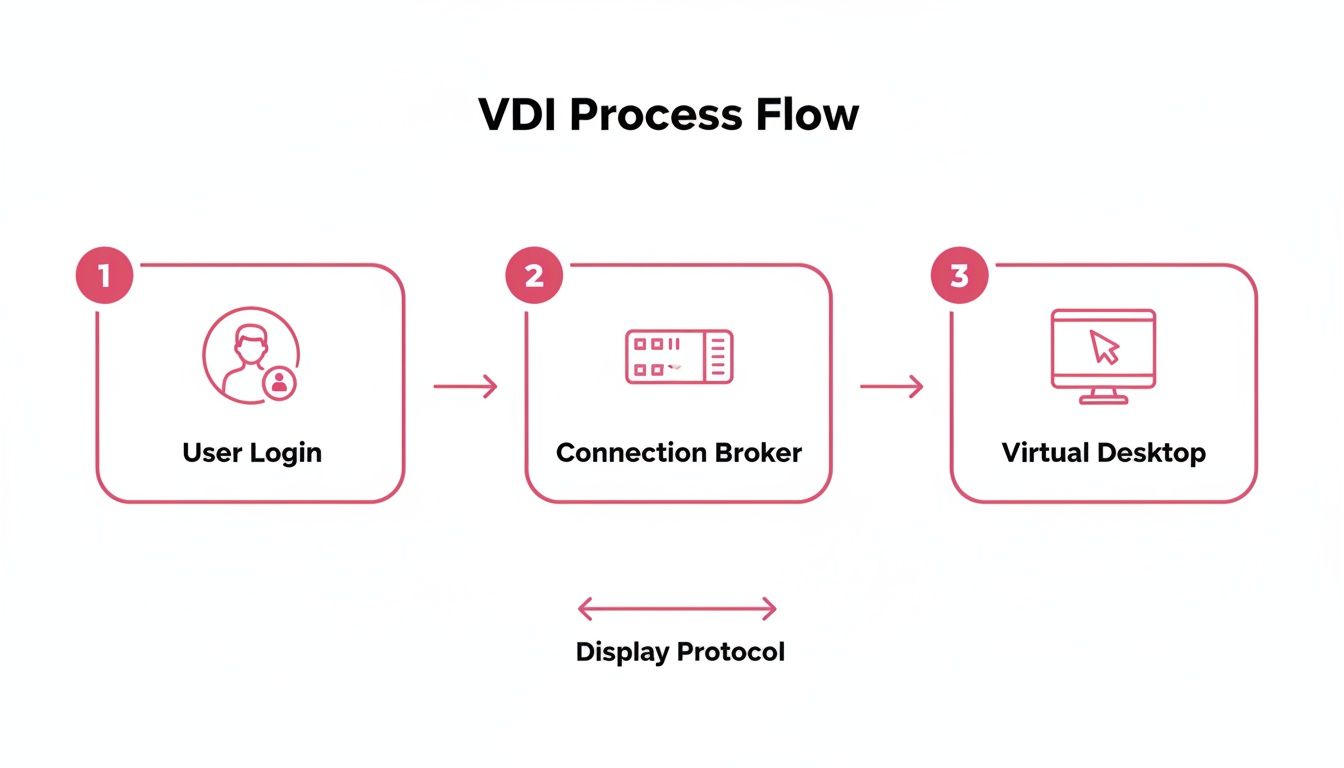
This flow shows how a user’s request is authenticated by a broker before they are securely connected to their virtual desktop, ensuring a managed and safe connection every time.
Comparison of VDI Deployment Models
To help you visualise the differences, this table breaks down the key characteristics of each model. It’s a quick way to see how they stack up against each other based on what matters most to your business.
| Feature | On-Premises VDI | Hosted VDI (e.g., SES Computers) | Desktop as a Service (DaaS) |
|---|---|---|---|
| Initial Cost | High (CapEx) | Low (OpEx) | Very Low (OpEx) |
| Control & Customisation | Full control over hardware and software | High control over desktops and apps | Limited to provider's offerings |
| IT Management Burden | High; requires in-house expertise | Low; partner manages infrastructure | Very Low; provider manages everything |
| Scalability | Limited by hardware purchases | High; can scale within dedicated resources | Very High; on-demand scaling |
| Security Responsibility | Entirely on your business | Shared responsibility model | Primarily on the provider |
| Best For | Organisations with strict compliance needs and a large IT team. | SMBs needing control without the hardware burden. | Businesses with fluctuating user numbers or seeking maximum flexibility. |
Picking the right model is a critical first step. By understanding these nuances, you can align your technology with your business strategy and ensure your VDI investment delivers real value. For a closer look at the service-based approach, you can learn more about VDI as a Service in our related guide.
The Business Benefits of Adopting VDI

It’s one thing to get your head around the mechanics of virtual desktop infrastructures, but the real question is always: what’s in it for my business? Moving to VDI isn’t just a technical upgrade; it’s a strategic decision that delivers real, measurable benefits across the board. It can strengthen security, boost productivity, and give you a genuine competitive edge—advantages that are especially powerful for UK SMEs.
The best way to think about these benefits is to group them into four key pillars: enhanced security, superior efficiency, significant cost savings, and greater business agility. By looking at it this way, VDI stops being an abstract concept and becomes a powerful business tool. Let's dig into what each of these means in practice.
Enhanced Security and Compliance
Centralising your data is one of the single most effective security measures any business can take. With VDI, absolutely no sensitive information is ever stored on an employee’s laptop, tablet, or home computer. This simple fact instantly neutralises the risk of a catastrophic data breach if a device is lost or stolen.
Think about it: a sales rep’s laptop gets nicked from their car. In a traditional setup, that’s a potential disaster—compromised client lists, financial data, and private company information are all at risk. With VDI, the laptop is just a window to your secure central server. Your IT team can revoke its access in seconds, and your data remains completely safe, tucked away in your controlled environment.
This central control also makes regulatory compliance far simpler. For any professional services firm handling personal data, adhering to GDPR is not optional.
VDI is a massive help in meeting these obligations. It ensures all data processing happens within a secure, monitored, and easily audited data centre. You maintain a clear, unbroken chain of custody over your information, which is the very foundation of a solid compliance strategy.
Superior Operational Efficiency
VDI can dramatically speed up how quickly your business operates and reacts to change. This is never more obvious than when you're onboarding new staff or setting up temporary project teams.
Imagine a Hampshire-based recruitment agency needs to get five new consultants started to handle a major new contract. The old way would involve ordering, configuring, and securing five new laptops—a process that could easily drag on for days, if not weeks.
With virtual desktop infrastructures, the IT team can roll out five fully configured virtual desktops from a master image in minutes. Each new starter can log in from almost any device and instantly have the exact software, files, and permissions they need. They're productive from day one, which translates directly into faster revenue.
Significant and Sustainable Cost Savings
While setting up VDI can involve an initial investment, the long-term financial wins are hard to ignore. One of the most immediate savings is in extending the life of your existing hardware.
Because all the heavy lifting—the actual computing—is done on the central server, you no longer need to shell out for high-spec PCs for every employee. Older, less powerful machines, or even low-cost 'thin clients', work perfectly well as simple access points. This can push back that expensive hardware refresh cycle by several years.
What's more, centralising your IT naturally reduces energy consumption. Instead of powering hundreds of individual desktop PCs, you're running a smaller number of highly efficient servers in a data centre. This consolidation means lower electricity bills and a smaller carbon footprint. In the UK, where the VDI market was valued at USD 1.5 billion in 2024, businesses are catching on to these savings. SMEs in sectors like manufacturing and research have seen hardware costs cut by up to 50%. You can learn more about these trends in the UK virtual desktop infrastructure market report.
Greater Business Agility
Finally, VDI gives you the agility to scale your operations up or down at a moment's notice. This kind of flexibility means your business can jump on opportunities without being bogged down by a rigid IT setup.
A classic example is a retail business gearing up for the Christmas rush. They need to hire dozens of temporary customer service agents to handle the inevitable surge in enquiries. Buying physical equipment for a three-month stint just doesn't make financial sense.
By using VDI, they can instantly provide virtual desktops for every temporary agent, allowing them to work securely from any location. As soon as the peak season is over, those desktops can be switched off just as quickly. This ensures the business only pays for the resources it's actually using. It’s this ability to scale on-demand, without huge capital spend, that defines a truly agile business.
What to Think About Before You Switch to VDI
Jumping into a VDI project without a solid plan is a recipe for disaster. It's easy to get excited by the potential benefits, but a "figure it out as we go" approach often leads to sluggish performance, unhappy staff, and a system that just doesn't work as promised.
To get it right, you need to do your homework first. Taking a step back to analyse your network, your people, and your software will ensure the VDI solution you build is genuinely right for your business.
Get Your Foundations Right: Network and Storage
In a VDI setup, the user experience is completely dependent on your network. Since every click and keystroke travels from the user's device to the central server and back, any network lag or bandwidth shortage will make the virtual desktop feel slow and unresponsive. Before you even think about anything else, you must be confident your network can handle the extra traffic.
Storage is the other common weak point. Imagine dozens, or even hundreds, of people trying to log in at 9 AM on a Monday. This "boot storm" puts immense pressure on your storage system. If it can't keep up with the sudden demand, everything grinds to a halt. Choosing the right storage—whether it's super-fast all-flash or a more balanced hybrid system—is critical for keeping things running smoothly.
A classic mistake is to focus only on total storage capacity (how many gigabytes) while ignoring performance (how many operations it can handle per second, or IOPS). Getting the IOPS right is often the single biggest factor in creating a system that feels fast and responsive, rather than one that causes constant complaints.
Understand Your Users and Their Software
Not everyone in your business uses their computer in the same way, so a one-size-fits-all virtual desktop is doomed from the start. You need to get a clear picture of what different teams actually do all day.
- Task Workers: Think of people in data entry or customer service roles. They typically use just a handful of applications and don't need a powerhouse machine. Their virtual desktops can be simple and efficient.
- Knowledge Workers: This group includes staff in areas like finance or marketing. They juggle multiple programmes like office suites and collaboration tools, so they need more memory and processing power to multitask effectively.
- Power Users: These are your engineers, designers, or developers who rely on heavyweight software for things like CAD or video editing. They’ll need high-performance virtual desktops, often with dedicated graphics processing (vGPU), to do their jobs properly.
An accountant's needs are worlds apart from a graphic designer's. By profiling your users, you can give each group the performance they require without wasting money on overkill for those who don't need it. You also need to double-check that all your essential business software will actually work in a virtual environment and get your head around the licensing, which can be surprisingly complex.
The move towards VDI is gaining serious momentum for a reason. By 2035, the UK Virtual Desktop Market is expected to grow at a CAGR of 19.351%, a trend driven by businesses like yours across Wiltshire looking for smarter, more scalable solutions. If you're interested, you can read more about the UK's VDI market trends.
Always Start with a Pilot Programme
Finally, never go for a big-bang, company-wide launch from day one. Instead, run a pilot programme. Pick a small but representative group of employees from your different user profiles and let them be the first to try the new system.
This trial run is your chance to get honest, real-world feedback, spot any unexpected problems, and tweak the setup in a safe environment. Getting these wrinkles ironed out early on will make the full rollout for the rest of the company a much smoother experience. For a more detailed walkthrough, check out our complete hosted desktop implementation guide.
Finding the Right VDI Partner

Moving to VDI isn't just another IT project; it’s a fundamental shift in how your business operates. The success of this transition hangs on the partner you choose to guide you. This isn't about buying a product off the shelf. It’s about building a relationship with a team that gets to the heart of your business needs and long-term goals.
A genuine partner’s work starts long before a single virtual machine is spun up. It begins with a deep dive into your operations, understanding how your team works and what you want to achieve. From there, they should map out a clear migration plan that keeps disruption to an absolute minimum and sets you up for the best possible return.
What to Look For in a Managed VDI Provider
Choosing your VDI provider is a big decision, so you need to look past the sales pitch. You're looking for someone who provides not just the technology, but the ongoing support and security that lets you sleep at night. A solid vendor due diligence checklist is a great starting point for evaluating your options.
Here are a few non-negotiables to look for:
- Local Expertise: A provider with a real presence in Dorset, Hampshire, and Wiltshire understands the local business landscape and can offer more personal, responsive support.
- UK-Based Infrastructure: Your data needs to stay in the UK. This is crucial for data sovereignty and meeting strict GDPR compliance standards. Make sure their data centres are here, not overseas.
- Proactive Security: Good security isn't about reacting to problems—it's about preventing them. Your partner should offer 24/7 proactive security monitoring to catch and stop threats before they can cause damage.
- Comprehensive Managed Services: You shouldn’t have to worry about the details. A great partner handles everything: initial setup, data migration, software updates, routine maintenance, and user support.
The right partner doesn't just sell you a service; they deliver a promise. A promise that your VDI environment will be secure, efficient, and perfectly aligned with your business objectives, allowing you to focus on what you do best.
At SES Computers, we’ve built our reputation on being that kind of partner. Our local team works side-by-side with businesses to design, implement, and manage virtual desktop solutions that actually help you move forward. From day one planning to round-the-clock support, we make sure your IT is an asset that works for you, not a problem you have to solve.
Your Top VDI Questions Answered
Even after getting to grips with the basics of virtual desktops, it’s completely normal to have some practical questions buzzing around. We’ve put together answers to the most common queries we hear from UK business owners, helping to clear up the finer details and tackle any lingering uncertainties.
Is VDI a Secure Way to Handle Our Client Data?
Yes, in most cases, VDI is actually a far more secure setup than having traditional PCs. The main reason comes down to one simple fact: all your company data lives in a protected, central data centre, not on scattered laptops and tablets.
This immediately neutralises the risk of a data breach if a device is lost or stolen. Should an employee's laptop go missing, you can revoke its access instantly. Your sensitive client information remains completely untouched and secure on the server. When you work with a managed partner like us, you also get the benefit of enterprise-grade security, from advanced firewalls to round-the-clock monitoring.
Will Our Staff Need a Lot of Training to Get Used to VDI?
Not at all. One of the most brilliant things about VDI is how seamless it is for your team. From their point of view, the experience is almost identical to sitting down at their usual computer.
They simply log in through an application on their device of choice and are greeted by the familiar Windows or macOS desktop they know. All their software, files, and shortcuts are right where they left them, which means disruption is minimal and the learning curve is practically non-existent.
The hallmark of a great VDI system is that it's invisible to the user. They just get a fast, reliable desktop that works, without the underlying technology ever getting in their way. This keeps productivity high from day one.
Can VDI Actually Run Our Demanding Software?
Absolutely. Because all the processing power comes from high-performance servers, virtual desktop infrastructures can be configured to give specific users a serious amount of computing muscle. This is a game-changer for roles that depend on resource-hungry applications.
Think about an engineer using CAD software or a designer editing video. They can run these intensive programmes smoothly on a basic, lightweight laptop. Their local device is just acting as a window—a screen, keyboard, and mouse—while the powerful servers in the data centre are doing all the heavy lifting. The result is a high-performance experience without the cost of specialised, high-end workstations.
What Happens if We Lose Our Internet Connection?
It's true that VDI relies on a network connection to the central servers, so an internet outage will prevent users from accessing their virtual desktops. But in reality, this is no different from most of the cloud-based services your business likely uses every day.
The smart way to handle this is by building resilience into your connectivity. A common and effective strategy is to have your primary fibre line backed up by an automatic 4G or 5G failover service. This way, if the main connection drops, your team stays online and critical work continues without a hitch.
Ready to see how a secure, locally managed VDI solution could fit into your business? The team at SES Computers has over 30 years of experience helping SMEs across Dorset and Wiltshire build robust and efficient IT systems. Contact us today for a no-obligation consultation.