At its most basic, IT support is the service that keeps your business's technology running. From the laptops on your team's desks to the complex cloud networks that store your data, IT support manages and maintains it all. Think of it as the strategic oversight of your entire digital operation, making sure everything is smooth, secure, and efficient so you can get on with running your business.
Defining Modern IT Support for UK Businesses

Let’s get one thing straight: the old idea of IT support being a helpline you call when a computer breaks is long gone. It’s better to think of it as the facilities management for your digital workspace. A good IT partner doesn’t just fix things when they break; they work tirelessly in the background to stop them from breaking in the first place.
This modern approach is a cornerstone of business growth. It’s what allows your daily operations to run without a hitch, from sending a secure email to protecting your most valuable client data.
The Shift From Reactive to Proactive
The real game-changer in modern IT support is the move away from the reactive 'break-fix' model towards a truly proactive partnership.
- The Old Way (Break-Fix): Something goes wrong—a server crashes, someone can’t log in, a PC grinds to a halt—and only then do you call for help. This always leads to frustrating downtime and unpredictable costs.
- The New Way (Proactive Management): Your IT partner is constantly watching over your systems. They’re applying security patches, checking backups, and spotting potential problems long before they can affect your business.
For a professional services firm, a proactive team might get an alert that a server’s hard drive is showing early signs of failure. They can then schedule a replacement over the weekend, meaning you arrive on Monday morning completely unaware of the data loss disaster that was just avoided.
More Than Just Troubleshooting
Today, IT support covers a massive range of responsibilities essential for any business. It's about building a technology foundation that is both resilient and effective.
A proactive IT partner works like an extension of your own team. They don't just provide technical fixes; they offer strategic advice to make sure your technology is actually helping you achieve your business goals.
As UK businesses navigate an ever-more complex landscape of cyber threats, this strategic role has never been more critical. Proper security is now a non-negotiable part of the package. For a closer look at the kind of modern defensive thinking involved, understanding Zero Trust security is a great place to start.
Ultimately, a complete picture of what is IT support reveals a service focused on optimising how you work and protecting your future. The full scope is surprisingly broad, and you can explore the specific IT support responsibilities in our detailed guide.
What’s Really Included in a Comprehensive IT Support Package?

Partnering with a professional IT support provider isn’t just about having a number to call when things break. It’s an investment in a whole suite of interconnected services designed to keep your business running smoothly, securely, and efficiently. Each service acts as a distinct layer of protection and optimisation, all working in concert to build a truly robust technology foundation.
These aren't just abstract technical features, either. They're direct answers to the real-world challenges that UK businesses grapple with every day. From stopping a cyberattack in its tracks to making sure your team can work effectively from anywhere, these core components deliver tangible, measurable value.
Proactive System Monitoring and Maintenance
This is the absolute bedrock of modern IT support. Instead of waiting for something to go wrong, a good provider is always watching. They monitor the health of your entire network—from servers to laptops and everything in between—around the clock.
This means they spot the warning signs long before you do. For example, a monitoring system might detect a server's temperature slowly creeping up, letting a technician fix the cooling over the weekend. That simple, proactive step prevents a catastrophic shutdown in the middle of your busiest week.
This forward-thinking approach typically includes:
- Automated Patch Management: Making sure all your software is kept up-to-date with the latest security fixes, closing the door on vulnerabilities that criminals actively look to exploit.
- Performance Tracking: Pinpointing bottlenecks, like a sluggish network connection, and sorting them out before they start to drag down your team’s productivity.
- System Health Checks: Regularly reviewing system logs and reports to ensure everything is running as efficiently as it should be.
Responsive Helpdesk and On-Site Support
Even with the best proactive care in the world, problems will still pop up. An employee can’t get into a critical file, or their email suddenly stops working. When that happens, you need fast, effective help to get them back on track with minimal disruption. That's where a responsive helpdesk comes in.
A quality helpdesk gives your team a single, reliable point of contact for any tech issue. What really defines modern IT support here is the smart use of automation for faster assistance. For instance, many providers now have advanced systems to triage problems, and some are even exploring the benefits of AI chatbots for instant answers to common questions.
For a local accountancy firm in Dorset during tax season, a printer malfunction isn't a minor inconvenience—it's a critical failure. Rapid on-site support means a technician can be there in person to resolve the hardware issue, ensuring deadlines are met without costly delays.
While most issues (over 90% in many cases) can be fixed remotely, having engineers ready to come on-site for hardware failures or complex network problems is absolutely essential.
Network Security and Cybersecurity
In today's climate, protecting your business from digital threats is a non-negotiable part of any IT support package. With cybercrime becoming more sophisticated and widespread, a multi-layered defence is the only realistic way to safeguard your sensitive data and your reputation.
This goes far beyond simply installing antivirus software. A comprehensive security service should include:
- Firewall Management: A properly configured firewall acts as your network's gatekeeper, inspecting traffic and blocking unauthorised access before it gets anywhere near your systems.
- Email Security: Advanced filtering systems designed to stop phishing attempts, malware, and spam from ever reaching your team's inboxes.
- Cybersecurity Training: One of the most effective defences you have is your own team. Educating your staff on how to spot and report threats is a critical security measure.
Cloud Services and Business Continuity
Cloud platforms like Microsoft 365 are now central to how we all work, offering fantastic flexibility and collaboration tools. A good IT partner doesn't just set it up for you; they manage it, ensuring it’s secure, correctly configured, and optimised for your specific business needs.
But they also look beyond the day-to-day and focus on business continuity. This is all about having a solid plan to get your business back on its feet after a disaster, whether it’s a fire, flood, or a major cyberattack. This plan is built around reliable data backups, giving you peace of mind that even if the worst happens, your critical information is safe and can be restored quickly, preventing catastrophic data loss.
Why Managed IT Services Are a Game Changer for SMEs
For most small and medium-sized businesses, the old approach to IT support is a frustrating loop. Something critical breaks, everything grinds to a halt, and you're hit with an unexpected, often eye-watering, bill to get things working again. This reactive 'break-fix' model isn't just inefficient; it's a genuine threat to your bottom line.
Think of it like this: you wouldn't wait for a major pipe to burst and flood your office before calling a plumber. You'd much rather have regular maintenance to prevent leaks from ever happening. That's the fundamental difference with Managed IT Services. It’s a complete shift away from firefighting towards a proactive partnership focused on keeping you up and running smoothly.
The Power of a Proactive Partnership
A Managed Service Provider (MSP) essentially becomes your outsourced IT department, all for a predictable monthly fee. Instead of waiting for the phone to ring with bad news, their entire job is to stop problems before they start. It’s this proactive mindset that makes managed services so powerful for growing businesses.
This approach is crucial in sectors where reliability is paramount. The UK's legal sector, for instance, depends on solid IT for everything from case management to secure client communication. Any IT hiccup can directly compromise client confidentiality and billable hours, making a preventative support model absolutely essential.
From Technician to Strategic Advisor
One of the biggest shifts when you partner with an MSP is gaining genuine strategic advice. They do more than just fix computers; they act as your virtual Chief Information Officer (vCIO), making sure your technology actively helps you meet your business goals.
A vCIO helps you tackle the big questions:
- Is our tech helping us grow, or holding us back? They look at how you work and suggest real improvements.
- How can we use technology to get ahead of the competition? They'll introduce tools to boost efficiency or improve customer experiences.
- Are we secure and meeting all our compliance obligations? They manage your cybersecurity and ensure you tick all the right boxes.
This level of strategic thinking is usually out of reach for SMEs trying to build an in-house team, but it's a core part of any good managed service plan. You can read more about the specific managed IT services benefits in our dedicated article.
A proactive MSP changes the conversation from "What's broken?" to "What's next?". They become a key part of your long-term strategy, helping you plan for the future instead of just reacting to today's problems.
This forward-looking partnership unlocks a whole host of benefits. Your IT budget becomes predictable, with no more nasty surprises from emergency repair bills. You also get instant access to a deep bench of specialists—from cybersecurity experts to cloud architects—without the headache and cost of recruiting them yourself.
Practical Example: A manufacturing firm here in Dorset was constantly battling IT glitches that caused frequent stops on their production line. After moving to a managed IT service, they got 24/7 monitoring. Their new MSP quickly found that an old, failing server was the culprit. They replaced it over a weekend, eliminating the downtime entirely and boosting the firm’s operational efficiency by over 15% in just three months.
Getting to Grips with IT Support Costs and Service Agreements
Talking about money is rarely the fun part, but when it comes to IT support, understanding the costs is vital. To make a smart investment, you need to look past the headline price and get a real feel for how different pricing models work and what your service agreement actually guarantees. This clarity is what stops you from facing unexpected bills and service gaps when you can least afford them.
The first step is figuring out what kind of support you actually need. Are you looking for someone to call when things break, or a partner to stop them from breaking in the first place? This decision has a huge impact on how you'll be billed.
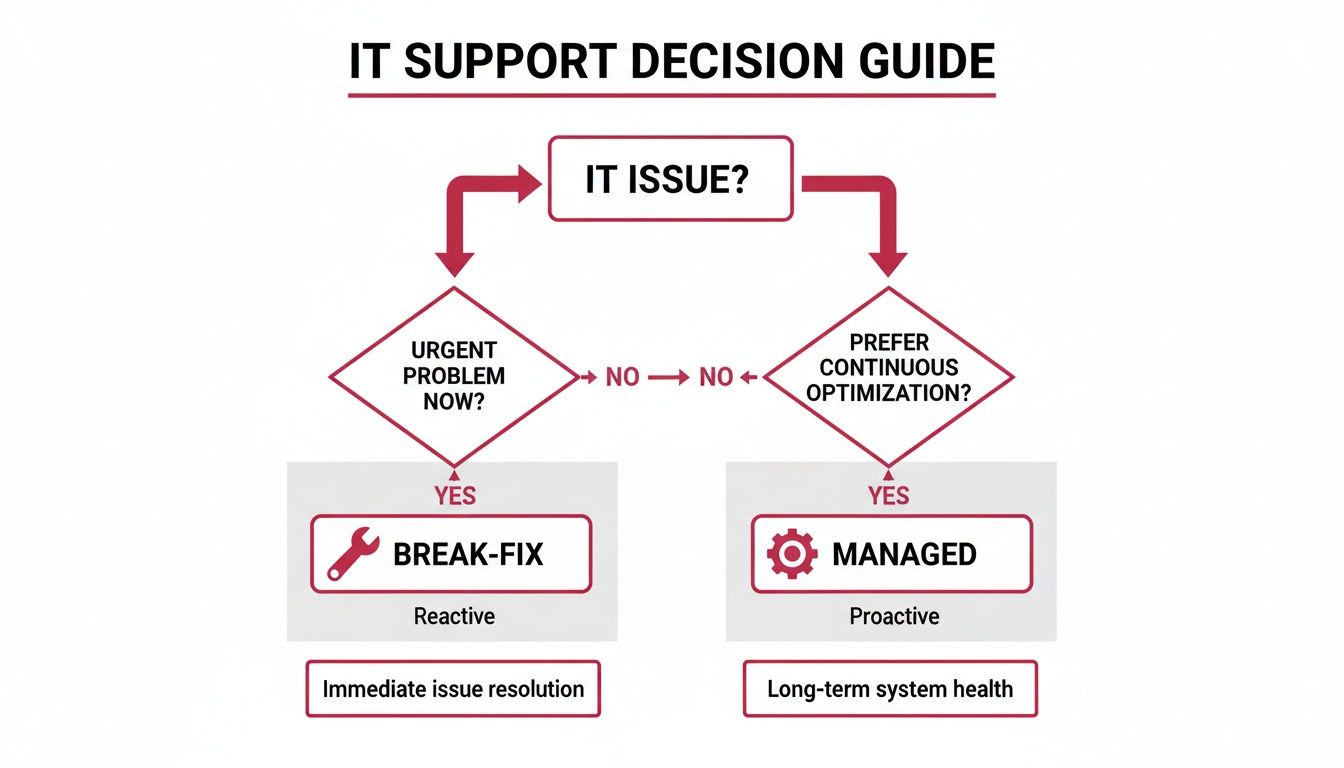
As you can see, the core difference is mindset. The old-school break-fix model is purely reactive, whereas modern managed services are all about prevention. This proactive approach is what shapes most modern pricing structures.
To help you navigate your options, we've put together a quick comparison of the most common pricing models you'll encounter.
Comparison of Common IT Support Pricing Models
| Pricing Model | How It Works | Best For | Pros | Cons |
|---|---|---|---|---|
| Per-Device | A flat, predictable fee is charged for each device (e.g., server, laptop, desktop) under management. | Businesses with a fixed number of on-site devices and minimal staff turnover. | Very transparent and easy to budget for. Costs scale predictably as you add new hardware. | Can become expensive if staff use multiple devices (e.g., a desktop, laptop, and tablet). |
| Per-User | A flat monthly fee is charged for each employee, covering all the devices they use for work. | Modern, flexible businesses, especially those with remote/hybrid teams or BYOD policies. | Simple, all-inclusive, and covers your people, not just machines. Great for companies that are growing. | May be less cost-effective for businesses where multiple staff share a single device. |
| Tiered (Bundled) | Support is offered in packages (e.g., Bronze, Silver, Gold), with each tier including more services. | Businesses that want to choose a package that fits their current needs and budget, with a clear path to scale up. | Clear options and predictable costs within each tier. Easy to upgrade as your needs change. | You might pay for services within a tier that you don't actually use, or the next tier up might be a big price jump. |
Choosing the right model really boils down to your specific circumstances—there's no single best answer. For a small accountancy firm with five staff members, each using a single desktop computer, per-device pricing is brilliantly simple and cost-effective. They know exactly what they’re paying for.
In contrast, a growing e-commerce business with a hybrid team using laptops, tablets, and company phones would get far more value from per-user pricing. It simplifies billing and ensures every employee is fully supported, no matter what device they’re using or where they're working from.
Decoding Your Service Level Agreement (SLA)
If there's one document you need to read carefully, it's the Service Level Agreement, or SLA. This is the most important part of your contract because it sets out, in black and white, exactly what level of service you can expect. It turns vague promises into measurable commitments.
An SLA is your safety net. It’s the guarantee that when a critical system fails during your busiest period, you won’t be left at the back of a very long queue.
When you're reviewing an SLA, look for these key details:
- Response Time vs. Resolution Time: These two are often confused, but they're very different. Response Time is how quickly the provider promises to acknowledge your issue and start work. Resolution Time is the deadline they have to actually fix it. A robust SLA defines both, usually based on how serious the problem is.
- Support Hours: Does the agreement just cover 9-to-5 business hours, or does it include evenings, weekends, and bank holidays? If your business operates outside the standard working week, 24/7 support is a must-have to prevent costly downtime.
- Issue Severity Levels: A good SLA will categorise problems based on their impact. A server outage that brings your entire business to a halt is a high-priority incident needing an immediate response. A single user having a printer issue is a lower priority. These levels dictate the guaranteed response and resolution times, ensuring the biggest fires are put out first.
By taking the time to understand these pricing models and the fine print in the SLA, you can choose an IT support partner with confidence, knowing you've secured a service that genuinely protects and supports your business.
How to Choose the Right IT Support Provider in the UK

Choosing an IT partner is one of the most significant decisions you'll make for your business. Get it right, and you’ll accelerate growth and shield yourself from risk. Get it wrong, and you're in for costly downtime and endless frustration. To find a provider that’s a genuine fit, you need to look past the sales pitch and start asking the right questions.
Ultimately, you’re looking for a partner, not just another supplier. You need a team with the technical skill to fix problems, sure, but also the business sense to understand your operational challenges and what you’re trying to achieve long-term.
Assess Their Technical Capabilities and Services
First things first, do their core services actually match what you need? Make sure they offer the full spectrum of support your business relies on, from day-to-day helpdesk tickets to strategic advice on things like cloud migration or cybersecurity. A crucial question to ask is whether they can provide on-site support when a remote fix just won't cut it.
Consider a local solicitors' firm that depends on specialist legal software hosted on an on-premise server. If that server fails, a technician on the other end of a phone line can’t solve the problem. That business needs a local provider who can get an engineer on-site—fast—to get them operational again. This blend of remote efficiency and local presence is vital for many businesses.
Here are the key technical areas to dig into:
- On-Site vs. Remote Support: Confirm they have local engineers who can actually visit your premises to deal with hardware failures or tricky network issues.
- Cybersecurity Credentials: Ask if they are certified with schemes like Cyber Essentials. This government-backed certification is a clear signal they take security seriously.
- Service Scalability: Can their services grow with you? Talk through how they would handle adding new users, opening another office, or adopting new technology down the line.
Evaluate Their Industry Experience and Reputation
Generic, one-size-fits-all IT support is rarely good enough. A provider with experience in your specific sector will already be familiar with your common challenges, the software you use, and the compliance rules you have to live by. That kind of specialised knowledge is invaluable.
For example, financial advisory firms have incredibly strict data protection requirements under FCA regulations. A provider who knows this world will understand how to implement systems that support compliance standards from the outset, safeguarding both client data and the firm's reputation.
A provider who understands your industry speaks your language. They won't just recommend generic software; they'll suggest solutions that are proven to work for businesses just like yours.
Don't just take their word for it, though. Ask for case studies or testimonials from clients in a similar field. Any reputable provider will be proud to share their success stories and might even connect you with an existing client. It's also worth checking online reviews on platforms like Google to get an unfiltered view of their customer service. For more tips on this, check out our guide on how to evaluate managed IT service companies.
Vet Their Communication and Client Onboarding
How a provider communicates from your very first enquiry is often a preview of the service you'll get later on. Are they responsive? Do they explain things clearly and transparently? The best providers invest real time upfront to understand your business inside and out through a proper, structured onboarding process.
A thorough onboarding should always include:
- A Deep-Dive Discovery: They should meet your key people to understand your workflows, your biggest headaches, and your business goals.
- A Full System Audit: This means a comprehensive review of your current IT setup to spot weaknesses, security gaps, and opportunities for improvement.
- A Strategic Roadmap: Based on the audit, they should present a clear plan outlining how they’ll support your immediate needs and help you reach your long-term objectives.
This initial time investment is critical. It ensures your new IT partner doesn't just inherit your existing problems but actively works to solve them from day one, setting the stage for a successful, long-lasting relationship.
Common Questions About Business IT Support
When you're thinking about bringing in professional IT support, it’s only natural that a few questions will pop up. Let's tackle some of the most common ones we hear from UK business owners. Getting these queries answered upfront should help you feel much more confident about making the right choice for your company.
My Business Is Small – Do I Really Need Professional IT Support?
Yes, absolutely. In fact, small businesses are often seen as low-hanging fruit by cybercriminals who bank on them having weaker security. But professional IT support is about so much more than just fixing things; it’s about robust cybersecurity, making sure your crucial business data is properly backed up, and finding smarter ways to use technology to grow.
Honestly, the cost of a single data breach or a day of serious downtime will almost always be far more than what you'd invest in a proactive support plan. Think of it as an essential safety net for your business, no matter its size.
What Is the Difference Between IT Support and Managed Services?
The real difference comes down to one thing: being reactive versus being proactive.
- Traditional IT Support is what most people think of as a ‘break-fix’ service. Something breaks, you call for help, and you get a bill. This classic model almost guarantees downtime and throws your budgeting out the window.
- Managed Services flips that on its head. For a predictable monthly fee, a Managed Service Provider (MSP) looks after your entire IT setup. The focus is always on preventing problems before they can disrupt your work, keeping systems optimised, and offering genuine strategic advice.
An MSP essentially becomes your outsourced IT department, working to make sure your technology is helping you hit your business goals, not holding you back.
"Think of it this way: break-fix is like calling an ambulance after an accident, while managed services is like having a chauffeur who also happens to be a trained mechanic, ensuring the car never breaks down in the first place."
How Quickly Should I Expect Help When Something Goes Wrong?
This should be spelled out crystal clear in your Service Level Agreement (SLA). A good SLA is a formal promise that outlines guaranteed response and fix times, all based on how serious the problem is. For something critical, like your entire network going down, a top-tier provider should guarantee a response within minutes.
For less urgent things, like a question about a piece of software, the response time might be a few hours. The key is to read the SLA carefully before you sign anything. Make sure it gives you the safety net your business actually needs to operate without worry.
Can an External Provider Truly Understand My Unique Business?
A great provider makes it their business to understand yours. The first part of working together, the onboarding, should feel like a deep dive into how you work, your challenges, and what you’re trying to achieve. The best IT partners have experience in specific sectors, which means they already know the software, compliance rules, and day-to-day pressures you face.
This partnership is what separates the good from the great. It ensures the solutions you get are genuinely right for your business, not just off-the-shelf fixes. It’s all about building a relationship where your IT partner is as invested in your success as you are.
Ready to see how a proactive IT partnership can protect and grow your business? The team at SES Computers has been delivering expert managed IT support across Dorset and the surrounding counties for over 30 years. Contact us today for a free consultation.