Network bandwidth measures how much data can traverse your network every second. Think of it as the number of lanes on a digital motorway: more lanes let more data vehicles pass through without queuing.
Grasping this concept explains why some services stall while others sail along smoothly. For example, a London law firm uploading high-resolution property plans can find even a 20 Mbps link stretched to its limits, leading to frustrating delays.
Understanding Network Bandwidth
At its core, bandwidth is the maximum volume of data your connection can handle each second, expressed in bits per second (bps). It sets the ceiling for every application—from file transfers to live video feeds.
In practice, bandwidth acts like motorway lanes carrying data packets instead of cars. When lanes are full, traffic slows down.
Key applications depend on available bandwidth:
- Video Conferencing: Demands 1–4 Mbps per participant for crisp audio and video.
- Cloud Backup: Ideally needs 10–50 Mbps to finish overnight jobs without slowing daytime work.
- Hosted Desktops: Often require 20 Mbps or more for seamless remote sessions.
For instance, a mid-sized marketing agency streaming HD training sessions for staff requires at least 25 Mbps to avoid buffering during peak hours.

Network Bandwidth At A Glance
Below is a quick reference for key concepts, definitions and real-world examples.
| Concept | Definition | Examples |
|---|---|---|
| Bandwidth | Maximum data capacity per second (bps) | Video calls, file transfers |
| Throughput | Actual data rate achieved in practice | Real-world speed test results |
| Latency | Delay before data transfer begins | Ping times in online gaming |
Use this at-a-glance summary to match your team’s needs with the right bandwidth plan.
Practical Snapshot For IT Managers
Before diving into detailed measurements, keep these three steps in mind:
- Review current usage patterns to spot congestion points.
- Compare plans by their Mbps rating and service-level agreements.
- Build in extra capacity to accommodate future growth.
For example, a consultancy firm observed 80 % utilisation during daily video briefings and upgraded from 50 to 100 Mbps, eliminating lag entirely.
Next Steps Guide
Armed with this snapshot, you’re ready to explore measurement and optimisation:
- Learn speed test best practices using Ookla Speedtest at regular intervals.
- Drill down into how throughput differs from latency in real networks.
- Discover simple tweaks—like router upgrades or traffic prioritisation—to boost performance.
- Understand how SES Computers supports SMBs with managed internet services and ongoing bandwidth management.
Understanding Key Concepts Of Network Bandwidth
Network bandwidth describes the maximum volume of data you can send each second. It’s measured in bits per second, so it shows raw capacity—not necessarily the speeds you’ll see in daily operations.
Key Units And Measurements
Bandwidth scales from kilobits per second to gigabits per second, adapting to different workloads. Think of it as the width of a highway: the wider the highway, the more cars it can carry.
- Kilobits per second (kbps): Used by simple sensors and telemetry devices.
- Megabits per second (Mbps): Powers cloud backups, video conferencing and streaming.
- Gigabits per second (Gbps): Supports data-centre backbones and full-fibre connections.
Modern networks juggle multiple streams with techniques like multiplexing and packet switching. This lets video calls, file transfers and voice traffic co-exist on the same link without congestion.
- Time division multiplexing gives each stream its own time slot.
- Packet switching breaks data into small units that travel independently.
- VLAN tagging creates separate virtual lanes for different types of traffic.
Remember, bandwidth isn’t the same as throughput (the real data rate you observe) or latency (the delay before data starts moving).
For instance, a graphic design team moved to 1 Gbps to support simultaneous large-file transfers without interruptions.
Theoretical Vs Real Performance
ISPs often advertise the maximum ceiling—say 100 Mbps—but real-world conditions rarely match the lab tests. During peak hours that link might only deliver 70 Mbps, which can introduce unwelcome bottlenecks.
Key Takeaway
Bandwidth ratings are an upper bound, so plan extra capacity to cover performance drops.
For a closer look at how your network fits together, check our guide on network infrastructure.
UK network bandwidth has surged in recent years. Today, over 85 % of households enjoy gigabit-capable broadband, thanks to a full-fibre rollout covering roughly three-quarters of UK premises. Dive into the details in the UK broadband report.
The image illustrates how bandwidth is visualised in bits per second, highlighting the gap between link capacity and actual throughput.
Identifying Bandwidth Needs
Different tasks place different demands on your network. Defining those needs early helps avoid nasty surprises.
- File transfers often require 10–50 Mbps to move large archives smoothly.
- VoIP calls benefit from 1–5 Mbps per active conversation for clear audio.
- HD streaming generally needs 5–8 Mbps to prevent buffering and maintain quality.
Seasonal peaks—like end-of-month backups or product launch streams—can push usage up by 30–50 %.
- Monitor usage trends over time to reveal spikes.
- Compare real data with your service-level agreements.
- Add at least a 20 % buffer when forecasting future growth.
A tax advisory firm saw a 40 % surge in traffic each March, underscoring the need for seasonal planning and buffer capacity.
In the next section, we’ll explore simple measurement tools and hands-on optimisation techniques.
How Bandwidth Is Measured In Practice
Running a speed test is often the quickest way to gauge your network’s capacity. It simulates real-world traffic and shows exactly how much data your link can carry at a given moment.
Different tools offer distinct perspectives:
- Ookla Speedtest: Gives you fast download/upload measurements plus latency figures.
- Router Dashboards: Display live throughput per port for immediate insight.
- SNMP Monitors: Track traffic patterns over days or weeks for trend analysis.
To get consistent results, clear your browser cache before each trial and disconnect other devices that might be active on the network.
Try this step-by-step Ookla Speedtest method:
- Visit speedtest.net and choose a nearby server.
- Click GO and wait until the download and upload bars complete.
- Note down the download, upload and latency metrics for later comparison.
Repeating this routine over time highlights the highs and lows in your connection’s capacity.
Interpreting Speed Test Results
Every test delivers three key metrics: download, upload and latency. Line them up against your service plan’s advertised limits to spot under-performance quickly. That clarity makes it easier to tie poor results back to potential network issues.
In this example, a 120 Mbps download rate aligns with typical fibre-optic capacity, while a 15 ms latency is well within VoIP requirements.
Fixed-line services can be constrained by line quality or peak-time congestion. Mobile broadband, however, tends to swing more widely. Median mobile download speeds in the UK have climbed 15 % to over 60 Mbps, driven by robust 4G and 5G rollouts. Learn more in a recent mobile broadband speed analysis on ISPreview.
Key tips for reliable testing:
- Run checks at different times, such as early morning and late afternoon.
- Log each result in a spreadsheet to identify trends.
- Compare your findings with your SLA to keep providers accountable.
A regular testing schedule makes your data more meaningful.
Using Router Dashboards And SNMP Tools
Most modern routers include a dashboard showing per-port bandwidth in real time. SNMP platforms like Cacti or PRTG collect that information over days or weeks. With historical data at hand, you can match usage spikes to specific applications or events.
For instance, a legal practice used Cacti to detect unexpected peer-to-peer traffic overnight, reclaiming bandwidth for critical applications.
For a deep dive on how physical media affects these measurements, see our guide to fibre-optic broadband.
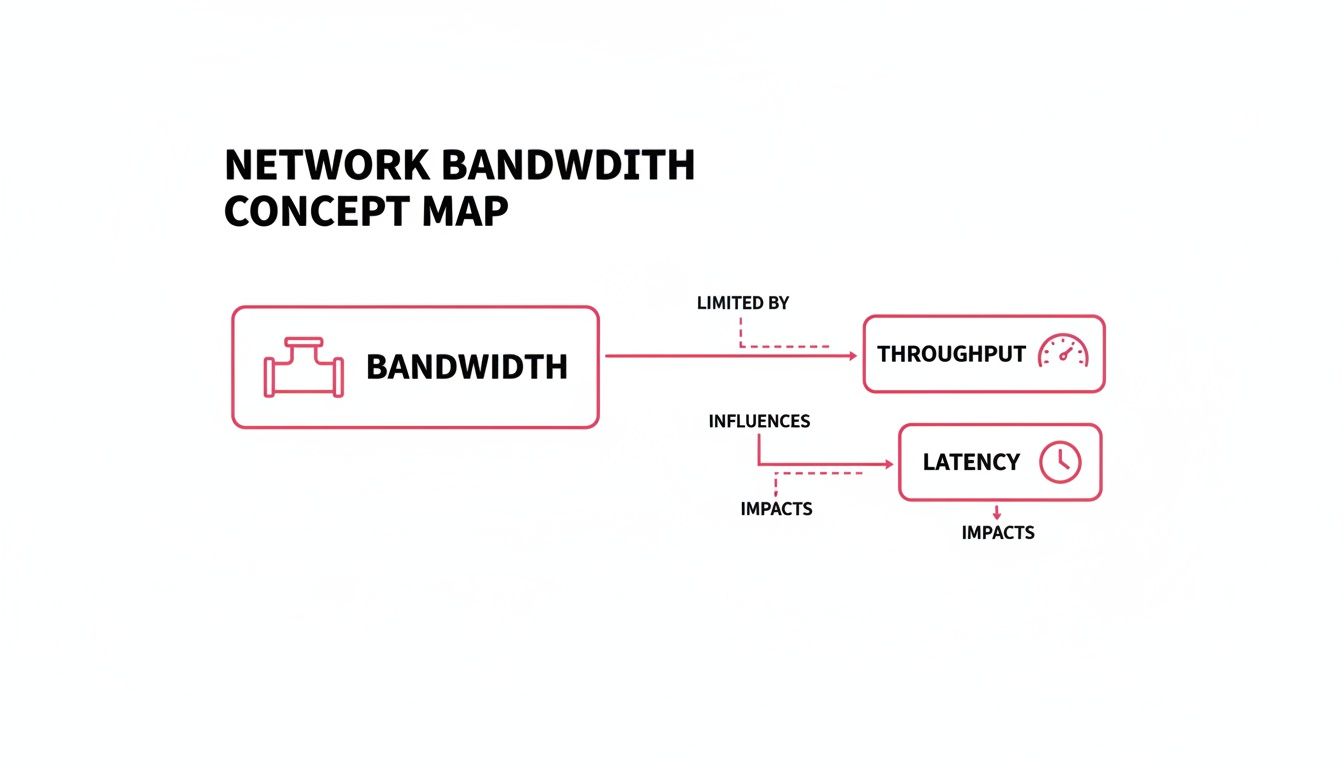
This diagram underlines a vital distinction: bandwidth is the maximum pipe size, throughput is the actual flow through that pipe, and latency is the brief pause before data begins its journey.
Common Misconceptions About Network Bandwidth
It’s easy to assume that pouring more bandwidth into your network will fix every hiccup. In practice, router settings, application limits and simple congestion often have a bigger say in your performance.
Take a marketing agency that doubled its internet plan—only to find video calls still dropping whenever large files were in play. Clearly, raw capacity alone won’t smooth out every bump.
Here are three myths that can lead you down the wrong path:
- Myth 1: More Bandwidth Fixes Every Bottleneck
Ignores device and application constraints and leads to misguided budgets. - Myth 2: Wired Always Beats Wireless
Overlooks modern Wi-Fi features such as beamforming and multi-user MIMO. - Myth 3: Unlimited Plans Deliver Infinite Speed
Misses fair-usage policies and peak-time throttling that slow you down.
Wi Fi Versus Wired Links
Many businesses still believe that Ethernet cables will always outperform Wi-Fi. In reality, Wi-Fi 6 access points can juggle multiple high-definition streams with minimal interference.
A small design studio swapped out legacy Cat5e cables for a Wi-Fi mesh and recorded almost identical throughput at close range. This experiment showed that equipment quality and network design often matter more than the medium itself.
“Network performance relies on holistic design, not just cable choice,” states a network engineer.
Before ripping out cables, take these steps:
- Check switch firmware, QoS rules and channel assignments
- Measure signal strength across all workspaces
- Confirm each device supports the latest wireless standards
UK connectivity also varies widely:
- Urban median speeds exceed 15 Mbps
- Rural areas often linger in single digits
- 75 % of premises can now access gigabit-capable connections
- Leading ISPs consistently deliver 95 % of their advertised speeds
Learn more in this study.
Unlimited Data Plans
Signing up for an “unlimited” package doesn’t guarantee unthrottled performance. Most providers include fair-usage clauses that slow heavy users during peak hours.
A solicitor’s office found its ‘unlimited’ package throttled during midday conference updates, delaying document transfers and client communications.
That slowdown can really hurt cloud backups or large downloads when everyone’s online. For insights into how delays affect your service, read our article on network latency.
To keep surprises at bay:
- Review your contract for traffic-shaping policies
- Monitor usage patterns to spot peak-time throttling
- Discuss performance expectations with your ISP
By spotting these myths early and aligning capacity with real-world needs—network design, device capabilities and user behaviour—you’ll make smarter bandwidth investments and avoid wasted spend.
Impact Of Network Bandwidth On Business Applications

Bandwidth governs how smoothly data flows through your network. When capacity falls short, packets queue up and critical services begin to stutter.
Consider a two-office law firm that ran short on bandwidth. Video calls became a jumble of echoes and freezes, while large files crawled across the link. Meetings were cut short, urgent documents lagged, and billable hours slipped away—along with staff morale.
Key warning signs of a bandwidth bottleneck include:
- High Latency spikes during conference calls, causing echoes and talk-over.
- Extended Backup Windows that spill into core business hours.
- Lag On Hosted Desktops where cursor movements and screen redraws feel sluggish.
VoIP Telephony And Call Quality
Voice over IP demands a consistent stream of data. A single HD VoIP session typically needs about 100 kbps up and down. Multiply that by ten concurrent calls and you’re looking at roughly 1 Mbps of reserved bandwidth.
For example, an insurance broker allocates 1.5 Mbps for 15 concurrent calls, ensuring each line maintains HD voice clarity.
Simple measures keep calls crystal-clear:
- Prioritise voice traffic with Quality of Service rules.
- Carve out a dedicated bandwidth pool for peak calling periods.
- Monitor jitter and packet loss in real time to catch issues early.
Bandwidth Requirements For Common Applications
Below is a quick reference table showing typical bandwidth needs for everyday services and the impact when you run short.
Bandwidth Requirements For Common Applications
| Application | Minimum Bandwidth | User Impact |
|---|---|---|
| VoIP Call (Per Line) | 100 kbps – 1 Mbps | Poor audio quality and dropped calls |
| Cloud Backup | 10 Mbps – 50 Mbps | Overnight backups may overrun business hours |
| Hosted Desktop | 20 Mbps – 50 Mbps | Delayed screen redraws and input lag |
This snapshot helps you match service plans to actual requirements, avoiding over- or under-provisioning.
Cloud Backup And Hosted Desktops
Moving 200 GB of data offsite at 20 Mbps wraps up in under three hours. On a mere 5 Mbps link, the same backup bleeds into the next day—putting restores and compliance at risk.
A financial advisor discovered that moving 300 GB of data over a 10 Mbps link took 20 hours, while a 50 Mbps upgrade reduced this to just four hours.
Hosted desktops bring both bandwidth and latency into play. Every keystroke and screen update must traverse the network. Even slight congestion can manifest as stuttering windows and delayed inputs.
To right-size your connection:
- Audit peak transfer rates during scheduled backups.
- Add a 25 % buffer to measured peaks to accommodate growth.
- Choose service tiers that balance upload and download speeds.
Remember that encryption, firewall inspections and packet analysis all eat into your raw throughput. Building extra headroom prevents nasty surprises.
SES Computers’ managed internet services combine 24/7 monitoring with proactive scaling. Alerts trigger before thresholds are breached, keeping your team productive.
Mapping each application’s demand against available capacity ensures smooth collaboration, protects revenue and maintains employee satisfaction. Regular capacity reviews let you adjust service tiers in step with evolving business goals.
Choosing The Right Bandwidth With SES Computers
Small operators often ask “What size pipe should I have?” It can feel like guessing how many lanes your network motorway needs. At SES Computers, we lay out a simple three-step plan: audit, forecast and match to service tiers.
Our approach not only pinpoints what you need now but prepares you for tomorrow’s growth. Along the way, we help you weigh support options and billing models so you pay for performance, not guesswork.
Audit Your Current Usage
Begin with a clear picture of today’s traffic. Track peak and average data flows over a typical week—anything less is a shot in the dark.
- Watch key links such as internet gateways and VPN tunnels.
- Employ SNMP monitors or traffic dashboards for real-time insight.
- Record daily upload and download figures to flag congestion points.
For instance, one accountancy firm spotted nightly backups spiking at 75 Mbps, showing they needed extra capacity to avoid morning bottlenecks.
Forecast Future Demand
Once you know your baseline, look ahead. Consider new software, extra users or seasonal spikes.
- Add a 20 % buffer to your estimates.
- Factor in events like product launches or tax deadlines.
- Review forecasts quarterly to keep them on track.
If you plan on rolling out hosted desktops, for example, budget roughly 20 Mbps per seat to maintain smooth performance.
Match Service Tiers
SES Computers offers three main options: Superfast Broadband, Fibre and Leased Lines. Each tier comes with set speeds, SLAs and support levels.
| Service Tier | Speed Range | SLA Uptime | Support Hours |
|---|---|---|---|
| Superfast | 50–250 Mbps | 99.9 % | Business hours |
| Fibre | 250–1000 Mbps | 99.95 % | 24/7 monitoring |
| Leased Line | 1–10 Gbps | 99.99 % | 24/7 priority |
This comparison shines a light on how each option stacks up. Leased lines, for example, deliver symmetrical speeds ideal for cloud backups and video calls.
Case Study Design Agency
A Dorset design agency hit delays when sending large artwork files. SES Computers installed a custom gigabit fibre link, complete with proactive monitoring.
They achieved 99.98 % uptime, slashed transfer times by 50 % and gained round-the-clock support. By consolidating services under one SLA, they also cut monthly network costs by 20 %.
This proactive setup prevented downtime and scaled effortlessly as the agency grew.
Evaluate Billing And Support
Pricing plans can be as varied as your traffic flows. Make sure you understand:
- Flat-rate vs usage-based billing and typical cycle lengths
- Response times, escalation paths and dedicated account managers
- Extra features such as DDoS protection or traffic prioritisation
- Upgrade options so you can boost bandwidth without long negotiations
- Contract flexibility—especially around minimum terms
SES Computers offers a free initial consultation to map your existing topology. Once you’ve collected this data, you’ll be in a strong position to select the ideal plan.
The diagram below illustrates SES Computers’ 24/7 monitoring dashboard for managed internet services.
It surfaces real-time bandwidth usage, alert thresholds and SLA compliance at a glance. Armed with these steps, you can choose your next bandwidth plan with confidence. SES Computers will adapt your service as your network evolves.
Get started today.
Frequently Asked Questions
Which Factors Influence Network Bandwidth for Businesses?
Your total bandwidth depends on three key elements: how many users are online at once, the types of applications they’re running and your peak usage periods. The design of your network, the quality of your hardware and even external traffic congestion also play a role. For instance, a small law practice with ten users conducting video conferences and cloud backups may need at least 50 Mbps to maintain service levels.
For a deeper dive, see our section on How Bandwidth Is Measured In Practice.
- Users and Concurrent Sessions track simultaneous logins and data flow.
- Application Type shows whether you’re streaming video, running VoIP calls or transferring large files.
- Network Architecture highlights how wired versus wireless setups affect throughput.
How Can I Test Network Bandwidth Reliably?
- Run Ookla Speedtest and stick to the same server each time.
- Compare tests at peak hours with off-peak readings.
- Log your results via SNMP or router dashboards into a spreadsheet.
Pro Tip
Testing consistently over several weeks uncovers real performance trends.
What’s the Difference Between Bandwidth and Internet Speed?
Bandwidth represents the maximum data capacity your connection can handle. Internet speed is the actual throughput you experience in real time.
For a fuller explanation, check out Understanding Key Concepts Of Network Bandwidth.
How SES Computers Ensures SLA Compliance
We monitor your links 24/7, alerting you the moment any threshold is breached. Every month, you’ll get a concise report comparing live performance against your SLA targets. That lets us adjust capacity proactively and helps you avoid unexpected downtime.
How Often Should Businesses Audit Bandwidth Usage?
We recommend a two-stage review:
- Monthly: Run SNMP polls or speed-test scans to capture technical metrics.
- Quarterly: Hold a strategic review with SES Computers to ensure your capacity matches business growth.
How Do SLAs Improve Network Reliability?
SLAs guarantee agreed-upon uptime and define response times for incidents. When something goes wrong, you know exactly how quickly support will arrive, keeping disruptions to an absolute minimum.
Contact SES Computers to secure your business bandwidth plan and get started today.