Getting reliable wifi in your office is about much more than just plugging in a router and hoping for the best. A genuinely high-performance network is built on a solid foundation of planning, starting with a realistic look at how your team actually uses the internet day-to-day. This first step is what separates a seamless, frustration-free network from a constant source of complaints.
Planning Your Office WiFi for Peak Performance
Before you even think about hardware, a successful WiFi deployment begins with a detailed plan. This initial discovery phase is absolutely critical because it sets the stage for everything that follows. I’ve seen it time and time again: businesses jump straight to buying access points, only to discover they’ve created a network full of dead zones and performance bottlenecks. That’s a costly mistake.
The real goal here is to get past a simple headcount. You need to dig into the specifics of your business operations. What devices are actually connecting? It’s rarely just laptops and company phones. Think about the printers, the VoIP handsets on desks, the smart TVs in the meeting rooms, and perhaps even the IoT sensors controlling the heating. Each of these adds a different kind of load to your network.
Assessing Your True Connectivity Needs
Just as important is understanding what people are doing on those devices. A small accountancy firm in Dorset that lives on cloud-based software and constant video calls has completely different needs from a logistics warehouse in Wiltshire using handheld scanners. The accountants need low latency and high throughput for real-time collaboration. The warehouse needs rock-solid coverage over a huge, often challenging, physical space.
To get a clear picture, start by mapping out a few key details:
- Device Density: Pinpoint the hotspots. Where will large numbers of people and devices gather at the same time? Consider conference rooms, break areas, and open-plan sections. For example, a 10-person boardroom might host 30 connected devices (laptops, phones, tablets) during a major client presentation.
- Application Demands: Make a list of the business-critical software you depend on. Give special attention to the bandwidth hogs like Microsoft Teams video conferencing, large CAD file transfers, or accessing client databases on a cloud platform like Salesforce.
- User Behaviour: What does a typical day look like? Are there peak times, like a Monday morning all-hands video call, where the network will be pushed to its limits?
This straightforward process helps you move from an idea to a concrete plan.
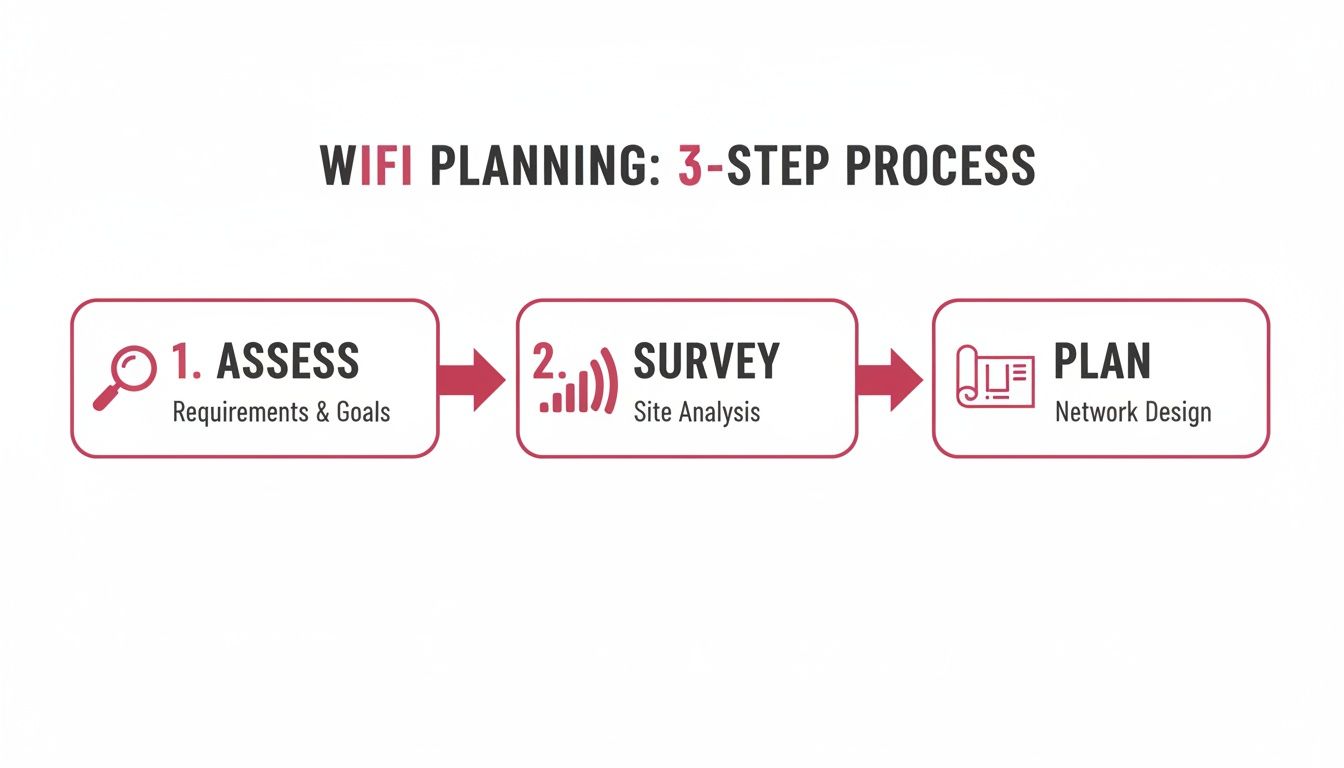
Following this structure from the start ensures you don't miss any critical details, leading to a much more reliable network design.
The Non-Negotiable Site Survey
Once you have a firm grasp of your requirements, the next step is a professional site survey. This is one corner you absolutely cannot cut. A proper survey uses specialised tools to analyse your office for radio frequency (RF) interference and physical obstacles.
A professional site survey is the blueprint for your wireless network. It turns assumptions into data, identifying potential issues like signal-blocking walls, interference from neighbouring networks, and optimal locations for access points before you commit to any hardware purchases.
Things you might not even consider, like steel support beams, reinforced concrete, lift shafts, and even large metal filing cabinets, can wreak havoc on WiFi signals, creating frustrating dead zones. A survey produces a "heatmap" of your office, showing exactly where signals are strong and where they die off.
This data-first approach is the only real way to guarantee complete coverage and is fundamental to planning an effective wifi in office setup. If you're looking to get a bit more technical, you can learn more about network bandwidth in our detailed guide. Understanding the basics here will help you make much smarter decisions during this planning phase.
Choosing the Right Hardware and Service Model
Once you've got a solid plan, it's time to pick the hardware that will actually run your office Wi-Fi. This is where you need to draw a clear line between home and business equipment. That router you have in your living room might be great for Netflix, but it's simply not engineered to handle the constant, heavy-duty demands of a modern office.
A professional network is built from a system of specialised parts. You'll need business-grade access points (APs) to send out the Wi-Fi signal, switches to manage the data traffic between devices, and a proper firewall to guard the gates against online threats. This 'building block' approach is far more powerful and scalable than any all-in-one consumer gadget.

Upgrading to Business-Class Wi-Fi Standards
Wi-Fi technology is always moving forward, and the latest standards offer real, tangible benefits for a busy office. Wi-Fi 6 and its successor, Wi-Fi 6E, were specifically designed for high-density environments. This means they excel at keeping everyone connected and running smoothly, even when you have a dozen people on a video call in the same boardroom.
Think of Wi-Fi 6E as opening up a brand-new, completely empty motorway for your office's data. It adds access to the less-congested 6 GHz frequency band, which makes a world of difference. For example, a busy Hampshire hotel with hundreds of guest and staff devices all trying to connect at once would see a massive performance boost. If you're looking for top-tier performance, hardware like the Eero Pro 6e is a great example of what modern tech can do for an office.
And the next generation, Wi-Fi 7, is already on the horizon. It promises even faster speeds and near-instant response times, making it a smart move if you want to future-proof your network for the demands of tomorrow.
In-House IT vs. a Managed Wi-Fi Service
With the hardware sorted, you face a big strategic question: who is going to look after it all? You've really only got two options. You can either task your own IT team with managing the network, or you can partner with a specialist for a Managed Wi-Fi service.
This isn't a small decision. It has huge implications for your costs, required expertise, and where your team focuses its energy. For many small and medium-sized businesses, pulling internal staff away from their main jobs to manage a network can be a serious drain on productivity.
To help you weigh the options, here's a direct comparison of the two approaches.
In-House IT vs Managed WiFi Service Comparison
| Aspect | In-House Management | Managed WiFi Service |
|---|---|---|
| Initial Cost | High capital outlay for all hardware (APs, switches, firewall). | Lower upfront cost, often rolled into a monthly fee. |
| Expertise | Relies on existing IT staff who may be generalists. | Access to a dedicated team of certified network specialists. |
| Monitoring | Often reactive; problems are fixed after they cause disruption. | Proactive 24/7 monitoring to prevent issues before they happen. |
| Maintenance | IT team must manually track and apply firmware/security updates. | All updates and patches are managed automatically by the provider. |
| Focus | Diverts internal IT resources from core business projects. | Frees up your team to focus on strategic business goals. |
| Scalability | Scaling up requires new hardware procurement and configuration. | Simple and seamless; the provider handles all scaling needs. |
Ultimately, choosing between these two paths comes down to your resources, expertise, and business priorities.
The real value of a Managed Wi-Fi service isn't just about fixing problems. It's about proactive, expert management that stops those problems from ever impacting your business in the first place.
When you work with a managed service partner like SES Computers, you hand over complete ownership of your office Wi-Fi. This covers everything:
- Sourcing the Right Gear: We procure the best business-grade APs, switches, and firewalls for your exact needs.
- Expert Setup: The network is configured correctly from day one, including all your security protocols and guest access.
- Proactive Monitoring: We keep a constant eye on network health to spot and fix issues before you even know they exist.
- Ongoing Maintenance: All firmware updates and security patches are handled by us, keeping your network secure and fast.
This approach effectively turns your Wi-Fi from a potential source of headaches into a reliable utility, just like electricity. It lets you get on with running your business, knowing your network is in safe hands. For businesses in regulated sectors like care providers or accountancy firms, this expert oversight isn't just a convenience—it’s a vital part of keeping your data secure and staying compliant.
Strategic Access Point Deployment for Flawless Coverage
Great office Wi-Fi isn't just about buying a box of shiny new access points (APs); it's about knowing exactly where to put them. This is where strategy trumps spending. Smart placement is the secret sauce to killing off dead zones and giving your team the rock-solid performance they need to get work done.
Once you have a professional site survey in hand, you’ve got your blueprint. That heatmap shows you everything—all the weak signal spots and the hidden sources of radio frequency (RF) interference you’d never guess were there. The real skill lies in translating that data into flawless, wall-to-wall coverage.
Decoding Your Office Layout
Every office is a unique puzzle. A wide-open studio space has completely different needs from a multi-floor building filled with private offices and thick, signal-blocking walls. You can't just copy and paste a layout; you have to tailor the AP deployment to your specific environment and building materials.
Over the years, I've seen some classic placement blunders that are easy to avoid:
- Tucking them near lift shafts: The metal construction and constant motion of a lift create a huge dead zone. It’s a signal black hole.
- Sticking them inside metal cabinets: Putting an AP in a metal box is like putting it in a Faraday cage. The signal gets trapped, making the device pretty much useless.
- Hiding them above ceiling tiles: It might look tidy, but stashing APs in the ceiling void can muffle the signal, especially if there's ductwork or thick insulation in the way. Always go for a clear line of sight if you can.
If you’re dealing with a particularly tricky layout or a very large space, consulting an ultimate WiFi booster guide for your business can provide some clever solutions that go beyond basic AP placement.
Proven Placement Strategies for Common Layouts
Let's talk through a couple of real-world scenarios.
For a modern, open-plan office, a grid-like pattern of ceiling-mounted APs usually does the trick. This setup creates overlapping zones of coverage, which means people can walk around during a call without their connection dropping. The art is in spacing them just right—close enough for a seamless handover, but far enough apart to prevent signals from clashing.
Now, picture a law firm or an accountancy practice with lots of individual offices. The strategy has to change. A single, powerful AP in the hallway will struggle to push a decent signal through all those walls. In this case, it’s often better to use a larger number of lower-powered APs, placing them strategically inside the rooms or zones where a strong connection is non-negotiable.
The thing most people forget is to plan for user density, not just floor space. A small meeting room that regularly hosts 12-person video conferences needs far more wireless capacity than a massive, empty warehouse. Always prioritise your high-density areas.
The Critical Role of Structured Cabling
Finally, let’s be clear: the most perfectly placed AP is worthless without a solid, physical connection back to your network. This is where structured Ethernet cabling is king.
Every single access point needs its own dedicated, high-quality Ethernet cable running from its mounting point straight back to your network switch. In most modern setups, you'll use Power over Ethernet (PoE), which is brilliant because it sends both data and power down the same cable, simplifying the installation.
Trying to cut corners with wireless mesh systems or repeaters in a professional environment is asking for trouble. They introduce frustrating lag and can slash your bandwidth with every wireless 'hop'. For example, a marketing agency trying to upload large video files over a mesh network would experience significantly slower performance compared to a hardwired AP setup. A hardwired connection is the only way to guarantee each AP performs at its absolute best.
For more insights on getting that signal just right, you can find some great advice on how to improve WiFi coverage in your office. Think of professional cabling as the unshakable foundation—everything else is built on top of it.
Implementing Robust Network Security and Access Controls
A fast Wi-Fi network is a brilliant asset, but a secure one is an absolute necessity. Leaving your office Wi-Fi wide open is like leaving the front door unlocked overnight—you’re just asking for trouble. Strong security isn't just a feature to tack on at the end; it has to be woven into the very fabric of your network design from day one.
The good news is that modern business-grade kit comes with some incredibly powerful tools to lock down your network. The trick is to think beyond the simple password you use at home and adopt a multi-layered security strategy. This approach ensures every single connection to your wifi in office network is properly authenticated, authorised, and contained.
Upgrading to WPA3 Encryption
First things first: your most fundamental layer of defence is solid encryption. WPA3 (Wi-Fi Protected Access 3) is the current gold standard, and it's a huge leap forward from its predecessors, WPA2 and the ancient WEP. It offers far stronger protection against brute-force attacks, where a hacker tries to hammer your network with password guesses until one sticks.
For any business handling sensitive information—think accountants, solicitors, or care providers—using WPA3 is non-negotiable. It scrambles the data travelling between your devices and the access point, making it completely unreadable to anyone trying to eavesdrop.
Segmenting Your Network with VLANs
One of the most effective security tactics you can deploy is network segmentation using Virtual Local Area Networks (VLANs). Imagine building invisible walls inside your network, creating separate, isolated zones. It’s an essential practice for shielding your core business systems from potential threats.
A standard professional setup will have at least three distinct VLANs:
- Staff Network: This is the trusted zone for company-owned devices. It provides access to internal resources like servers, shared drives, and office printers.
- Guest Network: Strictly for visitors, this network offers internet access but is completely firewalled off from everything else. A device on the guest network can't see or interact with anything on your internal network.
- IoT/Device Network: This is a dedicated space for "smart" devices like thermostats, security cameras, or digital displays. These gadgets often have weaker security, so isolating them prevents them from becoming a backdoor into your main systems.
Implementing VLANs is a genuine game-changer for security. If a device on your guest or IoT network gets compromised, the breach is contained. It can't spread to your critical business data.
This separation is crucial. If a visitor connects their malware-infected laptop to your guest Wi-Fi, for example, your company’s financial records and client databases remain completely safe and invisible on the staff network.
Creating a Secure and Professional Guest Network
Your guest network has two jobs: to be a helpful amenity for visitors and a silent guardian for your internal network. The best way to manage this is with a captive portal—that branded login page you’ve seen in hotels and coffee shops where you have to agree to terms or enter a password to get online.
A captive portal brings several key benefits:
- Enhanced Security: It puts a clear barrier in place, stopping unauthorised users from simply hopping onto your network.
- Branding Opportunity: You can customise the login page with your company logo and a welcome message, which looks far more professional.
- Usage Control: It lets you set limits on session times or bandwidth, ensuring guest traffic doesn't grind your business-critical operations to a halt.
This kind of controlled access is fundamental to a secure and efficient office. For a deeper dive, you can explore our advice on how to properly secure wireless networks for your business.
With high-speed internet becoming more widely available, robust security is more vital than ever. In the UK, the rollout of gigabit-capable broadband has been impressive, with 86% of premises now having access as of January 2025. This push, driven by schemes like the £5 billion Project Gigabit, means businesses across Dorset, Somerset, Wiltshire, and Hampshire can tap into reliable full-fibre connections. But with greater speed comes a greater responsibility to secure it properly.
For professional services, these measures are directly tied to compliance. If you're an accountant handling financial data or a care provider managing patient records, you have a legal and ethical duty to protect that information. A properly secured and segmented Wi-Fi network isn't just good IT practice—it's a core part of your commitment to data protection and confidentiality.
Mastering Ongoing Network Management and Troubleshooting
Getting your office Wi-Fi up and running is a great first step, but it’s definitely not the end of the story. The real work is keeping it humming along, day in and day out. Think of your network as a living system, not a 'set it and forget it' appliance. This proactive management is what separates a reliable connection your team can count on from a constant source of frustrating interruptions.
Staying on top of your network is how you prevent small glitches from spiralling into major disruptions that hit your bottom line. Simply waiting for someone to complain about slow speeds or dropped video calls is a recipe for unnecessary downtime. A smarter strategy means keeping the network healthy from the start.
Proactive Monitoring for Peak Performance
Thankfully, modern business-grade Wi-Fi systems come with powerful management dashboards. These tools give you a live, bird's-eye view of your entire network, letting you monitor key performance indicators (KPIs) in real time. And this isn't just for the IT specialists; the insights are vital for keeping the business running smoothly.
There are a few key metrics you’ll want to keep an eye on:
- Latency: This is the delay in data transfer. High latency is what makes video calls choppy and VoIP phone calls laggy, even if your internet speed test looks fine.
- Packet Loss: This happens when small 'packets' of data get lost on their way to their destination. Even a tiny percentage of packet loss can make applications feel sluggish and unresponsive.
- Channel Utilisation: This shows you how congested your Wi-Fi channels are. If a channel gets overloaded, performance for everyone connected to that access point will suffer.
Tracking these KPIs helps you spot trends before they become full-blown problems. For example, if you see channel utilisation gradually creeping up in one part of the office, that’s a clear sign you might need to adjust your access point settings or add another one to handle the load.
This continuous oversight is a core part of any good managed IT service. For businesses in Dorset and Hampshire, having a local partner monitor these vitals ensures the wifi in office remains a reliable asset rather than a source of operational friction.
Common Troubleshooting Scenarios
Even with the best monitoring, issues can still pop up. When they do, the key is to have a methodical approach to figuring out what’s wrong.
A frequent complaint we hear is about slow speeds in a specific area. One of the most common culprits, especially in busy office parks, is channel interference. All your neighbours' Wi-Fi networks are broadcasting on the same limited radio frequencies. If your access point and theirs are all trying to talk on the same channel, it’s like trying to have a conversation in a crowded room—everyone’s signals get muddled.
A professional network management tool can perform a real-time scan of the radio frequency environment. It can identify the least congested channel and automatically switch your access point to use it, often improving performance instantly without anyone needing to lift a finger.
Another classic issue is a dropped connection when someone is moving around the office. This often points to poorly configured "roaming" between access points, where a device doesn't smoothly hand over its connection from one AP to the next. Fine-tuning the power levels and channel settings of your APs is crucial for creating that seamless coverage blanket.
The Bigger Picture of UK Connectivity
This focus on robust network management has become more critical than ever, especially with the UK's rapidly improving broadband infrastructure. The government is on track to hit 85% gigabit coverage by 2025 through its £5bn Project Gigabit, giving businesses access to faster and more reliable internet connections than ever before.
This progress, detailed in recent reports, means the median fixed broadband speed soared to 123.92 Mbps in early 2025, a massive 34.5% increase in just one year. You can discover more insights about these UK broadband advancements on iotinsider.com. This powerful backbone makes high-quality office Wi-Fi not just possible, but essential for taking full advantage of cloud backups, virtual servers, and other modern business tools. But without expert management, all the benefits of that speed can be lost to internal network chaos.
Your Office WiFi Questions Answered
Even with the best plan in hand, you're bound to have questions when setting up or overhauling your office WiFi. The technical side of things can seem a bit daunting, but getting your head around a few key ideas will make a world of difference. It helps you make smarter, more confident decisions about your network.
Let's break down some of the most common questions we hear from UK businesses.
How Many Access Points Do I Actually Need?
This is the big one, and the honest answer is always "it depends." The right number of access points (APs) has less to do with square metres and more to do with the nitty-gritty of your office: the layout, what the walls are made of, and—most crucially—how many people are trying to connect at once.
A good starting point is to think about one AP for every 15-20 active users. But treat that as just a baseline. Thick concrete walls, lift shafts, or even a row of dense metal filing cabinets can kill a WiFi signal. In those cases, you'll need more APs placed closer together to get decent coverage.
The only way to know for sure is to get a professional site survey. This isn't just guesswork; it involves using specialist software to map out your office's signal strength. You get a "heatmap" showing exactly where the signal is strong and where it dies. This data is gold. It shows you the perfect spots for your APs to eliminate dead zones and ensure everyone gets a reliable connection, especially in busy spots like boardrooms or break-out areas.
What’s the Real Difference Between Business and Home WiFi Kit?
They both get you online, but that’s where the similarities end. Business-grade WiFi hardware is built from the ground up for a completely different job. It’s all about reliability, serious security, and the ability to grow with your company.
A home router might start to struggle with a dozen devices. A single business AP, on the other hand, can handle hundreds of simultaneous connections without breaking a sweat. But the real game-changer is the security and management features you simply don't get with consumer gear:
- VLANs (Virtual LANs): This is essential. It lets you slice your network into separate, isolated zones for staff, guests, and even things like smart TVs or IoT devices.
- WPA3 Enterprise Authentication: This is a much tougher, more secure way of making sure only authorised people and devices can get onto your main company network.
- Centralised Management: You can control every single AP from one dashboard, whether it's on-site or in the cloud. This makes it incredibly easy to change settings, see what's happening, and push out vital security updates to the whole system at once.
That central control is a lifesaver for any business that depends on its network. It changes network management from a tedious, hands-on chore into a slick, efficient process, ensuring your wifi in office is always secure and performing at its best.
Why Do I Need a Separate Guest WiFi Network?
This isn't just a "nice-to-have"; it's a fundamental security must. Setting up a separate network for visitors is one of the smartest, simplest things you can do to protect your business.
It works by building a digital wall between your guests and your internal corporate network—where all your sensitive company and client data lives.
Without that separation, a visitor's laptop or phone (which could easily have malware on it) becomes a potential backdoor into your company files, servers, and critical systems. A properly set-up guest network, often using a branded sign-in page called a "captive portal," lets visitors get online without ever touching your private digital assets. It’s a massive boost to your company’s overall cybersecurity.
A strong, secure, and dependable office WiFi network is no longer a luxury; it's a core business asset. At SES Computers, we have over 30 years of experience designing, deploying, and looking after high-performance networks for businesses across Dorset, Hampshire, and the South West. To make sure your connectivity is a strength, not a headache, find out more about our managed IT services.