Wireless internet security is all about protecting your network—and the sensitive data travelling across it—from prying eyes and cyber threats. It’s far more than just a password. Think of it as a comprehensive defence system, combining strong encryption, secure hardware setup, and vigilant monitoring to guard your business’s digital crown jewels.
Why Your Wi-Fi Is Your Biggest Security Blind Spot
For most businesses, Wi-Fi is just part of the furniture, as fundamental as the lights or the heating. But this everyday familiarity hides a dangerous truth: your wireless network is often the most vulnerable and neglected gateway for cyber attacks. Seeing it as a simple utility is a major misstep.
Think about your physical office for a moment. You'd never leave the front door wide open all night, especially with confidential client files and financial records sitting on the reception desk. An unsecured Wi-Fi network is the digital version of exactly that. It’s an open invitation for anyone with malicious intent to waltz right in and access your most private data, all without ever setting foot on your property.
The Real-World Consequences of Neglect
This isn't just scaremongering. The UK Cyber Security Breaches Survey painted a sobering picture, revealing that 32% of UK businesses suffered at least one cyber security breach or attack in the last year. For professional services firms across Dorset and Somerset, these numbers hit close to home, highlighting how often common wireless setups are the weak link exploited by phishing and other attacks. You can read the full breakdown in the official government report on cyber security breaches.
A single breach isn't a minor IT problem; the fallout can be devastating.
- Financial Loss: The direct costs can be crippling, from paying for remediation and regulatory fines to dealing with potential ransom demands. A practical example would be a legal firm having to pay significant ICO fines for a data breach originating from an insecure guest Wi-Fi network.
- Reputational Damage: Trust, once lost, is incredibly difficult to win back. This is especially true for professional services like legal firms, accountants, or care providers who handle deeply sensitive information.
- Operational Disruption: A compromised network can bring your entire business to a standstill for days, causing a painful loss of productivity and revenue. For an accountancy firm, this could mean missing critical tax deadlines during a system lockdown.
A robust wireless internet security strategy is an essential pillar of modern business resilience. It's not an IT expense but an investment in protecting your organisation's continuity, reputation, and bottom line.
Moving Beyond a Simple Password
Properly securing your network goes so much deeper than just setting a password. It demands a layered defence, starting with the right encryption protocols, ensuring every connected device is configured correctly, and actively monitoring who is on your network and what they are doing.
Even something as simple as expanding your network’s reach needs to be done carefully. If poor signal strength pushes staff to use insecure alternatives, you've created a new vulnerability. We cover how to strike the right balance in our guide on how to improve Wi-Fi coverage.
Ultimately, the first and most important step is to start treating your Wi-Fi not as a convenience, but as a core business asset that requires professional protection. That shift in mindset is the foundation of a truly secure workplace.
What Are We Actually Defending Against? Common Wi-Fi Threats
An insecure Wi-Fi network isn’t some abstract vulnerability on a compliance checklist. It's a wide-open door, and cybercriminals have a whole set of keys designed to unlock it. To properly defend your business, you need to get inside the mind of an attacker and understand exactly what you’re up against. These aren't just high-tech threats reserved for global corporations; they're everyday risks for any organisation with a wireless signal.
Think of your business data as packages moving through a delivery network. On a secure network, every package is in a locked, armoured van. But on an unsecured one, they're like postcards—anyone along the route can read them.
This is basically how Wi-Fi eavesdropping works. It's one of the oldest tricks in the book. A criminal sitting in a car park nearby can use readily available software to "listen in" on your unencrypted network traffic. For a professional services firm, this could mean an attacker capturing login credentials for a cloud accounting platform or sensitive client case details sent via email.
Man-in-the-Middle: The Digital Interception
A Man-in-the-Middle (MitM) attack takes this a big step further. Instead of just passively listening, the attacker places themselves right in the middle of a conversation. It's like having a rogue postman who doesn't just read your mail but opens it, copies it, maybe even changes the details, and then seals it back up and sends it on its way.
The scary part? Neither you nor the person you're communicating with has any idea it's happening. A practical example for a professional services firm would be an attacker intercepting an invoice email sent to a client. They could alter the bank details within the email to their own, successfully diverting a large payment meant for your business directly into their account.
A successful MitM attack isn't just about stealing data; it's about actively manipulating it. This shifts the danger from simple theft to outright fraud, which can have devastating financial consequences.
The Dangers of the "Evil Twin"
Another clever and deceptively simple threat is the "Evil Twin" attack. This is where an attacker sets up a fake Wi-Fi access point that looks exactly like your real one. For instance, if your office Wi-Fi is called "Accountants_Office_Main," they might broadcast a network with the same name, just with a slightly stronger signal.
Your phone or laptop, always looking for the best connection, might automatically connect to this malicious hotspot without you even noticing. From that moment on, all your internet traffic—every site you visit, every password you type—is funnelled directly through the attacker's equipment.
Here's a practical example of how this plays out:
- The Target: A solicitors' office in Dorset with a basic guest Wi-Fi setup.
- The Attack: A criminal sets up an Evil Twin network that mimics the firm's official guest Wi-Fi.
- The Result: A visiting client connects to the fake network and is presented with a convincing-looking login page that asks for their email and password. The attacker harvests these credentials, which the client may reuse for other sensitive services, leading to wider account compromises.
Phishing: The Gateway Attack
These network-level attacks are often the prelude to something even more damaging: phishing. The numbers here are staggering. The National Cyber Security Centre (NCSC) reported dealing with 2.7 million online scams in the UK in 2021. Today, it’s small businesses that are feeling the brunt of this, with phishing emails being the primary way attackers get in. You can get a clearer picture of the scale of this problem from the UK cyber crime statistics compiled by Twenty Four IT.
For businesses across Somerset and Dorset—whether you’re a financial adviser, architect, or consultant—the risk is very real. A single employee clicking a malicious link while connected to an unsecured network can be all it takes to let ransomware in. Suddenly, all your critical client files are encrypted, and your operations grind to a complete halt. Understanding these threats is the first, most important step toward building a truly resilient defence for your wireless network.
Understanding Essential Wireless Security Protocols
To properly defend your wireless network, you need to know the tools you're working with. The world of Wi-Fi security is a soup of acronyms—WEP, WPA, WPA2, WPA3—each representing a different encryption protocol designed to keep your data private. It helps to think of them as a series of locks, with each new version built to be stronger and more complex than the last.
Choosing the right protocol is one of the most critical decisions you'll make for your network's safety. Using an outdated one is like trying to secure your office with a cheap padlock; it might deter an amateur, but any determined intruder will get through in seconds.
The Evolution From Weakness To Strength
The history of these protocols is really a cat-and-mouse game between security experts and cybercriminals, a story of continuous improvement to counter new threats.
- WEP (Wired Equivalent Privacy): The original standard, WEP, was found to have critical security flaws decades ago. It's now completely obsolete and has no place on a modern business network.
- WPA (Wi-Fi Protected Access): This was a stop-gap measure to fix WEP's most obvious problems. While an improvement at the time, it has long been surpassed by far more secure options.
Frankly, these older protocols are dangerously insecure for any modern business. Any network still running on WEP or the original WPA is a sitting duck and needs immediate attention. After all, comprehensive network security means protecting every layer, from the physical hardware right up to the data itself.
The Modern Standards: WPA2 and WPA3
For any professional setup today, the only options you should be considering are WPA2 and WPA3. For over a decade, WPA2 has been the reliable standard. When configured correctly (specifically, using AES encryption), it still offers a solid level of protection that is adequate for many small businesses.
But the new gold standard is WPA3. Introduced in 2018, it closes known WPA2 vulnerabilities and adds crucial new safeguards. Its biggest advantage is a much more robust defence against offline "brute-force" attacks, where an attacker repeatedly tries to guess your password.
WPA3's protection against password guessing is like a bank vault that gets stronger with every failed attempt to crack the code. It makes it practically impossible for attackers to use common hacking tools to break your password, even if they capture the initial connection data.
Strong protocols are your first and best line of defence against the kind of common threats illustrated below.
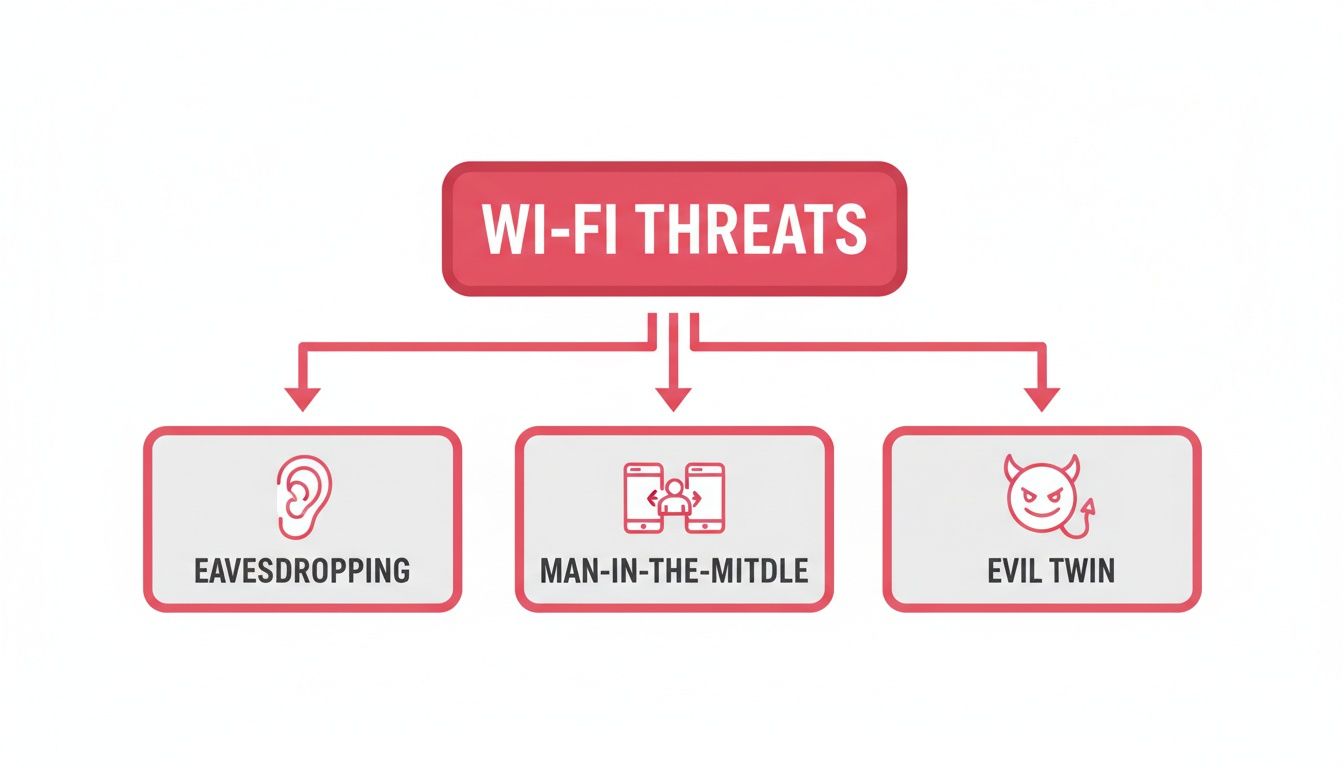
As the diagram shows, a poorly secured network makes it far too easy for an attacker to listen in on your traffic or trick your staff into connecting to a malicious network.
To make the differences clearer, here's a quick comparison of the protocols you're likely to encounter.
Comparing Wireless Security Protocols
| Protocol | Security Level | Key Vulnerabilities | Recommended Business Use |
|---|---|---|---|
| WEP | Very Low | Broken cryptographic algorithm; easily cracked in minutes. | None. Immediately upgrade any device still using WEP. |
| WPA | Low | Vulnerable to various attacks; superseded. | None. Consider it obsolete for business purposes. |
| WPA2 | Good | Susceptible to KRACK and offline brute-force attacks. | The minimum acceptable standard for small businesses. |
| WPA3 | Excellent | Robust protection against password guessing; enhanced encryption. | The recommended standard for all businesses, especially those handling sensitive data. |
This table lays it out plainly: for any organisation that takes its data security seriously, the choice is between WPA2 as a baseline and WPA3 as the goal.
Why This Matters For Your Business
Knowing the difference between these protocols empowers you to check your own network and spot a problem. Take a moment to log into your router's administrative panel and find the wireless security settings. If you see WEP or WPA selected, you have an urgent security gap that needs to be closed.
A practical example: a Wiltshire-based financial advisory firm handling confidential client investment records simply cannot afford the risk of that data being intercepted. By ensuring their network runs on WPA3, they create a secure environment where sensitive information is protected from prying eyes. This foundational knowledge is the first step towards building a truly secure wireless network.
Your Actionable Wi-Fi Security Hardening Checklist
Knowing the theory is one thing, but putting it into practice is what truly protects your business. It’s time to turn that knowledge into direct, defensive action. This isn’t a list of vague suggestions; it’s a prioritised checklist of practical steps you can take right now to dramatically strengthen your wireless security.
Think of this as the essential pre-flight check before you send your business data through the air. By working through these steps, you build layers of defence that turn your network from an easy target into a fortified position.
1. Change All Default Credentials Immediately
Every router, straight from the factory, has a default admin username and password like "admin" or "password". These aren't secrets; they're public knowledge, easily found online, and they are the very first thing an attacker will try. Leaving them unchanged is like leaving the master key to your entire office under the doormat.
A practical example: an attacker could log in to your router with default credentials and redirect your internet traffic to a malicious website, tricking staff into entering their login details for your client management system. By changing the credentials the moment you set up your router, you slam the door on this common entry point.
A recent survey on router security revealed some alarming habits among UK users: a significant percentage have never changed their router's factory settings or the default Wi-Fi password. For professionals handling sensitive client data, like accountants or care providers, this isn't just a risk—it's a potential breach of GDPR compliance. You can learn more from Broadband Genie's router security research page.
2. Implement a Strong Wi-Fi Passphrase
The word "password" really doesn't do it justice. What you actually need is a passphrase. A short, simple password like "Business123!" can be cracked by modern software in minutes, sometimes seconds. A passphrase, on the other hand, is a longer combination of words that is exponentially harder to break.
Instead of one complex word, think of a memorable but long phrase. Something like "OurWiltshireOfficeNetworkIsSecure2024!" is far more secure than a standard eight-character password. It makes brute-force attacks, where a computer tries millions of combinations per second, practically useless. It's a critical step to implement robust password security measures across all your access points and devices.
3. Enable WPA3 or WPA2-AES Encryption
As we covered earlier, the encryption protocol is the bedrock of your wireless security. It’s what scrambles your data, turning it into unreadable gibberish for anyone who might be snooping on your signal. You must use the strongest protocol your hardware can support.
Here’s how to check your security settings:
- Best Option: WPA3. If your router and your devices support it, choose this without hesitation. It offers far better protection against password-guessing attacks.
- Minimum Standard: WPA2 with AES encryption. If WPA3 isn't available, WPA2 is the next best thing, but only with AES encryption. Avoid the older, less secure TKIP standard.
Anything less than WPA2-AES, such as the original WPA or WEP, is dangerously obsolete. Using them is like sending your sensitive business data on a postcard for the whole world to read.
4. Disable Vulnerable Features like WPS
Wi-Fi Protected Setup (WPS) was designed for convenience, letting you connect a device by just pushing a button on the router. Unfortunately, that convenience comes at a steep price. The PIN method used by WPS has well-known flaws that attackers can exploit to crack your passphrase and get onto your network.
By disabling WPS in your router's settings, you close an unnecessary backdoor. The minor hassle of typing in your passphrase manually is a tiny price to pay for a major security upgrade.
5. Customise Your Network Name and Hide It
Your network's name, its Service Set Identifier (SSID), broadcasts your Wi-Fi's presence to everyone nearby. Simply changing it from the default (like "BT-Hub-XYZ") doesn't add a lock, but it does stop an attacker from immediately knowing your router model and looking up its specific weaknesses.
For an extra layer of protection through obscurity, disable the SSID broadcast entirely. This makes your network "invisible" to anyone casually scanning for Wi-Fi, as it won't pop up in their list of available networks. A determined hacker can still find it with specialised tools, but it effectively takes your business off the list of easy, low-hanging fruit.
6. Create a Segregated Guest Network
Finally, one of the most powerful security measures for any professional services firm is a separate guest network. This creates an isolated sandbox for all visitor traffic—whether it’s clients, suppliers, or contractors—keeping them completely separate from your core business systems.
Think of it like a secure reception area for your data. Guests get access to the internet, but they are walled off from your private servers, financial software, and confidential client files. This simple act of segregation drastically reduces your internal threat surface, ensuring that a visitor's potentially compromised laptop or phone can't cause an infection on your critical infrastructure.
Implementing Advanced Security for Growing Businesses

As your business expands, so does the sheer volume and sensitivity of the data you handle. The simple security measures that worked when you were a small startup—like a single, shared Wi-Fi password—just won't cut it anymore. For professional services firms across Wiltshire and Hampshire that are scaling up, it's time to graduate from basic protection to an enterprise-grade security posture.
Moving to this next level means ditching the "one key for everyone" approach. Instead, you'll build a system where network access is specific, controlled, and individually accountable. This isn't just about adding more locks; it's about creating a smarter, more responsive defence for your wireless network.
Upgrading to Individual User Authentication with RADIUS
Relying on one Wi-Fi password for the entire office is like giving every staff member the same key to the front door. If someone leaves, you’re supposed to change the locks and hand out new keys to everyone—a disruptive process that, let's be honest, rarely happens. This shared key model is a major security risk.
The professional solution is 802.1X authentication, which is usually managed with a RADIUS server. Think of RADIUS as a digital bouncer for your network. Instead of one password for the Wi-Fi, each employee gets their own unique login details, essentially a personal digital key.
When an employee tries to connect, their device presents these credentials. The RADIUS server then verifies their identity and grants access. This brings some powerful advantages:
- Granular Access Control: You can set different levels of network access based on someone's role. For example, the finance team at an accountancy firm can be granted access to sensitive servers while the marketing team is restricted from them.
- Immediate Revocation: When an employee leaves the company, you simply disable their individual account. Their Wi-Fi access is instantly cut off without disrupting anyone else.
- Detailed Auditing: The system logs every connection attempt. This gives you a clear audit trail of who accessed the network, from what device, and at what time.
Implementing RADIUS transforms your network from a public space with one password into a private, controlled environment. It ensures only authorised individuals can connect, providing a level of accountability impossible with a shared key.
Proactive Defence with Wireless Intrusion Prevention Systems
Even with strong authentication, you still need to guard against threats actively trying to get in. A Wireless Intrusion Prevention System (WIPS) acts as your dedicated 24/7 security guard for the airwaves. While a standard firewall protects your wired network, a WIPS specifically monitors the radio spectrum for suspicious wireless activity.
A WIPS is built to automatically spot and neutralise threats in real-time. It can identify rogue access points set up by attackers, detect "evil twin" networks designed to trick your staff, and block unauthorised devices from even trying to connect. When choosing your hardware and software, it's worth prioritising vendors who follow a robust secure software development lifecycle (SDLC).
For example, if a WIPS spots a malicious device trying to impersonate your official company Wi-Fi in the car park, it can instantly block it and notify your IT administrator. This kind of proactive defence is vital for stopping attacks before they can cause real damage. For any growing professional services firm serious about protecting its assets, moving up to these professionally managed systems is a critical step.
Why Proactive Security Requires a Professional Partner
Getting your wireless security right isn't a "set it and forget it" task. It's an ongoing commitment. The truth is, the threat environment is always shifting; new vulnerabilities pop up and attack methods get more sophisticated by the day. For any busy professional services firm, just keeping up can feel like a full-time job.
This constant cycle of monitoring, patching, and responding eats up time and resources that should be focused on serving your clients. Think about it: applying urgent firmware updates, managing who has access to what, and investigating every potential security alert—it all requires specialist knowledge and non-stop vigilance. Let just one of these slip, and you’ve left the door wide open for an attacker.
The Challenge of Going It Alone
Let’s be realistic. For most small and medium-sized businesses, building and retaining an in-house cyber security team just isn't feasible. The expertise needed is incredibly specialised, and the professional tools required for effective monitoring don't come cheap. This creates a dangerous gap between the protection you need and what you can realistically manage on your own.
This is exactly where a dedicated IT partner proves their worth. A managed services provider takes on the heavy lifting of cyber security, turning it from a source of constant stress into a professionally managed service. They bring the expertise, the tools, and the 24/7 oversight needed to keep your defences locked down.
Effective wireless security isn't just about the hardware you install; it’s about active, intelligent management. A professional partner provides the proactive oversight needed to find and shut down threats before they ever impact your business.
How a Managed IT Partner Delivers Peace of Mind
Working with a specialist like SES Computers gives professional services firms across Somerset and Hampshire an enterprise-grade security posture without the massive overheads. Instead of just reacting to problems after the damage is done, a managed partner works proactively to stop them from happening in the first place.
What does that proactive approach look like in practice?
- 24/7 Monitoring: Someone is always watching your network, ready to spot and respond to suspicious activity in real-time.
- Patch Management: All your network gear—from routers to access points—is kept up-to-date with the latest, most secure firmware. No exceptions.
- Compliance and Reporting: They help you stay on the right side of regulations like GDPR by maintaining a secure and fully auditable network environment.
- Expert Incident Response: If a security incident does happen, a skilled team is on it immediately, working to minimise damage and get you back up and running.
By handing this over to the experts, you free yourself up to focus on what you do best: running your business. You can operate with the confidence that your wireless internet security is in capable hands. For anyone thinking about making this strategic shift, a great first step is to understand the different managed services providers in the UK and what they offer. A professional partnership ensures your network is more than just functional—it's resilient, compliant, and secure against whatever comes next.
Frequently Asked Questions
Getting to grips with wireless security can seem like a daunting task, but a few core ideas can make a huge difference. Here are some straightforward answers to the questions we hear most often from professional service firms looking to secure their networks.
Is a Separate Guest Wi-Fi Network Really Necessary?
In a word, yes. Think of a guest network as a digital quarantine zone, completely walling off visitor traffic from your essential business systems. Without it, anyone who connects—be it a client for a meeting, a supplier, or someone with bad intentions—could potentially snoop around your internal servers, shared files, and other private data.
For any professional services firm that has people coming and going, this isn't just a 'nice-to-have'; it's a fundamental security measure. It stops a visitor's potentially compromised phone or laptop from becoming a gateway into your core network.
How Often Should I Change My Wi-Fi Password?
We get this one a lot. While a 90-day refresh is a decent rule of thumb, it's not the most important thing. The strength of your password is far more critical than how often you change it. A long, complex passphrase like 'Secure-Office-Network-Wiltshire-2024!' is infinitely better than a simple password that you cycle through regularly.
Of course, you should change your passphrase immediately if you suspect a breach or when an employee with network access leaves the company. This is where a managed service can be invaluable, helping to enforce strong password policies across the board.
Is My Internet Provider's Router Secure Enough?
Probably not. The routers your internet provider gives you are designed for one thing: getting you online quickly and easily. They aren't built with business-grade security in mind. More often than not, they come with default admin passwords, are running on old firmware, and have features enabled that could be easily exploited.
A practical example: many ISP-provided routers lack the advanced features needed to create properly isolated guest networks or support enterprise-level authentication like RADIUS. Simply plugging it in and hoping for the best is a massive gamble. Investing in proper business-grade hardware and getting it professionally configured is always the best path forward for solid wireless security.
What Is the Biggest Wireless Security Mistake?
By far, the most common and dangerous mistake we see is the 'set it and forget it' mindset. So many businesses set up their Wi-Fi when they first move in and then never touch the settings again. This is a recipe for disaster, as it leaves them wide open to new threats that pop up all the time.
This hands-off approach results in some critical oversights:
- Router firmware is never updated, leaving known security holes unplugged.
- Weak or default passwords are left in place, practically inviting attackers in.
- No one is monitoring the network for strange or unauthorised devices.
True security isn't a one-time task; it's an ongoing process. Proactive management is what turns your network from a sitting duck into a well-defended asset.
Securing your business takes more than just a strong password; it requires constant, expert attention. SES Computers provides managed IT support and cyber security services to ensure your wireless network is always protected, compliant, and ready for whatever comes next. Contact us to learn how we can safeguard your business at https://www.sescomputers.com.