Let's be honest, office printing is often a hidden chaos. You have printers, scanners, and copiers scattered around, each one a separate headache. When toner runs out or a machine jams, it’s a scramble. A managed print solution steps in to take that entire burden off your shoulders.
It’s a complete service where an expert provider manages every aspect of your company's print environment—from the hardware itself to the ink, maintenance, and support—all bundled into one clear, predictable monthly cost. It’s about taming an unmanaged expense and turning it into a streamlined business tool.
What Is a Managed Print Solution
Imagine trying to run a fleet of company cars where every vehicle is a different make and model, bought at a different time. Each needs its own unique parts, a specialist mechanic, and has wildly different running costs. It would be a logistical nightmare. That is exactly how most professional services firms handle their printers.
A managed print solution (MPS) is like hiring a professional fleet manager for your print devices. They take full responsibility for the entire setup, ensuring everything runs smoothly, efficiently, and cost-effectively.
This fundamentally shifts your approach from being reactive—fixing things only when they break—to being proactive. Instead of your office manager dropping everything to troubleshoot a paper jam or hunt for the right toner cartridge, your MPS provider is already on it, often before you even notice there is a problem.
Solving Common Office Frustrations
A well-designed managed print solution is built to eliminate the daily frustrations that quietly chip away at your team's productivity and inflate your overheads. For many professional services firms, these small issues add up to a significant drain on resources.
An effective MPS tackles these challenges directly:
- Unpredictable Costs: It gets rid of surprise invoices for toner or expensive repair call-outs. You get one fixed, transparent monthly fee, making budgeting simple. For example, a law firm avoids a sudden £400 bill for an emergency repair on a critical printer, as it's all covered in their monthly fee.
- Constant Device Errors: With proactive monitoring, potential problems are spotted and fixed before they can cause any serious downtime, keeping your workflow smooth.
- Wasted Staff Time: It frees your admin and IT teams from the thankless tasks of ordering supplies and fixing printers, letting them focus on work that actually drives your business forward.
- Security Vulnerabilities: Printers are often overlooked weak points in a network. An MPS locks them down, implementing security protocols to protect your sensitive client and company data.
This is not a niche service; it's a major business strategy. The Managed Print Services market in the United Kingdom was recently valued at around USD 1.50 billion. This figure shows just how many businesses are turning to MPS to cut operational costs and strengthen their security. You can explore more data on the managed print services market to see its growth trajectory.
A managed print solution is about far more than just printers. It’s about regaining control over your business processes, your budget, and your data. You’re not just outsourcing a task; you’re transforming a messy necessity into a powerful business asset.
Ultimately, for professional services firms like accountants, solicitors, and consultants, adopting an MPS ensures their document workflow is as efficient and secure as every other part of their operation.
The Core Components of Your MPS Service
So, what exactly do you get when you sign up for a managed print solution? It’s far more than just a new printer lease. Think of it as a complete, multi-layered service that takes every aspect of your document output off your plate. Essentially, it transforms your collection of individual machines into a single, cohesive, and intelligently managed system.
You are swapping the hassle of juggling different suppliers for toner, maintenance, and new hardware for one single point of contact. One predictable monthly bill covers everything. Let’s break down the key elements you should expect to find in any good MPS agreement.
Proactive Monitoring and Maintenance
The real heart of any effective managed print solution is proactive device monitoring. Your provider will install specialist software that acts like a digital engineer, keeping a constant watch over your entire printer fleet, 24/7.
This software reports back in real-time on everything from usage statistics and device health to potential faults. For example, if a component like a fuser unit is nearing the end of its life, the system flags it. An engineer can then be dispatched to replace the part before it fails, stopping disruptive downtime in its tracks.
Imagine a busy Dorset accountancy firm during tax season. A critical printer failing without warning would be a disaster, bringing productivity to a complete standstill. Proactive monitoring means that potential breakdown is identified and fixed during a quiet period, ensuring your operations are never compromised when it counts. It is a core promise of MPS: to solve problems before they even happen.
Automated Supplies Replenishment
How often has a vital print job been derailed by an empty toner cartridge? It’s a common frustration, but one that automated supplies replenishment completely eliminates. Modern printers are smart enough to know precisely when their toner is running low.
When a cartridge hits a pre-set level, usually around 20% capacity, the device automatically triggers an order with your MPS provider. A new cartridge is then sent straight to your office, arriving with plenty of time to spare before the old one runs out.
This one simple feature delivers a huge impact:
- No More Manual Checks: Your team can stop wasting time walking around the office, physically checking toner levels on every single machine.
- Reduced Storage Needs: You no longer need to tie up capital and office space stockpiling expensive cartridges.
- Continuous Operation: It simply guarantees your printers are always ready to go, removing a major source of workplace inefficiency.
By automating routine tasks like supply orders and maintenance alerts, a managed print solution gives your team back their most valuable asset: time. It allows them to stop managing office equipment and start focusing on the high-value work that actually drives your business forward.
Powerful Print Management Software
Beyond the hardware and supplies, a true managed print solution is powered by sophisticated software that gives you complete control over your print environment. This software is the brain of the whole operation, enabling you to set rules and policies that dramatically improve security and cut costs.
A standout feature is secure 'pull printing'. When a user prints a sensitive document—like a client's financial records or a confidential legal agreement—it does not just pop out of the printer for anyone to see. Instead, it’s held securely in a digital queue. To release the job, the user has to walk to any printer on the network and authenticate themselves, typically with a PIN code or a key fob. This simple step completely eradicates the risk of confidential documents being left abandoned on an output tray.
This software also delivers incredibly detailed analytics and reporting, giving you a crystal-clear view of your entire print infrastructure. Managing these devices is a key part of your wider IT strategy, and you can learn more by exploring what IT asset management is and why it's crucial. These insights let you track costs, monitor usage by department or even by individual, and make smart, data-driven decisions to keep optimising your setup over time.
The Real-World Wins: What Managed Print Actually Does for Your Business
So, we've talked about the tech and the monitoring, but what does a managed print solution really do for a business on the ground? The true value is not in the machines themselves, but in the tangible, day-to-day impact it has on professional services firms like accountants and solicitors. It’s about taking a function that is often a bit chaotic and turning it into a strategic asset that saves you money, locks down your data, and helps you build a better business.
These are not just vague promises. For businesses across Dorset and Hampshire, the switch from a messy, unmanaged print setup delivers real, measurable improvements to the bottom line, client confidentiality, and even your company's reputation.
Get a Firm Grip on Your Costs—and Keep Them There
The first thing you will notice with a managed print solution is how it reins in your spending. In most offices, print costs are all over the place. There are hidden expenses everywhere: sudden outlays for new printers, wildly different invoices for toner, and unexpected call-out fees when a machine inevitably breaks down.
An MPS swaps that financial rollercoaster for a single, predictable monthly payment. Simple. Everything you need—the hardware, the ink and toner, the maintenance, and all the support—is bundled into one clear operational cost. Moving from big, lumpy capital expenditure (CapEx) to a smooth operational expenditure (OpEx) makes budgeting a breeze and frees up cash you can invest in growing your business.
It is not unusual for businesses to slash their annual print spending by up to 30% once they optimise their setup and bring in smarter print rules. That is not just a saving; it is a significant financial boost that goes straight back into your pocket.
Think about it this way: a law firm in Somerset might have twenty different desktop printers scattered around the office, each one costing a small fortune to run. An MPS provider would come in, assess the situation, and likely replace them with a handful of highly efficient, centrally located multifunction devices. That one change alone cuts down on consumable costs, reduces energy bills, and makes maintenance far simpler, delivering immediate and often substantial savings.
Seriously Upgrade Your Document and Data Security
For any professional firm, protecting client data is everything. Yet, the humble office printer is often the weakest link in the security chain. How many times have you seen sensitive documents—confidential financial reports, legal strategies—just sitting on the printer tray for anyone to see? Each one is a potential data breach waiting to happen.
A managed print solution tackles this head-on with some seriously robust security features. Modern devices are packed with tools to protect your information from the moment you hit 'print'.
- User Authentication: Staff have to identify themselves right at the printer before a document is released. This can be with a simple PIN, a swipe of an ID card, or a key fob. This process, often called 'pull printing', is a game-changer. It completely eliminates the risk of sensitive prints being left unattended.
- Network Security: Your provider will make sure every device is properly locked down on your network. That means up-to-date firmware and tight security protocols to stop anyone from getting unauthorised access.
- Data Encryption: Any information sent to the printer, or stored on its internal hard drive, can be encrypted. It is another crucial layer of defence against cyber threats.
Picture an accountancy practice in Wiltshire handling delicate client tax returns. With user authentication, a partner can print a highly sensitive file from their desk, walk over to the machine later, and know with complete certainty that it will only be released when they are standing right there to collect it. It’s a simple fix that strengthens compliance and delivers priceless peace of mind.
Boost Your Green Credentials
Being environmentally responsible is not just a 'nice-to-have' anymore; it's a core priority for many UK companies. A managed print solution gives you a practical, effective way to reduce your carbon footprint and hit your sustainability goals.
It works in a few key ways. First, your provider will install modern, energy-efficient machines that use far less power than older models. Second, clever print management software lets you set eco-friendly rules across the board, like making double-sided printing the default or automatically sending large print jobs to the most efficient device.
A comprehensive managed print solution also considers what happens at the end of a device's life. This excellent guide to recycling electronic equipment offers some great insights into sustainable disposal. By actively cutting down on paper waste, using less energy, and disposing of old hardware responsibly, you are not just saving the planet—you are building a greener, more sustainable, and more respected business.
Calculating the Real Financial Value
So, how do you make the business case for a managed print solution? The key is to look past the monthly fee on a proposal and get a grip on the complete financial picture. It is about uncovering the hidden expenses you are already paying for and then projecting realistic savings.
For most businesses, the true cost of printing is a massive blind spot. You will see the invoices for toner and the odd new printer, of course, but that’s just the tip of the iceberg. A proper financial deep-dive tells the full story and builds a solid argument for making a change.
Understanding Your Total Cost of Ownership
To really see the value, you first need to calculate the Total Cost of Ownership (TCO) of your current setup. TCO is simply a way of adding up all the direct and indirect costs tied to your printers, not just what you paid for them.
Think of it like owning a car. The cost is not just the sticker price; it’s the fuel, insurance, tax, servicing, and unexpected repairs. Your print TCO is no different – it’s far more than just the hardware.
These hidden costs are where the money drains away:
- Wasted Staff Time: How many hours does your IT team lose wrestling with printer jams and driver issues? What about the admin time spent ordering dozens of different cartridges for a mismatched fleet of machines? That’s valuable time that could be spent on growing the business.
- Wasted Consumables: We have all seen it: the office cupboard full of unused toner for printers that were thrown out years ago. That’s dead money, pure and simple.
- Energy Consumption: A fleet of old, inefficient desktop printers can munch through a surprising amount of electricity, especially when they are all left on overnight.
- Emergency Repairs: Those emergency call-out fees for an engineer when a critical device dies can be eye-wateringly expensive and are totally unpredictable.
By putting a number on these hidden expenses, you establish a proper baseline. This figure shows what you are really spending on print right now, and it is almost always much higher than you imagine.
Calculating Your Return on Investment
Once you know your TCO, you can start to figure out the potential Return on Investment (ROI) from bringing in a managed print partner. This is not just about cutting costs; it’s about adding strategic value. A good ROI calculation looks at both the hard cash savings and the softer, less obvious benefits.
Large corporations have known this for years, but now small and medium-sized businesses are catching on fast. While the big players use sophisticated fleet optimisation to achieve 25-30% energy savings and CO₂ reductions, the fastest-growing market is actually SMEs right here in the UK, thanks to simple cloud portals and affordable subscriptions. You can read more about the growth of the managed print services market and what is driving it.
Let's look at a real-world example. Imagine a law firm in Hampshire running 15 individual desktop printers.
- Current TCO: They sit down and calculate their annual TCO at around £12,000. This includes estimated IT support hours (£3,000), a chaotic mix of toner costs (£6,500), energy use (£1,000), one emergency repair (£500), and general admin time.
- Proposed MPS Cost: A provider gives them a quote for £750 per month (£9,000 annually). This would replace all 15 devices with four modern, efficient multifunction printers and would cover every single supply, all maintenance, and any support they need.
- Calculating ROI: The immediate "hard" saving is £3,000 a year. But the true ROI is much bigger when you factor in the "soft" savings—the reclaimed IT time, the elimination of waste, and the boost to productivity from having reliable, centrally managed machines that just work.
This practical approach takes the guesswork out of it, turning what feels like a new expense into a clear, justifiable investment that delivers real, measurable financial returns.
Getting Your Managed Print Solution in Place
Switching to a managed print solution is not about turning your office upside down. Think of it more as a planned project, a step-by-step journey with a clear map, all designed to cause as little disruption as possible while delivering real value from the get-go.
When you break it down, the whole process is a logical flow from discovery and analysis to continuous improvement. Your provider manages each stage, making sure the transition is smooth and that the final setup fits your business like a glove. The goal is to get your team on board and start seeing the financial and operational wins almost right away.
The Initial Print Audit
First things first: the print audit. This is a proper deep dive into how your business currently prints. A specialist will come to your office to get the full picture of your existing setup. It’s a fact-finding mission to figure out what equipment you have, how it is being used, and—most importantly—what it’s actually costing you.
During this stage, they will map out every single device connected to your network, from small desktop printers to the big multifunction machines. They analyse who prints what, when, and how much, uncovering the true costs of ink, toner, and maintenance. For a local solicitor's office in Dorset, this might highlight that a few key people are printing huge document bundles on small, expensive-to-run desktop machines—a classic quick win for cost savings.
Designing a Solution That Fits
Armed with all that data from the audit, the provider gets to work on the solution design. This is where they architect a new, streamlined print environment that’s built specifically for your business. It’s never a one-size-fits-all package; the plan is crafted around your unique workflows, security requirements, and budget.
This bespoke plan will specify the right number and type of devices and, crucially, where to put them to make life easier for your staff. For example, instead of ten individual desktop printers all eating up expensive ink cartridges, they might recommend two strategically placed, high-efficiency multifunction devices that can handle printing, scanning, and copying for a whole department.
This is all about understanding the numbers—moving from figuring out your Total Cost of Ownership (TCO) to identifying concrete savings and proving the Return on Investment (ROI).
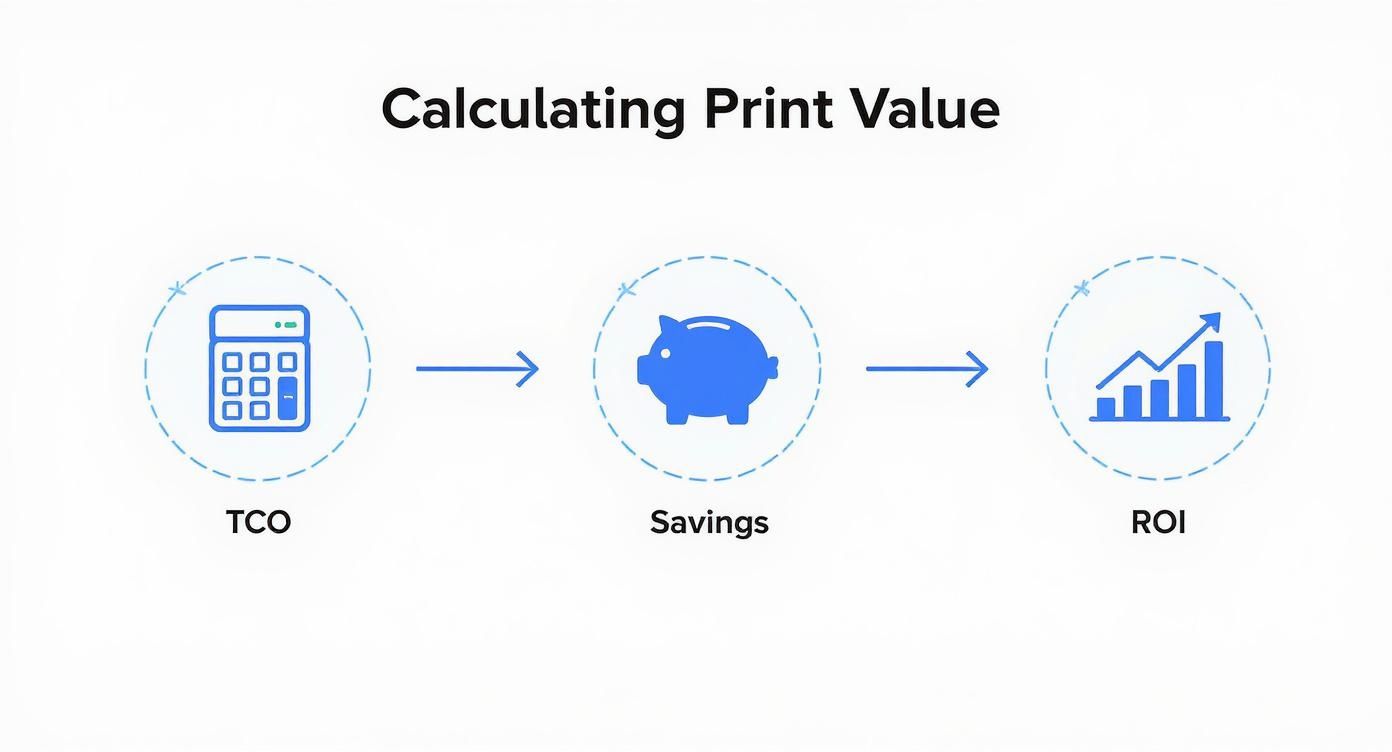
As the infographic shows, a successful managed print strategy is built on a solid financial case, not just shiny new tech.
Rollout and Getting the Team On Board
Once you have signed off on the design, it’s time for the rollout and installation. This is always carefully scheduled to keep disruption to a minimum, often happening outside of your main working hours. Engineers will get the new equipment installed, connected to your network, and running smoothly.
But the hardware is only half the story. The most important part of this stage is staff training. Your provider will run sessions to make sure everyone in your team knows how to use the new devices and software.
A successful rollout lives and dies by user adoption. Proper training on features like secure print release or scanning directly to cloud storage ensures your team actually uses the new system, allowing you to unlock its full potential.
Ongoing Reviews and Fine-Tuning
A managed print solution is not a 'set and forget' service. The final piece of the puzzle is a continuous cycle of review and optimisation. Your provider will schedule regular check-ins, usually quarterly, to go over usage data and talk about how the system is performing for you.
This ongoing conversation means the service can be tweaked as your business changes. If you open a new branch in Hampshire or a department’s needs shift, the service adapts with you. It’s how you ensure your print setup stays efficient and cost-effective for years to come.
How to Choose the Right MPS Provider
Picking a managed print partner is not just another line item on your procurement list. It’s a serious business decision. You are not just buying printers; you are bringing on board a provider who will be deeply involved in your day-to-day operations. The right partner acts more like a strategic advisor, helping you get a grip on costs, lock down your security, and make your team more efficient for years to come.
For small and medium-sized businesses here in the UK, especially professional services firms, getting this choice right is absolutely critical. You need someone who gets the specific pressures you are under, from protecting client confidentiality to needing rock-solid reliability. It’s about seeing past the shiny brochures to find a partner whose expertise genuinely matches your business goals.
Evaluate Their Local Presence and Support
When a crucial printer goes down right before a client deadline, the last thing you need is to be stuck on hold with a call centre miles away. Having a provider with a strong team of local engineers—whether you are in Dorset, Hampshire, or Wiltshire—is non-negotiable for getting fast, effective help.
A local team means quicker call-out times and engineers who actually understand the regional business landscape. That proximity is a massive advantage. It means problems get sorted quickly, keeping disruption to a minimum and your staff productive. A provider's local reputation is built on delivering that promise, time and time again.
Before you even think about signing a contract, ask some direct questions:
- What is your guaranteed engineer response time for our office?
- Are your engineers direct employees or third-party contractors?
- Can you put us in touch with a local business in our industry that uses your service?
Scrutinise Their Security and Compliance Expertise
If you are a firm handling sensitive client data, like an accountancy or a law practice, security is not just a feature—it's everything. Your MPS provider must have a real, demonstrable understanding of data security and regulatory compliance. They should be able to explain exactly how their solution will protect your information, from securing the printers on your network to setting up user authentication and encrypting data in transit.
The demand for tight security is a huge driver in the UK market. It is why sectors like financial services and healthcare are big adopters of managed print—they have to be. This has created a strong preference for on-premises solutions that keep data security firmly under their control. You can find more insights on this in reports covering the UK managed print services market.
A potential provider should feel like an extension of your IT team. If they cannot talk confidently about data protection and compliance, they are not the right partner for a professional services business. This is one area where their expertise is just as important as the hardware they sell.
Demand a Flexible Service Level Agreement
The Service Level Agreement, or SLA, is the blueprint for your relationship with your MPS provider. It spells out the services, performance targets, and responsibilities for both sides. A rigid, boilerplate contract is a major red flag. What you need is an SLA that’s built around your business and can evolve as you do.
The agreement must clearly define key metrics like device uptime guarantees and engineer response times. It should also cover the process for adding or removing machines and set a schedule for regular performance reviews. This kind of flexibility ensures the managed print solution remains a good fit long after the initial setup. This is a core principle for any managed service, something we explore further in our guide to managed IT services. A good provider will work with you to build a living document that truly supports your business, not one that ties your hands.
Answering Your Questions About Managed Print Solutions
Signing up for a managed print solution is a big step, so it’s only natural to have a few questions. We often hear from businesses wondering if it is the right move for them, how much day-to-day control they will keep, and what happens when a printer inevitably goes on the blink.
Let's clear up some of those common queries to help you see if this is the right strategic step for your company.
Is MPS Only for Big Companies?
There’s a persistent myth that managed print services are just for large corporations with hundreds of devices. That could not be further from the truth. In reality, today’s managed print solutions are incredibly flexible and can be just as beneficial—if not more so—for Small and Medium-sized Enterprises (SMEs).
Think about a small accountancy firm in Somerset. The time their team saves by not having to order toner or troubleshoot a paper jam is immensely valuable. Because the service is shaped around your specific print volumes and needs, it gives SMEs the kind of efficiency and security normally reserved for big players, but without the hefty price tag.
Will We Lose Control of Our Printing?
Handing over any part of your business operations can feel like you are giving up control. With a managed print solution, however, it’s quite the opposite. You actually gain more control because you get far better visibility.
You will receive detailed reports showing exactly who is printing what, on which device, and at what cost. This is not about micromanaging; it's about having the data to set sensible print rules, spot wastage, and manage your budget with real accuracy. You are swapping guesswork for genuine insight.
A well-designed managed print solution does not take control away. It gives you the tools and data you need to actively manage your print environment, rather than just reacting when things go wrong.
What Happens When a Device Breaks Down?
This is where your Service Level Agreement (SLA) really proves its worth. Instead of your office manager spending half the morning on the phone trying to diagnose an error code, your MPS provider is on the hook to sort it out.
The SLA will lay out guaranteed response times for an engineer, ensuring a qualified technician is on-site promptly to get you back up and running. This proactive support keeps downtime to an absolute minimum and lets your team get on with their actual jobs. For more general information, you can explore frequently asked questions about printing supplies to understand common issues.
How Long Are the Contracts?
Typically, you will find managed print contracts run for between three and five years. It’s absolutely vital to go through the terms and conditions with a fine-tooth comb. Pay close attention to the details on equipment upgrades, what’s included in the service, and what your options are when the contract ends.
A trustworthy provider will be completely transparent and help you find a term that fits your business plan. This also extends to how your print data is managed, which is a critical piece of your wider information security and should align with your company’s own data retention policies for UK businesses.
At SES Computers, we design managed print solutions that deliver complete control, robust security, and predictable costs. For over 30 years, we've been helping businesses across Dorset, Somerset, Wiltshire, and Hampshire get their printing in order.
Discover how our Managed Print Solutions can benefit your business today.