Think of practice management software as the central nervous system for a modern accountancy firm. It's the single source of truth that replaces scattered spreadsheets, forgotten sticky notes, and chaotic email chains with one unified hub. Essentially, it’s designed to manage everything from client data and deadlines to workflows and communications, all in one place.
The goal? To drive real efficiency and free up your team’s time for high-value advisory work.
Moving Your Firm Beyond Spreadsheets and Silos
For many accountancy firms in Dorset, Somerset, and across the UK, the daily grind feels like a constant battle with administrative chaos. Does this sound familiar? Critical client deadlines are tracked on monstrously complex spreadsheets. Vital communications are buried deep in overflowing inboxes. And tracking workflow progress relies on someone remembering to tick a box on a manual checklist.
This fragmented approach doesn't just slow you down; it actively puts a ceiling on your firm's growth potential. It creates very real risks, from missing crucial Making Tax Digital (MTD) deadlines to delivering inconsistent client service. Every hour your team spends chasing documents or cross-referencing data is an hour they can't spend providing the strategic advice your clients actually pay for.
Imagine your practice as an orchestra. Without a conductor, each musician plays from their own sheet music. The result is pure discord. That’s what the spreadsheet-and-email method sounds like.
The Central Hub for a Modern Practice
Practice management software is the conductor, bringing harmony and precision to your entire operation. It organises every element of your firm—from the first client onboarding call to the final invoice—into a seamless, automated workflow.
For instance, instead of hunting for an old email thread to confirm a client's query about capital gains, all communication is logged directly against their record in the system. Instead of manually updating a task list when a self-assessment is ready for review, workflows are automatically triggered and assigned to the relevant partner when a milestone is hit. This is a fundamental shift, turning reactive admin chores into a proactive, efficient system. By embracing advancements like AI in accounting, firms can push this even further by automating routine tasks, cutting down on errors, and speeding up reporting.
A Proven Path to Greater Efficiency
The shift towards integrated software isn't just a trend; it's backed by tangible results. The UK's financial management tools market is expected to reach $11.8 billion in the next eight years, a clear signal that firms are moving away from manual methods for good.
Firms that make the switch report saving up to 288 hours during tax season alone. Automation can slash paperwork by as much as 95%, boosting a firm’s overall efficiency by 20-27%. These aren't just numbers on a page; they represent a real opportunity for accountants to focus on what truly matters—providing expert advice to their clients.
What Practice Management Software Actually Does
Let's cut through the jargon and get to what this software really does for your firm. If you're like many practices, you might be juggling a patchwork of systems: intricate spreadsheets for tracking deadlines, client communications lost in Outlook inboxes, and maybe even physical folders for critical documents. It works, after a fashion, but it's fragmented, inefficient, and frankly, a bit risky.
Practice management software is designed to replace that operational chaos with a single, unified digital hub. Think of it less as another piece of software and more as an integrated command centre for your entire practice.
The diagram below really captures this shift from disjointed, confusing processes to a system that brings clarity and control.
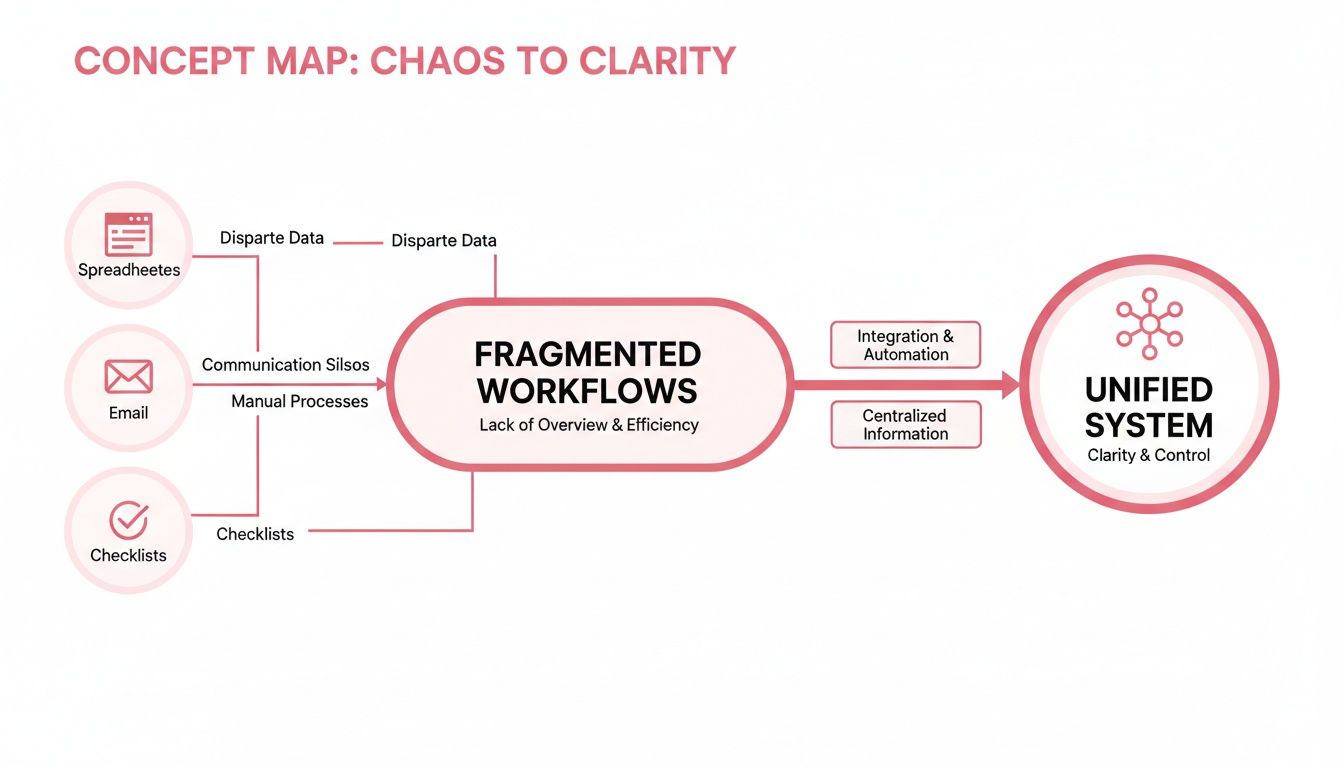
As you can see, integrating things like emails, tasks, and client files into one platform gives you a clear line of sight over everything happening in your firm.
Orchestrating Your Workflows
At its heart, this software is a powerful workflow management engine. It gives you the power to map out every single process—from onboarding a new client to filing a corporation tax return—and then puts much of the execution on autopilot. This creates consistency, builds in accountability, and ensures nothing ever gets missed.
Let’s take a client's annual tax return. Without a central system, it's a manual slog of checklists, chasing emails, and that constant worry that a key document is missing.
With proper practice management software in place, the process becomes systematic:
- Automated Reminders: The system can automatically email the client requesting specific documents by a set date. No more manual chasing.
- Task Assignment: Once documents arrive via a secure client portal, a task is automatically created and assigned to a junior accountant for preparation.
- Progress Tracking: A partner can see the real-time status of every single tax return across the firm from one dashboard, spotting bottlenecks before they turn into major problems.
- Review and Submission: When the prep work is done, the workflow automatically pushes the task to a manager for review, and then on for final submission, logging every single step along the way.
This kind of efficiency is why the UK accounting practice management software market is projected to hit $0.89 billion by 2025. It’s driven by the urgent need for better compliance with HMRC’s demands. For SMEs in southern England, where businesses in Dorset and Wiltshire rely on their accountants for perfect payroll, billing, and tax work, this is non-negotiable. These platforms often come with predefined templates for MTD adherence that can slash compliance time by over 50%. You can read more about the market expansion of accounting software and see the trends for yourself.
Building a Complete Client Picture
Beyond just workflows, the software acts as a robust Client Relationship Management (CRM) system. This isn't just a digital address book; it's a living history of every single interaction your firm has ever had with a client.
By centralising client data, you eliminate knowledge silos. Every member of your team can access a complete, up-to-date client history, ensuring a consistent and professional service regardless of who picks up the phone.
Imagine this scenario: a client rings with a question about their VAT return, but the accountant who usually handles their account is on holiday. The rest of the team is left scrambling, trying to piece together the story from old emails and notes. It's not a good look.
Now, picture that same call in a firm using practice management software. Any team member can instantly see:
- The last email exchange about the VAT submission.
- Notes from the last phone call discussing payroll adjustments.
- All the documents the client has uploaded to their portal.
- The live status of all their active jobs.
This immediate access to information means queries get resolved faster, clients feel properly looked after, and your firm presents a united, organised front. It fundamentally changes client service from being person-dependent to system-driven—an absolutely crucial step if you want to scale your practice.
What This Actually Means for Your UK Accountancy Firm
Features on a spec sheet are one thing, but what does practice management software actually do for your firm day-to-day? The real value is measured in tangible results that affect your efficiency, client relationships, security, and ultimately, your bottom line. These aren't just abstract ideas; they're the real-world outcomes firms across the UK are seeing right now.

A Serious Boost in Efficiency
The first thing you’ll notice is how much administrative grind it eliminates. Think about the classic client onboarding process – a notoriously manual slog of drafting engagement letters, chasing for documents, and endless copy-pasting of data. By automating this workflow, firms report saving over 20 hours per month on this task alone.
For example, a new client's details can be entered once and automatically populate the engagement letter, create a client record, and schedule the initial kick-off tasks for the team. That reclaimed time is gold. It frees up your senior accountants to focus on high-value advisory work and allows junior staff to manage more clients without being stretched thin. It’s about converting time spent on admin into billable, productive activity.
A Better Way to Work with Clients
Modern practice management platforms completely change the dynamic between you and your clients. The days of insecure email attachments and disjointed phone calls are replaced by a secure, branded client portal. This gives everyone a single, central place to collaborate that fits their schedule, not just your 9-to-5.
Here’s a perfect real-world example. A business owner in rural Somerset needs to get their quarterly VAT documents over to you. Instead of waiting until Monday, they can log into your portal on a Sunday evening and upload everything securely. That simple action can automatically create a task for your team, ready to be picked up first thing Monday morning. No emails needed.
This kind of self-service and professionalism makes your firm far easier and safer to do business with, which clients absolutely notice.
Stronger Security and Easier Compliance
Let’s be honest: managing sensitive financial data across spreadsheets, local drives, and email is a huge risk in today's world. With cyber threats and strict data protection laws, it’s a vulnerability you can't afford. A central practice management system is built from the ground up with security in mind, offering a far more robust defence than a patchwork of different tools.
By bringing all client information into one encrypted, access-controlled system, you massively shrink your firm’s "attack surface." This isn't just about ticking a GDPR box; it’s about providing genuine peace of mind for you and your clients.
Every document, message, and note is kept within a fortified environment, often hosted in secure UK data centres. You're no longer just trying to be compliant; you're actively protecting your firm’s most important asset—client trust. Our guide on how hosted desktops will make your accountancy firm more efficient digs deeper into the security and performance benefits of this kind of centralised IT.
A Clearer Path to Profitability and Growth
When you add it all up, these benefits point to one key outcome: a healthier bottom line. Greater efficiency cuts down non-billable hours, better client service improves retention and drives referrals, and solid security protects your reputation.
The clear view you get of workflows and team capacity also helps you manage resources far more effectively. For instance, a quick glance at the dashboard might reveal that the VAT return workflow is consistently hitting a bottleneck at the review stage. This allows you to allocate more senior resource to that step or provide targeted training, making the entire process more profitable. Your practice management software stops being just an operational tool and becomes a strategic asset for building a more successful firm.
How to Choose the Right Software for Your Firm
Selecting the right practice management software for your firm can feel like a monumental task. The market is crowded, and every vendor claims their solution is the best. It's easy to get lost in feature lists and sales pitches. The trick is to cut through the noise and create a simple decision-making framework based on what your firm actually needs.
Picking a platform isn’t just about the tech; it's a strategic move that will define your firm's efficiency, scalability, and client service for years. You’re looking for a solution that solves today's headaches and supports your growth tomorrow.
Evaluate Core Integration Capabilities
Of all the factors to consider, this is arguably the most important: how well does the software play with the tools you already use every day? Your practice management system should be the central hub that connects everything, not another island of data your team has to paddle to. Without smooth connections, you'll be stuck with manual data entry, which completely defeats the purpose of the investment.
Before you even think about booking a demo, list your must-have software integrations. This should definitely include:
- HMRC for MTD: Does it offer a direct, certified link for Making Tax Digital submissions? Think VAT, ITSA, and Corporation Tax.
- Bookkeeping Platforms: How does it sync with the major players like Xero, QuickBooks, or Sage? You need seamless data flow for client details and deadlines.
- Email and Calendars: Will it integrate with Outlook or Google Workspace? Automatically logging client emails and syncing calendar deadlines is a huge time-saver.
Don't just take a vendor's word for it. Insist on a live demonstration of these specific integrations in action. Ask a pointed question like, "Can you walk me through the entire workflow for a Self-Assessment return, from pulling client data from QuickBooks to the final submission to HMRC?"
Consider Hosting and Scalability
Your next big decision is whether to go with a cloud-based platform or a traditional on-premise setup. Each path has very different implications for cost, security, and day-to-day accessibility.
A cloud-based platform gives your team the freedom to work from anywhere—a massive advantage for any modern firm. On-premise solutions offer more direct control, but that control comes with the heavy burden of managing your own servers, backups, and security.
To help you weigh your options, this table breaks down the key differences.
Comparing Cloud-Based vs On-Premise Solutions
| Consideration | Cloud-Based Solution (e.g., Hosted by SES Computers) | On-Premise Solution |
|---|---|---|
| Initial Cost | Lower upfront cost (subscription-based) | High upfront cost (servers, licences, installation) |
| Accessibility | Access from anywhere with an internet connection | Limited to office network unless a VPN is set up |
| Maintenance | Managed by the provider (updates, security) | Managed by your internal team or IT partner |
| Scalability | Easy to scale up or down as your firm grows | Difficult and expensive to scale |
| Data Security | Provider manages security, often with dedicated expert teams | Your responsibility to secure servers and data |
| Backups | Handled automatically by the provider | Must be managed and verified by your team |
Ultimately, the right choice depends on your firm's resources, IT expertise, and long-term strategy. For many, the flexibility and reduced management overhead of a cloud solution are a clear winner.
As you explore, it's worth checking reviews of the best time and billing software for accountants to see how different platforms stack up. It’s also vital to understand exactly what you're signing up for with licensing; our article on the risks of software licensing audits is a must-read.
Scalability is another key piece of the puzzle. Will the software still perform when your firm grows from five staff members to fifty? Ask vendors about their pricing tiers and, more importantly, whether the system can handle a larger volume of users and data without grinding to a halt.
Focus on Security and Compliance
Given the incredibly sensitive financial data you handle, security is completely non-negotiable. With regulations like GDPR, you have to be absolutely certain your chosen platform meets the highest data protection standards.
Be prepared to ask vendors direct and specific questions about how they handle security:
- Data Location: Where, physically, are your data centres? For UK firms, having data hosted within the UK is a critical piece of the GDPR compliance puzzle.
- Encryption: What encryption standards do you use for data, both when it's moving (in transit) and when it's stored (at rest)?
- Access Controls: How does the platform let us manage user permissions? We need to ensure staff can only see the client data relevant to their role.
A vague answer to any of these questions should set off alarm bells. A trustworthy provider will be completely transparent about their security measures and should be able to provide documentation to back up their claims. This intense focus on security is a core part of choosing the right practice management software for accountants.
Navigating a Smooth Implementation and Migration
Let's be honest: the thought of moving your entire firm to a new system can be genuinely nerve-wracking. The fear of lost data, chaos during the switchover, and the steep learning curve for your team are real concerns. It's often why so many practices end up clinging to outdated, clunky methods that just aren't working anymore.
But here’s the thing: a successful transition to new practice management software for accountants isn't about flipping a switch overnight and hoping for the best. It's about a well-thought-out, phased approach that minimises risk and gets your team on board from day one. Think of it less as a technical project and more as a change management project. Success comes down to proper planning, clear communication, and a realistic timeline. Rushing it almost always backfires.

Your Four-Phase Implementation Plan
To make this feel less overwhelming, let's break the whole process down into four manageable phases. This structure gives you a clear roadmap, ensures nothing important gets missed, and helps your team feel supported every step of the way.
-
Data Preparation and Cleansing: This is, without a doubt, the most critical (and most underestimated) phase. Before you even think about importing a single record, you need to audit your existing client data. That means hunting down and merging duplicate records, fixing out-of-date contact details, and archiving clients you no longer work with. Simply dumping "dirty" data into a shiny new system is like moving all the clutter from your old house into a new one—you're just creating bigger problems for later.
-
System Configuration and Workflow Mapping: This is where you mould the software to fit your firm's unique processes, not the other way around. For example, you can build a custom workflow for your payroll service that includes automated client reminders for timesheet submission, a checklist for processing, and a final approval step for the client before BACS payment files are generated.
-
Comprehensive Team Training: Don't just give them a login and expect them to figure it out. Schedule proper, dedicated training sessions that are specific to different roles. Your admin staff need to know different things than your senior accountants. The key is to focus on the real-world scenarios they handle every day, which makes the training stick.
-
Staged Rollout and Go-Live: Instead of a risky "big bang" launch where everyone switches at once, a phased rollout is almost always the smarter move. This approach dramatically lowers the risk and allows you to iron out any kinks before the entire firm is using the new platform.
A Real-World Example of Staged Migration
Picture a Salisbury-based accountancy firm with 15 staff members. They were understandably anxious about causing disruption during the busy tax season. Instead of moving all 400 clients over in one go, they took a much more measured, staged approach.
They started by hand-picking a pilot group of 10 trusted, long-standing clients. This small-scale launch let them:
- Test workflows in a live environment with very little at stake.
- Spot and fix configuration issues before they could affect their entire client base.
- Create a small team of internal "super-users" who quickly became advocates for the new system.
After a successful one-month pilot, they had the confidence—and a proven process—to migrate the rest of their clients in manageable batches over the next two months. The result? A smooth, controlled transition with virtually zero disruption to their client service.
Avoiding Common Migration Pitfalls
Many implementation projects stumble over the same few avoidable mistakes. Just being aware of these common traps is half the battle.
The biggest barrier to a successful software migration is rarely the technology itself. It’s almost always a failure to plan for the human element—incomplete data cleansing, insufficient training, and poor communication with the team.
Here are the main issues to watch out for:
- Underestimating Data Cleansing: Thinking you can get this done in a few hours is a recipe for disaster. It's a meticulous job that requires time and attention to detail.
- Providing Generic Training: One-size-fits-all training just doesn't work. Your team needs to see precisely how the software helps them do their specific job better and more easily.
- Failing to Get Team Buy-In: Involve your team from the start, even during the selection process. If they feel like this change is being forced on them, you'll meet resistance at every turn.
By partnering with an expert like SES Computers, you can offload all the technical heavy lifting. We handle the secure data migration, system configuration, and provide ongoing support, freeing you up to focus on what matters most: leading your team through the change. This kind of collaborative approach is the key to a smooth, secure, and successful move to a more efficient future for your firm.
Partnering with SES Computers for Your Digital Future
Choosing the right practice management software is a huge step, but the technology itself is only half the battle. To get the most out of your investment, you need an IT environment that’s secure, reliable, and perfectly tuned to your firm's way of working. This is where a true technology partner comes in – someone who goes beyond a simple supplier relationship to become a core part of your strategic success.
At SES Computers, we're not just another IT provider. For over 30 years, we’ve been the dedicated technology partner for professional services firms across Dorset, Hampshire, and Wiltshire. We get the unique challenges accountants face, from the immense pressure of client data confidentiality to the absolute need for flawless uptime during tax season.
Managed IT Support That Understands Accountants
When your new software becomes the central hub of your firm, even a small technical glitch can bring everything grinding to a halt. Our Managed IT Support is designed to stop problems before they even start. We don't just sit back and wait for the phone to ring; we proactively monitor your systems to make sure your software, network, and devices are always running smoothly.
For instance, a routine software update could cause a conflict with another critical application. Our team can spot and fix that clash before it ever affects your team's workflow. That means less downtime and fewer frustrating interruptions, freeing up your accountants to focus on what they do best: serving their clients.
Secure and Compliant UK-Based Cloud Hosting
The on-premise versus cloud debate is a big one for any practice. Our UK-Based Cloud Hosting gives you the best of both worlds. You get all the flexibility and remote access of the cloud, but with the peace of mind that comes from knowing your sensitive client data remains securely within the UK, fully compliant with GDPR.
Imagine your team needing to pull up crucial client files while working from home or visiting a client. Our hosted solutions deliver fast, reliable access from anywhere without ever compromising on security. We handle all the server maintenance, security patches, and updates, taking a significant technical weight off your shoulders.
Proactive Cybersecurity and Disaster Recovery
For any accountancy firm, client data is your most valuable asset. Protecting it is non-negotiable. Our Proactive Cybersecurity services are built from the ground up to defend against the constant threat of data breaches and cyber-attacks. We implement layers of protection, from advanced firewalls to 24/7 threat monitoring, to keep your practice safe.
Your firm's reputation is built on trust. Our security and backup solutions are designed to protect that trust by ensuring your client data is always secure and your operations can continue, no matter what happens.
On top of that, our Backup and Disaster Recovery solutions provide the ultimate safety net. In the event of a system failure, hardware meltdown, or even a ransomware attack, we can restore your data and systems quickly. This guarantees your firm can get back up and running with minimal disruption, protecting both your revenue and your client relationships. You can learn more about how these services fit together in our guide on IT support for accountants.
With deep local expertise and a reputation for clear, jargon-free advice, SES Computers provides the guidance and technical excellence you need to make your digital future a success.
Frequently Asked Questions
When it comes to new practice management software, we find firms often have the same core questions. Let's tackle some of the most common ones.
How Much Does Practice Management Software for Accountants Typically Cost?
There's a huge range, and the final price tag really hinges on how many users you have, the specific features you need, and whether you go for a cloud or on-premise setup.
Cloud-based options usually work on a per-user, per-month subscription model, which can be anything from £30 to well over £100. On the other hand, traditional on-premise software means a much bigger initial outlay for server hardware and the software licences themselves.
It’s crucial to look beyond the initial quote and think about the total cost of ownership. This includes the one-off fees for implementation, the cost of training your team, and any ongoing technical support contracts. We can help you map all this out to make sure there are no surprises down the line.
Is Cloud-Based Accounting Software Secure for Sensitive Client Data?
Absolutely. In fact, reputable cloud solutions are often far more secure than a typical small firm's in-house server room. The top providers invest heavily in security measures like advanced data encryption and industrial-strength firewalls, and they regularly bring in independent auditors to test their defences.
When you work with an IT partner like SES Computers to host your software in UK-based data centres, you're not just getting top-tier security; you're ensuring full compliance with GDPR and data sovereignty laws. Our 24/7 cybersecurity monitoring is the final piece of the puzzle, giving you an essential layer of defence for your firm’s—and your clients’—most sensitive information.
How Long Does It Take to Implement New Practice Management Software?
The timeline really depends on three things: the size of your firm, the complexity of the software, and how clean your existing data is. For a small practice of 2-5 users with well-organised records, you could be looking at a straightforward implementation in just two to four weeks.
For larger firms with more intricate workflows or years of historical data to migrate, the process is naturally longer—think two to three months. Having a detailed project plan, drawn up with an experienced IT partner, is the key to keeping the whole transition smooth, on schedule, and with minimal disruption to your day-to-day business.
Ready to modernise your firm and leave administrative headaches behind? SES Computers provides the expert IT support, secure cloud hosting, and strategic guidance to ensure your investment in practice management software delivers maximum value.
Discover how we can support your digital future at https://www.sescomputers.com.